• You've discovered RedGuides, an EverQuest multi-boxing and scripting community 🧙‍♀️⚙️. We want you to play several EQ characters at once, come join us and say hello! 👋

  • A TLP without truebox has thawed (Very Vanilla ready)
    Frostreaver
Very Vanilla MQ (Live Servers)

Vanilla - Very Vanilla MQ (Live Servers) (3 Viewers) 3.1.52471.11

No permission to download
For those of you that also had that crashing thing when using IS, seems like I was able to fix it for me. I was playing around with all the the settings and when I changed the setting in IS to "inner space loader aggressiveness"= minimum, I could log in without crash.
 
Last edited:
Redbot updated Very Vanilla MQ (Live Servers) with a new update entry:

20220309

March 9, 2022:

  • Updated for patch.
  • Me.AssistComplete is temporarily disabled. Its been broken since x64 but the disabling is purposeful now to avoid crashing.
March 8, 2022:

  • Spell SPA data for base, base2, and max are now 64 bit values.
  • Spell Buff counters are now 64 bit values.
  • GetSpellBase, GetSpellBase2, GetSpellMax, CalcValue all return int64_t now.
  • GetSpellCounters, GetMySpellCounters, GetTotalSpellCounters, GetMyTotalSpellCounters all return...

Read the rest of this update entry...
 
I ran the VV upgrade this morning (after a reboot). My toon with a custom ui crashed with the uierrors.txt message. Below is the important part. Thanks

[Thu Mar 10 07:02:43 2022] Warning: file MQUI_AdvPathWnd.xml not found in directory UIFiles\beastie\. Attempting to use file from Default skin.
[Thu Mar 10 07:02:44 2022] XML reference error! ButtonDrawTemplate[8]:BDT_PlayerBuff[48] referenced but NEVER declared!
[Thu Mar 10 07:02:44 2022] Error validating symbol table.
[Thu Mar 10 07:02:44 2022] Error loading skin: loading default skin instead.
[Thu Mar 10 07:02:44 2022] Warning: file MQUI.xml not found in directory UIFiles\Default\. Attempting to use file from Default skin.
[Thu Mar 10 07:02:44 2022] Couldn't open or read UIFiles\Default\MQUI.xml
[Thu Mar 10 07:02:44 2022] Error reading XML.
 
I ran the VV upgrade this morning (after a reboot). My toon with a custom ui crashed with the uierrors.txt message. Below is the important part. Thanks

[Thu Mar 10 07:02:43 2022] Warning: file MQUI_AdvPathWnd.xml not found in directory UIFiles\beastie\. Attempting to use file from Default skin.
[Thu Mar 10 07:02:44 2022] XML reference error! ButtonDrawTemplate[8]:BDT_PlayerBuff[48] referenced but NEVER declared!
[Thu Mar 10 07:02:44 2022] Error validating symbol table.
[Thu Mar 10 07:02:44 2022] Error loading skin: loading default skin instead.
[Thu Mar 10 07:02:44 2022] Warning: file MQUI.xml not found in directory UIFiles\Default\. Attempting to use file from Default skin.
[Thu Mar 10 07:02:44 2022] Couldn't open or read UIFiles\Default\MQUI.xml
[Thu Mar 10 07:02:44 2022] Error reading XML.
you need to fix your player windows - this is an eq issue not mq issue

the important part above is the XML reference error! ButtonDrawTemplate[8]:BDT_PlayerBuff[48] referenced but NEVER declared!
 
you need to fix your player windows - this is an eq issue not mq issue

the important part above is the XML reference error! ButtonDrawTemplate[8]:BDT_PlayerBuff[48] referenced but NEVER declared!
Thanks, the weird thing was I rebooted, again, and reinstalled VV from the launcher. No errors.
Thanks for the quick response.
 
Thanks, the weird thing was I rebooted, again, and reinstalled VV from the launcher. No errors.
Thanks for the quick response.
because it probably loaded default ui now.

if you intend on using a custom ui, you will need to make sure you get those xml pieces updated - if they do end up loading you'll see weird icons like pearl necklaces, they may crash otherwise
 
I tried the dev versions of ISB (build 6894) and the live version (6837). I changed the loader aggressiveness to minimum, but I can't seem to get ISB to load MQ. I can load ISB or MQ individually but no together. Any ideas?
 
I tried the dev versions of ISB (build 6894) and the live version (6837). I changed the loader aggressiveness to minimum, but I can't seem to get ISB to load MQ. I can load ISB or MQ individually but no together. Any ideas?

I load ISB first and start my team of 6 (multiple sets of 6 but never more than 6 characters at once). I then use ISB's key repeater to log all the characters into the game and the specific world. Once the characters are successfully in game I then CTRL+ESC to see my Start Menu where I have the RedGuides launcher pinned. I start the launcher and wait for it to do it's updating checks. Then I start MQ and EQBC and wait for them to load.

Prior to setting the loader aggressiveness to Minimum the games would all crash. The Dev version of ISB fixed that however it borked my screen resolutions and layout. After learning about the option to set the loader aggressiveness to Minimum I was able to go back to the default release version of ISB which then allowed me success in all aspects.

I should note that I spent a lot of time in the ISB Toolkit and remade my teams using his Wizard and creating new Windows Layouts. Nothing I'm loading in ISB is the same as what it was even 2 weeks ago! I should also note that I've never used or configured MQ2 to load my teams. In fact I have a bare minimum of MQ2 plugins loading since I do all my team management through ISB hotkeys I made years ago.

I have a beefy PC with 32GB of memory and a fast M.2 SSD drive so the game is not stressing the hardware at all. I don't know if that makes a difference for various configurations.

In case it helps here is a subset of my Macroquest.ini file with the boilerplate stuff removed...

[CODE lang="ini" title="General sections of Macroquest.ini file"]
[MacroQuest]
MacroPath=.\Macros
LogPath=.\Logs
MacroQuestWinClassName=__MacroQuestTray
MacroQuestWinName=MacroQuest2
# setting BossMode=0 disables it.
BossMode=0
# setting CycleNextWindow=0 disables it.
CycleNextWindow=0
DebugSpewToFile=0
FilterSkills=0
FilterTarget=0
FilterMoney=0
FilterFood=0
FilterMacro=0
FilterEncumber=0
FilterDebug=0
FilterMQ=0
KeepKeys=1
LaxColor=0
AllErrorsDumpStack=1
AllErrorsFatal=0
HUDMode=Normal
MQ2LoadingMsg=0
ExactSearchCleanNames=0
CreateMQ2NewsWindow=1
TimeStampChat=1
BeepOnTells=1
FlashOnTells=1
IfDelimiter=,
IfAltDelimiter=~
Parserengine=1
ShowMacroQuestConsole=0
[Aliases]
[Substitutions]
omg=Oh My God
[Plugins]
mq2aaspend=0
mq2advpath=1
mq2afnuke=0
mq2autoaccept=1
mq2autocamp=0
mq2autoforage=0
mq2autogroup=0
mq2autologin=0
mq2autoloot=1
mq2autosize=1
mq2bandolier=0
mq2bardswap=0
mq2bucles=0
mq2bufftool=0
mq2bzsrch=1
mq2camera=0
mq2cast=1
mq2charnotes=0
mq2chat=0
mq2chatwnd=1
mq2clipboard=0
mq2combat=0
mq2cpuload=0
mq2cursor=0
mq2custombinds=0
mq2damageparser=0
mq2dannet=1
mq2debuffs=0
mq2discord=0
mq2dpsadv=0
mq2easyfind=1
mq2eqbc=1
mq2eqbugfix=1
mq2eqwire=0
mq2events=1
mq2exchange=1
mq2farmtest=0
mq2fearrunner=0
mq2feedme=0
mq2finditem=0
mq2fps=0
mq2gmail=0
mq2gmcheck=0
mq2headshot=0
mq2heals=0
mq2hud=0
mq2hudmove=0
mq2inix=0
mq2irc=0
mq2itemdisplay=1
mq2killtracker=0
mq2kisstemplate=1
mq2labels=0
mq2linkdb=0
mq2log=1
mq2map=1
mq2medley=0
mq2melee=1
mq2missing=0
mq2moveutils=1
mq2mule=0
mq2mybuttons=0
mq2nav=1
mq2netbots=0
mq2netheal=0
mq2notepad=0
mq2paranoid=0
mq2plattracker=0
mq2portalsetter=1
mq2posse=1
mq2pvpalert=0
mq2radar=0
mq2raidutils=0
mq2randomstuff=0
mq2relaytells=0
mq2reward=0
mq2rez=1
mq2say=1
mq2search=0
mq2shellcmd=1
mq2slave=0
mq2spawnmaster=1
mq2spawns=0
mq2spawnsort=0
mq2speaker=0
mq2spellhotkeys=0
mq2spellsearch=0
mq2sqlite=0
mq2status=1
mq2targetinfo=0
mq2targets=0
mq2telnet=0
mq2tooltip=0
mq2tracking=0
mq2tributemanager=0
mq2twist=1
mq2twitch=0
mq2vendors=0
mq2viewport=0
mq2worsthurt=0
mq2xassist=1
mq2xptracker=0
mq2yes=1
mq2react=1
mq2groundspawns=1
mq2lua=1
MQ2GroupInfo=0
MQ2Rewards=1
MQ2TSTrophy=0
MQ2XTarInfo=0
[Key Binds]
[Captions]
[Caption Colors]
[AutoBank]
[CoolBoxes]
CheckBoxFeatureEnabled=1
ColorsFeatureEnabled=1
[AutoRun]
[Developer Tools]
Benchmarks=0
Macro Expression Evaluator=0
String Inspector=0
RealEstate Inspector=0
InvSlot Inspector=0
Spells Developer Tools=0
Alt Abilities Inspector=0
Character Data Inspector=0
[FrameLimiter]
Enable=1
BackgroundFPS=6
MinSimulationFPS=52
ForegroundEnable=1
ForegroundFPS=45
RenderInBackground=1
[/CODE]
 
Thanks BD. I got both to work.

I had always used the autologin method, ISB + MQ2 Autologin. I had never tried to load MQ2 after the characters were in game with ISB running. Good to know that you can do that. It's a little extra work, but easier than trying to mess around with ISB toolkit, etc., and I can get both to work now.
 
Last edited:
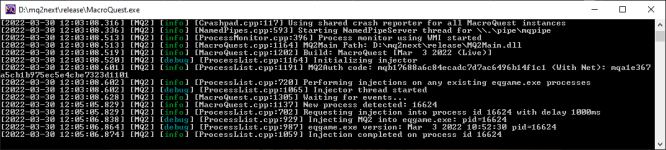
I upgraded MQ to today's patch. Now I am getting some kind of a debug window, is that normal?
1648660239358.png

Nevermind, I was playing with the toggle console earlier..
 
I upgraded MQ to today's patch. Now I am getting some kind of a debug window, is that normal?
View attachment 39052
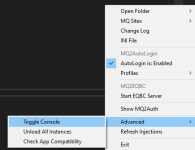
That's the external console. Right click the little mq icon at the bottom and go to advanced pull out. There should be a button that says like console with a check mark next to it. Uncheck it.


1648661462261.png

*mod edit: added picture for you*
 
Last edited by a moderator:
Redbot updated Very Vanilla MQ (Live Servers) with a new update entry:

20220414

April 13, 2022:

  • Fix Group.Members: Empty group will now report 0 instead of nil/NULL (#481).
  • Fix Math.Rand: Replace with new number generator. There are no longer any limits on the upper or lower bounds of the random number range. The only requirement is that the minimum value must not be greater than the maximum.
  • Fix Spell.Stacks to now only consider a duration if a nonzero value is provdied...

Read the rest of this update entry...
 
Redbot updated Very Vanilla MQ (Live Servers) with a new update entry:

20220420

April 20, 2022:

  • Updated for live patch.
  • plugins: PcProfile.Buff and PcProfile.ShortBuff have been deprecated and replaced with accessor functions GetEffect and GetTempEffect, respectively. Deprecation warnings have been added for this change. For accessing all buffs, both short and long, GetEffect can be used with MAX_TOTAL_BUFFS as the upper bound.

Read the rest of this update entry...
 
Redbot updated Very Vanilla MQ (Live Servers) with a new update entry:

20220513

May 13, 2022 (test):
- Updated for test patch
- Number of buffs has changed for player and target. Buff arrays are now dynamically sized,
and require some attention when using them in plugins:
- Use GetPcProfile()->GetMaxEffects() to get the total number of effects (short and
long buffs) for player
- Use pPetInfoWnd->GetMaxBuffs() for the max number of buffs on the pet window.
- Use pTargetWnd->GetMaxBuffs() for the max number of buffs on the target window.

May 13, 2022:
- Add...

Read the rest of this update entry...
 
Redbot updated Very Vanilla MQ (Live Servers) with a new update entry:

20220518

May 18, 2022:
- Updated for patch
- Number of buffs has changed for player and target. Buff arrays are now dynamically sized,
and require some attention when using them in plugins:
- Use GetPcProfile()->GetMaxEffects() to get the total number of effects (short and
long buffs) for player
- Use pPetInfoWnd->GetMaxBuffs() for the max number of buffs on the pet window.
- Use pTargetWnd->GetMaxBuffs() for the max number of buffs on the target window.

Read the rest of this update entry...
 
Redbot updated Very Vanilla MQ (Live Servers) with a new update entry:

20220528

May 27, 2022:
  • datatype: ItemSpell: add members OverrideName, OverrideDescription.
    • OverrideName replaces the OtherName member. This is a name that overrides the spell name when the spell is on an item.
    • OverrideDescription overrides the description string from the spell, similar to OverrideName.
  • datatype: Item: fixed off-by-one error with AugSlot. The Correct range is now 1-6 and now matches the Slot value as expected.
May 26, 2022:
  • lua...

Read the rest of this update entry...
 
Sorry if im posting in the wrong spot.. but Just Downloaded Redguides for the first time on this laptop.. its not letting me open program, and ive reinstalled 3times now.. any Advice would be Helpful
 
Sorry if im posting in the wrong spot.. but Just Downloaded Redguides for the first time on this laptop.. its not letting me open program, and ive reinstalled 3times now.. any Advice would be Helpful
howdy doorn,

going to need some more information than "not letting me open program". that doesn't give very much to go by.

did you follow the guide > RG New User Videos < ?

what *specifically* is not working?
 
Sorry if im posting in the wrong spot.. but Just Downloaded Redguides for the first time on this laptop.. its not letting me open program, and ive reinstalled 3times now.. any Advice would be Helpful
the RG Launcher, or MQ?
 
RG Launcher, Try to open.. acts like it wants to but does nothing... no clue what im doing.. and watched the video on it
Launcher problems? :( Sorry to hear that - we're working on fixing it.
Sometimes the Launcher gets a little confused and will close automatically - when this happens you need to reinstall the launcher after deleting your APPDATA and here are some steps to help you do that.
1 - delete your AppData - paste this in windows explorer search window (any folder) %LocalAppData%\RedGuides and then delete the contents in that folder
1b - Did you skip step 1? if you did, go back and do step 1 :)
2 - then go to add/remove programs, and remove the redguide's launcher
3 - reinstall the launcher
4 - open launcher
5 - point the re-install to your existing mq2 directory
6 - boom - back in business
7 - get a snack/drink - you earned it!

Here is the link to re-download the launcher https://www.redguides.com/community/resources/redguides-launcher.1255/download
 
OKay so tryed that.. no APP File...
Launcher problems? :( Sorry to hear that - we're working on fixing it.
Sometimes the Launcher gets a little confused and will close automatically - when this happens you need to reinstall the launcher after deleting your APPDATA and here are some steps to help you do that.
1 - delete your AppData - paste this in windows explorer search window (any folder) %LocalAppData%\RedGuides and then delete the contents in that folder
1b - Did you skip step 1? if you did, go back and do step 1 :)
2 - then go to add/remove programs, and remove the redguide's launcher
3 - reinstall the launcher
4 - open launcher
5 - point the re-install to your existing mq2 directory
6 - boom - back in business
7 - get a snack/drink - you earned it!

Here is the link to re-download the launcher https://www.redguides.com/community/resources/redguides-launcher.1255/download

Okay so tried Looking for the AppData File.. none on Laptop
 
Vanilla - Very Vanilla MQ (Live Servers)

Users who are viewing this thread

Back
Top
Cart