
• You've discovered RedGuides, an EverQuest multi-boxing and scripting community 🧙‍♀️⚙️. We want you to play several EQ characters at once, come join us and say hello! 👋

  • A TLP without truebox has thawed (Very Vanilla ready)
    Frostreaver
Very Vanilla MQ (Live Servers)

Vanilla - Very Vanilla MQ (Live Servers) (5 Viewers) 3.1.52471.11

No permission to download
hello everyone since maybe my post was lost in a previous discussion i'm going to post it again now.
i can't load Macroquest since the 64bits update on one specific of my computer...i have an error at launch (either from the redguide launcher or directly when i launch the exe) that says could not load MQ2Main.dll or one of its dependencies Macroquest will now exit as shown in the screenshot below
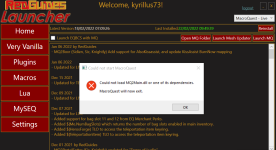
Screenshot_4.png

i have checked in the folder and the dll is there i have tried everything from a reinstall to a complete clean install (it was working fine previously) and now i am just lost at what i can do to fix this issue (i even tried to run it as administrator).
my OS is Win10 64bits release 21H2.
below are the logs i could find from the error:

D 2022-02-22 09:51:44.075449 [MQ2] Logging Initialized (C:\agent\_work\1\s\src\tools\loader\MacroQuest.cpp:194)
I 2022-02-22 09:51:44.076153 [MQ2] Starting MacroQuest Loader. Built Tue Feb 15 21:17:58 2022 (C:\agent\_work\1\s\src\tools\loader\MacroQuest.cpp:1223)
I 2022-02-22 09:51:44.078759 [MQ2] Initializing crashpad handler (C:\agent\_work\1\s\src\tools\loader\Crashpad.cpp:97)
D 2022-02-22 09:51:44.078830 [MQ2] Handler Path: C:\Users\cyrille\AppData\Local\VeryVanilla\MacroQuest\Release\mq_crash_handler.exe (C:\agent\_work\1\s\src\tools\loader\Crashpad.cpp:98)
I 2022-02-22 09:51:44.082909 [MQ2] Crash report submission is: enabled (C:\agent\_work\1\s\src\tools\loader\Crashpad.cpp:103)
I 2022-02-22 09:51:44.084997 [MQ2] Crash report guid: 94a0174d-6585-4fee-b028-72de97819bf3 (C:\agent\_work\1\s\src\tools\loader\Crashpad.cpp:107)
I 2022-02-22 09:51:44.085025 [MQ2] Using shared crash reporter for all MacroQuest instances (C:\agent\_work\1\s\src\tools\loader\Crashpad.cpp:117)
I 2022-02-22 09:51:44.178060 [MQ2] Starting NamedPipeServer thread for \\.\pipe\mqpipe (C:\agent\_work\1\s\src\common\NamedPipes.cpp:593)
I 2022-02-22 09:51:44.415732 [MQ2] Process monitor using WMI started (C:\agent\_work\1\s\src\tools\loader\ProcessMonitor.cpp:396)
I 2022-02-22 09:51:44.415787 [MQ2] MQ2Main Path: C:\Users\cyrille\AppData\Local\VeryVanilla\MacroQuest\Release\MQ2Main.dll (C:\agent\_work\1\s\src\tools\loader\MacroQuest.cpp:1164)
W 2022-02-22 09:51:44.417955 [MQ2] MQ2Main was not loadable at startup. This might cause issues later (C:\agent\_work\1\s\src\tools\loader\MacroQuest.cpp:1169)
D 2022-02-22 09:51:44.417995 [MQ2] Initializing injector (C:\agent\_work\1\s\src\tools\loader\ProcessList.cpp:1164)
E 2022-02-22 09:51:44.420341 [MQ2] Fatal Error: Could not load MQ2Main.dll (C:\agent\_work\1\s\src\tools\loader\ProcessList.cpp:1179)
I 2022-02-22 09:51:45.977120 [MQ2] Waiting for events... (C:\agent\_work\1\s\src\tools\loader\MacroQuest.cpp:1305)
I 2022-02-22 09:51:45.977184 [MQ2] Shutting down... (C:\agent\_work\1\s\src\tools\loader\MacroQuest.cpp:1328)
I 2022-02-22 09:51:45.988233 [MQ2] Stopping NamedPipeServer thread for \\.\pipe\mqpipe (C:\agent\_work\1\s\src\common\NamedPipes.cpp:632)
I 2022-02-22 09:51:45.988300 [MQ2] Canceling pending connect requests (C:\agent\_work\1\s\src\common\NamedPipes.cpp:834)

any help would be appreciable :)

ty
 
Last edited by a moderator:
hello everyone since maybe my post was lost in a previous discussion i'm going to post it again now.
i can't load Macroquest since the 64bits update on one specific of my computer...i have an error at launch (either from the redguide launcher or directly when i launch the exe) that says could not load MQ2Main.dll or one of its dependencies Macroquest will now exit as shown in the screenshot below

View attachment 38247

i have checked in the folder and the dll is there i have tried everything from a reinstall to a complete clean install (it was working fine previously) and now i am just lost at what i can do to fix this issue (i even tried to run it as administrator).
my OS is Win10 64bits release 21H2.
below are the logs i could find from the error:

D 2022-02-22 09:51:44.075449 [MQ2] Logging Initialized (C:\agent\_work\1\s\src\tools\loader\MacroQuest.cpp:194)
I 2022-02-22 09:51:44.076153 [MQ2] Starting MacroQuest Loader. Built Tue Feb 15 21:17:58 2022 (C:\agent\_work\1\s\src\tools\loader\MacroQuest.cpp:1223)
I 2022-02-22 09:51:44.078759 [MQ2] Initializing crashpad handler (C:\agent\_work\1\s\src\tools\loader\Crashpad.cpp:97)
D 2022-02-22 09:51:44.078830 [MQ2] Handler Path: C:\Users\cyrille\AppData\Local\VeryVanilla\MacroQuest\Release\mq_crash_handler.exe (C:\agent\_work\1\s\src\tools\loader\Crashpad.cpp:98)
I 2022-02-22 09:51:44.082909 [MQ2] Crash report submission is: enabled (C:\agent\_work\1\s\src\tools\loader\Crashpad.cpp:103)
I 2022-02-22 09:51:44.084997 [MQ2] Crash report guid: 94a0174d-6585-4fee-b028-72de97819bf3 (C:\agent\_work\1\s\src\tools\loader\Crashpad.cpp:107)
I 2022-02-22 09:51:44.085025 [MQ2] Using shared crash reporter for all MacroQuest instances (C:\agent\_work\1\s\src\tools\loader\Crashpad.cpp:117)
I 2022-02-22 09:51:44.178060 [MQ2] Starting NamedPipeServer thread for \\.\pipe\mqpipe (C:\agent\_work\1\s\src\common\NamedPipes.cpp:593)
I 2022-02-22 09:51:44.415732 [MQ2] Process monitor using WMI started (C:\agent\_work\1\s\src\tools\loader\ProcessMonitor.cpp:396)
I 2022-02-22 09:51:44.415787 [MQ2] MQ2Main Path: C:\Users\cyrille\AppData\Local\VeryVanilla\MacroQuest\Release\MQ2Main.dll (C:\agent\_work\1\s\src\tools\loader\MacroQuest.cpp:1164)
W 2022-02-22 09:51:44.417955 [MQ2] MQ2Main was not loadable at startup. This might cause issues later (C:\agent\_work\1\s\src\tools\loader\MacroQuest.cpp:1169)
D 2022-02-22 09:51:44.417995 [MQ2] Initializing injector (C:\agent\_work\1\s\src\tools\loader\ProcessList.cpp:1164)
E 2022-02-22 09:51:44.420341 [MQ2] Fatal Error: Could not load MQ2Main.dll (C:\agent\_work\1\s\src\tools\loader\ProcessList.cpp:1179)
I 2022-02-22 09:51:45.977120 [MQ2] Waiting for events... (C:\agent\_work\1\s\src\tools\loader\MacroQuest.cpp:1305)
I 2022-02-22 09:51:45.977184 [MQ2] Shutting down... (C:\agent\_work\1\s\src\tools\loader\MacroQuest.cpp:1328)
I 2022-02-22 09:51:45.988233 [MQ2] Stopping NamedPipeServer thread for \\.\pipe\mqpipe (C:\agent\_work\1\s\src\common\NamedPipes.cpp:632)
I 2022-02-22 09:51:45.988300 [MQ2] Canceling pending connect requests (C:\agent\_work\1\s\src\common\NamedPipes.cpp:834)

any help would be appreciable :)

ty
is this computer on windows 7 or some other old, outdated, and unsupported OS?

you will need to be on an up to date OS like windows 10 or newer
 
when i try to start macroquest after update getting error...
Could not start MacroQuest
X Could not load MQ2Main.dll or one of its dependencies.

MacroQuest will now exit.
....help thx
I'm also getting the same. I've re-patched EQ, verified it, uninstalled MQ and reinstalled twice all to no avail, still getting the same message.
 
is this computer on windows 7 or some other old, outdated, and unsupported OS?

you will need to be on an up to date OS like windows 10 or newer
no Sic it's running a perfectly working windows 10 64bits release 21H2 so it's up to date.
 
was getting an API-MS-WIN-CORE-path error...... seems like it fixed that. NOw its saying can not find EQMAIN.dll. any help would be apprecaited
 
was getting an API-MS-WIN-CORE-path error...... seems like it fixed that. NOw its saying can not find EQMAIN.dll. any help would be apprecaited
Are you on windows 7?

You need to be on a modern updated windows like 10+
 
To be able to use RedGuides plugins and some macros, you going to have upgrade to Win10 64bit or higher to have a chance at making everything work correctly.
my computer is on windows 10 64bits up to date and i get the EQMain.dll missing message as well
 
Two suggestions..
1) IF you can execute the LaunchPad.exe in your existing directory, when the window opens, Click on the "Live" or "Test" version at the top left of the window. This should bring up more options to choose from. Click the "Validate Game Assets" and let it download any missing files.

2) If the first option did not work, go to everquest.com and create a new account, download the game to a new directory and either copy the missing file to your existing non-working directory or put your station name / password into the new install window.

Hope this helps, going to bed now.

--Taz
 
Two suggestions..
1) IF you can execute the LaunchPad.exe in your existing directory, when the window opens, Click on the "Live" or "Test" version at the top left of the window. This should bring up more options to choose from. Click the "Validate Game Assets" and let it download any missing files.

already did this...the game is running fine it's specifically Macroquest that isn't loading (MQ2Main.dll or a dependency as it's saying in the error message)
2) If the first option did not work, go to everquest.com and create a new account, download the game to a new directory and either copy the missing file to your existing non-working directory or put your station name / password into the new install window.

Hope this helps, going to bed now.

--Taz
for information i've runned a ldd to check on MQ2Main.dll dependencies on my computer and it appears nothing is missing so i'm really clueless :(

$ ldd MQ2Main.dll
ntdll.dll => /cygdrive/c/WINDOWS/SYSTEM32/ntdll.dll (0x7ffa34d30000)
KERNEL32.DLL => /cygdrive/c/WINDOWS/System32/KERNEL32.DLL (0x7ffa342e0000)
KERNELBASE.dll => /cygdrive/c/WINDOWS/System32/KERNELBASE.dll (0x7ffa328d0000)
msvcrt.dll => /cygdrive/c/WINDOWS/System32/msvcrt.dll (0x7ffa341c0000)
MQ2Main.dll => /cygdrive/c/Users/xxxxxxxx/AppData/Local/VeryVanilla/MacroQuest/Release/MQ2Main.dll (0x7ff9c1e70000)
user32.dll => /cygdrive/c/Windows/System32/user32.dll (0x7ffa34600000)
D3DX9_43.dll => /cygdrive/c/Windows/System32/D3DX9_43.dll (0x650c0000)
win32u.dll => /cygdrive/c/Windows/System32/win32u.dll (0x7ffa32790000)
gdi32.dll => /cygdrive/c/Windows/System32/gdi32.dll (0x7ffa34cc0000)
D3DX9_43.dll => /cygdrive/c/Windows/System32/D3DX9_43.dll (0x650c0000)
gdi32full.dll => /cygdrive/c/Windows/System32/gdi32full.dll (0x7ffa327c0000)
msvcp_win.dll => /cygdrive/c/Windows/System32/msvcp_win.dll (0x7ffa32c40000)
ucrtbase.dll => /cygdrive/c/Windows/System32/ucrtbase.dll (0x7ffa32690000)
D3DX9_43.dll => /cygdrive/c/Windows/System32/D3DX9_43.dll (0x650c0000)
shell32.dll => /cygdrive/c/Windows/System32/shell32.dll (0x7ffa33110000)
advapi32.dll => /cygdrive/c/Windows/System32/advapi32.dll (0x7ffa347a0000)
sechost.dll => /cygdrive/c/Windows/System32/sechost.dll (0x7ffa32ec0000)
rpcrt4.dll => /cygdrive/c/Windows/System32/rpcrt4.dll (0x7ffa33b00000)
 
try to install mq in a new location....like on your desktop like do.

C:\Users\xxxxx\Desktop\mq2


and run it from that new spot....see what happens.
 
already did this...the game is running fine it's specifically Macroquest that isn't loading (MQ2Main.dll or a dependency as it's saying in the error message)

for information i've runned a ldd to check on MQ2Main.dll dependencies on my computer and it appears nothing is missing so i'm really clueless :(

$ ldd MQ2Main.dll
ntdll.dll => /cygdrive/c/WINDOWS/SYSTEM32/ntdll.dll (0x7ffa34d30000)
KERNEL32.DLL => /cygdrive/c/WINDOWS/System32/KERNEL32.DLL (0x7ffa342e0000)
KERNELBASE.dll => /cygdrive/c/WINDOWS/System32/KERNELBASE.dll (0x7ffa328d0000)
msvcrt.dll => /cygdrive/c/WINDOWS/System32/msvcrt.dll (0x7ffa341c0000)
MQ2Main.dll => /cygdrive/c/Users/xxxxxxxx/AppData/Local/VeryVanilla/MacroQuest/Release/MQ2Main.dll (0x7ff9c1e70000)
user32.dll => /cygdrive/c/Windows/System32/user32.dll (0x7ffa34600000)
D3DX9_43.dll => /cygdrive/c/Windows/System32/D3DX9_43.dll (0x650c0000)
win32u.dll => /cygdrive/c/Windows/System32/win32u.dll (0x7ffa32790000)
gdi32.dll => /cygdrive/c/Windows/System32/gdi32.dll (0x7ffa34cc0000)
D3DX9_43.dll => /cygdrive/c/Windows/System32/D3DX9_43.dll (0x650c0000)
gdi32full.dll => /cygdrive/c/Windows/System32/gdi32full.dll (0x7ffa327c0000)
msvcp_win.dll => /cygdrive/c/Windows/System32/msvcp_win.dll (0x7ffa32c40000)
ucrtbase.dll => /cygdrive/c/Windows/System32/ucrtbase.dll (0x7ffa32690000)
D3DX9_43.dll => /cygdrive/c/Windows/System32/D3DX9_43.dll (0x650c0000)
shell32.dll => /cygdrive/c/Windows/System32/shell32.dll (0x7ffa33110000)
advapi32.dll => /cygdrive/c/Windows/System32/advapi32.dll (0x7ffa347a0000)
sechost.dll => /cygdrive/c/Windows/System32/sechost.dll (0x7ffa32ec0000)
rpcrt4.dll => /cygdrive/c/Windows/System32/rpcrt4.dll (0x7ffa33b00000)
are you running from some kind of backup?
 
I'm running KA 12.002, and MQ-Live. I updated to the latest version of VV from 2/22/22, and now after I zone, and I bring up a map, my toons insta-crash.

Any magic fix ?

Thanks.
 
this is an mq issue currently with map spawns, wholly unrelated to the kissassist macro

nothing you're doing wrong, and the devs know about it, so hopefully it will be fixed up soon
 
I'm running KA 12.002, and MQ-Live. I updated to the latest version of VV from 2/22/22, and now after I zone, and I bring up a map, my toons insta-crash.

Any magic fix ?

Thanks.
If your experience has been anything like mine, the game has simply been pretty much unplayable due to frequent crashes whenever you open the map. Here is a temporary solution that worked for me, "/plugin mq2map unload" this will stop the crashing when you open the map, additional bonus is the text in your other windows won't blank out when your in heavily populated zones and open the map. You do lose seeing the mobs on the map however. If you are still craving mob locations and spawns, launch Show EQ which will provide that data (again without blanking the txt in your other windows in heavily populated zones. Hope this helps, and stops your crashing as it did mine.
 
Last edited:
Here is a temporary solution that worked for me, "/plugin mq2map unload"

I depend on the map too much to unload it. I do /mqsettings and then select the Map under Plugins and I toggle the top option off and then back on and then the map seems to work normally for the rest of that session.
 
Redbot updated Very Vanilla MQ (Live Servers) with a new update entry:

20220225

February 25, 2022:
- Fixed some potential issues with detours. Possibly fixes issue with unloading/reloading
causing problems with commands
- Moved GetSubscriptionLevel to core. If you have a copy of this function in your plugin,
you can remove it now.
- Added GetClass(), GetClassString(), GetRace(), GetRaceString(), GetClassThreeLetterCode()
to PlayerClient (SPAWNINFO) as convenience helpers for plugin code.
- Reverted an earlier change to MQ2Map during 64-bit conversion to...

Read the rest of this update entry...
 
running very vanilla on live with a couple of new toons. dannet seems to be loaded but none of the commands seem to be working follow, mimic etc. can anyone point me in the right direction as i am not finding what i need on forum search
 
running very vanilla on live with a couple of new toons. dannet seems to be loaded but none of the commands seem to be working follow, mimic etc. can anyone point me in the right direction as i am not finding what i need on forum search
Hover over the follow me button and see if it says /dgge or /bcga. I believe these buttons were set up to use eqbc, you would have to change the commands.

Are your toons accepting commands from your chat box?

mq2targetinfo.ini
in the config folder
 
Last edited:
Hover over the follow me button and see if it says /dgge or /bcga. I believe these buttons were set up to use eqbc, you would have to change the commands.

Are your toons accepting commands from your chat box?
hover shows it as /dgge and none of the commands seem to work across toons. only thing working at this time is auto login
 
no i dont
did you run /plugin mq2dannet load on all your toons?

can try from another post. open up command prompt in admin mode and type these out.

Code:
ipconfig /flushdns #Clear the dns cache
nbtstat -RR #release and refresh NetBIOS names
netsh int ip reset #Reset the IP configurations
netsh winsock reset #Resets the Winsock Catalog to a clean state
netsh interface ip delete arpcache #Flushes the ARP cache for one or all interfaces
netsh advfirewall reset #Resets the policy to the default out-of-box policy
 
I have updated RedGuides launcher from the 25 of February 2022 patch. I open EQBC server, like I've always done, then try to load up my toons under Profiles and nothing happens. I have also got this new pop-up window every time I open RedGuides launcher that says to disable Nahimic, which I've done, but still the same thing -- toons dont load into the world. What to do?
 
I have updated RedGuides launcher from the 25 of February 2022 patch. I open EQBC server, like I've always done, then try to load up my toons under Profiles and nothing happens. I have also got this new pop-up window every time I open RedGuides launcher that says to disable Nahimic, which I've done, but still the same thing -- toons dont load into the world. What to do?
Howdy,

Did you do the migration and such to move all your profiles over?

Check out the following:
It is OFFICIAL! MacroQuest is the version of MacroQuest that we offer here at RedGuides.

You will see this with "MacroQuest - Live" or "MacroQuest - Test" in the RG Launcher.

Please, check out this link: >>> Functions & Features Demo + Migration to the new MacroQuest<<<

There are a couple of small, yet important changes with MacroQuest:
1. mq2map click is Control+Shift+Click
2. new easyfind self travel is Control+Click (reminder in find window title bar)
3. new easyfind group travel is Control+Shift+Click
4. If you selected a destination in your zone guide and want to activate it you /travelto activate
5. /yes and /no are now aliases
6. your ini configuation files (like for kissassist) now reside in your "Config" folder and not your "Macro" folder
 
CrashID: 43494255-b4f5-46d8-90fd-d7d986a57650

Only Tank crashes in a group of 3. Any idea what's causing it?
I am not finding that crash.

can you please PM me the dmp

it will be in release\Logs\Dumps\reports
 
I have receiving CrashID's since the 64bit update. The last time successful attempt to load all the characters in were to uninstall RG and delete its directory fully from the system. I then created all new six character ini files and that worked. Today is the first day back trying to use RG since about Feb 22 and I continue to get CrashID's . I deleted all character.ini in profiles and just attempted a "clean launch".

Clean Launch CrashID: 7d43d587-bec6-4a88-9c75-e61aa9902a66

I did save all the Dumps/reports from today.
 
I have receiving CrashID's since the 64bit update. The last time successful attempt to load all the characters in were to uninstall RG and delete its directory fully from the system. I then created all new six character ini files and that worked. Today is the first day back trying to use RG since about Feb 22 and I continue to get CrashID's . I deleted all character.ini in profiles and just attempted a "clean launch".

Clean Launch CrashID: 7d43d587-bec6-4a88-9c75-e61aa9902a66

I did save all the Dumps/reports from today.
I don't see that dmp by ID, which might mean it is one of those oddball dmps that isn't getting logged for various reason.

can you pm 1 dmp to me plz?

edit: these ended up being mq2irc issue (knightly already has updates for that, thank you knightly)
 
Just started having an Issue with the swap from just 1 toon to the other 5 using the MQ profile shortcuts. All the other 5 work just fine swapping back and forth, issue only happens if i select this toon either with shortcut or manually and can not swap back to the any of the other 5 unless I manually do it. Any advice? Bard is the class with the issue...
 
Just started having an Issue with the swap from just 1 toon to the other 5 using the MQ profile shortcuts. All the other 5 work just fine swapping back and forth, issue only happens if i select this toon either with shortcut or manually and can not swap back to the any of the other 5 unless I manually do it. Any advice? Bard is the class with the issue...
What is the error that happens?
 
The windows don't swap, there is no error msg if thats waht you are asking... I have just narrowed down it is the 6th profile to log in that gets this issue, did a swap of how they log in and was another toon than before but still in the same sequence of logging.

UPDATE - have definitely narrowed it to the 6 position / qued login of the MQ profiles, doesn't matter if toon is KA or CWTN. Have ran 2 different group profile settings with same results, checking a 3rd group setup in a minute and then will run a random single set with out the group profile setup

Update 2 - 3rd group was fine no issues, uses ctrl+Alt+# for its setup, Singly logging in, alternating the groups, came up to same issue when the 6 sequenced having ctrl+shift+#, so was issue on the 8th login it was the 6th ctrl+shift.

Done all I can think of to test it further...
 
Last edited:
Just did a clean install of Everquest and MQ2 ...still having issues on the EQ side with connecting to the server but the newest issue I am facing is getting my toons to login into server /bccmd connect. Did I miss something on the install of MQ2? I have MQ2 installed on my H:/reguides/release/MQ2 and Everquest is installed in H:/users/public/daybreak game company/installed games/everquest ...do I have MQ2 installed in the wrong place? My toons are loading with auto login group but I can't /bccmd connect to the server? Sorry I keep adding info that might help. MQ2 Window, Nav Tools, Pluginmanager all load when I login in as well as teh EQBCS Window but I can't login into server to run macros
 
Last edited:
Vanilla - Very Vanilla MQ (Live Servers)

Users who are viewing this thread

Back
Top
Cart