• You've discovered RedGuides, an EverQuest multi-boxing and scripting community 🧙‍♀️⚙️. We want you to play several EQ characters at once, come join us and say hello! 👋

  • A TLP without truebox has thawed (Very Vanilla ready)
    Frostreaver
Very Vanilla MQ (Live Servers)

Vanilla - Very Vanilla MQ (Live Servers) (7 Viewers) 3.1.52471.11

No permission to download
Thanks for your help Red and Sic, hovering over the MQ2Main.dll in my MQ folder shows version 3.1.0.216, Entering the /echo command into the MQ window still yields nada for me, the attached image shows everything that appears in MQ window from Launch up to entering the /echo $(MacroQuest.Version) command. I'm kicking myself for deleting all mq folders and reinstalling fresh, as i previously had majority of the toons taking commands in any window and only a few showing double names. Now the problem is once again with all. Will keep my eyes on the RG Launcher for an update, thank you again for your help.
jester,

sorry for the troubles, i don't think you're quite following what i mentioned before.

there is a current and known but where you can't use regular chat windows to issue mq commands - only the mq window or mq console work.

this can happens after unloading / reloading and or unloading/reloading plugins.

that is a currently bug as has not been fixed yet.

the double names thing appears to be an eq bug - you can see this in places by looking in your find window (even without mq) and you will see there are duplicate spawns listed
 
On the off chance anyone is using Wine to run the new EQ client and new MQ. I found wine 5.0 will not work (appears to be missing wine compatibility with a zeromq library being used by MQ, was fixed maybe in 6.x). I fuggered up my install with all kinds of trial and error... not sure I ever got it to work, but I confirmed it working on a clean install. I switched to winehq-stable and winehq-staging and both worked fine. At least as far as zoning in and seeing all the mq windows, probably won't get a chance to try and use it until Friday.

I confirmed it was working under wine on the day of release if you look back a bit through the thread. You should be using the lastest wine-devel package with dxvk support. See my thread in my Linux guide detailing how to get things setup here:


MQ64 has been loading and working normally for me on Linux+Wine 7.2 devel, minus a few hiccups here and there that everyone else is noticing that are running on windows. So in my experience it's working as expected under Wine at this point.
 
Thanks for your help Red and Sic, hovering over the MQ2Main.dll in my MQ folder shows version 3.1.0.216, Entering the /echo command into the MQ window still yields nada for me, the attached image shows everything that appears in MQ window from Launch up to entering the /echo $(MacroQuest.Version) command. I'm kicking myself for deleting all mq folders and reinstalling fresh, as i previously had majority of the toons taking commands in any window and only a few showing double names. Now the problem is once again with all. Will keep my eyes on the RG Launcher for an update, thank you again for your help.
looks like you aren’t using the curly brackets-double check you are using this: ${MacroQuest.Version}
 
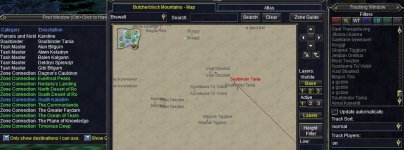
Again thank you for your help, the seeing double issue only appears on the MQ map for me, one label is targetable the other is not. No doubles present in find or tracking for me. What made this issue interesting to me was that I first load several toons on a single pc, then run the RG Launcher followed by loading MQ and not all toons on the pc were seeing double names. (After performing a clean install of RG launcher and MQ, all toons now see double names with only 1 targetable).

I understand the mq commands being entered into any window is being worked on, (when I launch MQ on a machine running multiple toons, it's hit or miss whether or not they will accept commands outside the MQ window upon launching MQ).

Since performing a fresh install of MQ, I have noticed that toons that will accept mq commands in any window will no longer recognize /bc commands in any window (they will take /plugin etc commands however they don't accept /bccmd etc.)
Is there a way to restore the ability to use /bc commands in any window on the toons that are accepting other mq commands in any window in the latest version of MQ without having legacy (no longer offered for download) present on the machine and using the migrator tool?
(Dannet lacking a server is a PITA to use to communicate across multiple PC's compared to EQBC with its standalone server that allows client pc's and devices can connect to via ip address).
 

Attachments

  • seeingdoubles.JPG
    seeingdoubles.JPG
    103.9 KB · Views: 5
Again thank you for your help, the seeing double issue only appears on the MQ map for me, one label is targetable the other is not. No doubles present in find or tracking for me. What made this issue interesting to me was that I first load several toons on a single pc, then run the RG Launcher followed by loading MQ and not all toons on the pc were seeing double names. (After performing a clean install of RG launcher and MQ, all toons now see double names with only 1 targetable).

I understand the mq commands being entered into any window is being worked on, (when I launch MQ on a machine running multiple toons, it's hit or miss whether or not they will accept commands outside the MQ window upon launching MQ).

Since performing a fresh install of MQ, I have noticed that toons that will accept mq commands in any window will no longer recognize /bc commands in any window (they will take /plugin etc commands however they don't accept /bccmd etc.)
Is there a way to restore the ability to use /bc commands in any window on the toons that are accepting other mq commands in any window in the latest version of MQ without having legacy (no longer offered for download) present on the machine and using the migrator tool?
(Dannet lacking a server is a PITA to use to communicate across multiple PC's compared to EQBC with its standalone server that allows client pc's and devices can connect to via ip address).
no.

unfortunately, if you can't use commands in a chat window - then you can't use /bccmd or hotkeys - which is what we've been talking about.

hopefully, it gets fixed soon.


re: legacy - there is no such thing any more. everquest is a 64 bit program, legacy is a 32bit program and it is not possible to use it.
 
Since performing a fresh install of MQ, I have noticed that toons that will accept mq commands in any window will no longer recognize /bc commands in any window (they will take /plugin etc commands however they don't accept /bccmd etc.)
Silly question but did you reconnect toons to /bccmd after your fresh install?
 
no.

unfortunately, if you can't use commands in a chat window - then you can't use /bccmd or hotkeys - which is what we've been talking about.

hopefully, it gets fixed soon.


re: legacy - there is no such thing any more. everquest is a 64 bit program, legacy is a 32bit program and it is not possible to use it.
Whether or not i'm able to use commands in any window seems to be a roll of the dice when I launch MQ, (MQ pop's up on all toons on the pc at the same time, sometimes a few can use any window while others cannot, sometimes none can use any window). My question is on the ones that can use any window, they still seem to ignore /bc commands in any window but will accept other commands such as /plugin in any window.

Was wondering if there was a way to restore the ability to use /bc commands, for some reason I seem to remember a post somewhere saying the default was toggled to dannet in the latest incarnation of MQ and in order to restore eqbc the migrator tool was needed. Perhaps i'm just misremembering?
 
Silly question but did you reconnect toons to /bccmd after your fresh install?
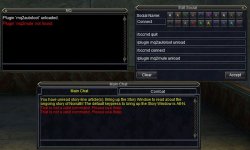
This is what i'm seeing on one of my toons that can take commands in any window when i activate this social. the plugin commands spit out responses in the MQ window, while the /bccmd commands spit out That is not a valid command in the main chat window. (If I enter the /bccmd commands in the MQ window it will accept them)


EQBCBUST.JPG
 
This is what i'm seeing on one of my toons that can take commands in any window when i activate this social. the plugin commands spit out responses in the MQ window, while the /bccmd commands spit out That is not a valid command in the main chat window.


View attachment 38133
if you *can* use commands in your regular window but /bccmd does not work, that almost cetainly means that mq2eqbc is not loaded /plugin mq2eqbc
 
I confirmed it was working under wine on the day of release if you look back a bit through the thread. You should be using the lastest wine-devel package with dxvk support. See my thread in my Linux guide detailing how to get things setup here:


MQ64 has been loading and working normally for me on Linux+Wine 7.2 devel, minus a few hiccups here and there that everyone else is noticing that are running on windows. So in my experience it's working as expected under Wine at this point.
It didn't work under lutris with the first couple mq live 64bit releases so I had to begin trying different things so reported what I found. Incidentally I found dxvk on my Intel 630 UHD introduced lag and was slower. Probably would be awesome if my nvidia chip still worked.
 
Last edited:
are you on an old, not up-to-date windows? like windows 7?

if so, unfortunately you will need to update to at least Windows 10

which also, eq is now 64bit so you need a 64bit OS anyhow
@Sic
Thanks... updated to Windows 10 today and no longer have any issues.
 
Is Redguides still not working? Whenever I open it up it says Patch Day- Unavailable
It is OFFICIAL! MacroQuest is the version of MacroQuest that we offer here at RedGuides.

You will see this with "MacroQuest - Live" in the RG Launcher.

Please, check out this link: >>> Functions & Features Demo + Migration to the new MacroQuest<<<

There are a couple of small, yet important changes with MacroQuest:
1. mq2map click is Control+Shift+Click
2. new easyfind self travel is Control+Click (reminder in find window title bar)
3. new easyfind group travel is Control+Shift+Click
4. If you selected a destination in your zone guide and want to activate it you /travelto activate
5. /yes and /no are now aliases
6. your ini configuation files (like for kissassist) now reside in your "Config" folder and not your "Macro" folder
 
I confirmed it was working under wine on the day of release if you look back a bit through the thread. You should be using the lastest wine-devel package with dxvk support. See my thread in my Linux guide detailing how to get things setup here:


MQ64 has been loading and working normally for me on Linux+Wine 7.2 devel, minus a few hiccups here and there that everyone else is noticing that are running on windows. So in my experience it's working as expected under Wine at this point.
@thedank I finally found where some of my crashes came from as I tested slightly different things. If I do a fresh install (rather than copying an old config) of MacroQuest from zip file it crashes, I tracked it down to the default loading of MQ2dannet=1 (when it builds a default Macroquest.ini). Do you have dannet working in your Wine setup?
 
It is OFFICIAL! MacroQuest is the version of MacroQuest that we offer here at RedGuides.

You will see this with "MacroQuest - Live" in the RG Launcher.

Please, check out this link: >>> Functions & Features Demo + Migration to the new MacroQuest<<<

There are a couple of small, yet important changes with MacroQuest:
1. mq2map click is Control+Shift+Click
2. new easyfind self travel is Control+Click (reminder in find window title bar)
3. new easyfind group travel is Control+Shift+Click
4. If you selected a destination in your zone guide and want to activate it you /travelto activate
5. /yes and /no are now aliases
6. your ini configuation files (like for kissassist) now reside in your "Config" folder and not your "Macro" folder
I'm sorry, I am not at all tech-savvy. I've been using Macro Quest within Redguides for a while now but have not been able to use it since the patch to upgrade EQ to 64 bit. I assumed that it would be resolved shortly as is the case whenever there is a patch. Do I need to upgrade to MQ Next in order to use Redguides now?
 
I'm sorry, I am not at all tech-savvy. I've been using Macro Quest within Redguides for a while now but have not been able to use it since the patch to upgrade EQ to 64 bit. I assumed that it would be resolved shortly as is the case whenever there is a patch. Do I need to upgrade to MQ Next in order to use Redguides now?
Yes
 
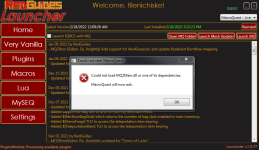
Here is my issue, I had this issue popping up so I uninstalled/removed all of my old files and then reinstalled the launcher and now am getting this error

1645219973844.png

When I go into my files I can see the MQ2MAIN.dll file but have no idea why I am getting this message, Yeah I am sure it is something simple but my pc literacy with this is minimal and trying to resolve this even kills what small amount of confidence that I knew what I was doing even more

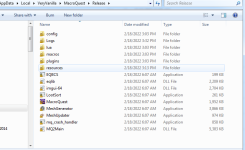
Here is the veryvanilla file showing the mq and mq2main.dll files

1645220251165.png

any help would be greatly appreciated feel like i'm running in circles doing the same thing over and over again thinking I will get a different results...yep going insane haha
 
Here is my issue, I had this issue popping up so I uninstalled/removed all of my old files and then reinstalled the launcher and now am getting this error

View attachment 38175

When I go into my files I can see the MQ2MAIN.dll file but have no idea why I am getting this message, Yeah I am sure it is something simple but my pc literacy with this is minimal and trying to resolve this even kills what small amount of confidence that I knew what I was doing even more

Here is the veryvanilla file showing the mq and mq2main.dll files

View attachment 38176

any help would be greatly appreciated feel like i'm running in circles doing the same thing over and over again thinking I will get a different results...yep going insane haha
Are you running on an old out of date windows, like windows 7?

If so you need to update to windows 10 64bit or newerr
 
Are you running on an old out of date windows, like windows 7?

If so you need to update to windows 10 64bit or newerr
I do run windows 7 64bit so that would be the problem then ....... figured it was something simple ........ thanks for the quick reply!!!!
 
Are you running on an old out of date windows, like windows 7?

If so you need to update to windows 10 64bit or newerr
I do run windows 7 64bit so that would be the problem then ....... figured it was something simple ........ thanks for the quick reply!!!!

I would suggest Windows 10.

I've heard of issues with EQ 64 and people using Windows 11.

Not saying that's everyone, and there are probably people with issues on Windows 10.


Repeating that again for clarity. I've seen multiple references to people trying to use EQ, and only EQ, since patch on Windows 11 having trouble with getting that to run. The "eqgame.exe" bailing out. i.e. EQ 32 worked fine, EQ 64 does not.
This is totally unrelated to RG VV MQ.


Regards and Best Wishes
 
I have not updated anything today, but loaded in and was able to /mac in the regular chat boxes. /shrug

Thanks for the good work everyone.
 
Hi All,

I have a problem while starting MQ pn eq. I launch the game and start mq, everthing starts good, i saw data loading on mq console but when i switch zone i am getting this and i have to restart mq;

[2022-02-20 10:56:25.392] [MQ2] [debug] [ProcessList.cpp:929] Injecting MQ2 into eqgame.exe: pid=9396
[2022-02-20 10:56:25.420] [MQ2] [debug] [ProcessList.cpp:987] eqgame.exe version: Feb 10 2022 18:50:38 pid=9396
[2022-02-20 10:56:25.425] [MQ2] [info] [ProcessList.cpp:1059] Injection completed on process id 9396
[2022-02-20 10:56:28.436] [MQ2] [debug] [NamedPipes.cpp:226] Created PipeConnection: connectionId=1 pid=9396
[2022-02-20 10:58:16.858] [MQ2] [debug] [NamedPipes.cpp:323] PipeConnection::HandleReadComplete: pipe closed. connectionId=1
[2022-02-20 10:58:16.858] [MQ2] [debug] [NamedPipes.cpp:910] Closing connection. connectionId=1
[2022-02-20 10:58:16.859] [MQ2] [debug] [NamedPipes.cpp:233] Destroyed PipeConnection: connectionId=1 pid=9396
[2022-02-20 10:59:00.919] [MQ2] [debug] [MacroQuest.cpp:1143] Process closed: 9396

Any suggestion?
 
Sounds like you're trying to use it on an unsupported server.
MQ doesn't work on Truebox servers

MQ is not supported and does not work on Truebox servers. DarkPaw Games doesn't want multi-boxers, and we don't want to upset the official devs.

Other tools such as MySEQ are available for truebox servers.
 
No accts will load with MQ2 running, not with auto login or individually. I turn off MQ2 and I can login characters.
Any work arounds for this or do I just have to wait for the 64 bit MQ2 update?
 
No accts will load with MQ2 running, not with auto login or individually. I turn off MQ2 and I can login characters.
Any work arounds for this or do I just have to wait for the 64 bit MQ2 update?
did you do the migration over your stuff including the login profiles?

what specifically do you mean does not log in? do you see mq attaching?

are you using isboxer? - if so you need to run the isboxer DEVELOPER build


actually - you don't appear to be using MQ - you appear to be trying to use MQ2 (as you said)

1645383535399.png

unfortunately there is no such thing as MQ2 any more - you need to select MacroQuest - Live in the rg launcher.

eq moved to 64bit, mq2 is not 64bit and thus will not work


It is OFFICIAL! MacroQuest is the version of MacroQuest that we offer here at RedGuides.

You will see this with "MacroQuest - Live" or "MacroQuest - Test" in the RG Launcher.

Please, check out this link: >>> Functions & Features Demo + Migration to the new MacroQuest<<<

There are a couple of small, yet important changes with MacroQuest:
1. mq2map click is Control+Shift+Click
2. new easyfind self travel is Control+Click (reminder in find window title bar)
3. new easyfind group travel is Control+Shift+Click
4. If you selected a destination in your zone guide and want to activate it you /travelto activate
5. /yes and /no are now aliases
6. your ini configuation files (like for kissassist) now reside in your "Config" folder and not your "Macro" folder
 
Been away for awhile. Came back and updated MQ. After update now my MQ does load to task bar? It used to pop up in lower right side of task bar then i would right click the icon and load all my toons. now nothing?

Basically cant use MQ at all. I must have missed something while i was away.

Any help would be awesome!
 
Last edited:
Since the update randomly MQ will decide that it will not allow commands to be registered unless typed directly into mq window. Get the standard "That is not a valid command" message. Mq2chatwnd is loaded and all that stuff. Known issue or any ideas how to resolve?
 
I have had some success /unload MQ then right click the MQ icon in taskbar and select reinject, rinse repeat until it allows commands in any window (at least on the master toon's), occassionally EQ will get tired of it and stop displaying the MQ window altogether if I unload / reinject too many times.
 
We've been told this happens more frequently when you're using a custom UI. I had planned on looking into it this weekend, but MQ2Discord got the better of me. I'll try to reproduce it tomorrow.
 
Here is my issue, I had this issue popping up so I uninstalled/removed all of my old files and then reinstalled the launcher and now am getting this error

View attachment 38175

When I go into my files I can see the MQ2MAIN.dll file but have no idea why I am getting this message, Yeah I am sure it is something simple but my pc literacy with this is minimal and trying to resolve this even kills what small amount of confidence that I knew what I was doing even more

Here is the veryvanilla file showing the mq and mq2main.dll files

View attachment 38176

any help would be greatly appreciated feel like i'm running in circles doing the same thing over and over again thinking I will get a different results...yep going insane haha
i've been facing the same issue on a windows 10 64bits version so far i haven't been able to run MQ since the 64bits patch i have the same MQ2main.dll error :(
 
We've been told this happens more frequently when you're using a custom UI. I had planned on looking into it this weekend, but MQ2Discord got the better of me. I'll try to reproduce it tomorrow.
FWIW I use 100% stock ui, but I do have to reinject often for reasons. The post above stating to unload and reinject did provide a work around, with the side effect of sometimes EQ just doesnt allow the reinject, in which case I am forced to reload the eq client. Could not pinpoint a cause, seemed very RNG.
 
Once I get MQ going and have been in game awhile i occasionally encounter a map crash, (open map and crash). What I found kind of interesting is once one of my chars triggers a map crash, all toons across multiple PC's (Seperate instances of MQ with the only link being EQBCS and Dannet) will then crash the next time they open the map. Glad the tip was able to help you dewdew, it does get frustrating when EQ stops taking the injections altogether and you have to reload the eqclient. I use the default UI as well.
 
Last edited:
Is it normal that IS and MQ don't work together anymore? The client keeps crashing during the EULA screen while MQ works on its own and so does IS. I tried many of the things suggested here, but none of them seemed to help. My computer is Win11 if this is relevant.
I am mediocre tech savvy at best, so I am happy if any of you pros could help.
 
Is it normal that IS and MQ don't work together anymore? The client keeps crashing during the EULA screen while MQ works on its own and so does IS. I tried many of the things suggested here, but none of them seemed to help. My computer is Win11 if this is relevant.
I am mediocre tech savvy at best, so I am happy if any of you pros could help.
It is a known issue as a result of the 64 bit release for everquest. Some are reporting that the ISboxer dev version can work with mq. You may want to see if that works for you.
 
It is a known issue as a result of the 64 bit release for everquest. Some are reporting that the ISboxer dev version can work with mq. You may want to see if that works for you.
Thank you for your answer. I previously updated to the dev version 6869 and it didn't help. Well then, let's wait and see :)
 
Vanilla - Very Vanilla MQ (Live Servers)

Users who are viewing this thread

Back
Top
Cart