Has anyone confirmed that dannet is back up and working after the 64bit upgrade?did everything you mentioned in the link you provided. I have never used dannet until today to try and get my toons to come to me. Afollow does not work, /follow does not seem to work and the buttons in the gorup window dont seem to work, minus mimic me, it seems to be working. I am stumped.

-
 Hail, we're RedGuides. We want you to play six (yes, 6!) EverQuest characters at once. We have scripts and a friendly community to help, please join our playstyle and say hello! 👋
You are using an out of date browser. It may not display this or other websites correctly.
You should upgrade or use an alternative browser.
You should upgrade or use an alternative browser.

Vanilla - Very Vanilla MQ (Live Servers) (3 Viewers) 3.1.52471.42
- Thread starter Knightly
- Start date

yes can confirm - just make sure you keep checking for updatesHas anyone confirmed that dannet is back up and working after the 64bit upgrade?
brainiac and the MQ dev team have put an enormous amount of effort put into converting MacroQuest to x64, so please be patient as bugs are ironed out.
The current release will have bugs and crashes, expect a couple days before things are running smooth again.
Dmps are automatically submitted, so the devs are receiving them and working through them as quickly as possible.
Thank you so much for being patient with us! Keep checking those updates and ensure you're patched up. Fixes are comin!
avolonsummers
New member
the new default is with dannetdid everything you mentioned in the link you provided. I have never used dannet until today to try and get my toons to come to me. Afollow does not work, /follow does not seem to work and the buttons in the gorup window dont seem to work, minus mimic me, it seems to be working. I am stumped.
so unless you migrate/change your buttons - you should load dannet
it is very painless
/bcaa //plugin dannet1. sounds like issues with your mesh and/or settings - I have had several toons going for hours and no unusual behavior thereHiya @Sic ,
Couple issues I am noticing:
1) My two berserkers sometimes doesn't assist in combat, there just stand.
2) Beastlord is stuck in casting his haste spell on himself in a loop.
besides that nothing else to report.
2. you should check the beastlord thread about that.

try re plugging in mq2moveutils?


Fennil
Member
What version of ISBoxer is that? and where do i need to get it cus its still crashes for me when i load isboxer with mq2 runningThe dev build of ISBoxer is working great with MQ right now

Right click on the innerspace tray icon and select the `Patcher` option. This will open a window that has a tiny window inside of it with 3 tabs at the top, select the `Development` tab and then click on the `Install Now` button on the bottom right of that screen. This will install the development version.What version of ISBoxer is that? and where do i need to get it cus its still crashes for me when i load isboxer with mq2 running

One Cool Trick
Seasoned veteran member
Just wanted to follow up and say... I've been playing for hours simultaneously with ISB and MQ... the update ISB dev patch and the hard work from the MQ devs has TRULY worked out! THANK YOU ALL SO MUCH FOR YOUR DILIGENCE! I got my fix in today 

I noticed that i cannot activate my /mac in normal text boxes any longer since migrating to MQnext
ONLY in the MQ chat box can I activate the /mac kissassist etc etc ...
Is there a setting in the newer MQ that I need to change to allow this again? Biggest problem is I go to type /mqp and its in a chat window instead of the MQ window and i have to manually Click the window, then type it in. Very cumbersome.
Thanks.
ONLY in the MQ chat box can I activate the /mac kissassist etc etc ...
Is there a setting in the newer MQ that I need to change to allow this again? Biggest problem is I go to type /mqp and its in a chat window instead of the MQ window and i have to manually Click the window, then type it in. Very cumbersome.
Thanks.

I thought that was fixed yesterday, are you up to date?I noticed that i cannot activate my /mac in normal text boxes any longer since migrating to MQnext
ONLY in the MQ chat box can I activate the /mac kissassist etc etc ...
Is there a setting in the newer MQ that I need to change to allow this again? Biggest problem is I go to type /mqp and its in a chat window instead of the MQ window and i have to manually Click the window, then type it in. Very cumbersome.
Thanks.
I’m having the same problem.
just used kissassist in normal box works fine for me

Nothing but love to our devs and developers. You guys are the best...now get some sleepyes can confirm - just make sure you keep checking for updates
brainiac and the MQ dev team have put an enormous amount of effort put into converting MacroQuest to x64, so please be patient as bugs are ironed out.
The current release will have bugs and crashes, expect a couple days before things are running smooth again.
Dmps are automatically submitted, so the devs are receiving them and working through them as quickly as possible.
Thank you so much for being patient with us! Keep checking those updates and ensure you're patched up. Fixes are comin!

On the off chance anyone is using Wine to run the new EQ client and new MQ. I found wine 5.0 will not work (appears to be missing wine compatibility with a zeromq library being used by MQ, was fixed maybe in 6.x). I fuggered up my install with all kinds of trial and error... not sure I ever got it to work, but I confirmed it working on a clean install. I switched to winehq-stable and winehq-staging and both worked fine. At least as far as zoning in and seeing all the mq windows, probably won't get a chance to try and use it until Friday.
In regards to commands having to be typed directly into the MQ window, this seems to be hit or miss and often requires me to unload and reload MQ several times before all toons are able to enter commands outside of the MQ window. Just giving a heads up. Additionally some toons display double spawn names on the map, while others do not.
Last edited:
i see you've downloaded updates - can you just 100% confirm that you're running the updated version?In regards to commands having to be typed directly into the MQ window, this seems to be hit or miss and often requires me to unload and reload MQ several times before all toons are able to enter commands outside of the MQ window. Just giving a heads up.
can you paste your ${MacroQuest.Version} to confirm?
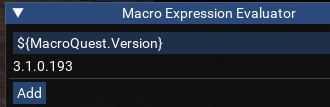
current live version should show 3.1.0.216
Not sure how to display the Macro Expression Evaluator you are showing above. I update MQ, all plugins, Macro's, and Lua entries before I load MQ (Last update from launcher is showing 2/17 5:44am with latest version 2/17 3:31am) I have 3 toons running on the same updated build per machine, of those 3 toons I experience intermittent ability based on the loading of MQ to type commands into any window other then the MQ Window. The same situation is happening with the double names, just had 2 of 3 showing single names, unloaded and reloaded mq and this go all 3 showing double names followed by crashes. (expecting crashes based on banner just giving heads up to what i'm experiencing). Sometimes all 3 characters on each machine can enter commands into any window, other times only 1 or two of the characters can enter commands into any window. There seems to be no rhyme or reason as to what's causing them to see double names on the map, or have the ability to enter commands into any window other than the mq window.i see you've downloaded updates - can you just 100% confirm that you're running the updated version?
can you paste your ${MacroQuest.Version} to confirm?
View attachment 38111
current live version should show 3.1.0.216
Last edited:
you can also just echo the ${MacroQuest.Version}Not sure how to display the Macro Expression Evaluator you are showing above. I update MQ, all plugins, Macro's, and LUA entries before I load MQ (Last update from launcher is showing 2/17 5:44am with latest version 2/17 3:31am) I have 3 toons running on the same updated build per machine, of those 3 toons I experience intermittent ability based on the loading of MQ to type commands into any window other then the MQ Window. Currently of those 3 toons running the same latest build of MQ only 1 is having the double name issue on the map consistently.
but the console is
control + ` and then tools -> macro expression evaluator
The difference in that scenario is going to be something in your ini.WOOT!!! Finally got it fixed. Not sure why but when i do the migration i get massive issues. Clean install, no migration and fresh kissasisst did the trick, whew! Now just putting my inis back togther. Thank you all again.
Oh no doubt man, its always user error as far as i am concerned. Just supper happy i figured it out so that it works now, like figuring our my xtagetheals being turned on made my healers no cast anything but heals.The difference in that scenario is going to be something in your ini.
honestly think it was my navmesh. after every migration try it said i needed 5 updates, on clean install no migration i need them all of course and no more 5 updates when i checked again. My issues where toons not following the follow commands, was a nightmare and they seemed like they were all on a 10 second delay. Glad this is over and thanks to all the people that made this program and keep it up, you all rock!Gotcha, yeah, just pointing it it in case you were interested in what was specifically the issue.
In attempts to solve the inability to enter MQ commands into any chat window, and eliminate double names on the map. I uninstalled MQ completely and reinstalled from scratch with nothing else loaded. Version installed was pushed 2/17/2022 at 3:31am (latest according to patcher). Now instead of some chars being unable to enter commands into any window, all chars once again are unable to enter commands into any window other than the MQ window, all are showing double names on the map. (again i'm expecting bugs/problems just reporting what i'm experiencing). Any suggestions or should I wait for next patch?
When I try to install the IS Boxer patch, it tells me that it can't becuase a file (ISUI.DLL) is locked by Launchpad. What did you do to fix that?Right click on the innerspace tray icon and select the `Patcher` option. This will open a window that has a tiny window inside of it with 3 tabs at the top, select the `Development` tab and then click on the `Install Now` button on the bottom right of that screen. This will install the development version.
i'd probably just restart your computer, then patch isboxer and then go from thereWhen I try to install the IS Boxer patch, it tells me that it can't becuase a file (ISUI.DLL) is locked by Launchpad. What did you do to fix that?

blitz80690
New member
Hello all. I downloaded the new Live version. I saw the Powershell script to migrate.
First red flag is that it says it can't download and shows me a Microsoft link that leads to try and download Nuget and Chocolately packages - which is blocked, says I don't have internet.
I went into my Windows Firewall and explicitly made exceptions for Inbounds and Outbounds for the Powershell exe it's using and that didn't fix it.
I continue with the upgrade anyway. It migrates successfully.
When I go to try and launch MQ it says: Could not load MQ2Main.dll or one of it's dependancies. Macroquest will now exit.
When I first did this it said it was missing api-ms-win-core-path-L1-1-0.dll. I have downloaded that and added it to my system32 and sysWOW64 folders. I have restarted and redownloaded MQ2 Live multiple times. I've restarted. I've tried downloading the C++ 2019 Redistributable package to try and have the correct DLL files needed.
I'm at wits end on what I need to make MQ2Main.dll have the correct dependencies. What am I missing?
First red flag is that it says it can't download and shows me a Microsoft link that leads to try and download Nuget and Chocolately packages - which is blocked, says I don't have internet.
I went into my Windows Firewall and explicitly made exceptions for Inbounds and Outbounds for the Powershell exe it's using and that didn't fix it.
I continue with the upgrade anyway. It migrates successfully.
When I go to try and launch MQ it says: Could not load MQ2Main.dll or one of it's dependancies. Macroquest will now exit.
When I first did this it said it was missing api-ms-win-core-path-L1-1-0.dll. I have downloaded that and added it to my system32 and sysWOW64 folders. I have restarted and redownloaded MQ2 Live multiple times. I've restarted. I've tried downloading the C++ 2019 Redistributable package to try and have the correct DLL files needed.
I'm at wits end on what I need to make MQ2Main.dll have the correct dependencies. What am I missing?
Last edited:
are you on an old, not up-to-date windows? like windows 7?Hello all. I downloaded the new Live version. I saw the Powershell script to migrate. First red flag is that it says it can't download and shows me a Microsoft link that leads to try and download Nuget and Chocolately packages - which is blocked, says I don't have internet. I went into my Windows Firewall and explicitly made exceptions for Inbounds and Outbounds for the Powershell exe it's using and that didn't fix it. I continue with the upgrade anyway. It migrates successfully. When I go to try and launch MQ it says: Could not load MQ2Main.dll or one of it's dependancies. Macroquest will now exit.
When I first did this it said it was missing api-ms-win-core-path-L1-1-0.dll. I have downloaded that and added it to my system32 and sysWOW64 folders. I have restarted and redownloaded MQ2 Live multiple times. I've restarted. I've tried downloading the C++ 2019 Redistributable package to try and have the correct DLL files needed.
I'm at wits end on what I need to make MQ2Main.dll have the correct dependencies. What am I missing?
if so, unfortunately you will need to update to at least Windows 10
which also, eq is now 64bit so you need a 64bit OS anyhow
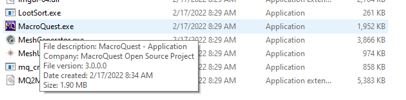
When I hover the mouse pointer over the MQ EXE file it is showing file version 3.0.0.0, this is what the patcher gave me at 8:29am this morning and is not offering anything newer. Re-installing MQ fresh has simply just given me this same file version again. Entering ${MacroQuest.Version} into the MQ window does not yield any output or spit out a version number for me.you can also just echo the ${MacroQuest.Version}
but the console iscontrol + `and then tools -> macro expression evaluator
Attachments
blitz80690
New member
Yes i'm on Windows 7. Sad face. It's a 64-bit OS.are you on an old, not up-to-date windows? like windows 7?
if so, unfortunately you will need to update to at least Windows 10
which also, eq is now 64bit so you need a 64bit OS anyhow
Yes i'm on Windows 7. Sad face. It's a 64-bit OS.
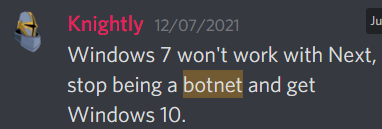
yeah unfortunately
 not gonna work
MicroSoft stopped support of windows 7 a while ago
 That seemed to do it. I have IS Boxer and MQ both running.
Fenworth
Member
Thanks for the location of this innerspace update. All is working for me now.Right click on the innerspace tray icon and select the `Patcher` option. This will open a window that has a tiny window inside of it with 3 tabs at the top, select the `Development` tab and then click on the `Install Now` button on the bottom right of that screen. This will install the development version.
Sic has the changelog been updated since 2/15? Trying to figure out if the RG Launcher is giving me an old version or the latest... When I hover over the MQ exe I see version 3.0.0.0, when I look in the changelog in the resources folder the last entry refers to 2/15. I am unable to get the MQ window to list the version of MQ currently being run by entering the command $(MacroQuest.Version). Any help is greatly appreciated. Would like to be able to enter mq commands in any window once again, and hopefully eliminate the double names on the map. Things I have tried so far, fresh install of RG Launcher and MQ, still no dice...
Attachments
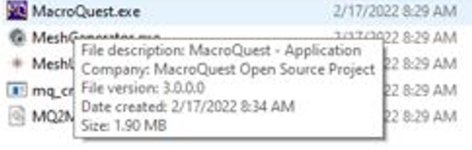
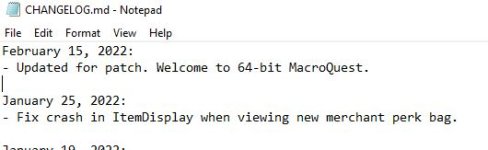

We're not updating the changelog for crash fixes.Sic has the changelog been updated since 2/15? Trying to figure out if the RG Launcher is giving me an old version or the latest... When I hover over the MQ exe I see version 3.0.0.0, when I look in the changelog in the resources folder the last entry refers to 2/15. I am unable to get the MQ window to list the version of MQ currently being run by entering the command $(MacroQuest.Version). Any help is greatly appreciated. Would like to be able to enter mq commands in any window once again, and hopefully eliminate the double names on the map. Things I have tried so far, fresh install of RG Launcher and MQ, still no dice...
/echo ${MacroQuest.Version} to check your version in-game.Oh I see you tried that. My guess is you have multiple MacroQuest folders, likely created by accident, and are using the wrong one. Go to RG Launcher -> Settings to confirm your folder.
there are some bugsSic has the changelog been updated since 2/15? Trying to figure out if the RG Launcher is giving me an old version or the latest... When I hover over the MQ exe I see version 3.0.0.0, when I look in the changelog in the resources folder the last entry refers to 2/15. I am unable to get the MQ window to list the version of MQ currently being run by entering the command $(MacroQuest.Version). Any help is greatly appreciated. Would like to be able to enter mq commands in any window once again, and hopefully eliminate the double names on the map. Things I have tried so far, fresh install of RG Launcher and MQ, still no dice...
the double spawn appears to be an eq bug
the not typing in the regular chat window is a known current mq bug
the rg launcher is what you want to be checking at all times

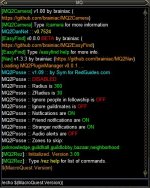
Thanks for your help Red and Sic, hovering over the MQ2Main.dll in my MQ folder shows version 3.1.0.216, Entering the /echo command into the MQ window still yields nada for me, the attached image shows everything that appears in MQ window from Launch up to entering the /echo $(MacroQuest.Version) command. I'm kicking myself for deleting all mq folders and reinstalling fresh, as i previously had majority of the toons taking commands in any window and only a few showing double names. Now the problem is once again with all. Will keep my eyes on the RG Launcher for an update, thank you again for your help.
Attachments
Users who are viewing this thread
Total: 4 (members: 0, guests: 4)
Share: