• You've discovered RedGuides, an EverQuest multi-boxing and scripting community 🧙‍♀️⚙️. We want you to play several EQ characters at once, come join us and say hello! 👋

  • A TLP without truebox has thawed (Very Vanilla ready)
    Frostreaver
Very Vanilla MQ (Live Servers)

Vanilla - Very Vanilla MQ (Live Servers) (3 Viewers) 3.1.52471.11

No permission to download
Loaded up, started VV KA like I always do, but the macro keeps ending saying my Tank can't be MA as PullerTank... /scratches head... trying to play with it a bit... will report shortly :)...

I think I may have figured it out... so I originally moved everything with the MQ2 to MQ Next... did I have to do it again with the MQ 64bit now as well? Because when I load the config folder from the new launcher/console(whatever the icon in the taskbar is called) it does not pull from my MQ Next folder

UPDATE: just SMH @ myself... 1. thanks for being patient 2. I'm an idiot... I think... 3. realized I may have copy and cut my INI files into a new folder JUST INCASE I need to update them later with this update... and so NEW INI files were populated in the toons' INI files as if it were the first time logging them in SMH...
 
Last edited:
Loaded up, started VV KA like I always do, but the macro keeps ending saying my Tank can't be MA as PullerTank... /scratches head... trying to play with it a bit... will report shortly :)...

I think I may have figured it out... so I originally moved everything with the MQ2 to MQ Next... did I have to do it again with the MQ 64bit now as well? Because when I load the config folder from the new launcher/console(whatever the icon in the taskbar is called) it does not pull from my MQ Next folder
you can check and ensure that your directory for your launcher is pointing to where you want it to in your settings tab
 
@Sic I believe it was a copy and cut instead of paste issue of my INI files... SMH and thanks for being so helpful with this village idiot LOL

Started it up, seems to be going swell, will update if anything happens beyond :)

a HUGE thank you to the DEV TEAM!... and thanks for the tip about ISB dev update 6869... literally never do the experimental ones cause I feel like they might break something...!
 
Last edited:
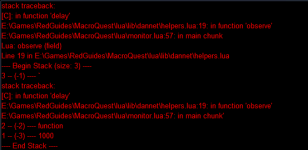
Not sure where to post this, but since this was working yesterday morning (pre-patch), I'm guessing it's related to the 64bit update.

lua_dannet_helper_crash.png

The line in monitor.lua that brought up the issue is

[CODE lang="Lua" title="Trigger line"]Dannet.observe(value, 'Me.PctHPs')[/CODE]

where value is the name of another character.

The character being observed is in game, in the same zone.
 
I gave the latest updates a try yesterday. I got a trifecta - EQ, Nvidia driver, and RG. I am experiencing stuttering problems with the Nvidia driver and EQ. RG wise I opted to perform a clean installation and restored my character configurations for CWTN. I have had no issues with RG after 4 hours of gameplay. Update looks solid. Even added a few plugins. Thank you for the great work.
 
Not sure where to post this, but since this was working yesterday morning (pre-patch), I'm guessing it's related to the 64bit update.

View attachment 38030

The line in monitor.lua that brought up the issue is

[CODE lang="lua" title="Trigger line"]Dannet.observe(value, 'Me.PctHPs')[/CODE]

where value is the name of another character.

The character being observed is in game, in the same zone.

Well, I have a "fix" in the sense my original Lua didn't account for mercs in one case. Not sure why observing the hps for a merc "worked" before the update, but it definitely doesn't now. Thing is, even doing the observe didn't really work in the first place (my approach handled it in other ways, but the observe wasn't changed since it didn't squawk).
 
Great work to all involved. Had a few crashes last night, after the updates this morning have been running multiple macros, plugins, and Lua with no issue.
 
Ok, I am having some real issues getting next to work like legacy has for years. I made a new mq2next folder and did the migration, it seemed to work, got the message saying it did. Made sure my plugins where there and updated them, all looked good. I load up my toons and my inis load on my toons that done have a plug in and my plugins show up on the toons that have them, after this is where the trouble lies. Now, i am playing 12 toons, my tank hits auto follow and none of the group follow, i attack and some toons may assist some may just stand there. Now if I ALT tab to each of the 12 toons then they seem to start to do what they are supposed to but not always and it is very clucky and seems like all my toons except for the one i am actually on are like delayed by 10 seconds or so and i have no clue why.

In another thread i saw this:
1. Rename your old MQ install folder. I renamed mine to MQ2.old.
2. Install Next into a fresh and shiny MQ2 folder. (or whatever you want to call it)
3. Run the migrator utility. Point it at your .old folder and your new install.
4. Copy all the meshes from your old installs Mesh folder to the MQ2\Resources\MQ2Nav folder.
5. Start it up, kick ass, take names!

My question is this, is my old mq install folder my veryVanilla-master folder that i am supposed to rename or is it on of the 60 folders inside of that? Would really like to get this to work but having no luck. Any and all help is appreciated as fumbling through it does not seem to be working for me. THanks for any and all help.
 
your lua script has a "nil" somewhere in it and looks like referencing a table where perhaps it shouldn't.

I'd double check the script itself
i just have lootly, easyfind, lootlier and tradeskill construction - nothing else, nothing self-made... - will remove everything and start with zero...
 
Ok, I am having some real issues getting next to work like legacy has for years. I made a new mq2next folder and did the migration, it seemed to work, got the message saying it did. Made sure my plugins where there and updated them, all looked good. I load up my toons and my inis load on my toons that done have a plug in and my plugins show up on the toons that have them, after this is where the trouble lies. Now, i am playing 12 toons, my tank hits auto follow and none of the group follow, i attack and some toons may assist some may just stand there. Now if I ALT tab to each of the 12 toons then they seem to start to do what they are supposed to but not always and it is very clucky and seems like all my toons except for the one i am actually on are like delayed by 10 seconds or so and i have no clue why.

In another thread i saw this:
1. Rename your old MQ install folder. I renamed mine to MQ2.old.
2. Install Next into a fresh and shiny MQ2 folder. (or whatever you want to call it)
3. Run the migrator utility. Point it at your .old folder and your new install.
4. Copy all the meshes from your old installs Mesh folder to the MQ2\Resources\MQ2Nav folder.
5. Start it up, kick ass, take names!

My question is this, is my old mq install folder my veryVanilla-master folder that i am supposed to rename or is it on of the 60 folders inside of that? Would really like to get this to work but having no luck. Any and all help is appreciated as fumbling through it does not seem to be working for me. THanks for any and all help.
It is OFFICIAL! MacroQuest is the version of MacroQuest that we offer here at RedGuides.

You will see this with "MacroQuest - Live" in the RG Launcher.

Please, check out this link: >>> Functions & Features Demo + Migration to the new MacroQuest<<<

There are a couple of small, yet important changes with MacroQuest:
1. mq2map click is Control+Shift+Click
2. new easyfind self travel is Control+Click (reminder in find window title bar)
3. new easyfind group travel is Control+Shift+Click
4. If you selected a destination in your zone guide and want to activate it you /travelto activate
5. /yes and /no are now aliases
6. your ini configuation files (like for kissassist) now reside in your "Config" folder and not your "Macro" folder


^ i would do the above.

I would NOT just try and rename an old MQ2 legacy folder. you can and ABSOLUTELY will have issues.

I know you said you migrated - but you also mentioned copying folders. don't do that.

I would also make sure that your location in your settings tab of the launcher matches where you want your mq updated
 
It is OFFICIAL! MacroQuest is the version of MacroQuest that we offer here at RedGuides.

You will see this with "MacroQuest - Live" in the RG Launcher.

Please, check out this link: >>> Functions & Features Demo + Migration to the new MacroQuest<<<

There are a couple of small, yet important changes with MacroQuest:
1. mq2map click is Control+Shift+Click
2. new easyfind self travel is Control+Click (reminder in find window title bar)
3. new easyfind group travel is Control+Shift+Click
4. If you selected a destination in your zone guide and want to activate it you /travelto activate
5. /yes and /no are now aliases
6. your ini configuation files (like for kissassist) now reside in your "Config" folder and not your "Macro" folder


^ i would do the above.

I would NOT just try and rename an old MQ2 legacy folder. you can and ABSOLUTELY will have issues.

I know you said you migrated - but you also mentioned copying folders. don't do that.

I would also make sure that your location in your settings tab of the launcher matches where you want your mq updated
Thank you. I will delete my current mqnext folder and try again. God i hope it works as i like the feel of next but i have just never been able to get it to work.
 
I don't know if it does anything yet. But it is loading under Wine on Linux now (didn't seem to be last night, but this morning it fired up). Color me impressed. It complains a little about a couple wine environment things but it continues on and seems to inject ok. Nice work. I'll try it out tonight, I came back to EQ/MQ just in time to have to deal with 64 bit issues.
 
It is OFFICIAL! MacroQuest is the version of MacroQuest that we offer here at RedGuides.

You will see this with "MacroQuest - Live" in the RG Launcher.

Please, check out this link: >>> Functions & Features Demo + Migration to the new MacroQuest<<<

There are a couple of small, yet important changes with MacroQuest:
1. mq2map click is Control+Shift+Click
2. new easyfind self travel is Control+Click (reminder in find window title bar)
3. new easyfind group travel is Control+Shift+Click
4. If you selected a destination in your zone guide and want to activate it you /travelto activate
5. /yes and /no are now aliases
6. your ini configuation files (like for kissassist) now reside in your "Config" folder and not your "Macro" folder


^ i would do the above.

I would NOT just try and rename an old MQ2 legacy folder. you can and ABSOLUTELY will have issues.

I know you said you migrated - but you also mentioned copying folders. don't do that.

I would also make sure that your location in your settings tab of the launcher matches where you want your mq updated
I did all this but and made sure all the plugins where loaded but my toons will not autofollow me or come to me or mimic me from the buttons at the bottom of the group info window. Any ideas? I turned on the frame limiter as well. I am not sure why i am having these issues as when i did the old version of this years ago everything worked, not sure what i am missing.. Went through the videos as well and still cant get my toons to assist me when attacking or follow me. Is there something i need to do with the eqbc thing?
 
I did all this but and made sure all the plugins where loaded but my toons will not autofollow me or come to me or mimic me from the buttons at the bottom of the group info window. Any ideas? I turned on the frame limiter as well. I am not sure why i am having these issues as when i did the old version of this years ago everything worked, not sure what i am missing.. Went through the videos as well and still cant get my toons to assist me when attacking or follow me. Is there something i need to do with the eqbc thing?
Well, you should at a minimum make sure it is started. Initially there was no option to start EQBCS automatically with Next, so had to do it via taskbar before entering game. The launcher was updated to include the "Launch EQBCS" checkbox for Next, but it is possible you need to check it again even if it was previously checked for MQ2/Live.
 
Well, you should at a minimum make sure it is started. Initially there was no option to start EQBCS automatically with Next, so had to do it via taskbar before entering game. The launcher was updated to include the "Launch EQBCS" checkbox for Next, but it is possible you need to check it again even if it was previously checked for MQ2/Live.
It launched when i started next, the eqbc did. I even tried shutting it down and redoing it once in game and did /bccmd quit and then /bccmd connect to get them all in there but still the autofollow is not working. Cant even seem to get the chase command to work either. Really confused as to why currently but i thank you all and please keep offering insight and i will continue to change what is mentioned to get this to work. Love this program and really want to get next to work right. Do i need to find /lau scripts to make this work? That is a totally new thing for me.
 
I did all this but and made sure all the plugins where loaded but my toons will not autofollow me or come to me or mimic me from the buttons at the bottom of the group info window. Any ideas? I turned on the frame limiter as well. I am not sure why i am having these issues as when i did the old version of this years ago everything worked, not sure what i am missing.. Went through the videos as well and still cant get my toons to assist me when attacking or follow me. Is there something i need to do with the eqbc thing?
no assisting doesn't have anything to do with eqbc.

i would make sure that you migrated and have meshes for mq2nav
 
mq2war simply loaded and zoning will crash also there is a bug with map open cant see anything in task windows it goes blank

Whenever I experience this map and UI issue (existing prior to 64bit update) it is because the map is rendering too many labels and it impedes the rest of the ability of the UI to render properly. I don't believe this is something specifically that can be addressed here and is just a fundamental limitation of the UI capabilities that exist today in the game being utilized by MQ functionality. If you reduce the labels on the map by changing the mapfilters `/mapfilter npc hide` or something does it fix the rest of the UI for you? I often have to change the filters if I want to be able to see the labels in advanced loot, etc if I have the map open with lots of entities in zone.
 
Last edited:
Whenever I experience this issue (existing prior to 64bit update) it is because the map is rendering too many labels and it impedes the rest of the ability of the UI to render properly. I don't believe this is something specifically that can be addressed here and is just a fundamental limitation of the UI capabilities that exist today in the game being utilized by MQ functionality. If you reduce the labels on the map by changing the mapfilters `/mapfilter npc hide` or something does it fix the rest of the UI for you? I often have to change the filters if I want to be able to see the labels in advanced loot, etc if I have the map open with lots of entities in zone.
dont know but will try it out, thanks.
 
Well I spoke too soon, it crashes entering world. But MQ2 stuff showed up on character select screen so it made it a little way in. Not going to fuss about this as running under Wine is an oddball thing to do. Maybe it can be looked at after things settle.
 
When my MT of a group and i hit the Follow Me button in the group window the toons show this in the macroquest window:
[Nav/] no navigation path currently active (the bracket part is in red)
[Nav] navigating to spawn: character info (the bracket is in green)
[Nav} reached desinationat: coordinate info (bracket is in green)

my toons will keep running from my spot out and then reset back unless i click on the tab of that toon. THere seems to be some kind of delay.
 
Is it possible to just delete all of the redguide files from my computer and then just do a new install? I can save my inis elsewhere and then move them to the mq2next->config if that is possible. Then i would just need to redo the navmesh thing right?
 
Is it possible to just delete all of the redguide files from my computer and then just do a new install? I can save my inis elsewhere and then move them to the mq2next->config if that is possible. Then i would just need to redo the navmesh thing right?
Sure, yup.

Or just point your settings tab to a new location and install there
 
Sure, yup.

Or just point your settings tab to a new location and install there
i am guessing that the legacy version will never be around again now that the servers are 64 bit? Would wait for that if it is coming back but dont think it is.
 
i am guessing that the legacy version will never be around again now that the servers are 64 bit? Would wait for that if it is coming back but dont think it is.
there is no more legacy. EverQuest moved on

MacroQuest is the official version that we have at redguides
 
there is no more legacy. EverQuest moved on

MacroQuest is the official version that we have at redguides
well by god then i need to get this next thing to work then, lol, thank you again for all you help. Trying a new fresh install currently, crossing fingers
 
i am guessing that the legacy version will never be around again now that the servers are 64 bit? Would wait for that if it is coming back but dont think it is.
She’s never coming back.

But MQ is just building on that original code base.
 
She’s never coming back.

But MQ is just building on that original code base.
well i hope i can get it to work like the old one, so far no luck. Even my zerk, rog and mag macros not doing what they should. Nothing seems to be working right. Just deleted and uninstalled everything and trying aging.
 
well i hope i can get it to work like the old one, so far no luck. Even my zerk, rog and mag macros not doing what they should. Nothing seems to be working right. Just deleted and uninstalled everything and trying aging.
Unfortunately with EQ's transition to 64 bit there's a lot of things in macroquest that aren't quite right just yet. The devs here are working through the dump files and making corrections as we find the issues. Essentially the transition to make MQ 64 bit caused a large amount of work to make it possible to even load MQ by today's patch. But rest assured we're all looking into the dumps that are automatically sent and trying to get updates out to correct those crashes asap.
 
well i hope i can get it to work like the old one, so far no luck. Even my zerk, rog and mag macros not doing what they should. Nothing seems to be working right. Just deleted and uninstalled everything and trying aging.
a few folks today end up installing to a completely new location and then don't notice that they don't have meshes.

make sure that you:

a: check your settings tab on the launcher to ensure you are installing the location you think you are
b: migrate if you have an old install you need to migrate from

the link i shared you earlier will have you running next in ~10 minutes
 
a few folks today end up installing to a completely new location and then don't notice that they don't have meshes.

make sure that you:

a: check your settings tab on the launcher to ensure you are installing the location you think you are
b: migrate if you have an old install you need to migrate from

the link i shared you earlier will have you running next in ~10 minutes
Oh i am up and running, i can load my ini's and do stuff on the toon that i have up in the foreground of the other 12, they just wont follow me or come to me using the buttons in the group window. Everything seems to be right and i can use /dgge /target bowyer then /dgge /nav target and they will run to me but that seems to be the only way i can get it to work. I have not tried fighting yet but very afraid that it will fail again. This is the right kissassist right - Kissassistver=12.002
 
Oh i am up and running, i can load my ini's and do stuff on the toon that i have up in the foreground of the other 12, they just wont follow me or come to me using the buttons in the group window. Everything seems to be right and i can use /dgge /target bowyer then /dgge /nav target and they will run to me but that seems to be the only way i can get it to work. I have not tried fighting yet but very afraid that it will fail again. This is the right kissassist right - Kissassistver=12.002
follow me + come to me not working sounds like your don't have your dannet setup and working correctly > Check this post <
 
Well, I have a "fix" in the sense my original lua didn't account for mercs in one case. Not sure why observing the hps for a merc "worked" before the update, but it definitely doesn't now. Thing is, even doing the observe didn't really work in the first place (my approach handled it in other ways, but the observe wasn't changed since it didn't squawk).

And in the "well, that isn't the whole story" file, now I'm getting the original Lua crash on a character I know is a live one (there's logic in the routine to filter out mercs prior to observing Me.PctHPs). The code mostly works, but sometimes will bail out with the originally reported error. Eh, something to add to the pile.
 
follow me + come to me not working sounds like your don't have your dannet setup and working correctly > Check this post <
did everything you mentioned in the link you provided. I have never used dannet until today to try and get my toons to come to me. Afollow does not work, /follow does not seem to work and the buttons in the gorup window dont seem to work, minus mimic me, it seems to be working. I am stumped.
 
The dev build of ISBoxer is working great with MQ right now
 
Vanilla - Very Vanilla MQ (Live Servers)

Users who are viewing this thread

Back
Top
Cart