• Hail, we're RedGuides. We want you to play six (yes, 6!) EverQuest characters at once. We have scripts and a friendly community to help, please join our playstyle and say hello! 👋
Very Vanilla MQ (Live Servers)

Vanilla - Very Vanilla MQ (Live Servers) (6 Viewers) 3.1.52471.42

mq has some crashes atm. we took down the build until the devs have a chance to check out some of the crash dumps.

it is likely to be a little touch and go since everything is brand new 64bit.

thanks for understanding - we'll have it back up asap

You guys have turned him into a BOT!!
 
yes, mq has some crashes atm. we took down the build until the devs have a chance to check out some of the crash dumps.

it is likely to be a little touch and go since everything is brand new 64bit.

thanks for understanding - we'll have it back up asap

Does this mean if I log out the toons that are working they won't log back in? 5 CWTN's are working just fine, rest all took dumps though.
 
Does this mean if I log out the toons that are working they won't log back in? 5 CWTN's are working just fine, rest all took dumps though.
no it doesn't - but there is a patch you can try this and see if it works .

there are still several bugs - so again, thank you for your patience
 
no it doesn't - but there is a patch you can try this and see if it works .

there are still several bugs - so again, thank you for your patience
It's all good so far this has been 100x smoother than the 16bit to 32bit adventure and that mostly was on SONY... if you were around for that one... forgot how long it took before was playable back then...
 
Is anyone here running the compile and enjoying it? If it's not usable we can lock it until the devs sort out some issues.
It's all good so far this has been 100x smoother than the 16bit to 32bit adventure and that mostly was on SONY... if you were around for that one... forgot how long it took before was playable back then...
I'd forgotten that EQ was 16 bit! For fun I looked up original system requirements. Closest I could get is from 2000, so Kunark era:


Minimum System Requirements
Win 95/98
Pentium 166
32MB RAM
Glide or D3D Accelerator
28.8+ Internet Access
500MB Hard Disk Space
 
Mq2Dannet seems partially broke.
For example:
/dgae /say hi
Looks fine in my sender client window, but the receiver clients don't report the "/say hi" part in their mq2 window, and don't /say hi.
 
Mq2Dannet seems partially broke.
For example:
/dgae /say hi
Looks fine in my sender client window, but the receiver clients don't report the "/say hi" part in their mq2 window, and don't /say hi.
aye, there are some issues with dannet atm, you're not doing anything wrong, it is a bug, hopefully we can get that sorted here soon.

sorry for the troubles and thanks for your understanding
 
Just logged in and noticed when I try to set mode it says error not available for all modes. Just curious as to when it'll be fixed or updated :) thanks in advance :)
Patch Day Woes?! Sorry about that!
brainiac has put an enormous amount of effort put into converting MacroQuest to x64, so please be patient as bugs are ironed out.
The current release will have bugs and crashes, expect a couple days before things are running smooth again.
Dmps are automatically submitted, so the devs are receiving them and working through them as quickly as possible.


you are also not on the most current build, which is 177.

there will likely be several builds as bugs get worked out.
 
Is anyone here running the compile and enjoying it? If it's not usable we can lock it until the devs sort out some issues.
NOooooo... I enjoying with the 5 CWTN Toons that were playable... 3 of the toons needed the workouts :dance: Also forced a new group make up

I'd forgotten that EQ was 16 bit! For fun I looked up original system requirements. These are from 2000, so Kunark era:
the Boxing back then was multiple PC's usually had to have window fan blowing on the PC's, I finally just dumped the PC that actually caught fire
 
Kiss now loading up without crashing on Linux+Wine with Build 177. Fairly smooth so far with one toon crashing after a bit of farting around. Awesome work getting this out so fast!
 
Hey all,

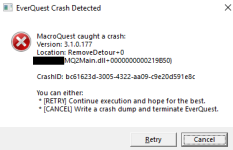
Since this has happened on every KA run attempt, I figured I'd share. The following error message pops up only on my enchanter, and occurs immediately after mezzing an enemy. This is while KA is running.
1644977454475.png
 
the Boxing back then was multiple PC's usually had to have window fan blowing on the PC's, I finally just dumped the PC that actually caught fire
I had my case open and fan on it... then some fireworks happened.. loud pops... and a few capacitor caps shot across the room... game was still playing... but I quickly shut everything down... figured thermal runaway was imminent.
 
Be ready for another game patch soon, there are a few noticeable bugs with the new 64 bit client release that warrant an emergency patch within the next 24 hrs. (ie. Guild Hall portals not working).
 
Probably already on the list but multiline isn't working. Individual commands work but if you attempt to combine them in a multiline it goes crash.
 
Soo. my team is stable... right up until i go grab a mob and run it back to ym camp to kill.. as soon as my guys are supposed to engage, they all crash. anyone else having this issue? and is there a way i can possibly fix this? didnt have this problem until the 64 patch

thx:)
 
Wait, i'm using isboxer right now............... what part of it isn't working? I only use it for the window arrangement.
 
Let me preface this post by stating that I am not computer savvy at all.

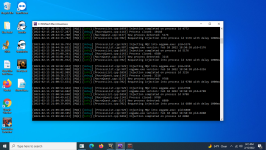
I was playing around with the many functions of Macroquest today while I was waiting for patch to finish. My goal was to learn more about it and what it does. At one point I selected the "Refresh Injections" option from the drop-down menu. A dialog box that looks like the EQBCS window opened and commands began running inside the box. When the patch was finished and the Macroquest build was brought back up, this dialog box remained open. I can minimize it to the taskbar but cannot make it go away completely. If I close the box, Macroquest closes also. I am attaching a screenshot of the box. My question is, how do I get rid of this box? Screenshot (5).png
 
Vanilla - Very Vanilla MQ (Live Servers)

Users who are viewing this thread

Back
Top
Cart