
-
 Hail, we're RedGuides. We want you to play six (yes, 6!) EverQuest characters at once. We have scripts and a friendly community to help, please join our playstyle and say hello! 👋
You are using an out of date browser. It may not display this or other websites correctly.
You should upgrade or use an alternative browser.
You should upgrade or use an alternative browser.

Vanilla - Very Vanilla MQ (Live Servers) (5 Viewers) 3.1.52471.42
- Thread starter Knightly
- Start date


There was another thread that was talking about something similar. I was experiencing it on occasion too, but I only play on Test so I can't really test it anymore.Ever since I swapped over to mqnext it seems I'm pretty consistently having issues with everquest clients just hanging and "not responding". Is there a way I can force a dump before killing the process?
I have no idea if anyone will really be interested in it, but you can use Process Explorer to create crash dumps. Once you get it set up just right-click any process and create a dump.
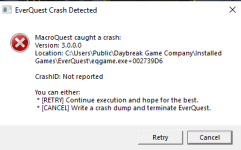
Hi Sic, I just started getting Macroquest caught a crash and noticed from previous posts, you mentioned 3.0.0.0, exactly what version report im getting as well. Location mq::datatypes: spawntype::getmember+0 (D:/mq2next/mq2main.dll+0013c6b0) crashID not reported... where shouild i go from here?? thanks
spawntype::getmember+0 (D:/mq2next/mq2main.dll+0013c6b0) crashID not reported... where shouild i go from here?? thankssince the new launcher was added I’ve been having issues with zoning. 4 of my 6 crew disconnected when I used my drunkards Stein. Last night 1-3 would randomly disconnect when zoning anywhere. They still show in my group, but they no longer show up with all tab. I never had this problem before the new launcher. I run KA and Lootly. That’s about it other than all the other fun stuff preloaded. My UI is whatever EQ throws at us. I don’t get any disconnect errors or anything, they just disappear.
thanks,
thanks,
well the launcher only patches and starts macroquest - it doesn't do anything with macroquest or everquest outside of that if instead by "launcher" you mean "macroquest" you appear to have been using macroquest (what was called "next") for a while now.since the new launcher was added I’ve been having issues with zoning. 4 of my 6 crew disconnected when I used my drunkards Stein. Last night 1-3 would randomly disconnect when zoning anywhere. They still show in my group, but they no longer show up with all tab. I never had this problem before the new launcher. I run KA and Lootly. That’s about it other than all the other fun stuff preloaded. My UI is whatever EQ throws at us. I don’t get any disconnect errors or anything, they just disappear.
thanks,
Not really a lot of info to go by, but definitely curious it happens while zoning.
Firewall issue?
Antivirus issue? Kaspersky?
Last edited:
I didn’t figure it had anything to do with the new launcher. That’s just when the disconnecting started. Would the EQbc coming from the launcher vs having to manually start it cause an issue? Regardless, I’m having these disconnects and I havn‘t changed anything else.well the launcher only patches and starts macroquest - it doesn't do anything with macroquest or everquest outside of that if instead by "launcher" you mean "macroquest" you appear to have been using macroquest (what was called "next") for a while now.

Nope, the launcher just starts stuff.I didn’t figure it had anything to do with the new launcher. That’s just when the disconnecting started. Would the EQbc coming from the launcher vs having to manually start it cause an issue? Regardless, I’m having these disconnects and I havn‘t changed anything else.
It doesn't do anything after that.
It is the same as just manually starting it.
Not really a lot of info to go by, but definitely curious it only happens while zoning.
No dmp/crash dialog is even more curious
Firewall issue?
Antivirus issue? Kaspersky
Shouldn’t be a firewall or antivirus. I have them turned off. I wish had more info to give but I can’t think of anything else pertinent. The only change I’ve made in the last few weeks was installing Office. I haven‘t even upgraded to 11 yet.Nope, the launcher just starts stuff.
It doesn't do anything after that.
It is the same as just manually starting it.
Not really a lot of info to go by, but definitely curious it only happens while zoning.
No dmp/crash dialog is even more curious
Firewall issue?
Antivirus issue? Kaspersky

I hope not! But I suppose that it could be hardware related. It’s odd. I got the 4 logged back in, went to GL and summoned corpse, rezzed the dead, zoned back and ran all the way back to the zone I was previously in with no issues. rolling along I was in trouble so tried to drunkards Stein out again and bam! 2 of the 6 dropped. It’s not the same toons as last time either. So flipping weird! And annoyingHard to say without being at the box to troubleshoot but I had a similar issue last year. It turned out my router was going bad and it would send the zone request and just hang forever. As soon as I replaced the router everything was back to normal.

Can you try the newest version?View attachment 37079
Finally got an error with a toon dropping. All I could do was cancel. Retry failed each time
I see there is an update that went live last night. I downloaded it but I won’t get much playing time the next few days. If this fixes my challenge, I will report back. Thanks!Can you try the newest version?
Redbot updated Very Vanilla MQ (Live Servers) with a new update entry:
20220119
Read the rest of this update entry...
20220119
Januay 19, 2022:
- Updated for patch.
- Add missing ToL entry to GetZoneExpansionName() (#444)
- Fix Me.AmIGroupLeader not returning a proper bool.
- Fix a bug with /itemnotify and rightmouseup
- Fix /plugin command so that it parses the command line
- Add settings panel for ChatWnd
- lua: Added mq.gettime() which returns current time in microseconds
Read the rest of this update entry...
Redbot updated Very Vanilla MQ (Live Servers) with a new update entry:
some fixes and a new datatype
Read the rest of this update entry...
some fixes and a new datatype
- Add DynamicZone.MinMembers
- Fix crash when reading DynamicZone.Leader and maybe others
- Fix crash casued be Me.Aura[0] (#449)
Read the rest of this update entry...
Hello,
I am getting this error after I select my character and try to log in. I have tried removing Redguides and reinstalling several times and fresh download of Everquest
X MacroQuest Caught a Crash:
Version: 3.1.0159
Location:RtlCapturestackContext+0
(C:\\Windows\System32\ntdll+0007F560)
Crash ID: 5b98e43f-ob12-44e8-af00-3b2270a350e9
You can either:
*{retry} continue execution and hope for the best .
* {Cancel} Write a crash dump and terminate Everquest
Anyone can help or ideas on this ?
thanks
I am getting this error after I select my character and try to log in. I have tried removing Redguides and reinstalling several times and fresh download of Everquest
X MacroQuest Caught a Crash:
Version: 3.1.0159
Location:RtlCapturestackContext+0
(C:\\Windows\System32\ntdll+0007F560)
Crash ID: 5b98e43f-ob12-44e8-af00-3b2270a350e9
You can either:
*{retry} continue execution and hope for the best .
* {Cancel} Write a crash dump and terminate Everquest
Anyone can help or ideas on this ?
thanks

Havent crashed or suddenly-closed anything since last update, amazing work there @devsRedbot updated Very Vanilla MQ (Live Servers) with a new update entry:
some fixes and a new datatype
Read the rest of this update entry...
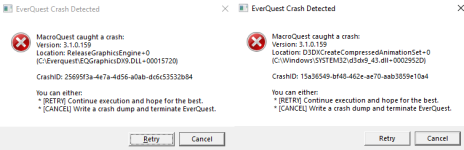
Hello all,
Sorry for another noob question. Any reason that these crashes are happening with such frequency. Usually about one every 10-15 minutes on one of my 4 accounts. Its quite annoying and dangerous
depending on healer/tank going out. Looking for a fix or a direction to head in to try to address the issue.
I apologize if I am missing something basic that I should be doing.
Cheers
Mike
Sorry for another noob question. Any reason that these crashes are happening with such frequency. Usually about one every 10-15 minutes on one of my 4 accounts. Its quite annoying and dangerous
depending on healer/tank going out. Looking for a fix or a direction to head in to try to address the issue.
I apologize if I am missing something basic that I should be doing.
Cheers
Mike
Attachments
Hello all,
Sorry for another noob question. Any reason that these crashes are happening with such frequency. Usually about one every 10-15 minutes on one of my 4 accounts. Its quite annoying and dangerous
depending on healer/tank going out. Looking for a fix or a direction to head in to try to address the issue.
I apologize if I am missing something basic that I should be doing.
Cheers
Mike
I would double check you have the correct DX9 verison
Directx 9.0c June 2010 Redist
(Windows 10 comes with a stripped-down version)
https://www.microsoft.com/en-us/download/details.aspx?id=8109
I would double check you have the correct DX9 verison
Directx 9.0c June 2010 Redist
(Windows 10 comes with a stripped-down version)
https://www.microsoft.com/en-us/download/details.aspx?id=8109
Just downloaded. Thank you good sir.
plz don't post screenshots with your character information in them.Any other suggestions?
you could PM 1 of your dmp files from your release->logs->dumps->reports folder
but in this case the dialog appears to point to a dx9 crash, so it is very likely that it is an issue happening with eq itself, but i'm happy to take a look, just in case

Check these locations in your registry for anything eq/mq2 related and delete.
HKEY_CURRENT_USER\Software\Microsoft\WindowsNT\CurrentVersion\AppCompatFlags\Layers
and
HKEY_LOCAL_MACHINE\Software\Microsoft\WindowsNT\CurrentVersion\AppCompatFlags\Layers
I appriecate both of your help. However I do not know how to check my registry or "app compat layers". Working on sending you a log now. The game crashed twice since my last post. It seems to be more frequent since I dl'd the link you sent.
Are you having same issues ,nothing works before they did this garbage, It was a perfect running machine. Now it not wanting to loaD RIGINNS macs not working, nav in game is screwed to So madAwesome stuff, one issue even though I have watch selected for several LUA's none of them are showing in the LUA tab
I Am a paying vv2 players...And NOTHING is working in game navigation on find ect sense MQ2 changes plugins nav nothing is working correctly, Before you guys made changes..It ran so smooth, now no,its not even loaDING UP WHEN YOU CLICK LAUNCH MQ

It definitely works and there are quite a few people who are using it just fine. Your problem summary amounts it “It No Work” and we all know it does, so…
If you’re having trouble with the commands that were reverted to defaults, check the title bar for the find window.
If you’re having other problems, post a thread and explain what you’re seeing and someone will help you. But right now I don’t even know what you’re trying to say.
If you’re having trouble with the commands that were reverted to defaults, check the title bar for the find window.
If you’re having other problems, post a thread and explain what you’re seeing and someone will help you. But right now I don’t even know what you’re trying to say.
Are you having same issues ,nothing works before they did this garbage, It was a perfect running machine. Now it not wanting to loaD RIGINNS macs not working, nav in game is screwed to So mad
I Am a paying vv2 players...And NOTHING is working in game navigation on find ect sense MQ2 changes plugins nav nothing is working correctly, Before you guys made changes..It ran so smooth, now no,its not even loaDING UP WHEN YOU CLICK LAUNCH MQ
I don't think "IM SO MAD IM GONNA SAY THINGS IN CAPS" is useful to a: you to actually express your issues or to b: anyone who would try and help.
Make sure you take the ~10 minutes to ensure you have migrated, and understand some of the *very* few differences particularly with easyfind and the find window as articualted below.
hundreds of people use this new version of macroquest at this point, saying it doesn't work just is simply not true.
help us help you.
It is OFFICIAL! MacroQuest is the version of MacroQuest that we offer here at RedGuides.
You will see this with "MacroQuest - Live" in the RG Launcher.
Please, check out this link: >>> Functions & Features Demo + Migration to the new MacroQuest<<<
There are a couple of small, yet important changes with MacroQuest:
1. mq2map click is Control+Shift+Click
2. new easyfind self travel is Control+Click (reminder in find window title bar)
3. new easyfind group travel is Control+Shift+Click
4. If you selected a destination in your zone guide and want to activate it you /travelto activate
5. /yes and /no are now aliases
6. your ini configuation files (like for kissassist) now reside in your "Config" folder and not your "Macro" folder
Thank you. I tried searching the forums but could not find what I was looking for. This link is what I needed. I had bookmarked kissassist guide, now to add this one.There is. The RedGuides website has a search feature. I would highly suggest using it. Start by searching for "MQ2Melee" else jump into the Wiki (https://www.redguides.com/docs/plugins/)
First of all apologies if this is a totally dumb question. I have moved to MQnext and since then I have noticed that the Come to me / Follow me / Mimic me buttons are missing at the bottom of the group window. All other features seem fine, its just the buttons are gone. Any suggestions please.
Thank you
Thank you
the old legacy mq2targetinfo was moved into 3 pluginsFirst of all apologies if this is a totally dumb question. I have moved to MQnext and since then I have noticed that the Come to me / Follow me / Mimic me buttons are missing at the bottom of the group window. All other features seem fine, its just the buttons are gone. Any suggestions please.
Thank you
load them and you should be gtg.
/plugin groupinfo/plugin targetinfo/plugin xtarinfoThank you Sic.... works a treatthe old legacy mq2targetinfo was moved into 3 plugins
load them and you should be gtg.
/plugin groupinfo
/plugin targetinfo
/plugin xtarinfo


Redbot updated Very Vanilla MQ (Live Servers) with a new update entry:
20220202
Read the rest of this update entry...
20220202
- Fix crash in ItemDisplay when viewing new merchant perk bag.
Read the rest of this update entry...

clients keep crashing, anyone able to look at my dmp file and see what's going on?
Users who are viewing this thread
Total: 6 (members: 0, guests: 6)
Share: