
-
 Hail, we're RedGuides. We want you to play six (yes, 6!) EverQuest characters at once. We have scripts and a friendly community to help, please join our playstyle and say hello! 👋
You are using an out of date browser. It may not display this or other websites correctly.
You should upgrade or use an alternative browser.
You should upgrade or use an alternative browser.

Vanilla - Very Vanilla MQ (Live Servers) (5 Viewers) 3.1.52471.42
- Thread starter Knightly
- Start date
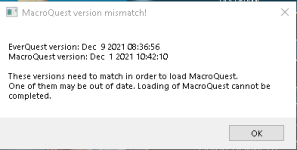
So I played for 5 hours got tired, logged my six box out (they were logged in using the MQ2 icon to launch group) and thought I would try to work on monk epic instead for a bit.... but when I loged her in using the EQ launchpad,, this message popped up. I already had MQ2Next running. so I shut everything down and rebooted... I validated game resources in EQ and reinstalled using the Redguides launcher..... made sure all the macros and plugins were current. ..... I looked for information on 'mismatch' but the posts seemed to talk about 'test' and 'time' mismatches. .... Any help to resolve would be appreciated. ...


it is not ready yet.The problem is the date shows corrected and its in the "green"
not sure why its still not working
next doesn't use the same "ready not ready" that old mq2 does for the launcher.
Thank you so much!
/plugin groupinfo
/plugin targetinfo
/plugin xtarinfo
mental notes:
1. mq2map click is Control+Shift+Click
2. new easyfind self travel is Control+Click (reminder in find window title bar)
3. new easyfind group travel is Control+Shift+Click
4. If you selected a destination in your zone guide and want to activate it you /travelto activate
5. /yes and /no are now aliases !yes and !no if you need them.

Fearbringer
Active member
So I have been using MQLive for about a month or so. About 3 days ago I switched to Next. No problems, used migrator, checked all files transferred.
Then... computer started freezing yesterday after a zone got rebooted my toons were in (ME new expansion). I said, that's strange.
So here's what I did, after looking on these forums for answers and Google in general. Updated drivers, windows update, and video card update. Logged into MQNext as normal, and about 2 minutes into running around, computer froze. So I looked into the Nav issue I read about, did the mesh .exe file into resources and updated the file. Logged back in, and still froze. Ok, so maybe a hardware issue. Everything checked out ok when I ran tools to check. Then, I logged into EQ without MQ, and there are no issues at all with regular everquest.
Then I used the migrate tool to redo the migration from Live to Next, and it still Froze?
Stumped...
Then... computer started freezing yesterday after a zone got rebooted my toons were in (ME new expansion). I said, that's strange.
So here's what I did, after looking on these forums for answers and Google in general. Updated drivers, windows update, and video card update. Logged into MQNext as normal, and about 2 minutes into running around, computer froze. So I looked into the Nav issue I read about, did the mesh .exe file into resources and updated the file. Logged back in, and still froze. Ok, so maybe a hardware issue. Everything checked out ok when I ran tools to check. Then, I logged into EQ without MQ, and there are no issues at all with regular everquest.
Then I used the migrate tool to redo the migration from Live to Next, and it still Froze?
Stumped...

Fearbringer
Active member
Ok let me try that
Still froze
Going to Validate Game Assets, maybe its EQ launcher
So I ran validate and after i reinstalled Next. Back in game now. The difference is that the MQ2Nav Tools window popped up. I didn't see that before. Let me try to zone again
Still froze
Going to Validate Game Assets, maybe its EQ launcher
So I ran validate and after i reinstalled Next. Back in game now. The difference is that the MQ2Nav Tools window popped up. I didn't see that before. Let me try to zone again
I upgraded to Next a few days ago. Currently loving it, but I cannot get ISBoxer to work with Next consistently. I managed to get it working without messing with any settings after the patch yesterday, but it has gone back to not playing well with each other. The issue I am having is if I login in to the game with ISB, Next won't load (doesn't happen with Legacy). I have been trying to find any work around for it but I cannot seem to get it to work. Any help or advice would be massively appreciated.
hrm, i exclusively use isboxer on 2 of my computers.I upgraded to Next a few days ago. Currently loving it, but I cannot get ISBoxer to work with Next consistently. I managed to get it working without messing with any settings after the patch yesterday, but it has gone back to not playing well with each other. The issue I am having is if I login in to the game with ISB, Next won't load (doesn't happen with Legacy). I have been trying to find any work around for it but I cannot seem to get it to work. Any help or advice would be massively appreciated.
Isboxer is a total pain in the ass, and with next i did have to improve *how* i was logging on with it.
how do you have it setup to log in your toons?
ISBoxer launches Everquest elevated (as administrator) for zero reason, but it does. MQ2 launches as elevated (as administrator) for zero reason, but it does. We have a story to detect when EQ is elevated and ask you if you want to elevate MQ, but we haven't done it yet. So, for now, if you're running ISBoxer, right click on MacroQuest.exe and choose "run as administrator" and it will work.I upgraded to Next a few days ago. Currently loving it, but I cannot get ISBoxer to work with Next consistently. I managed to get it working without messing with any settings after the patch yesterday, but it has gone back to not playing well with each other. The issue I am having is if I login in to the game with ISB, Next won't load (doesn't happen with Legacy). I have been trying to find any work around for it but I cannot seem to get it to work. Any help or advice would be massively appreciated.
ISBoxer launches Everquest elevated (as administrator) for zero reason, but it does. MQ2 launches as elevated (as administrator) for zero reason, but it does. We have a story to detect when EQ is elevated and ask you if you want to elevate MQ, but we haven't done it yet. So, for now, if you're running ISBoxer, right click on MacroQuest.exe and choose "run as administrator" and it will work.
Yup, looks like that was the fix. I didn't even think about trying that. Thank you so much!
Fearbringer
Active member
Ok I think I made some headway for us. Let me make a list of what I found
I think what I am going to do is create a "compare program" to scan launcher and next side by side and see the difference so I can locate the files that I am seeing that were missing for some reason (why this issue was caused). And locate the issue in case it occurs again for someone else.
I think what I am going to do is create a "compare program" to scan launcher and next side by side and see the difference so I can locate the files that I am seeing that were missing for some reason (why this issue was caused). And locate the issue in case it occurs again for someone else.
Last edited:
just wondering ...I Downloaded the next version of macroquest got everything downloaded in the proper folder ...but when I log in my toons I dont have the kissassist or anything ... do I have to repurchase or is there like a NEXTShaman or something
After I downloaded the MQNEXT the link in the prior question I had some months back is now able to be used to load all toons at once so thank you
After I downloaded the MQNEXT the link in the prior question I had some months back is now able to be used to load all toons at once so thank you
howdy Palarian,just wondering ...I Downloaded the next version of macroquest got everything downloaded in the proper folder ...but when I log in my toons I dont have the kissassist or anything ... do I have to repurchase or is there like a NEXTShaman or something
for your macros and configuration you should run the Migrator Utility
for plugins you would use the RedGuide's Launcher to download and manage them
Fearbringer
Active member
uga2k20 I am having the same issue, has not been resolved, I am looking into the cause as well
Fearbringer
Active member
Running MQLive and there is no issue so far

So many "Next" problems would be solved if people just made a directory at the root of C: rather than buried 45 subdirectories deep in the %Appdata% folder and then if they also performed the original installation AND migration AS ADMINISTRATOR!
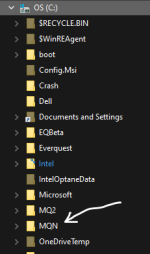

I'm not sure using root C: for anything *not windows* is best computing practice anymore. All my games and applications reside on a drive separate from the C: Windows drive.So many "Next" problems would be solved if people just made a directory at the root of C: rather than buried 45 subdirectories deep in the %Appdata% folder and then if they also performed the original installation AND migration AS ADMINISTRATOR!
View attachment 35711
Fearbringer
Active member
Big Daddy I will try this now and report back
It’s not an issue to have it at the root of C: But running as admin is going to bite you. That said, the path isn’t going to be the issue.
If the entire computer is freezing up, I’m not sure what to tell you. If just the game is freezing, you can force a crash dump through task manager.
If the entire computer is freezing up, I’m not sure what to tell you. If just the game is freezing, you can force a crash dump through task manager.
Fearbringer
Active member
how do i force crash dump through task manager?
right click on it and create dump filehow do i force crash dump through task manager?

It’s not an issue to have it at the root of C: But running as admin is going to bite you. That said, the path isn’t going to be the issue.
If the entire computer is freezing up, I’m not sure what to tell you. If just the game is freezing, you can force a crash dump through task manager.
Way back in the mists of time, the original FAT and FAT12 had issues with the number of file or folder objects you could store at the root. They cautioned people about limiting the use of the root. This spread in the tech community like an old wive's tale and 40+ years later we're still gun shy about using files/folders at the root of a drive. NTFS or EXT4 will happily store millions of file/folder objects there.
Fearbringer
Active member
Ok ty, let me give this a shot
I just don’t like disorganization at the root in any OS.Way back in the mists of time, the original FAT and FAT12 had issues with the number of file or folder objects you could store at the root. They cautioned people about limiting the use of the root. This spread in the tech community like an old wive's tale and 40+ years later we're still gun shy about using files/folders at the root of a drive. NTFS or EXT4 will happily store millions of file/folder objects there.
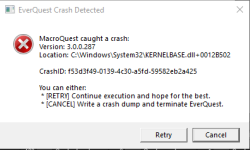
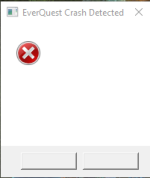
I need help I moved over to Next and the move itself was painless thanks to the video from Sic... My issue is random player accounts crashing about every 2-3 hours. I am using about 15 accounts on my main cpu and it will randomly drop 1-3 of them about every 2 hours. I was getting the 1st error message for the 1st 30-40 crashes now I am getting the blank one for the last 30 or so crashes. I have lots of crash logs if one of the devs want to take a look..
Attachments
I don't know if this is the right place for this. I recently moved from Mq2 to MqNext and so far, love it. Since making this move when a toon dies it doesn't get a rez. In fact, even when in the GL and we summon corpses the other toons cannot see each other's corpses. My cleric can only see my cleric's corpse. My Zerker can only see his own corpse. It's pretty odd! Is there a setting to make corpses visible to my other toons so they get a rez?
Easy fix thank you so much!
I was out yesterday, I’ll look at it later today.Any ideas on my crash issue I posted above?
You have an Avast AV hook installed, can you test with that disabled? I'd like to know if that's causing issues. Otherwise, also make sure you have your MQ and EQ directories excluded from scanning in Avast. The other thing I notice is you have steam overlay enabled. I don't think these are the cause of the issue, but just for the purposes of troubleshooting I'd like to make sure those are off.
Users who are viewing this thread
Total: 6 (members: 0, guests: 6)
Share: