
-
 Hail, we're RedGuides. We want you to play six (yes, 6!) EverQuest characters at once. We have scripts and a friendly community to help, please join our playstyle and say hello! 👋
You are using an out of date browser. It may not display this or other websites correctly.
You should upgrade or use an alternative browser.
You should upgrade or use an alternative browser.

Vanilla - Very Vanilla MQ (Live Servers) (3 Viewers) 3.1.52471.42
- Thread starter Knightly
- Start date


- Commits
- 191
mesh updater is actually a seperate executable file that the launcher runs. Next doesn't contain the exe at this time so the button isn't shown.

no, not atm I explain a bit > here < about "next" and the updater not having some of the things we would normally have, should be a soon type of situationThis doesn't have the mesh updater built in?


Sinickal
Well-known member
I moved to Next a few weeks back and as far as I'm aware the following apply at this time;
Next is not the default VV build, so you need to start EQBC manually buy right clicking on MacroQuest2 in task bar and "Start EQBC Server." This will open an eqbc window EQBCS (EQ Box Chat Server) 1.5.
That EQBCS Window will have the line "Waiting for connections on port: 2112..."
As I then load my characters I receive Client connections in the EQBCS window and see my characters joining as normal.
The main difference at this time is in the VV Launcher you cannot tick a box to say, auto-fire-up EQBC when launching MQ.
Please note: This is NOT a first time setup EQBC guide. I already had eqbc running on standard VV, then moved to the Next build.
Next is not the default VV build, so you need to start EQBC manually buy right clicking on MacroQuest2 in task bar and "Start EQBC Server." This will open an eqbc window EQBCS (EQ Box Chat Server) 1.5.
That EQBCS Window will have the line "Waiting for connections on port: 2112..."
As I then load my characters I receive Client connections in the EQBCS window and see my characters joining as normal.
The main difference at this time is in the VV Launcher you cannot tick a box to say, auto-fire-up EQBC when launching MQ.
Please note: This is NOT a first time setup EQBC guide. I already had eqbc running on standard VV, then moved to the Next build.

Grimlock
Well-known member
which EQBC do you use ? are you using the one in the default mqnext folder ? if you're not using that one you might have an issue , i think i saw mule made one that works with next ? i thought i saw it on the board somewhere . but if you are using a old mq2 version of a BC it won't .. open the mqnext folder and make a link to the EQBC there , it should work then . and if you want one of the other versions you will need to talk to the author of the others or find and download one from the next section on the boards. hope that straightens ya out or gets ya on the right path

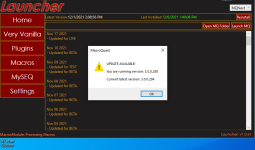
yes, the current version of next is 284 and you appear to be running 280. (btw you posted in the mq2 legacy and not in next, but i moved it)
also do i dare ask about your cringe in this pic?

Faazed
Clearly Not of This Planet
It won't update, I re-installed it as well. Guessing it will fix itself as usual after tomorrow's patch.yes, the current version of next is 284 and you appear to be running 280. (btw you posted in the mq2 legacy and not in next, but i moved it)
also do i dare ask about your cringe in this pic?
The picture was more for humor than anything else

should restart your pc and then run updaterIt won't update, I re-installed it as well. Guessing it will fix itself as usual after tomorrow's patch.
The picture was more for humor than anything else
Faazed
Clearly Not of This Planet
Okay restarted PC and loaded The Launcher... now it says install. I'm getting a good laugh
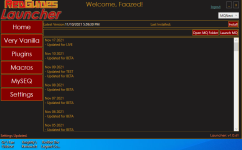
Restarted it and it gave me, so at least now I'm able to update
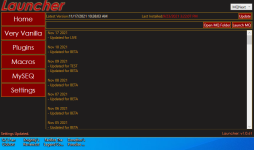
AND FAIL! Like I said, now that my hopes are beaten down like a red headed step child, I'll wait until tomorrow's patch.
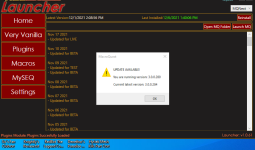
Restarted it and it gave me, so at least now I'm able to update
AND FAIL! Like I said, now that my hopes are beaten down like a red headed step child, I'll wait until tomorrow's patch.
Last edited:

Sic updated MacroQuest (Live Servers) with a new update entry:
ToL Update Ready before launch!
Read the rest of this update entry...
ToL Update Ready before launch!
Thank you brainiac
Read the rest of this update entry...
Sic updated MacroQuest (Live Servers) with a new update entry:
ToL Ready before servers are up! Thank you Brainiac
Read the rest of this update entry...
ToL Ready before servers are up! Thank you Brainiac
December 7, 2021:
* Happy Terror of Luclin Day!
* Added full support for the merchant perk and bag slot 11 and 12.
* Added ${Me.NumBagSlots} which returns the number of bag slots enabled in main inventory.
* Added ${TeleportationItem} TLO to access the teleportation item keyring.
* Fix crash when selling items using button from find item window (#426).
* Fix spell display for SPA_TRIGGER_SPELL_NON_ITEM
* Fix ${DisplayItem.Collected} (#420).
Read the rest of this update entry...
Sic updated MacroQuest (Live Servers) with a new update entry:
zones.ini update
Read the rest of this update entry...
zones.ini update
zones.ini update
Read the rest of this update entry...
- Commits
- 191
There was a minor mistake made when we uploaded the new MacroQuest to fix the Zones.ini file.
If you've already patched please patch again.
Also please look inside of your MacroQuest folder's install location and verify you don't have an additional sub-Folder called "MacroQuest"
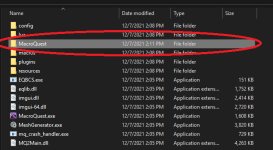
If you have that folder inside of your install, please delete it, this is the mistake that was made. Apologies in advance.
If you've already patched please patch again.
Also please look inside of your MacroQuest folder's install location and verify you don't have an additional sub-Folder called "MacroQuest"
If you have that folder inside of your install, please delete it, this is the mistake that was made. Apologies in advance.

hello blasty,I would really like if the GUI had a reset button for running script so you do not have to stop the script and then hit reset.
Just a small and simple request
Thanks in advance
you could create an issue > HERE <
I am likely going to have several questions; I just bought a new computer today. I loaded MQ2next and have toggled that from live. this was a new install, I updated next and live, i see my Premium plug ins, and they appear to load. i have two characters i do not have cwtn yet - a mage and a Druid, so i use typical Vanilla files for this. I copied my ini files . i did the self target /mac kissassist so that it would create a blank file. When i click on the program file of red guides and open location its completely different there is usual some sub files that goes to a macro folder where i could load my ini into. But all i see now is c: - program data - redguides= desktop utility ?? that has Downloads which is empty - libs - logs - modules resources - for folders that's it. i just re watched the starting video and i am not seeing what i am doing wrong. Anyone able to assist please, Thank you
- Commits
- 191
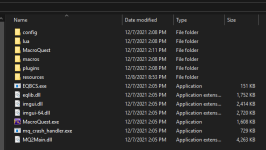
This is what a "Virgin" Macroquest "Next" install should look like.
Is this not what you're seeing?

Fisrt you need to install the launcher (like you did). The folder used for that instal is different than the VV folder for MQ2 or MQNext.
You'll have to define your folders for these in the launcher.
You'll have many informations in this thread. >> HERE <<
You'll have to define your folders for these in the launcher.
You'll have many informations in this thread. >> HERE <<
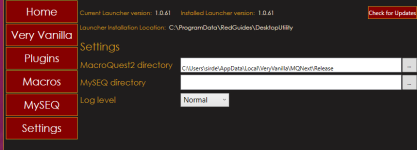
That is what i am looking for i see the macros folder , but this is what i have when i open file location. i fully understand it is me Makign the mistake, i do not think there is a program problem. this just my ignorance. i appreciate the helpView attachment 35558
This is what a "Virgin" Macroquest "Next" install should look like.
Is this not what you're seeing?
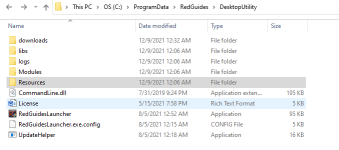
So i see in launcher under settings it shows user sird app data local very vanillia but thats not actual there when i go to it?Fisrt you need to install the launcher (like you did). The folder used for that instal is different than the VV folder for MQ2 or MQNext.
You'll have to define your folders for these in the launcher.
You'll have many informations in this thread. >> HERE <<
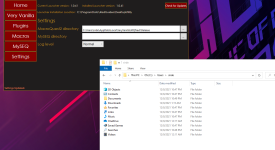
Attachments
Last edited by a moderator:
OK its 2:30 am local time i have to go to bed lol. i did another re install - it now shows a file drive in launcher but that folder local i can not find? i do not think the folder actual exists - i think i need to actually download mq2 some how. looks like launcher is supposed to do it. what should be the proper location - c: drive - user, .......

probably not visible for you since appdata is a hidden folder by defaultOK its 2:30 am local time i have to go to bed lol. i did another re install - it now shows a file drive in launcher but that folder local i can not find? i do not think the folder actual exists - i think i need to actually download mq2 some how. looks like launcher is supposed to do it. what should be the proper location - c: drive - user, .......
https://www.howtogeek.com/wp-conten...b9eab98a1ff.png?trim=1,1&bg-color=000&pad=1,1
Ok, I spent most of yesterday and all day today trying to get this set up. I deleted everything and used launcher a second and third time. it does not appear to be wanting to download actual mq2 - it keep trying to put it into app file, i manually assigned the files as phot, but cannot find it . in game the CWTN file load, in next and live. no navigation. in live i ran mesher and I can see that folder under redguides= desktop utility= resources. that folder has all the meshes, I tried to follow the video and copy those files to load into mq2nav folder but i do not see a mq2nav folder. i am certain this is something i am doing wrong, but i have watch videos all day yesterday and today and can not figure it out, so while CWTN is loaded on 4 of my toons they will not navigate so they do not assist, I cannot find the macro folder to load the VV macros i had copied from other system. I desperately need help as I am so excited to use this new system and i cannot get it right. thank you
Ok, I spent most of yesterday and all day today trying to get this set up. I deleted everything and used launcher a second and third time. it does not appear to be wanting to download actual mq2 - it keep trying to put it into app file, i manually assigned the files as phot, but cannot find it . in game the CWTN file load, in next and live. no navigation. in live i ran mesher and I can see that folder under redguides= desktop utility= resources. that folder has all the meshes, I tried to follow the video and copy those files to load into mq2nav folder but i do not see a mq2nav folder. i am certain this is something i am doing wrong, but i have watch videos all day yesterday and today and can not figure it out, so while CWTN is loaded on 4 of my toons they will not navigate so they do not assist, I cannot find the macro folder to load the VV macros i had copied from other system. I desperately need help as I am so excited to use this new system and i cannot get it right. thank you
howdy randy,
I'm sorry you're having some challenges.
Please see this post here:

Tech - - No Meshes?! CWTN Doesn't Work?! No Movement in ToL?!
Howdy All, With this newest expansion from everquest, there are new zones. With new zones, you need navigation meshes for mq2nav, easyfind, and anything else that uses mq2nav to move around to be able to do all the navigation stuff that you're used to. This includes the cwtn plugins for modes...
 www.redguides.com

I installed MQnext and the buttons for "Follow me" "Mimic me" and "Come to me" are gone. I tried loading the plugin but it said it was already loaded. Any idea what I did wrong? When I go back to Mq2 the buttons are still there.
/plugin groupinfo5. if you want the functionality of the MQ2 "MQ2TargetInfo" - They are now in 3 separate plugins:
/plugin targetinfo
/plugin xtarinfo
mental notes:
1. mq2map click is Control+Shift+Click
2. new easyfind self travel is Control+Click (reminder in find window title bar)
3. new easyfind group travel is Control+Shift+Click
4. If you selected a destination in your zone guide and want to activate it you /travelto activate
5. /yes and /no are now aliases !yes and !no if you need them.
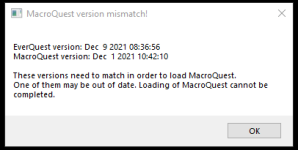

Servers just had a hot fix patch. Use the old eqgame.exe until we get updated
Users who are viewing this thread
Total: 4 (members: 0, guests: 4)
Share: