- Commits
- 2
Any trick to getting the /mapshow npc to highlight on the map? Shows as previously hidden in the mq2 window but nothing on any layers of the map.




You mean highlighting npcs? believe it is still Left Alt + right click on npcAny trick to getting the /mapshow npc to highlight on the map? Shows as previously hidden in the mq2 window but nothing on any layers of the map.
Its /mapfilterplugin mq2maps . use to be able to type /mapshow npc and it would place them all on the map.

/mapfilter npc showplugin mq2maps . use to be able to type /mapshow npc and it would place them all on the map.
Best place for these bug reports is on their respective plugin, that's what I usually look at when I'm looking to do bug fix work. Most of the plugins can be found here: https://gitlab.com/redguides/plugins MQ2Exchange is here: https://gitlab.com/redguides/plugins/MQ2Exchange . But I went ahead and created this issue here: https://gitlab.com/redguides/plugins/MQ2Exchange/-/issues/1seems /exchange will only exchange an item if it is in the base inventory (not in a bag).
Example:
- Rebreather in bag
- Helm of XXX on character
- type /exchange "rebreather" head = does nothing
- Move Rebreather out of bag into base inventory
- type /exchange "rebreather" head = works
It'll be in the next build. But I didn't check to see if it works so you'll have to tell me.any chance of getting mq2raidutils transferred over?
| With MQNext the float variables that are set using ${Me.X}, ${Me.Y}, ${Me.Z}
| may differ by 0.01. This does not happen with VeryVanilla.
|
| Blunt explanation: When you set a variable to 0.01, you expect to retrieve the
| variable as 0.01, not 0.00 or 0.02
|
| Use the following to see for yourself how it behaves. Move somewhere, remain
| stationary. Move somewhere else.
|
| My belief is the issue lies with a type conversion / rounding rule. It probably
| is widespread.
|
Sub Main

    /declare SomeXPosition float outer 0.00
    /declare SomeYPosition float outer 0.00
    /declare SomeZPosition float outer 0.00

    /while (1) {

        /varset SomeXPosition ${Me.X}
        /varset SomeYPosition ${Me.Y}
        /varset SomeZPosition ${Me.Z}

        /echo X: SomeXPosition ${SomeXPosition} Me.X ${Me.X}
        /echo Y: SomeYPosition ${SomeYPosition} Me.Y ${Me.Y}
        /echo Z: SomeZPosition ${SomeZPosition} Me.Z ${Me.Z}
        /echo
        /delay 5s

    }

/return
Sub Main
/declare floatzero  float outer
/declare floatone   float outer
/declare floattwo   float outer
/declare floatthree float outer
/declare floatfour  float outer
/declare floatfive  float outer
/declare floatsix   float outer
/declare floatseven float outer
/declare floateight float outer
/declare floatnine  float outer

    /while (1) {

        /varset floatzero    0.00
        /varset floatone     0.01
        /varset floattwo     0.02
        /varset floatthree   0.03
        /varset floatfour    0.04
        /varset floatfive    0.05
        /varset floatsix     0.06
        /varset floatseven   0.07
        /varset floateight   0.08
        /varset floatnine    0.09

        /echo floatzero  | ${floatzero} | 0.00
        /echo floatone   | ${floatone} | 0.01
        /echo floattwo   | ${floattwo} | 0.02
        /echo floatthree | ${floatthree} | 0.03
        /echo floatfour  | ${floatfour} | 0.04
        /echo floatfive  | ${floatfive} | 0.05
        /echo floatsix   | ${floatsix} | 0.06
        /echo floatseven | ${floatseven} | 0.07
        /echo floateight | ${floateight} | 0.08
        /echo floatnine  | ${floatnine} | 0.09

        /echo
        /delay 5s

}> /mac rounding_test
floatzero | 0.00 | 0.00
floatone | 0.00 | 0.01
floattwo | 0.01 | 0.02
floatthree | 0.02 | 0.03
floatfour | 0.03 | 0.04
floatfive | 0.05 | 0.05
floatsix | 0.05 | 0.06
floatseven | 0.07 | 0.07
floateight | 0.07 | 0.08
floatnine | 0.09 | 0.09
floatzero | 0.00 | 0.00
floatone | 0.00 | 0.01
floattwo | 0.01 | 0.02
floatthree | 0.02 | 0.03
floatfour | 0.03 | 0.04
floatfive | 0.05 | 0.05
floatsix | 0.05 | 0.06
floatseven | 0.07 | 0.07
floateight | 0.07 | 0.08
floatnine | 0.09 | 0.09
floatzero | 0.00 | 0.00
floatone | 0.00 | 0.01
floattwo | 0.01 | 0.02
floatthree | 0.02 | 0.03
floatfour | 0.03 | 0.04
floatfive | 0.05 | 0.05
floatsix | 0.05 | 0.06
floatseven | 0.07 | 0.07
floateight | 0.07 | 0.08
floatnine | 0.09 | 0.09
floatzero | 0.00 | 0.00
floatone | 0.00 | 0.01
floattwo | 0.01 | 0.02
floatthree | 0.02 | 0.03
floatfour | 0.03 | 0.04
floatfive | 0.05 | 0.05
floatsix | 0.05 | 0.06
floatseven | 0.07 | 0.07
floateight | 0.07 | 0.08
floatnine | 0.09 | 0.09Nah that's not it. VeryVanilla behaves. The issue is within mqnext.
The problem also presents itself when you convert the values to Int.
What seems to work is ${Math.Abs[${Math.Calc[${Me.X}-${LastMoveX}]}]}>1
That at least mitigates rounding jitter.
Note. Also found the problem occurs with ${Me.Pet.Height}
This is why we can't have nice things!this is how its always been
Thank You. I'll keep you postedIt'll be in the next build. But I didn't check to see if it works so you'll have to tell me.
I'm completely switched over. Phew.
I miss being able to click the map to nav to spots tho, or nav directly to places with CTRL-F...unless I'm clicking the wrong buttons.
I'm completely switched over. Phew.
I miss being able to click the map to nav to spots tho, or nav directly to places with CTRL-F...unless I'm clicking the wrong buttons.
This is what I use in my MQ2Map.ini It adds some versatility but requires MQ2DanNet. Could swap around the commands to use EQBC if that is what you prefer. Just have it pasted at the bottom of the MQ2Map.ini and works perfect.
INI:[Left Click] #Shift + LClick = Melee KeyCombo1=/dgexe melee /nav locyx %y %x |log=off #Ctrl + LClick = All in zone KeyCombo2=/dgzaexe /nav locyx %y %x |log=off #Ctrl+Shift + LClick = Casters KeyCombo3=/dgexe caster /nav locyx %y %x |log=off #LAlt + LClick = Self KeyCombo4=/nav locyx %y %x |log=off #RAlt + LClick = Priest KeyCombo8=/dgexe priest /nav locyx %y %x |log=off

yup, sounds rightHopefully this is the correct thread for this question. Apologies in advance if it isn't...
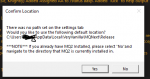
I'm installing MQNext so I can migrate over (using the migration tool). When I click "Install" for MQNext from the launcher, I get this question:
View attachment 31712
I do have MQ2 installed at C:\users\redacted\AppData\Local\VeryVanilla\MQ2\Release. I think my answer here should by yes, correct? I'd then have two folders. One for MQ2 (that I'll migrate from) and the new folder for MQNext.
There is a field for telling the launcher where you want to install MQNext. This error is happening because you haven't put anything in that field so it doesn't know where you want to install.Hopefully this is the correct thread for this question. Apologies in advance if it isn't...
I'm installing MQNext so I can migrate over (using the migration tool). When I click "Install" for MQNext from the launcher, I get this question:
View attachment 31712
I do have MQ2 installed at C:\users\redacted\AppData\Local\VeryVanilla\MQ2\Release. I think my answer here should by yes, correct? I'd then have two folders. One for MQ2 (that I'll migrate from) and the new folder for MQNext.
Agree I saw the field in the settings tab. Not a big deal and I got it to work and used the migrator without any issues. Just think the wording on the pop-up window is a bit confusing.There is a field for telling the launcher where you want to install MQNext. This error is happening because you haven't put anything in that field so it doesn't know where you want to install.

ldon was just released on rizlona.On live servers do people use mq2 to do Ldon's? i would think as they level past it becomes mostly obsolete but perhaps some of the skill augs are useful?
I would just use the VV launcher and make sure i'm not telling it to install next into my existing mq2 location. ezI have some basic questions. I tried Next once last month and got so frustrated with the changes I quickly just deleted it from my HDD.
What is the preferred step-by-step method to install (and maintain) a standalone version of MQNext that doesn't overwrite an existing MQ2 installation?
Do you use the MQNext distribution files attached to this thread? Or do you just use the MQNext option in the launcher? Or do you grab the files from GitLab? Or? And in what order?
Where do you find the migration script? When do you run it? How do you run it? What will I have to copy/maintain manually?
How do I adjust MQNext to play nice with ISBoxer? (I use ISBoxer to start my team at this time.)
How do I adjust MQNext to work with a non-standard (Drakah's Default_Old) interface?
What other changes should I expect will be required?
What existing VVMQ2 options/capabilities will be different/changed/missing in MQNext? (I see mq2easyfind for example.)
Can I maintain both the existing VVMQ2 and MQNext? Is there a preferred method to switch back and forth?
Perhaps it's time for a sticky FAQ? Or a Redguides Wiki category?
1.) Click the dropdown box in the RG UpdaterWhat is the preferred step-by-step method to install (and maintain) a standalone version of MQNext that doesn't overwrite an existing MQ2 installation?
I build it myself -- which is what GitLab is for. But if you're not building yourself, you can ignore GitLab for everything except submitting issues. The download attached to this thread and the one from the updater are the same, the updater uses the attachment here. So, if I were you, I'd just use the updater and not worry about anything else. The updater will also keep all your private plugins in sync, which this thread will not.Do you use the MQNext distribution files attached to this thread? Or do you just use the MQNext option in the launcher? Or do you grab the files from GitLab? Or? And in what order?
Sic linked it above. You can run it any time, but the best time to run it is right after you install MQNext. But you can run it as many times as you'd like, it'll just warn you that your configuration will get overwritten (since that's what it's doing). Sic has a good video on how to run it, but it's basically just run it with powershell. As far as what you have to copy manually...nothing that I'm aware of.Where do you find the migration script? When do you run it? How do you run it? What will I have to copy/maintain manually?
IsBoxer/InnerSpace forces EverQuest to run as administrator. This isn't required, it just does. So in order for MQ to be used with InnerSpace, you have to run MQ as administrator. You can right click on the MacroQuest.exe and go to properties and set it to always run as administrator and that will solve that problem. We also have a bug where sometimes it doesn't inject on startup, so I recommend launching all of your characters using IsBoxer and then launching MQ as admin. That works every time.How do I adjust MQNext to play nice with ISBoxer? (I use ISBoxer to start my team at this time.)
No adjustment required, if it works with legacy MQ2 it's going to work with MQNext.How do I adjust MQNext to work with a non-standard (Drakah's Default_Old) interface?
er...get used to crashing less? You can look at this list for a list of issues we've closed: https://gitlab.com/groups/macroquest/next/-/issues?scope=all&state=closed . You can look at the changelog for recent changes. There's a page up on the wiki that has a brief outline (that we didn't really maintain) of what changed. But for the most part, you're not going to need to adapt much. Think of MQNext like "MQ2 but more."What other changes should I expect will be required?
Any closed source plugin that the author doesn't want converted isn't going to be converted. The ones I know off the top of my head are easyfind and slotcolors. There's probably more. If it's open source and you're missing it, tell me and I'll convert it. I usually do that on the weekends. so if you ask on say...a Monday...gonna feel like a long time before I get to it. (Sorry @Douler -- I'll get to itWhat existing VVMQ2 options/capabilities will be different/changed/missing in MQNext? (I see mq2easyfind for example.)
 ).
).The issue you're going to have running both side by side is just trying to keep your configuration changes in sync. As long as you are okay with that, it's not a big deal. If you make changes in one, you have to go edit the config in the other, or you have to copy the config over (or always make your changes in MQ2 and just keep running the migrator over and over). You can actually point your macros at the same directory if you want, but it's not a great long-term solution.Can I maintain both the existing VVMQ2 and MQNext? Is there a preferred method to switch back and forth?
Now that it's in the launcher and we have a migrator...try it out and see if you have questions. The F in FAQ stands for "Frequently" asked and the most frequently asked question is "Where my easyfind, yo?"Perhaps it's time for a sticky FAQ? Or a Redguides Wiki category?
1.) Click the dropdown box in the RG Updater
2.) Choose MQNext
3.) Set your MQNext path to something other than your MQ2 Path (this is already defaulted)
I build it myself -- which is what GitLab is for. But if you're not building yourself, you can ignore GitLab for everything except submitting issues. The download attached to this thread and the one from the updater are the same, the updater uses the attachment here. So, if I were you, I'd just use the updater and not worry about anything else. The updater will also keep all your private plugins in sync, which this thread will not.
Sic linked it above. You can run it any time, but the best time to run it is right after you install MQNext. But you can run it as many times as you'd like, it'll just warn you that your configuration will get overwritten (since that's what it's doing). Sic has a good video on how to run it, but it's basically just run it with powershell. As far as what you have to copy manually...nothing that I'm aware of.
IsBoxer/InnerSpace forces EverQuest to run as administrator. This isn't required, it just does. So in order for MQ to be used with InnerSpace, you have to run MQ as administrator. You can right click on the MacroQuest.exe and go to properties and set it to always run as administrator and that will solve that problem. We also have a bug where sometimes it doesn't inject on startup, so I recommend launching all of your characters using IsBoxer and then launching MQ as admin. That works every time.
No adjustment required, if it works with legacy MQ2 it's going to work with MQNext.
er...get used to crashing less? You can look at this list for a list of issues we've closed: https://gitlab.com/groups/macroquest/next/-/issues?scope=all&state=closed . You can look at the changelog for recent changes. There's a page up on the wiki that has a brief outline (that we didn't really maintain) of what changed. But for the most part, you're not going to need to adapt much. Think of MQNext like "MQ2 but more."
Any closed source plugin that the author doesn't want converted isn't going to be converted. The ones I know off the top of my head are easyfind and slotcolors. There's probably more. If it's open source and you're missing it, tell me and I'll convert it. I usually do that on the weekends. so if you ask on say...a Monday...gonna feel like a long time before I get to it. (Sorry @Douler -- I'll get to it
The issue you're going to have running both side by side is just trying to keep your configuration changes in sync. As long as you are okay with that, it's not a big deal. If you make changes in one, you have to go edit the config in the other, or you have to copy the config over (or always make your changes in MQ2 and just keep running the migrator over and over). You can actually point your macros at the same directory if you want, but it's not a great long-term solution.
As for switching back and forth, that depends on what you mean. Sometimes MQ2 fails to unload and I've got a bug with MQ2Discord right now that causes it not to unload with Next so trying to unload one and load the other while in game is probably gonna give you bad results. But other than that you just load the one you want.
Now that it's in the launcher and we have a migrator...try it out and see if you have questions. The F in FAQ stands for "Frequently" asked and the most frequently asked question is "Where my easyfind, yo?"
I will add it to my list, but most of your KA is already anonymous.The question is do we just c&p whats in the KissAssist_choosename.ini from notepad ++ or wait for the plugin to be added to MQNext? I am good with either way. Inquiring minds are scratching heads and going hummmmmm.
Do you have crash reporting turned on and if so did this happen about 45 minutes ago? What specific zones?anyone else getting Varset+0 mq2main.dll crashes when zoning? It happens pretty frequently when going to specific zones