• You've discovered RedGuides, an EverQuest multi-boxing and scripting community 🧙‍♀️⚙️. We want you to play several EQ characters at once, come join us and say hello! 👋

  • A TLP without truebox has thawed (Very Vanilla ready)
    Frostreaver
Very Vanilla MQ (Live Servers)

Vanilla - Very Vanilla MQ (Live Servers) (3 Viewers) 3.1.52471.11

No permission to download
If you migrate from MQ2 using muleassist and immediately port over your characters muleassist.mac INI files, it breaks the addition of aliases.

INI:
    /echo Ini/Alias info ${MuleAssistVer.NotEqual[${MacroVer}]} "${MuleAssistVer}" "${MacroVer}""
    /if (${MuleAssistVer.NotEqual[${MacroVer}]}) {

Make sure you run muleassist once without the inis to force the update of the aliases.

This is also probably true of the Kissassist aliases as well.
 
Can a list start to be compiled of the closed source plugins that are ported so we don't have guessing games?

It's up to the plugin authors to update them to next if the source is not open. However some have not done so because next was not open to all and they didn't want to have to keep them updated for both versions. I would assume as more people migrate to next that will change. No cwtn plugins sucks but im sure he will update them for next when he has time and its worth it for the number of people using next.
 
It's up to the plugin authors to update them to next if the source is not open. However some have not done so because next was not open to all and they didn't want to have to keep them updated for both versions. I would assume as more people migrate to next that will change. No cwtn plugins sucks but im sure he will update them for next when he has time and its worth it for the number of people using next.
Chicken and Egg scenario I'm sure.

No cwtn plugins yet, is the only thing stopping me moving over to Next tbh
 
Any ETA on a ROF2 emu build for this?

Or for TEST?

Just curious what your guys policy will be in regards to building this as compared to current MQ2 builds? Or are you mainly going to focus on building for Live?

I would love to fire this up and put it through its paces in my regular routine, and help out testing anything you guys want! I bounce alot between live and test and would be running both versions of it very frequently..
 
Been running for 3 days on a 12 box in a raid using MuleAssist on all toons and so far no issues. Feels pretty crisp. Framelimiter is my favorite add.
 
Is the functionality of wire built into next? I'm pretty sure it helps me out...
 
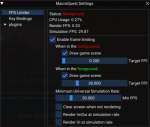
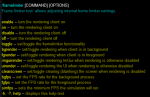
The framelimiter separates the main loop from the render rate and simulates full FPS whether in the foreground or the background. Each instance uses a minuscule amount of resources compared to EQWire.

1619633699556.png
 
Any ETA on a ROF2 emu build for this?
Just curious what your guys policy will be in regards to building this as compared to current MQ2 builds? Or are you mainly going to focus on building for Live?

The focus on Live was because Live was because between Test and Live, Live was the source that was closed (outside of IC itself being closed and required on all builds). But it does make sense for us to have a Test build as well. We'll probably do another couple rounds of bug fixes on Live and then make a Test branch.

While the Test --> Live cycle makes sense to me, ROF2 I have a completely different philosophy on. I don't think it should be attached to the Live build since the ROF2 client quite literally never changes. I think it should stand alone and any requested features should be backported to that client. Most of the features that are added to MQ take advantage of things that the ROF2 client doesn't have so an abstraction layer helps too, but even then the clients have pretty far divergence. I tried to talk Shin into doing it since he's heavy in the emu community. Chances of me doing it are low unless all my Live accounts get banned :D Right now there's no open source RoF2 build that I'm aware of outside of the ones that were done during the era of RoF2.
 
The imgui stuff and Lua scripting just makes me not want to use old shitty mq on rof2 anymore 😂 Hopefully Red can make it happen when things settle down.
 
With respect to frame limiter, I have a question / suggestion, although I have no clue how difficult the code would be to implement.

First off, I love it, it's done great things for my boxing, even over eqwire, and that's pretty awesome. But is there a way to force Frame LImiter to still draw chat / UI windows and not the actual frame itself? Similar to how Wire's option for this.

The only thing I don't like is if I tab out and check on a quest in a windowed window, i dont know if something is hitting me, on my xtar suddenly, etc. With wire, it would update the UI windows so I could react back to the game and fix whatever was engaging me.
 
With respect to frame limiter, I have a question / suggestion, although I have no clue how difficult the code would be to implement.

First off, I love it, it's done great things for my boxing, even over eqwire, and that's pretty awesome. But is there a way to force Frame LImiter to still draw chat / UI windows and not the actual frame itself? Similar to how Wire's option for this.

The only thing I don't like is if I tab out and check on a quest in a windowed window, i dont know if something is hitting me, on my xtar suddenly, etc. With wire, it would update the UI windows so I could react back to the game and fix whatever was engaging me.

You're looking for /framelimiter uirender on
1620033072110.png
 
With respect to frame limiter, I have a question / suggestion, although I have no clue how difficult the code would be to implement.

First off, I love it, it's done great things for my boxing, even over eqwire, and that's pretty awesome. But is there a way to force Frame LImiter to still draw chat / UI windows and not the actual frame itself? Similar to how Wire's option for this.

The only thing I don't like is if I tab out and check on a quest in a windowed window, i dont know if something is hitting me, on my xtar suddenly, etc. With wire, it would update the UI windows so I could react back to the game and fix whatever was engaging me.
To expand on what chats said, there are 2 options -- one for the EQ UI and one for ImGui. They are in the bottom two checkboxes in the settings UI. But keep in mind, the EQ UI eats up CPU, so turning that back on will likely mitigate any gains you see right now.
 
The UI actually renders at the simulation rate. So if you have background FPS set to 1, the UI renders at 1 FPS. Was running it like this on my toons so that my plugins would detect some windows. The increase in cpu was from 1% to 2%, but overall still down from the 9-10% it was without the limiter on.
 
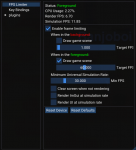
It seems there's some confusion here, also I think the GUI is more helpful to illustrate this, so here's this:
1620068024265.png

The bottom two check marks will make your UI simulate at the "Simulation Rate" -- this is the rate that the eq client game loop runs, so when I have it set up like this, the EQ UI (and the ImGui UI) will update at 30 FPS in the background (since that is the Minimum Universal Simulation Rate). If I was to uncheck those, then the UI would update at 1 FPS if the client is in the background, or 60 FPS if it is in the foreground. Those are the "Render Rate" values (which by default extends to the UI).
 
Last edited by a moderator:
One thing I've noticed, is when Blind effects happen the entire screen goes black when running Next (instead of still allowing you to see map and UI) - presumed it was something to do with the FPS limiter. I've tried ticking/unticking the different Render options, but that doesn't help unfortunately.

Any ideas please?
 
One thing I've noticed, is when Blind effects happen the entire screen goes black when running Next (instead of still allowing you to see map and UI) - presumed it was something to do with the FPS limiter. I've tried ticking/unticking the different Render options, but that doesn't help unfortunately.

This is a bug, we'll work on it. Thanks for the report!
 
just curious if im missing something, but is mqnext available in the updater? i cant install it on this computer and only recently decided to try on the others (it works) but i cant tell if im missing something, if "beta" is mqnext, or if it simply has to be manually dl'd, which i have to do on this machine anyway, but much nicer to automate it on the rest. Also, if its NOT in the launcher, is the best way to know what is and isnt migrated by using mq2pluginmanager and looking in the list? i only use a few things and none of the most common lol

-side rant since im thinking about not being able to see something: is it just me or does AMD seem to enjoy using like a 2pt font for anything that needs details? Was trying to find how to turn off the led's on heatsink on the ryzen(im finally installing windows on it but it has been disaster from the start- another story lol) and im reminded of watching my elderly neighbors using magnifying glasses to read stuff. This makes me feel that's necessary (and what time of day varies how bad i can see, but this is just ridiculously tiny, it's not just my eyes but purely microscopic writing on the cpu insert lol)
 
Last edited:
just curious if im missing something, but is mqnext available in the updater? i cant install it on this computer and only recently decided to try on the others (it works) but i cant tell if im missing something, if "beta" is mqnext, or if it simply has to be manually dl'd, which i have to do on this machine anyway, but much nicer to automate it on the rest. Also, if its NOT in the launcher, is the best way to know what is and isnt migrated by using mq2pluginmanager and looking in the list? i only use a few things and none of the most common lol
not, is not currently available on the RG Launcher, but will soon :tm:
 
just curious if im missing something, but is mqnext available in the updater? i cant install it on this computer and only recently decided to try on the others (it works) but i cant tell if im missing something, if "beta" is mqnext, or if it simply has to be manually dl'd, which i have to do on this machine anyway, but much nicer to automate it on the rest. Also, if its NOT in the launcher, is the best way to know what is and isnt migrated by using mq2pluginmanager and looking in the list? i only use a few things and none of the most common lol

The list of DLLs in the plugins folder in the zip will tell you (most of) what's migrated. If something's missing, just say and I'll either tell you why you shouldn't use it, what you should use in its place, or if I can't think of anything pithy I'll port it.
 
The list of DLLs in the plugins folder in the zip will tell you (most of) what's migrated. If something's missing, just say and I'll either tell you why you shouldn't use it, what you should use in its place, or if I can't think of anything pithy I'll port it.
ok, i know the cwtn's are a lot of work and numerous, but has there been any work on tradesman yet? (not cwtn, but still paid-[macro] plugin) i know i still have a good 10-20k recipes to learn lol. i dont see any of the paid plugins in the list.
 
ok, i know the cwtn's are a lot of work and numerous, but has there been any work on tradesman yet? (not cwtn, but still paid-[macro] plugin) i know i still have a good 10-20k recipes to learn lol. i dont see any of the paid plugins in the list.
haven't checked yet but tradesman it should not be a problem. probably need some fiddling with the ini files.
 
It seems there's some confusion here, also I think the GUI is more helpful to illustrate this, so here's this:
View attachment 29961

The bottom two check marks will make your UI simulate at the "Simulation Rate" -- this is the rate that the eq client game loop runs, so when I have it set up like this, the EQ UI (and the ImGui UI) will update at 30 FPS in the background (since that is the Minimum Universal Simulation Rate). If I was to uncheck those, then the UI would update at 1 FPS if the client is in the background, or 60 FPS if it is in the foreground. Those are the "Render Rate" values (which by default extends to the UI).
i know this is a dumb question and i hate asking dumb questions, ive honestly searched a lot but cant find it...

whats the command to bring up that window lol??
 
I've been setting it up and everything appears to be working great now! There was a few learning curves due to me forgetting how I set stuff up over time, and I definitely miss mq2easyfind... but some of the new features are awesome! For example, boxhud and the alert scripts are amazing.
 
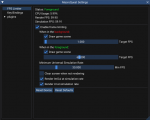
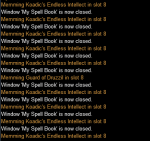
one thing im seeing when using the fps limiter with the following settings is that it struggles with memming spells, as shown by second picture.

fpslimit.PNG
spells.PNG
 
Build 190 -- I think this also fixes the issue @RYN227 and @vsab reported about windows shifting when using hotkeys from the launcher but I didn't put it in there because I don't use that and wanted someone else to test.
Code:
May 7, 2021
- Plugins using pLocalPC->zoneId (GetCharInfo()->zoneId) will once again function properly (#287)

May 5, 2021
- Fixed InputText ImGui functions in the lua binding, also removed the buffer size argument.
- /mqlog will no longer force a parse on items sent to the log (#177)

May 4, 2021
[MQ2PortalSetter]
- Fixed issue with window not showing in standard guild hall
- Will no longer buy the stone if you already have one in your inventory
 
@Knightly the hotkey windows switching issue appears to be fixed for me. I'll keep using it and will let you know if it shifts the window again but so far its working as expected! Thanks!
 
i was trying to set an item as you do with autoloot, /setitem barter 10 or whatever. i wasn't paying attention and accidentally hit enter after /set. it told me autorun was set to ''. i was sort of confused since none of the plugins or macros i was using does a /set command. i looked in macroquest.ini and sure enough, at the bottom was a section with my character's name and autorun=.

so with that said, what does autorun do?
 
This was the precursor to cfg files, unless I remember wrong. It autoruns a command one time when you log into the game.
 
Vanilla - Very Vanilla MQ (Live Servers)

Users who are viewing this thread

Back
Top
Cart