• You've discovered RedGuides, an EverQuest multi-boxing and scripting community 🧙‍♀️⚙️. We want you to play several EQ characters at once, come join us and say hello! 👋

  • A TLP without truebox has thawed (Very Vanilla ready)
    Frostreaver
Very Vanilla MQ (Emulated servers)

Vanilla - Very Vanilla MQ (Emulated servers) (1 Viewer) 3.1.52474.5

No permission to download
sorry if this is in the wrong thread: but getting immediate crashes (only on WIN 11; not on my WIN 10 pc) after update, and reinstalled MQ
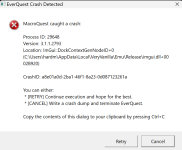
Please try and follow the instructions on the crash dialog where it says to control+c it so you can paste the details.

Having to transcribe the crashid from a screenshot/snip/photo isn't always easy or convenient
 
Please try and follow the instructions on the crash dialog where it says to control+c it so you can paste the details.

Having to transcribe the crashid from a screenshot/snip/photo isn't always easy or convenient
---------------------------
EverQuest Crash Detected
---------------------------
MacroQuest caught a crash:

Process ID: 15600
Version: 3.1.1.2793
Location: ImGui::DockContextGenNodeID+0 (C:\Users\hardm\AppData\Local\VeryVanilla\Emu\crashed_Release_BAK\imgui.dll+0002B920)

CrashID: bb00fce1-72bc-4010-bbae-760406d1ccbb

You can either:
* [RETRY] Continue execution and hope for the best.
* [CANCEL] Write a crash dump and terminate EverQuest.

Copy the contents of this dialog to your clipboard by pressing Ctrl+C

---------------------------
Retry Cancel
---------------------------

here it is (sorry bout that); and since then; I have reinstalled MQ into a fresh location (none) of my character settings or Lua's transfered...and am able to login to my characters...but the 'crashing' (my orginal MQ install still crashing)
 
---------------------------
EverQuest Crash Detected
---------------------------
MacroQuest caught a crash:

Process ID: 15600
Version: 3.1.1.2793
Location: ImGui::DockContextGenNodeID+0 (C:\Users\hardm\AppData\Local\VeryVanilla\Emu\crashed_Release_BAK\imgui.dll+0002B920)

CrashID: bb00fce1-72bc-4010-bbae-760406d1ccbb

You can either:
* [RETRY] Continue execution and hope for the best.
* [CANCEL] Write a crash dump and terminate EverQuest.

Copy the contents of this dialog to your clipboard by pressing Ctrl+C

---------------------------
Retry Cancel
---------------------------

here it is (sorry bout that); and since then; I have reinstalled MQ into a fresh location (none) of my character settings or lua's transfered...and am able to login to my characters...but the 'crashing' (my orginal MQ install still crashing)
 
Redbot updated Very Vanilla MQ (Emulated servers) with a new update entry:

20241026

Oct 24, 2024:
- Fix new spawns getting mq captions applied when mqcaptions are disabled
- Fix crash that could occur when using /lua stop in some circumstances (#906)
- Fix crash when joining too many chat channels
- Add parameter to mq/eval script to pass an expression to evaluate
Oct 19, 2024:
- Fixed some missing console/editor keybinds. Some new functionality includes ctrl+[ +, -, 0 ] to zoom the font.
- lua: Starting a script will now also search require dirs if script is not found in...

Read the rest of this update entry...
 
---------------------------
MacroQuest
---------------------------
Incorrect client version
---------------------------
OK
---------------------------


Should this work on Eqemu The heros journey?
 
---------------------------
MacroQuest
---------------------------
Incorrect client version
---------------------------
OK
---------------------------


Should this work on Eqemu The heros journey?
MQ emu build is for rof2emu version of everquest
 
Redbot updated Very Vanilla MQ (Emulated servers) with a new update entry:

20250331

March 18, 2025:
- live: Update for live patch
March 12, 2025:
- test: Update for test patch
- live: Update for live patch
- Improve file permission checks to reduce the number of false positives
Feb 15, 2025:
- Fix EverQuest.WinTitle not returning the window title
Feb 12, 2025:
- live: Update for patch
Feb 10, 2025:
- test: Update for patch
Jan 29, 2025:
- test: Update for patch
Jan 15, 2025:
- live: Update for patch
- lua: Add error handling to mq.delay, failures inside the callback should...

Read the rest of this update entry...
 
I've been using MacroQuest (VeryVinilla/RedGuides version) for a few months now. Had some issues here and there. Mostly learning stuff. But I started seeing increasing issues as I tried to run a 36 toon raid. I thought I'd try updating Very Vanilla through the Red Guides launcher. Now, none of my toons will launch via MacroQuest.

Does anyone have any information on what might be happening to the best way to debug? Can I roll back to a previous version?

Will be happy to provide more information, but I'm not sure what will be useful.
 
I've been using MacroQuest (VeryVinilla/RedGuides version) for a few months now. Had some issues here and there. Mostly learning stuff. But I started seeing increasing issues as I tried to run a 36 toon raid. I thought I'd try updating Very Vanilla through the Red Guides launcher. Now, none of my toons will launch via MacroQuest.

Does anyone have any information on what might be happening to the best way to debug? Can I roll back to a previous version?

Will be happy to provide more information, but I'm not sure what will be useful.
you probably are launching eq with elevated permissions - but MQ is not allowing you to do that

1749652453436.png

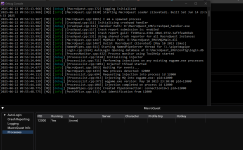
if you turn on "Toggle Debug Console" it will probably tell you why however
 
You are correct. It made sense because I was running EQ as administrator to get around another issue I had years ago, and I just started running all my clients like that. But now, in response to the error, I've turned that off, and it's still giving me the elevation error. Hopefully it's just something turned on I've forgotten about.

Thank you. I'll update once I've played with it some more.

1749656063743.png

Ok. It appears that compatibility mode is an issue too. Fingers crossed turning it off doesn't cause issues. I haven't run without compatibility mode in years either.

Ok. Sorry to spam, but it's working again. I had to remove run as admin and all compatibility mode options I had selected. Now, everything is coming up as expected. If those settings were causing issues with MacroQuest, maybe that means some of the other issues I was having will be fixed by this as well.

Thank you so much for the assistance.
 
You are correct. It made sense because I was running EQ as administrator to get around another issue I had years ago, and I just started running all my clients like that. But now, in response to the error, I've turned that off, and it's still giving me the elevation error. Hopefully it's just something turned on I've forgotten about.

Thank you. I'll update once I've played with it some more.

View attachment 70018

Ok. It appears that compatibility mode is an issue too. Fingers crossed turning it off doesn't cause issues. I haven't run without compatibility mode in years either.

Ok. Sorry to spam, but it's working again. I had to remove run as admin and all compatibility mode options I had selected. Now, everything is coming up as expected. If those settings were causing issues with MacroQuest, maybe that means some of the other issues I was having will be fixed by this as well.

Thank you so much for the assistance.
awesome dude! glad you're sorted
 
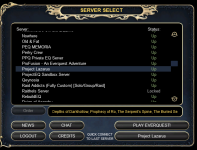
As of this mornings update (20250621), I am unable to launch eq (emu servers) when MQ is running.

Screenshot 2025-06-22 095723.png

If I exit MQ, I am able to launch the game with no issues.
All the way into the game.

Screenshot 2025-06-22 100000.png

Is there any cleanup required on this last MQ update?

Thank you - M
 
As of this mornings update (20250621), I am unable to launch eq (emu servers) when MQ is running.

View attachment 70376

If I exit MQ, I am able to launch the game with no issues.
All the way into the game.

View attachment 70377

Is there any cleanup required on this last MQ update?

Thank you - M
the emu rebuild was entirely just for a plugin rebuild unrelated to MQ as a whole

maybe reboot
 
the emu rebuild was entirely just for a plugin rebuild unrelated to MQ as a whole

maybe reboot

Thanks for the suggestion, but the reboot didn't work.
As I seem to be the only one, I tried creating a new directory for MQ and this has worked.
There must have been a corruption in one of the files from the old directorty.
So now I will just have to rebuild my configs, one-by-one. 🤬

Thank you again - M
 
Thanks for the suggestion, but the reboot didn't work.
As I seem to be the only one, I tried creating a new directory for MQ and this has worked.
There must have been a corruption in one of the files from the old directorty.
So now I will just have to rebuild my configs, one-by-one. 🤬

Thank you again - M
Why not just copy the config directory?
Unless you are saying that is where the issue is?
 
Why not just copy the config directory?
Unless you are saying that is where the issue is?
Thank you for the suggestion.
Because I can't be sure where the issue is, I have decided to copy the configs over one at a time.
This way I can eliminate any of those as contributing to the problem.

(of course I have some configs also that I'm not using anymore because of changes)

- M
 
Vanilla - Very Vanilla MQ (Emulated servers)

Users who are viewing this thread

Back
Top
Cart