• You've discovered RedGuides, an EverQuest multi-boxing and scripting community 🧙‍♀️⚙️. We want you to play several EQ characters at once, come join us and say hello! 👋

  • A TLP without truebox has thawed (Very Vanilla ready)
    Frostreaver
Very Vanilla MQ (Emulated servers)

Vanilla - Very Vanilla MQ (Emulated servers) (2 Viewers) 3.1.52474.5

No permission to download
Redbot updated Very Vanilla MQ (Emulated servers) with a new update entry:

20260311

## 3/11/2026
emu: Spell links within the item display window will now open a spell
display window when clicked.
## 3/5/2026
Add support for teek and tormax
## 3/1/2026
Updated to crashpad from the crashpad-backtrace fork we were previously using.
- For local builders you should remove crashpad-backtrace to prevent conflicts
- `vcpkg remove crashpad-backtrace:x64-windows-static` and/or `vcpkg remove crashpad-backtrace:x86-windows-static`
### Bug fixes
- live/test: Fix /removeaug (#974)
- emu...

Read the rest of this update entry...
 
Redbot updated Very Vanilla MQ (Emulated servers) with a new update entry:

20260322

## 3/22/2026
### Per-Character ImGui Configuration
ImGui configuration can now be saved on a per-character basis. This is now enabled
by default. The first time a per-character config is loaded, it will be copied from the
default config if it exists.
Per-character configuration can be toggled from the overlay settings (/mqsettings overlay)
or via command with /mqoverlay perchar. Changing this option requires a reload of the
overlay (/mqoverlay reload)
Per-character overlay configuration is...

Read the rest of this update entry...
 
The downloader is missing the update done 6 ish days ago which was pretty big for the EMU build. (Or it’s me failing)
 
We'll have a new version out today or tomorrow, sorry for the wait!

I'm currently re-doing our build scripts so we'll have more timely emu updates.
 
Redbot updated Very Vanilla MQ (Emulated servers) with a new update entry:

20260421

## 4/18/2026
### Bug fixes
- ROF2: Add fix for D3DXEffects::CEffect::FindValue crash when game client goes over 2GB of used memory
## 4/16/2026
### Bug fixes
- Fix issue where /mapfilter commands would not take effect until the map plugin was reloaded
## 4/11/2026
- PackageMan bug fixes
## 4/10/2026
### New Plugin Callbacks
Added two new callbacks for plugins - OnLoginFrontendEntered and OnLoginFrontendExited
both have been added to the mkplugin template and will be generated when mkplugin...

Read the rest of this update entry...
 
Ever since updating to this version, I have begun crashing when doing mass pulling. The game completely closes with no error message at all that I can see. I pull around 70+ mobs, stop, begin popping discs and then crash to desktop. I can log back in and continue the fight without a second crash, but if I wait for respawn, pull everything and repeat, it will crash again.
 
I updated to the latest MQ via Redguides (EMU) and it appears to not be active? I have the icon in the systray, but when I start any EMU session, it's not showing on screen. The client just looks generic. I can right click and select profiles and everything so I know the app is working, but my client doesn't see it?
 
I updated to the latest MQ via Redguides (EMU) and it appears to not be active? I have the icon in the systray, but when I start any EMU session, it's not showing on screen. The client just looks generic. I can right click and select profiles and everything so I know the app is working, but my client doesn't see it?
you also downloaded mq for live right around the same time.

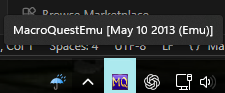
what does mq say if you mouse over it in your sys tray? are you accidentally running live mq?
 
It says MacroQuestEMU (Elevated) I downloaded it via the Launcher also if that helps?
well, you shouldn't be running anything elevated


can you check that thread and run debug and see if that is your problem
 
if you used rglauncher make sure its switched to emu before launching mq, also make sure no mq is running prior

if you used redfetch(which you should) then also make sure its switched to emu before launching mq from the shortcuts tab
 
well, you shouldn't be running anything elevated


can you check that thread and run debug and see if that is your problem
Here's a snippit of the debug. Autologin isn't working as all 6 instances are stuck on the EULA.

[2026-05-04 12:41:19.865] [MQ] [debug] [ProcessList.cpp:905] Injecting MQ into eqgame.exe: pid=32720
[2026-05-04 12:41:19.880] [MQ] [debug] [ProcessList.cpp:976] eqgame.exe version: May 10 2013 23:30:08 pid=32720
[2026-05-04 12:41:19.883] [MQ] [info] [ProcessList.cpp:1048] Injection completed on process id 32720
[2026-05-04 12:41:24.870] [MQ] [info] [MacroQuest.cpp:1685] New process detected: 34192
[2026-05-04 12:41:24.898] [MQ] [info] [ProcessList.cpp:686] Requesting injection into process id 34192
[2026-05-04 12:41:24.899] [MQ] [debug] [ProcessList.cpp:905] Injecting MQ into eqgame.exe: pid=34192
[2026-05-04 12:41:24.914] [MQ] [debug] [ProcessList.cpp:976] eqgame.exe version: May 10 2013 23:30:08 pid=34192
[2026-05-04 12:41:24.918] [MQ] [info] [ProcessList.cpp:1048] Injection completed on process id 34192
[2026-05-04 12:41:29.913] [MQ] [info] [MacroQuest.cpp:1685] New process detected: 27152
[2026-05-04 12:41:29.941] [MQ] [info] [ProcessList.cpp:686] Requesting injection into process id 27152
[2026-05-04 12:41:29.941] [MQ] [debug] [ProcessList.cpp:905] Injecting MQ into eqgame.exe: pid=27152
[2026-05-04 12:41:29.957] [MQ] [debug] [ProcessList.cpp:976] eqgame.exe version: May 10 2013 23:30:08 pid=27152
[2026-05-04 12:41:29.964] [MQ] [info] [ProcessList.cpp:1048] Injection completed on process id 27152
 
hey so im sorry if this is wrong threat but i didnt know where to put, anyways i use to be able to click watch on cwtn and some other people macros and like a day later they would show up on patcher to download , is there a way to manually force them to load in patcher ? been a couple days starting to think they arent going to appear lol thx in advance
 
hey so im sorry if this is wrong threat but i didnt know where to put, anyways i use to be able to click watch on cwtn and some other people macros and like a day later they would show up on patcher to download , is there a way to manually force them to load in patcher ? been a couple days starting to think they arent going to appear lol thx in advance
The cwtn class plugins have never been something to "watch". Since they're licenses you purchase, they would automatically show.

Right now the cwtn class plugins are not available for emu.

You should also use redfetch since the RG launcher is deprecated and will no longer get support/updates
 
The cwtn class plugins have never been something to "watch". Since they're licenses you purchase, they would automatically show.

Right now the cwtn class plugins are not available for emu.

You should also use !redfetch since the RG launcher is deprecated and will no longer get support/updates
was using as a example , he does have some free ones like fishing and some other one and yea i own most of ones you guys got. i didnt know about redfetch ill look into it , thankyou. i just remember being able to watch a macro and it showed up on rg launcher , but its been a long time since i downloaded a macro lol
 
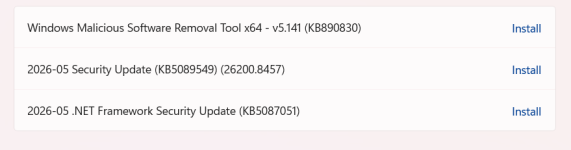
latest windows security updates wont let Macroquest run anymore.. i tried everything (windows defender off), run as adminstrator...nothing. MQ wont run or appear in the sys tray even if RedFetch says it has successfully launched.

1778682392911.png

will a fix be released? unfortunately i cannot rollback my windows updates.....
 
latest windows security updates wont let Macroquest run anymore.. i tried everything (windows defender off), run as adminstrator...nothing. MQ wont run or appear in the sys tray even if RedFetch says it has successfully launched.

View attachment 77076

will a fix be released? unfortunately i cannot rollback my windows updates.....
Are you absolutely sure it isn't already running but hidden in your system tray?
I say that because every single install of MQ has to be set to not auto hide in the tray if you do that (and it's thrown me off before).
 
Hello once again . I have Mq2 and redfetch installed in 4 computers all running Windows 11. For some reason today after a normal patch by Microsoft and a regular reboot of the said PCs....I cannot get Macroquest to run.

I have :

1. Rebooted the PCs several times
2. Run Redfetch on EMU and Live settings ....Redfetch says that MQ is successfully launched, however .....
3. the MQ sys tray icon doesnt appear anywhere. I have checked the windows sys tray settings and Macroquest is enabled to be shown
4. I check the Task Manager app and Macroquest is nowhere to be found running
5. I have tried running Macroquest directly with Adminstrator priveleges from its install directory and nothing happens
6. I have turned off Windows Defender ( my only antivirus ) and still cannot get Macroquest to run

any help will be greatly appreciated as I really cannot play EQ without MQ. Please note I have been running MQ and Redfetch for months without any issues. Only today this issue has happened (and after a windows update and reboot)

thank you
 
please dont make multiple posts about the same thing - it makes helping you impossible.

you're posting about the RG VV Emu build, so i moved your post in redfetch to there - but now, you made another new post.

for some reason your MQ isn't running, so let's try and keep the discussion in one place.

1 - good a reboot is always good. did you check AV before hand to ensure you don't have anything quarantined?
2. yep redfetch just trying to launch it
3. sounds like it didn't successfully launch
4. sounds like it didn't successfully launch
5. you should not run anything as admin
6. did you check nothing was quarantined tho? just turning it off isn't the same.

I recently had an issue where mq was just silently failing to launch and it ended up having something to do with the the port that actors was trying to use for the mq launcher was being used by the Armoury Crate software on my laptop. I believe this has since been fixed. It took me nearly 2 weeks to try and figure out why i was having a silent failure, it really sucked
 
please dont make multiple posts about the same thing - it makes helping you impossible.

you're posting about the RG VV Emu build, so i moved your post in redfetch to there - but now, you made another new post.

for some reason your MQ isn't running, so let's try and keep the discussion in one place.

1 - good a reboot is always good. did you check AV before hand to ensure you don't have anything quarantined?
2. yep redfetch just trying to launch it
3. sounds like it didn't successfully launch
4. sounds like it didn't successfully launch
5. you should not run anything as admin
6. did you check nothing was quarantined tho? just turning it off isn't the same.

I recently had an issue where mq was just silently failing to launch and it ended up having something to do with the the port that actors was trying to use for the mq launcher was being used by the Armoury Crate software on my laptop. I believe this has since been fixed. It took me nearly 2 weeks to try and figure out why i was having a silent failure, it really sucked
sorry for the double post . wasnt sure where to post. will stick to this thread.

1. yes , i checked the antivirus quarantines and it doesnt show that Macroquest has been quarantined
2. all PCs are ASUS ROG laptops but i am not using armory crate but G-Helper but there was no issue until an hour ago.
3. it is so strange that this happened literally all at the same time. i am not running any other software (that i know of). The setup is purely for everquest.
4. any other tricks i can do to try to launch it?
5. i tried clicking on the Macroquest executable in the install folder...and the MQ sys tray icon pops up for a fraction of a second in its normal location and then disappears after that fraction of a second. this is very repeatable.
 
Can also look in task manager to see if it's running but just not showing up in the tray. If not, try closing unnecessary programs and try running it after each one. It would be much easier to roll back the updates and install them later after Ms updates their updates.
 
thanks. I Tried all of these and it didnt work. i tried backing up and deleting the ini file but it also did not work. i tried deleting the mq2main.dll and now redfetch wont update it either. How do i force redfetch to redownload macroquest? when i deleted the exe and dll file (i assumed redfetch would redownload them)...redfetch just checks the navmeshes and then ends without downloading the macroquest component
 
thanks. I Tried all of these and it didnt work. i tried backing up and deleting the ini file but it also did not work. i tried deleting the mq2main.dll and now redfetch wont update it either. How do i force redfetch to redownload macroquest? when i deleted the exe and dll file (i assumed redfetch would redownload them)...redfetch just checks the navmeshes and then ends without downloading the macroquest component
go to your settings tab and scroll down and then "Clear Download Cache" and try again
 
DoNotReply updated Very Vanilla MQ (Emulated servers) with a new update entry:

3.1.52474.5

5/18/2026​

Bug fixes​

  • Fix for /lua stop crash when a dead script was part of the stop call
  • Fixed some luarocks modules not building when a version already existed for another architecture
  • Prospective fix for autologin window hotkeys not behaving for some people after the last /foreground update.

4/26/2026​

Features​

Support for stencil and alpha masking is now available through ImGui to c++ and lua. This allows forcreating more advanced effects like rounded corners on anything or gradient text.

  • For more info see mq/imgui/AlphaMask.h.
  • An example is available via /lua run examples/imgui_mask_demo

4/22/2026​

Bug fixes​

  • Fixed an issue where the lua imgui binding for BeginPopupModal was not properly allowing flags
  • Added some brute force tactics to /foreground so that it will work in more situations
  • Fix context menu losing focus and not closing on focus
  • rof2: Fix crash when opening alt ability inspector

Features​

  • Added mq.canDelay() - returns true if the script is in a state where delay is allowed

PackageMan improvements​

  • Cleaned up workarounds in PackageMan.lua for the flag issue
  • Added a fail state in PackageMan to prevent use if it is in a state that will for sure fail. This is a prospective fix for the blocking issue.
  • Added a fail state in ImguiHelper to prevent use in a similar scenario (should not reach from PackageMan, but just in case)

Read the rest of this update entry...
 
Last edited by a moderator:
My fault for not having our changelog parser fixed. I'll add changelogs manually until I do.
 
Vanilla - Very Vanilla MQ (Emulated servers)

Users who are viewing this thread

Back
Top
Cart