
Install the app
How to install the app on iOS
Follow along with the video below to see how to install our site as a web app on your home screen.
Note: This feature may not be available in some browsers.
-
 You've discovered RedGuides, an EverQuest multi-boxing and scripting community 🧙♀️⚙️. We want you to play several EQ characters at once, come join us and say hello! 👋
You are using an out of date browser. It may not display this or other websites correctly.
You should upgrade or use an alternative browser.
You should upgrade or use an alternative browser.
Question - Using Kissassist for first time, cant seem to get the tank to taunt or bash
- Thread starter Nordgaar
- Start date

Would need to see your dps section and conditions section from your ini to be able to help with that, but generally taunt and bash would be something like
Mash telling it to use it just whenever its ready.
Check out https://kissassist.com (short cut to kissassist wiki page)
There is also a searchable library of premade ini's @ https://www.redguides.com/community/resources/categories/kissassist-ini-library.18/
Code:
DPS1=Taunt|99|mash
DPS2=Bash|99|mash
Mash telling it to use it just whenever its ready.
Check out https://kissassist.com (short cut to kissassist wiki page)
There is also a searchable library of premade ini's @ https://www.redguides.com/community/resources/categories/kissassist-ini-library.18/
I sure appreciate your help.
#1 it said I posted in the wrong area. where is the right area.
#2 This didn't work. I must be close!
#1 it said I posted in the wrong area. where is the right area.
#2 This didn't work. I must be close!
Code:
[Aggro]
AggroOn=1
AggroSize=10
Aggro1=Taunt|99|Mash
Aggro2=Bash|99|Mash
Aggro3=NULL
Aggro4=NULL
Aggro5=NULL
Aggro6=NULL
Aggro7=NULL
Aggro8=NULL
Aggro9=NULL
Aggro10=NULL
Aggro11=NULL
Aggro12=NULL
Aggro13=NULL
Aggro14=NULL
Aggro15=NULL
Aggro16=NULL
Aggro17=NULL
Aggro18=NULL
Aggro19=NULL
Aggro20=NULL
Aggro21=NULL
Aggro22=NULL
Aggro23=NULL
Aggro24=NULL
Aggro25=NULL
Last edited by a moderator:

you'll probably want to adjust a few things:I sure appreciate your help.
#1 it said I posted in the wrong area. where is the right area.
#2 This didn't work. I must be close!
[Aggro]
AggroOn=1
AggroSize=10
Aggro1=Taunt|99|Mash
Aggro2=Bash|99|Mash
Aggro3=NULL
Aggro4=NULL
Aggro5=NULL
Aggro6=NULL
Aggro7=NULL
Aggro8=NULL
Aggro9=NULL
Aggro10=NULL
Aggro11=NULL
Aggro12=NULL
Aggro13=NULL
Aggro14=NULL
Aggro15=NULL
Aggro16=NULL
Aggro17=NULL
Aggro18=NULL
Aggro19=NULL
Aggro20=NULL
Aggro21=NULL
Aggro22=NULL
Aggro23=NULL
Aggro24=NULL
Aggro25=NULL
for taunt you'll want it to be (this will tell the tank that if they are not at 100% on agro to use taunt. We don't spam taunt because when it is successful it moves you to 1 point above the highest threat. So spamming it does no good if you're already the top aggro):
Aggro1=Taunt|100|<
for bash, you'll want to put that in your dps section: DPS1=Bash|100|Mash
ask awayMay I ask you 2 more questions, or put them out to the forum?
Ok, here we go:
1: Is there a way to pull with my bards chords of dissonance song? I just follow the critter or go to him and stand there. I don't blast it.
1: Is there a way to pull with my bards chords of dissonance song? I just follow the critter or go to him and stand there. I don't blast it.
Code:
Role=Puller
CampRadius=20
CampRadiusExceed=400
ReturnToCamp=1
ChaseAssist=0
ChaseDistance=25
MedOn=0
MedStart=20
MedStop=100
MedCombat=0
LootOn=1
RezAcceptOn=1|90
AcceptInvitesOn=1
GroupWatchOn=0
GroupWatchCheck=FALSE
CorpseRecoveryOn=0
EQBCOn=0
DanNetOn=0
DanNetDelay=20
IRCOn=0
CampfireOn=0
CharInfo=Bard|3|GOLD
DefaultUI=TRUE
DPSMeter=1
ScatterOn=0
LOSBeforeCombat=0
UseSpawnMaster=0
TwistOn=1
TwistMed=Mana song gem
TwistWhat=1
XTSlot=1
[SpellS]
MiscGem=8
MiscGemLW=0
MiscGemRemem=1
LoadSpellSet=0
SpellSetName=KissAssist
CastingInterruptOn=1
CheckStuckGem=1
Gem1=Chant of Battle
Gem2=Chords of Dissonance
Gem3=NULL
Gem4=NULL
Gem5=NULL
Gem6=NULL
Gem7=NULL
Gem8=NULL

[Melee]
AssistAt=95
MeleeOn=1
FaceMobOn=1
MeleeDistance=75
StickHow=snaproll
AutoFireOn=0
UseMQ2Melee=0
TargetSwitchingOn=0
MeleeTwistOn=1
MeleeTwistWhat=1
PetTauntOverride=0

[Pull]
PullWith=Chords of Dissonance
PullMeleeStick=1
MaxRadius=200
MaxZRange=50
UseWayPointZ=0
PullWait=1
PullRadiusToUse=30
PullRoleToggle=0
ChainPull=0
ChainPullHP=1
PullPause=30|2
PullLevel=1|4
PullArcWidth=0
PullTwistOn=0
PullOnReturn=1
[PullAdvanced]
PullLocsOn=0
Last edited by a moderator:
That might be challenging because Chords of Dissonance is a PB AE song. at lower levels it's easiest to pull with either Melee, or something that is targeted, like a dot or DD. At lower levels, I think it's best to use Melee to pull.Ok, here we go:
1: Is there a way to pull with my bards chords of dissonance song? I just follow the critter or go to him and stand there. I don't blast it.
Role=Puller
CampRadius=20
CampRadiusExceed=400
ReturnToCamp=1
ChaseAssist=0
ChaseDistance=25
MedOn=0
MedStart=20
MedStop=100
MedCombat=0
LootOn=1
RezAcceptOn=1|90
AcceptInvitesOn=1
GroupWatchOn=0
GroupWatchCheck=FALSE
CorpseRecoveryOn=0
EQBCOn=0
DanNetOn=0
DanNetDelay=20
IRCOn=0
CampfireOn=0
CharInfo=Bard|3|GOLD
DefaultUI=TRUE
DPSMeter=1
ScatterOn=0
LOSBeforeCombat=0
UseSpawnMaster=0
TwistOn=1
TwistMed=Mana song gem
TwistWhat=1
XTSlot=1
[SpellS]
MiscGem=8
MiscGemLW=0
MiscGemRemem=1
LoadSpellSet=0
SpellSetName=KissAssist
CastingInterruptOn=1
CheckStuckGem=1
Gem1=Chant of Battle
Gem2=Chords of Dissonance
Gem3=NULL
Gem4=NULL
Gem5=NULL
Gem6=NULL
Gem7=NULL
Gem8=NULL
[Melee]
AssistAt=95
MeleeOn=1
FaceMobOn=1
MeleeDistance=75
StickHow=snaproll
AutoFireOn=0
UseMQ2Melee=0
TargetSwitchingOn=0
MeleeTwistOn=1
MeleeTwistWhat=1
PetTauntOverride=0
[Pull]
PullWith=Chords of Dissonance
PullMeleeStick=1
MaxRadius=200
MaxZRange=50
UseWayPointZ=0
PullWait=1
PullRadiusToUse=30
PullRoleToggle=0
ChainPull=0
ChainPullHP=1
PullPause=30|2
PullLevel=1|4
PullArcWidth=0
PullTwistOn=0
PullOnReturn=1
[PullAdvanced]
PullLocsOn=0

is it just the 1 char you're playing or do you have a group you're pulling back to? I find it easier to put my tank in Hunter mode and then have my other chars on chase and just roam around killing. You can adjust that by setting your tank character's role to Hunter or you can override when you start the macro by starting it like this: /mac kissassist hunter Then on your other characters, you start them assisting your tank and change the ChaseAssist=1 and set your chase distance to like 30.Ok, thanks
You can see my set up above, sometimes I follow a critter and it wont melee, I run back to my camp and then sit forever with it targeted on a critter 2 miles away rather then changing to something 20 feet from me. What setting do I have wrong above?
Sweet! Thanks! I am pulling 1 critter back to my group of 5.is it just the 1 char you're playing or do you have a group you're pulling back to? I find it easier to put my tank in Hunter mode and then have my other chars on chase and just roam around killing. You can adjust that by setting your tank character's role to Hunter or you can override when you start the macro by starting it like this: /mac kissassist hunter Then on your other characters, you start them assisting your tank and change the ChaseAssist=1 and set your chase distance to like 30.
True, but that doesn't work until you're level 61+For bash, you can now just use the built-in /autoskill functionality of EQ. In game, type /autoskill bash to turn it on.

https://forums.daybreakgames.com/eq...pdate-notes-june-15-2022.283693/#post-4145111True, but that doesn't work until you're level 61+
- Removed the minimum level requirement to use /autoskill.
well they sure did, I stand corrected. Been a long time since I've played a char below 61 hahahahhttps://forums.daybreakgames.com/eq...pdate-notes-june-15-2022.283693/#post-4145111
- Removed the minimum level requirement to use /autoskill.

For taunt i believe it is /melee taunt on if using mq2melee
in your config folder, there should be a file called KissAssist_Info.ini Inside of that ini file, there's a list of zones by name with various options on which mobs to pull, or ignore based on zone. There are also / commands that you can use while running Kiss which will automatically add to that file as well. For example, if there's a mob specifically I do not want to pull, I can type /addignore mobname (even partial works like rabbit and it will add a rabbit). That will add a_rabbit to the mobstoignore list in that file and Kiss will not pull them. You can do the same with mobstopull by using /addpull mobname.I keep learning lol. The reason I run past mobs is that i set my level to pull from 2-5 and I'm running past level 1's. What a sweet program!
Now if I could learn how to selectively pull. Where it only pulls say skeletons and ignores all else.
If you haven't already read through it, the KissAssist wiki is really worth looking at closely as you deal with specific areas of KissAssist. You can find that here: https://www.redguides.com/docs/projects/kissassist/
Are you using kissassist on all your characters? Keep posting your .ini for the character that starts having an issue. Sometimes things change/save - we need to see whats really going on to help.So strange. Playing for hours and all of a sudden my tank stopped tanking. Tried ending and restarting over and over. Logged out and back in. Turned the computer off and relogged. Just totally bugged now. Wont help my puller. So odd.
I think this is what is messing my team of 6 up (all are on kissassist). Even just running the tank and the rest of the party is just sitting there.....my pullertank will pull by running up and hitting a rat, then turn and run back to camp (wierd how he he stops targeting on the run back) and when he gets to camp the rat tries hitting him and he immediately takes off to pull something else. This messes everything up. Pls see below, im sure its an easy fix.
INI:
[General]
KissAssistVer=12.002
Role=PullerTank
CampRadius=30
CampRadiusExceed=50
ReturnToCamp=1
ChaseAssist=0
ChaseDistance=25
MedOn=1
MedStart=20
MedStop=90
MedCombat=0
LootOn=1
RezAcceptOn=1|90
AcceptInvitesOn=1
GroupWatchOn=0
GroupWatchCheck=FALSE
CorpseRecoveryOn=0
EQBCOn=0
DanNetOn=0
DanNetDelay=20
IRCOn=0
CampfireOn=0
CharInfo=Shadow Knight|5|GOLD
DefaultUI=TRUE
DPSMeter=1
ScatterOn=0
LOSBeforeCombat=0
UseSpawnMaster=0
XTSlot=0
[SpellS]
MiscGem=8
MiscGemLW=0
MiscGemRemem=1
LoadSpellSet=0
SpellSetName=KissAssist
CastingInterruptOn=1
CheckStuckGem=1
Gem1=Spike of Disease
Gem2=NULL
Gem3=NULL
Gem4=NULL
Gem5=NULL
Gem6=NULL
Gem7=NULL
Gem8=NULL
[Buffs]
BuffsOn=0
BuffsSize=20
Buffs1=NULL
Buffs2=NULL
Buffs3=NULL
Buffs4=NULL
Buffs5=NULL
Buffs6=NULL
Buffs7=NULL
Buffs8=NULL
Buffs9=NULL
Buffs10=NULL
Buffs11=NULL
Buffs12=NULL
Buffs13=NULL
Buffs14=NULL
Buffs15=NULL
Buffs16=NULL
Buffs17=NULL
Buffs18=NULL
Buffs19=NULL
Buffs20=NULL
RebuffOn=1
CheckBuffsTimer=10
PowerSource=NULL
[Melee]
AssistAt=95
MeleeOn=1
FaceMobOn=1
MeleeDistance=30
StickHow=snaproll
AutoFireOn=0
UseMQ2Melee=0
TargetSwitchingOn=0
PetTauntOverride=0
[GoM]
GoMSHelp=Format - Spell|Target, MA Me or Mob, i.e. Rampaging Servant Rk. II|Mob
GoMSize=3
GoMSpell1=NULL
GoMSpell2=NULL
GoMSpell3=NULL
[GMail]
GMailHelp=Events currently support - Dead,Drag,GM,Level,Named,Leftgroup,Tells
GMailOn=0
GMailSize=5
GMail1=NULL
GMail2=NULL
GMail3=NULL
GMail4=NULL
GMail5=NULL
[AE]
AEOn=0
AESize=10
AERadius=50
AE1=NULL
AE2=NULL
AE3=NULL
AE4=NULL
AE5=NULL
AE6=NULL
AE7=NULL
AE8=NULL
AE9=NULL
AE10=NULL
[DPS]
DPSOn=0
DPSSize=20
DPSSkip=20
DPSInterval=2
DPS1=NULL
DPS2=NULL
DPS3=NULL
DPS4=NULL
DPS5=NULL
DPS6=NULL
DPS7=NULL
DPS8=NULL
DPS9=NULL
DPS10=NULL
DPS11=NULL
DPS12=NULL
DPS13=NULL
DPS14=NULL
DPS15=NULL
DPS16=NULL
DPS17=NULL
DPS18=NULL
DPS19=NULL
DPS20=NULL
DebuffAllOn=0
[Aggro]
AggroOn=0
AggroSize=10
Aggro1=NULL
Aggro2=NULL
Aggro3=NULL
Aggro4=NULL
Aggro5=NULL
Aggro6=NULL
Aggro7=NULL
Aggro8=NULL
Aggro9=NULL
Aggro10=NULL
[Heals]
Help=Format Spell|% to heal at i.e. Devout Light Rk. II|50
HealsOn=0
HealInterval=0
AutoRezOn=0
HealsSize=5
Heals1=NULL
Heals2=NULL
Heals3=NULL
Heals4=NULL
Heals5=NULL
XTarHeal=0
XTarHealList=Xtar slots here Example: 5|6|7
HealGroupPetsOn=0
RezMeLast=0
[Cures]
CuresOn=0
CuresSize=5
Cures1=NULL
Cures2=NULL
Cures3=NULL
Cures4=NULL
Cures5=NULL
[Pet]
PetOn=0
PetSpell=YourPetSpell
PetFocus=NULL
PetShrinkOn=0
PetShrinkSpell=Tiny Companion
PetBuffsOn=0
PetBuffsSize=8
PetBuffs1=NULL
PetBuffs2=NULL
PetBuffs3=NULL
PetBuffs4=NULL
PetBuffs5=NULL
PetBuffs6=NULL
PetBuffs7=NULL
PetBuffs8=NULL
PetCombatOn=1
PetAssistAt=95
PetAttackDistance=115
PetToysSize=6
PetBreakMezSpell=NULL
PetRampPullWait=0
PetSuspend=0
MoveWhenHit=0
PetHoldOn=1
PetForceHealOnMed=0
[Merc]
Help=To use: Turn off Auto Assist in Manage Mercenary Window
MercOn=0
MercAssistAt=92
[Burn]
BurnAllNamed=0
UseTribute=0
BurnSize=15
Burn1=NULL
Burn2=NULL
Burn3=NULL
Burn4=NULL
Burn5=NULL
Burn6=NULL
Burn7=NULL
Burn8=NULL
Burn9=NULL
Burn10=NULL
Burn11=NULL
Burn12=NULL
Burn13=NULL
Burn14=NULL
Burn15=NULL
[Pull]
PullWith=Melee
PullMeleeStick=1
MaxRadius=300
MaxZRange=50
UseWayPointZ=0
PullWait=5
PullRadiusToUse=1
PullRoleToggle=0
ChainPull=0
ChainPullHP=90
PullPause=30|2
PullLevel=1|6
PullArcWidth=0
PullOnReturn=0
[PullAdvanced]
PullLocsOn=0
[AFKTools]
AFKHelp=AFKGMAction=0 Off, 1 Pause Macro, 2 End Macro, 3 Unload MQ2, 4 Quit Game
AFKToolsOn=1
AFKGMAction=1
AFKPCRadius=500
CampOnDeath=0
ClickBacktoCamp=0
[KConditions]
ConOn=0
CondSize=5
Cond1=TRUE
Cond2=TRUE
Cond3=TRUE
Cond4=TRUE
Cond5=TRUE
Last edited by a moderator:


Allurex
Well-known member
Kiss can run as many tools as ur comp can handle I had 3 full groups working as a unit a awhile ago.. tho rgmercs is much easier to useCan Kissassist run 2 separate groups of 6 on the same computer?
Thinking about how much fun it would be raid a dragon later in the game.
Ohhhhh that sounds awesome, i could take 3 6 man groups to fight the old school raid creatures. I wonder if they still require you to be below 52Kiss can run as many tools as ur comp can handle I had 3 full groups working as a unit a awhile ago.. tho rgmercs is much easier to use

no, that changed darn near a year ago (plus aoc's made it pointless).Ohhhhh that sounds awesome, i could take 3 6 man groups to fight the old school raid creatures. I wonder if they still require you to be below 52
next question, this is a blast btw, is there a macro through redguides that will let one of my spellcasters just sit and cast a spell over and over, med, rinse and repeat so i can work on their alteration etc skills?
2nd question, if you dont have to be under level 52, can you still get the loot from the dragon if you are really high level?
2nd question, if you dont have to be under level 52, can you still get the loot from the dragon if you are really high level?
Sure isnext question, this is a blast btw, is there a macro through redguides that will let one of my spellcasters just sit and cast a spell over and over, med, rinse and repeat so i can work on their alteration etc skills?
2nd question, if you dont have to be under level 52, can you still get the loot from the dragon if you are really high level?
Max all Spell Skills

Utility - Max all Spell Skills
Just a little mac I wrote for fun. Will auto mem spells and cast till your maxed in all spell skills. Will not use Damaging spells (this will most likely cause issues with evocation and wiz / mages). Ill try and figure something out for evo...
 www.redguides.com
Skills2
Trade / Skill - Skills2
Skills2 - Original Author: Blasty Maintained for RedGuides by Blasty Purpose: The Lua script will help you level up almost all your skills (Active, Passive, Specialize and Spells) This script replace the macro: skills.mac Recommended: Use a...
www.redguides.com
probably some more also

- Commits
- 191
When you're post is tagged with wrong forum, it's also moved to the correct forum. In this case#1 it said I posted in the wrong area. where is the right area.
The above will get you to the correct forum for KissAssist support.
Having the questions in the section related to your issue greatly helps keep things organized in the forums and allows information related to the topic or resource your issue is located greatly assists the authors with finding issues related to their resource. In some cases, which a particular resource isn't mentioned in the troubleshooting request it's also a good indicator of the resource being used so others know how to help.
For example, you don't mention that you are using Kissassist in this help request. Several resources have a pull mode, an assist mode, a tank mode, etc. Without more information it's hard to know which resource you're using, which results in people asking for more information before they can address the question usually.Good Morning,
I'm pulling, im healing (6 man), tank is going to assist the puller.
All is well but he wont seem to use button 2 (taunt) or button 3 (bash)
Sure could use some help please.

Each resource on RG has an Overview / Discussion Thread and either a link to their wiki or tabs with FAQ, Commands, Etc.
Please make sure to post in the respective discussion thread, and check the FAQ/Commands/Wiki for information before posting.
Please make sure to post in the respective discussion thread, and check the FAQ/Commands/Wiki for information before posting.
Thanks for everyone's help, this is another kissassist question. Out of the blue my mage stopped blasting stuff. It happened around when I added my pet. but i can't seem to get him to blast anymore. He buffs, he keeps the pet up, the pet attacks...but thats it.
[General]
KissAssistVer=12.002
Role=Assist
CampRadius=120
CampRadiusExceed=130
ReturnToCamp=1
ChaseAssist=0
ChaseDistance=25
MedOn=1
MedStart=20
MedStop=90
MedCombat=1
LootOn=1
RezAcceptOn=1|90
AcceptInvitesOn=1
GroupWatchOn=0
GroupWatchCheck=FALSE
CorpseRecoveryOn=0
EQBCOn=0
DanNetOn=0
DanNetDelay=20
IRCOn=0
CampfireOn=0
CharInfo=Magician|7|GOLD
DefaultUI=TRUE
DPSMeter=1
ScatterOn=0
LOSBeforeCombat=0
UseSpawnMaster=0
XTSlot=1
[SpellS]
MiscGem=8
MiscGemLW=0
MiscGemRemem=1
LoadSpellSet=0
SpellSetName=KissAssist
CastingInterruptOn=1
CheckStuckGem=1
Gem1=burst of flame
Gem2=burn
Gem3=NULL
Gem4=Shield of Fire
Gem5=NULL
Gem6=NULL
Gem7=Elementalkin: Earth
Gem8=Lesser Shielding
[Buffs]
BuffsOn=1
BuffsSize=20
Buffs1=Lesser Shielding
Buffs2=Shield of Fire|MA
Buffs3=NULL
Buffs4=NULL
Buffs5=NULL
Buffs6=NULL
Buffs7=NULL
Buffs8=NULL
Buffs9=NULL
Buffs10=NULL
Buffs11=NULL
Buffs12=NULL
Buffs13=NULL
Buffs14=NULL
Buffs15=NULL
Buffs16=NULL
Buffs17=NULL
Buffs18=NULL
Buffs19=NULL
Buffs20=NULL
RebuffOn=1
CheckBuffsTimer=10
PowerSource=NULL
[Melee]
AssistAt=95
MeleeOn=0
FaceMobOn=1
MeleeDistance=75
StickHow=snaproll
AutoFireOn=0
UseMQ2Melee=0
TargetSwitchingOn=0
PetTauntOverride=0
[GoM]
GoMSHelp=Format - Spell|Target, MA Me or Mob, i.e. Rampaging Servant Rk. II|Mob
GoMSize=3
GoMSpell1=NULL
GoMSpell2=NULL
GoMSpell3=NULL
[GMail]
GMailHelp=Events currently support - Dead,Drag,GM,Level,Named,Leftgroup,Tells
GMailOn=0
GMailSize=5
GMail1=NULL
GMail2=NULL
GMail3=NULL
GMail4=NULL
GMail5=NULL
[AE]
AEOn=0
AESize=10
AERadius=50
AE1=NULL
AE2=NULL
AE3=NULL
AE4=NULL
AE5=NULL
AE6=NULL
AE7=NULL
AE8=NULL
AE9=NULL
AE10=NULL
[DPS]
DPSOn=1
DPSSize=20
DPSSkip=20
DPSInterval=2
DPS1=burst of flame|75
DPS2=burn|95
DPS3=NULL
DPS4=NULL
DPS5=NULL
DPS6=NULL
DPS7=NULL
DPS8=NULL
DPS9=NULL
DPS10=NULL
DPS11=NULL
DPS12=NULL
DPS13=NULL
DPS14=NULL
DPS15=NULL
DPS16=NULL
DPS17=NULL
DPS18=NULL
DPS19=NULL
DPS20=NULL
DebuffAllOn=0
[Aggro]
AggroOn=0
AggroSize=5
Aggro1=NULL
Aggro2=NULL
Aggro3=NULL
Aggro4=NULL
Aggro5=NULL
[Heals]
Help=Format Spell|% to heal at i.e. Devout Light Rk. II|50
HealsOn=0
HealInterval=0
AutoRezOn=0
HealsSize=5
Heals1=NULL
Heals2=NULL
Heals3=NULL
Heals4=NULL
Heals5=NULL
XTarHeal=0
XTarHealList=Xtar slots here Example: 5|6|7
HealGroupPetsOn=0
RezMeLast=0
[Cures]
CuresOn=0
CuresSize=5
Cures1=NULL
Cures2=NULL
Cures3=NULL
Cures4=NULL
Cures5=NULL
[Pet]
PetOn=1
PetSpell=Elementalkin: Earth
PetFocus=NULL
PetShrinkOn=0
PetShrinkSpell=Tiny Companion
PetBuffsOn=0
PetBuffsSize=8
PetBuffs1=NULL
PetBuffs2=NULL
PetBuffs3=NULL
PetBuffs4=NULL
PetBuffs5=NULL
PetBuffs6=NULL
PetBuffs7=NULL
PetBuffs8=NULL
PetCombatOn=1
PetAssistAt=95
PetAttackDistance=55
PetToysSize=6
PetToysOn=0
PetToys1=NULL
PetToys2=NULL
PetToys3=NULL
PetToys4=NULL
PetToys5=NULL
PetToys6=NULL
PetToysGave=NULL
PetBreakMezSpell=NULL
PetRampPullWait=0
PetSuspend=0
MoveWhenHit=0
PetHoldOn=1
PetForceHealOnMed=0
[Merc]
Help=To use: Turn off Auto Assist in Manage Mercenary Window
MercOn=0
MercAssistAt=92
[Burn]
BurnAllNamed=0
UseTribute=0
BurnSize=15
Burn1=NULL
Burn2=NULL
Burn3=NULL
Burn4=NULL
Burn5=NULL
Burn6=NULL
Burn7=NULL
Burn8=NULL
Burn9=NULL
Burn10=NULL
Burn11=NULL
Burn12=NULL
Burn13=NULL
Burn14=NULL
Burn15=NULL
[Pull]
PullWith=Melee
PullMeleeStick=0
MaxRadius=350
MaxZRange=50
UseWayPointZ=0
PullWait=5
PullRadiusToUse=90
PullRoleToggle=0
ChainPull=0
ChainPullHP=90
PullPause=30|2
PullLevel=0|0
PullArcWidth=0
PullOnReturn=0
[PullAdvanced]
PullLocsOn=0
[AFKTools]
AFKHelp=AFKGMAction=0 Off, 1 Pause Macro, 2 End Macro, 3 Unload MQ2, 4 Quit Game
AFKToolsOn=1
AFKGMAction=1
AFKPCRadius=500
CampOnDeath=0
ClickBacktoCamp=0
[KConditions]
ConOn=0
CondSize=5
Cond1=TRUE
Cond2=TRUE
Cond3=TRUE
Cond4=TRUE
Cond5=TRUE
[General]
KissAssistVer=12.002
Role=Assist
CampRadius=120
CampRadiusExceed=130
ReturnToCamp=1
ChaseAssist=0
ChaseDistance=25
MedOn=1
MedStart=20
MedStop=90
MedCombat=1
LootOn=1
RezAcceptOn=1|90
AcceptInvitesOn=1
GroupWatchOn=0
GroupWatchCheck=FALSE
CorpseRecoveryOn=0
EQBCOn=0
DanNetOn=0
DanNetDelay=20
IRCOn=0
CampfireOn=0
CharInfo=Magician|7|GOLD
DefaultUI=TRUE
DPSMeter=1
ScatterOn=0
LOSBeforeCombat=0
UseSpawnMaster=0
XTSlot=1
[SpellS]
MiscGem=8
MiscGemLW=0
MiscGemRemem=1
LoadSpellSet=0
SpellSetName=KissAssist
CastingInterruptOn=1
CheckStuckGem=1
Gem1=burst of flame
Gem2=burn
Gem3=NULL
Gem4=Shield of Fire
Gem5=NULL
Gem6=NULL
Gem7=Elementalkin: Earth
Gem8=Lesser Shielding
[Buffs]
BuffsOn=1
BuffsSize=20
Buffs1=Lesser Shielding
Buffs2=Shield of Fire|MA
Buffs3=NULL
Buffs4=NULL
Buffs5=NULL
Buffs6=NULL
Buffs7=NULL
Buffs8=NULL
Buffs9=NULL
Buffs10=NULL
Buffs11=NULL
Buffs12=NULL
Buffs13=NULL
Buffs14=NULL
Buffs15=NULL
Buffs16=NULL
Buffs17=NULL
Buffs18=NULL
Buffs19=NULL
Buffs20=NULL
RebuffOn=1
CheckBuffsTimer=10
PowerSource=NULL
[Melee]
AssistAt=95
MeleeOn=0
FaceMobOn=1
MeleeDistance=75
StickHow=snaproll
AutoFireOn=0
UseMQ2Melee=0
TargetSwitchingOn=0
PetTauntOverride=0
[GoM]
GoMSHelp=Format - Spell|Target, MA Me or Mob, i.e. Rampaging Servant Rk. II|Mob
GoMSize=3
GoMSpell1=NULL
GoMSpell2=NULL
GoMSpell3=NULL
[GMail]
GMailHelp=Events currently support - Dead,Drag,GM,Level,Named,Leftgroup,Tells
GMailOn=0
GMailSize=5
GMail1=NULL
GMail2=NULL
GMail3=NULL
GMail4=NULL
GMail5=NULL
[AE]
AEOn=0
AESize=10
AERadius=50
AE1=NULL
AE2=NULL
AE3=NULL
AE4=NULL
AE5=NULL
AE6=NULL
AE7=NULL
AE8=NULL
AE9=NULL
AE10=NULL
[DPS]
DPSOn=1
DPSSize=20
DPSSkip=20
DPSInterval=2
DPS1=burst of flame|75
DPS2=burn|95
DPS3=NULL
DPS4=NULL
DPS5=NULL
DPS6=NULL
DPS7=NULL
DPS8=NULL
DPS9=NULL
DPS10=NULL
DPS11=NULL
DPS12=NULL
DPS13=NULL
DPS14=NULL
DPS15=NULL
DPS16=NULL
DPS17=NULL
DPS18=NULL
DPS19=NULL
DPS20=NULL
DebuffAllOn=0
[Aggro]
AggroOn=0
AggroSize=5
Aggro1=NULL
Aggro2=NULL
Aggro3=NULL
Aggro4=NULL
Aggro5=NULL
[Heals]
Help=Format Spell|% to heal at i.e. Devout Light Rk. II|50
HealsOn=0
HealInterval=0
AutoRezOn=0
HealsSize=5
Heals1=NULL
Heals2=NULL
Heals3=NULL
Heals4=NULL
Heals5=NULL
XTarHeal=0
XTarHealList=Xtar slots here Example: 5|6|7
HealGroupPetsOn=0
RezMeLast=0
[Cures]
CuresOn=0
CuresSize=5
Cures1=NULL
Cures2=NULL
Cures3=NULL
Cures4=NULL
Cures5=NULL
[Pet]
PetOn=1
PetSpell=Elementalkin: Earth
PetFocus=NULL
PetShrinkOn=0
PetShrinkSpell=Tiny Companion
PetBuffsOn=0
PetBuffsSize=8
PetBuffs1=NULL
PetBuffs2=NULL
PetBuffs3=NULL
PetBuffs4=NULL
PetBuffs5=NULL
PetBuffs6=NULL
PetBuffs7=NULL
PetBuffs8=NULL
PetCombatOn=1
PetAssistAt=95
PetAttackDistance=55
PetToysSize=6
PetToysOn=0
PetToys1=NULL
PetToys2=NULL
PetToys3=NULL
PetToys4=NULL
PetToys5=NULL
PetToys6=NULL
PetToysGave=NULL
PetBreakMezSpell=NULL
PetRampPullWait=0
PetSuspend=0
MoveWhenHit=0
PetHoldOn=1
PetForceHealOnMed=0
[Merc]
Help=To use: Turn off Auto Assist in Manage Mercenary Window
MercOn=0
MercAssistAt=92
[Burn]
BurnAllNamed=0
UseTribute=0
BurnSize=15
Burn1=NULL
Burn2=NULL
Burn3=NULL
Burn4=NULL
Burn5=NULL
Burn6=NULL
Burn7=NULL
Burn8=NULL
Burn9=NULL
Burn10=NULL
Burn11=NULL
Burn12=NULL
Burn13=NULL
Burn14=NULL
Burn15=NULL
[Pull]
PullWith=Melee
PullMeleeStick=0
MaxRadius=350
MaxZRange=50
UseWayPointZ=0
PullWait=5
PullRadiusToUse=90
PullRoleToggle=0
ChainPull=0
ChainPullHP=90
PullPause=30|2
PullLevel=0|0
PullArcWidth=0
PullOnReturn=0
[PullAdvanced]
PullLocsOn=0
[AFKTools]
AFKHelp=AFKGMAction=0 Off, 1 Pause Macro, 2 End Macro, 3 Unload MQ2, 4 Quit Game
AFKToolsOn=1
AFKGMAction=1
AFKPCRadius=500
CampOnDeath=0
ClickBacktoCamp=0
[KConditions]
ConOn=0
CondSize=5
Cond1=TRUE
Cond2=TRUE
Cond3=TRUE
Cond4=TRUE
Cond5=TRUE

CampRadius=120
This is likely your issue and it appears you changed it from the original ini you posted. Your camp radius should always be less than your melee distance.MeleeDistance=75
I thought that too except he isn't melee, he is pure dps and I have it turned off. Whats really odd is all my settings (different spells though) are the exact same as my wizard who just fires away. Everything stopped once I added my mage pet. I'm thinking there is 1 additional thing I have to do if my mage pet is active and fighting.
I thought that too except he isn't melee, he is pure dps and I have it turned off. Whats really odd is all my settings (different spells though) are the exact same as my wizard who just fires away. Everything stopped once I added my mage pet. I'm thinking there is 1 additional thing I have to do if my mage pet is active and fighting.

It still uses it for pure casters even when it's off, so I would highly recommend changing it to see if it solves your problem.
Also, how do you toons communicate?EQBCOn=0
DanNetOn=0
Could change to 1 and see if that helpsLOSBeforeCombat=0
Outside of those things, I don't see anything glaring in the ini that would prevent the mage from casting. Might be LoS or maybe someone else's eye will see something I missed?
You could try a different zone and see if it works there as well. Troubleshoot time =)
I tried the LOS and it didn't work.
I have 2 groups of 6 running and spellcasters are firing spells off non stop. except my mage.
I have completely mimic'd the others and nada. I have deleted the ini and retyped in /mac kissassist for a basic rebuild. That didn't work. I copied a level 1 wizard that was working great for dps and just changed the part with name and level...didn't work.
Mage will summon pet, buff herself...but will not fire a spell.
I tried multiple spells...none work. I tried different distances.
When the puller brings back a critter she faces it, it says that she is attacking, but just stands there.
Its like she is not seen as a magic caster for dps.
When I tried to completely recreate her ini. by deleting her file and retyping /mac kissassist, it was missing the spell bubbles part like all my other magic users automatically put in. I had to copy that part from a shaman so at least it was in her file.
Its like /kissassist see's my mage as something other then a mage.
I have 2 groups of 6 running and spellcasters are firing spells off non stop. except my mage.
I have completely mimic'd the others and nada. I have deleted the ini and retyped in /mac kissassist for a basic rebuild. That didn't work. I copied a level 1 wizard that was working great for dps and just changed the part with name and level...didn't work.
Mage will summon pet, buff herself...but will not fire a spell.
I tried multiple spells...none work. I tried different distances.
When the puller brings back a critter she faces it, it says that she is attacking, but just stands there.
Its like she is not seen as a magic caster for dps.
When I tried to completely recreate her ini. by deleting her file and retyping /mac kissassist, it was missing the spell bubbles part like all my other magic users automatically put in. I had to copy that part from a shaman so at least it was in her file.
Its like /kissassist see's my mage as something other then a mage.
Other then in config with the Kissassist_ImTheCoolestToonOfAllTime. Is her information stored elsewhere where maybe DPS is turned off in a master area. Or there is a bug in a different file where it sees her as a melee? If I wanted to delete all traces of my mage from kissassist so I can do a fresh start with her what would I delete?
I'm considering making new mage and running him to 10 to fix this.
I'm considering making new mage and running him to 10 to fix this.
Last edited by a moderator:
FIRST - if that file name contains your toon name, please edit the post and delete the name to protect the guilty =)Other then in config with the Kissassist_XXXXXXXXXXX Is her information stored elsewhere where maybe DPS is turned off in a master area. Or there is a bug in a different file where it sees her as a melee? If I wanted to delete all traces of my mage from kissassist so I can do a fresh start with her what would I delete?
I'm considering making new mage and running him to 10 to fix this.
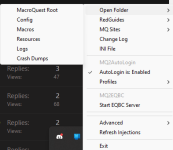
A duplicate file could definitely cause this issue. They are normally stored in your config folder. If you are unsure as to where that is, you can access it through the icon in your system tray. You should only have one Kissasssit_TOONNAME. You can move/delete those and then login the toon and type /mac kissassist to make a new one and edit it with the spells you want to cast in the dps section as it will not populate that for you. It only populates the spell gems automatically iirc.
Users who are viewing this thread
Total: 1 (members: 0, guests: 1)
Share: