
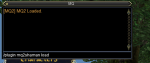
I have been using VV for years, i am not a pro at it but i can swap ini files. I absolutely love the idea of the out of the box plug ins. I am still not very technical. I believe this question is going to be very very basic and probably obvious to others but i am lost. sorry for my lack of general knowledge. I have vv loader updated, I have purchased CWTN mq2shaman i see the plug in listed in my loader. I think i am missing actual mq2? typically i load or turn on profiles in game /mac kiss assist. I tried typing the /plugin mq2shaman load and get an error. It is likely my mistake i do not think there is any issue with your plug in. i tried typing it at charter screen and in the mq box in game after character loaded. I have watch the start here video, each class i would like to use and the ui video. i think all of them assume a person has and uses mq2? i only ever use VV so i think i am missing a step, the box that shows the options/ commands/ camp i do not see i only have the blank mq box? Does this make sense? i am not sure how to describe it better. Can anyone help or point me maybe to a video for true beginners? thank you. I am looking forward to buying the cwtn plug in for each toon i run i just started with shammy to get started.

Install the app
How to install the app on iOS
Follow along with the video below to see how to install our site as a web app on your home screen.
Note: This feature may not be available in some browsers.
-
 You've discovered RedGuides, an EverQuest multi-boxing and scripting community 🧙♀️⚙️. We want you to play several EQ characters at once, come join us and say hello! 👋
You are using an out of date browser. It may not display this or other websites correctly.
You should upgrade or use an alternative browser.
You should upgrade or use an alternative browser.
Question - Using CWTN plugins/ MQ2
- Thread starter randy13
- Start date

Many_Whelps
WoW was the first MMO
- Joined
- Jul 22, 2018
- RedCents
- 762¢
vv is mq2
Ok I just re watched the videos, I noticed there is a time for update. so I went and purchased warrior, cleric and chanter also so ill have 4 of the 6 i need. I have faith this will work and will be awesome once i figure out what i am doing wrong. I will wait for the other three to show in the red guides launcher and see if i can get any of those to work. I see option to download on the specific pages Do i need to do a download to a specific file, from the video looked like it would auto show in launcher then I just install from there? I have not downloaded direcetly, maybe thats my problem?


I deleted the image with your server and toon name. Please take care not to post that information. Some people have nothing better to do than harass other people.I have been using VV for years, i am not a pro at it but i can swap ini files. I absolutely love the idea of the out of the box plug ins. I am still not very technical. I believe this question is going to be very very basic and probably obvious to others but i am lost. sorry for my lack of general knowledge. I have vv loader updated, I have purchased CWTN mq2shaman i see the plug in listed in my loader. I think i am missing actual mq2? typically i load or turn on profiles in game /mac kiss assist. I tried typing the /plugin mq2shaman load and get an error. It is likely my mistake i do not think there is any issue with your plug in. i tried typing it at charter screen and in the mq box in game after character loaded. I have watch the start here video, each class i would like to use and the ui video. i think all of them assume a person has and uses mq2? i only ever use VV so i think i am missing a step, the box that shows the options/ commands/ camp i do not see i only have the blank mq box? Does this make sense? i am not sure how to describe it better. Can anyone help or point me maybe to a video for true beginners? thank you. I am looking forward to buying the cwtn plug in for each toon i run i just started with shammy to get started.
All of the cwtn plugins are for macroquest/macroquest2.
You will definitely want to have at least a basic feel for how MQ/MQ2 works as it is the platform that the plugins run on.
> Here < is the RG Starter videos.
looking at your download history you've used MQ2 through VV for quite a while, so i think you have the basics down, and you *definitely* use MQ2, but you asked for beginner vid information.
the > Getting Started With CWTN Plugins < series is going to explain to you your other questions about the options, camps, commands, and ui etc.
that error message you had was either trying to load the wrong version of the plugin (like a test version on live server or live version on next etc), or an out-of-date one. You can and should use the VV launcher to download your updates, just check the plugin tab.
thank you, I was not sure if the mq2 was a separate thing, i will go through the videos again, and double check items. i appreciate the help and thank you for deleting the pictureI deleted the image with your server and toon name. Please take care not to post that information. Some people have nothing better to do than harass other people.
All of the cwtn plugins are for macroquest/macroquest2.
You will definitely want to have at least a basic feel for how MQ/MQ2 works as it is the platform that the plugins run on.
> Here < is the RG Starter videos.
looking at your download history you've used MQ2 through VV for quite a while, so i think you have the basics down, and you *definitely* use MQ2, but you asked for beginner vid information.
the > Getting Started With CWTN Plugins < series is going to explain to you your other questions about the options, camps, commands, and ui etc.
that error message you had was either trying to load the wrong version of the plugin (like a test version on live server or live version on next etc), or an out-of-date one. You can and should use the VV launcher to download your updates, just check the plugin tab.
Sic, I was able to update all 4 Plugins on the launcher page, i now see the box for plugin, settings, pulling and ignores.. wooot woot. all 4 loaded and i can see i have a few spells missing. I just put my group in a zone to try the basics, a few questions all profiles are set to manual, when i try to switch any charcter off manual i get error code Mode reuires a mesh for the zone you are in, Make one and try again? what is a mesh? so everyone is in manual looked like cleric and shammy still healed, but chanter did not mez, or cast. warrior sat still when i hit attack he used disc and aa's. I assume that is proper as manual i would think has most features turned off. i am not sure does a camp need to be set for other functions to work? i am not sure how to set a camp. i tried to switch warrior to sic tank mode like your video to see it it put up a camp but received the mesh error. I do not see any mention of setting up mesh in the guides and i an not certain what that actual is.I deleted the image with your server and toon name. Please take care not to post that information. Some people have nothing better to do than harass other people.
All of the cwtn plugins are for macroquest/macroquest2.
You will definitely want to have at least a basic feel for how MQ/MQ2 works as it is the platform that the plugins run on.
> Here < is the RG Starter videos.
looking at your download history you've used MQ2 through VV for quite a while, so i think you have the basics down, and you *definitely* use MQ2, but you asked for beginner vid information.
the > Getting Started With CWTN Plugins < series is going to explain to you your other questions about the options, camps, commands, and ui etc.
that error message you had was either trying to load the wrong version of the plugin (like a test version on live server or live version on next etc), or an out-of-date one. You can and should use the VV launcher to download your updates, just check the plugin tab.
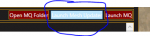
yup, you have to have mq2nav setup with meshes if you want to do stuff with navigation (like assist modes with the cwtn plugins) - you can watch those RG starter videos i linked earlier if you need to see how to get that situatedWell i found this button so this may fix the mesh question.
View attachment 33539
re: not seeing it anywhere, it should be in all of the FAQ's, i suppose i could update them to "trying to go any mode other than mode 0"
Q. Trying to go mode 1 but says I need a mesh?
A. The plugins require mq2nav for movement. You will need to run the mesh updater in your RedGuide's Launcher. Please watch the video > HERE <
Sic many thanks, your videos are awesome and i am certain these plugins will be awesome, i just lack some basic lingo and idea of how to run things. I found the mesh, i tried again and now i can set sic tank and assist and already the programs are starting to work beautifully. i will continue to read and learn. i thank you so much for dealing with me and i appreciate the help and what is probably basic questionsyup, you have to have mq2nav setup with meshes if you want to do stuff with navigation (like assist modes with the cwtn plugins) - you can watch those RG starter videos i linked earlier if you need to see how to get that situated
re: not seeing it anywhere, it should be in all of the FAQ's, i suppose i could update them to "trying to go any mode other than mode 0"
Q. Trying to go mode 1 but says I need a mesh?
A. The plugins require mq2nav for movement. You will need to run the mesh updater in your RedGuide's Launcher. Please watch the video > HERE <
Users who are viewing this thread
Total: 1 (members: 0, guests: 1)
Share: