• You've discovered RedGuides, an EverQuest multi-boxing and scripting community 🧙‍♀️⚙️. We want you to play several EQ characters at once, come join us and say hello! 👋

  • A TLP without truebox has thawed (Very Vanilla ready)
    Frostreaver

Vanilla - Updating Portal Setter Window for VV - Need Dev to fix please

Smokeybear72

Only YOU can prevent forest fires !
Joined
Jul 3, 2018
RedCents
5,070¢
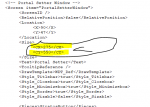
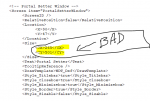
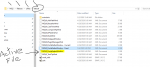
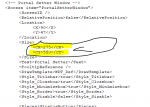
In the uifiles/default folder you will find MQUI_PortalSetterWindow XML that needs adjusted

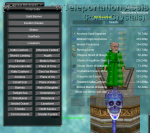
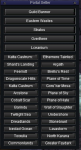
The default version chops off Commonlands and Greater Faydark .. I have adjusted mine with future growth if someone with authority can get this patched in permanently , would be very helpful please.


With Fix :
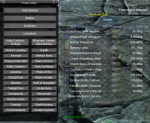

1588633336129.png

1588633432315.png


Current version :
1588633636699.png

1588633830353.png
 

Attachments

I thought this was part of EQ native, not MQ2.

I should play without MQ2 just to see exactly what the real game looks like.
 
Its part of the VV files for sure.... I apologize , my earlier post was with my old work around, this one below is the current one with EW in it but its still the same bottom cover issue.

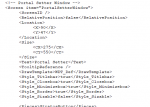
You can use mine below or you can go in and edit your own with the two new coords below.. these are the good ones.

You can find the Portal Setter

1588646894510.png

This is the part to edit until they correct :

1588646693461.png

Here is what it looks like with the correction:

1588646534679.png


Thanks for the Red Cents !
 

Attachments

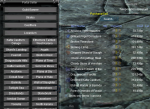
This is what mine looks like. I'm not sure what you mean about cutting off Commonlands and Greater Faydark

1588655313684.png
 
Anything special to turn this on in VV? Don't see that window when I buy stones in the guild hall.
Thanks

Fixed: did some snooping and found mq2portalsetter :-p
 
Both of the examples here are using custom UI's. Neither of those were used when I was updating the window.
1588681201376.png

This is the window on the default UI and what the window is being created and the sizes adjusted for. If you're using a custom UI and that requires you use custom sizes for the window itself, then it's up to the user to make the necessary adjustments.
 
Both of the examples here are using custom UI's. Neither of those were used when I was updating the window.
View attachment 21326

This is the window on the default UI and what the window is being created and the sizes adjusted for. If you're using a custom UI and that requires you use custom sizes for the window itself, then it's up to the user to make the necessary adjustments.


I am using Drakah KROME from EQUI. https://www.eqinterface.com/downloads/fileinfo.php?id=6585
When I download that UI, it doesnt have the Portal Setter INI in it.

When I changed the name of the portal setter INI and redownloaded VV, it give me a fresh copy of the INI with the coords that cut it off.

So now I am rather lost as to why a downloaded INI that I have verified comes with the VV install and the custom UI does not, has different veiws?
 
Vanilla - Updating Portal Setter Window for VV - Need Dev to fix please

Users who are viewing this thread

Back
Top
Cart