
-
 Hail, we're RedGuides. We want you to play six (yes, 6!) EverQuest characters at once. We have scripts and a friendly community to help, please join our playstyle and say hello! 👋
-
 We've added LLM sections to our Terms & Rules and Resource Rules, for everyone's sanity & in-game safety.
Read more
a. Do not replace your voice with an LLM. This goes for your posts and your scripts. Drafting and editing with a tool is fine, but don't take you out of what you share.
b. Do not replace your EQ character's voice with an LLM. We don't want scripts that speak over/ooc,/shoutor other public channels. This has been an unwritten rule that's kept casino scripts off the site for decades, but we're now compelled to make it clear: keep automated communication private.
Why Does RG Review Scripts?
Nearly every LLM-written Lua script we see is making your character do impossible things, and rarely in a way that's beneficial to you. We've seen heavy server hammering,/targetover impossible distances when/nav spawnwould passively accomplish the same thing, a spawn search that fires 20+ times per second, and other pointless actions that are likely annoying GMs.
You are welcome to use LLMs as a tool to structure, draft, and edit your work, but please read critically before hitting/lua run
You are using an out of date browser. It may not display this or other websites correctly.
You should upgrade or use an alternative browser.
You should upgrade or use an alternative browser.
Question - UI Skins for EQ Multiboxing
- Thread starter Onimal
- Start date


MQ is generally UI agnostic

JustGlassin
Well-known member
it works fine with all the ones I tried. Just have to disable the party window buttons And make my own macros.
i use aya ui that i really like, and i tried one called deth UI i found on here but it had some problems causing crashes
i use aya ui that i really like, and i tried one called deth UI i found on here but it had some problems causing crashes
I've watched enough of your videos that that UI grew on me. It's what I never knew I needed.I use zliz (a version kaen and i keep updated)
"better" is subjective at best - what would be "better" for you?

Lord Sivion
Ultimate seasoned veteran member
The UI portion of the game is really just personal preference. Much like playing certain classes. Drakah is a good set. Not too many custom UI's out there as compared to many years ago.
RebelHeartActual
Well-known member
Where can one find this UI Link?Agreed, UI preferences can really enhance the gaming experience, much like choosing a class. Drakah's set seems like a solid option. It's interesting to see how the availability of custom UIs has changed over the years.

Where can one find this UI Link?


Not EQ related...dude you are terrible at marketing. Hope Sic deletes this.If you're ever looking to explore more options, you might find some interesting UI skins on skin.land/market/. Happy gaming!

I like Sparxx with some mods thrown in
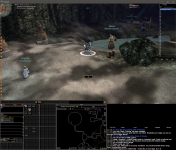
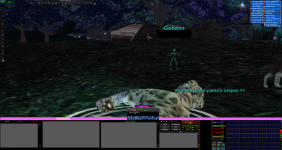
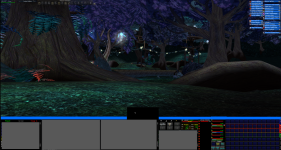
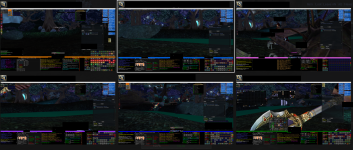

manydills
Well-known member
I really like the color bars that make which toon you're on instantly distinguishable.Looks like this when I alt tab
What UI is this one?View attachment 60458
Looks like this when I alt tab
What comes to UI, I am looking one now, I had mine, good one, but then I took a break from the game. And uninstalled.
I know, that is kinda off, but I tried some from EQ interface, and those were, like from outer space. those were hard to learn... atleast.
After uninstal, I am supriced that some characters kept almost all socials. Some none. So, I have some adjustments to to.
What UI would be the best, and easy to start with?
For full grp purposes?
What UI is this one?

Software - Zliz - Sic/Kaen version
Sic submitted a new resource: Zliz - Sic/Kaen version - Sic & Kaen's version of Zliz Sic & Kaen's zliz UI for everquest Read more about this resource...
 www.redguides.com
Users who are viewing this thread
Total: 1 (members: 0, guests: 1)
Share: