• You've discovered RedGuides, an EverQuest multi-boxing and scripting community 🧙‍♀️⚙️. We want you to play several EQ characters at once, come join us and say hello! 👋

  • A TLP without truebox has thawed (Very Vanilla ready)
    Frostreaver
Resource icon

Release Tutorial sic update (cause otherone was overwtitten)

No permission to download
Joined
Sep 27, 2020
RedCents
6,554¢
rouneq submitted a new resource:

Tutorial - Lua conversion of Tutorial.mac

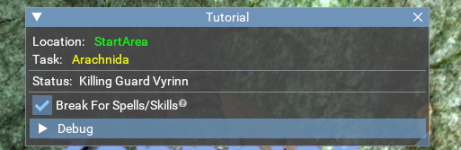
Will conduct the tutorial for the current character from immediately after character creation to completing all steps (required and optional) in both "Basic Training" and "The Revolt of Gloomingdeep"

Deployment:
Download the archive to <MQ directory>\lua, extract contents there (some files are placed in the \lib directory)​

Usage:
/lua run Tutorial [option]
where option...​

Read more about this resource...

This script uses an updated mesh (attached)
 

Attachments

Last edited:
@rouneq don't put loose lib and files into your zip. put them into a subfolder and name your main file init.Lua. this creates a package that you can run directly. and will also avoid conflicts with other people's files that might already be in lib.
 
I used the macro "recently" to run a new character through. There were a number of things I wanted to change and just decided to bite the bullet with the conversion. The code itself wasn't the problem (I already have programs written to do the bulk of the conversion work). The testing to get the little tweaks in place took far more time. But once I started down the rabbit hole, I had to see it to the "end". The effort brought a lot of things to light for me which I'll use in other projects.
 
I used the macro "recently" to run a new character through. There were a number of things I wanted to change and just decided to bite the bullet with the conversion. The code itself wasn't the problem (I already have programs written to do the bulk of the conversion work). The testing to get the little tweaks in place took far more time. But once I started down the rabbit hole, I had to see it to the "end". The effort brought a lot of things to light for me which I'll use in other projects.
When I initially started programming the tutorial macro way back when it was done to help me understand the way that I could achieve some of the results that would be needed to implement the various systems. It was all a learning experience for me and the results of that learning experience have treated me quite well over the years since it's original creation. This was very much one of my first "large" projects that involved a vast array of various things implemented into a single macro. This is ground zero so to speak for all the things I have done up to this point.
 
@rouneq don't put loose lib and files into your zip. put them into a subfolder and name your main file init.lua. this creates a package that you can run directly. and will also avoid conflicts with other people's files that might already be in lib.
@rouneq any way we can make this a priority to get updated today?

I don't want to have to remove the resource until it is, but this is a bigger priority/need than brain's request sounded.

Let me (or brain) know if you need help or whatnot

Red did update the > Resource rules and guidelines < in case a reference is needed, or something in the guidelines/rules can be clarified updated
 
I finally had the chance to try this with a new 6-box I am starting, and I have some feedback.

1- May want to specify to do this solo. When you are in a group, you have issues when doing the merc quest. May be too much work but when on this step the person can disband, get the merc, kill the kobs, come back and turn in and go on a wait mode. When the group is gone the user can manually unpause and remake the group to continue
2- Consider some radius check so that you don't jump in and join in the fight when someone has already engaged a mob. I KS a couple of times until I realized what was happening

This all may not be possible as I know nothing of coding, but just a couple of thoughts

EDIT: You may also wanna check on this :)

1671055582157.png
 
Well, the Tutorial mac was always intended to be done solo.

You mean those guards aren't killable? What kind of tutorial is this?!?

I'll need to see more detail on what's going on there. There isn't a place that specifically targets any of the quest givers for combat. If you expand that Debug area, the last section is a running call stack. You can also turn on logging and send me the log (the character name is in the log, so rename it).
 
mq.cmd.squelch("/alert add 1 Guard")

local spawnPattern = string.format("noalert 1 targetable radius %s zradius %s", workSet.PullRange, workSet.ZRadius)

Spawns with the word "Guard" should be ignored based on the alerts and search string for the spawns. Curious how that came about.
 
mq.cmd.squelch("/alert add 1 Guard")

local spawnPattern = string.format("noalert 1 targetable radius %s zradius %s", workSet.PullRange, workSet.ZRadius)

Spawns with the word "Guard" should be ignored based on the alerts and search string for the spawns. Curious how that came about.

That's the third add in loadIgnores.
 
Yeah, I looked at your source to confirm before I mentioned it.
Ahh. My bad. I thought it was a recommendation. Yeah. The only thing that comes to mind specific to the alerts is if they are cleared on zoning. Which would be odd and something I would've expected to encounter in testing.
 
I don't know if I've got a bad mesh, but I'm running into the following issues with this one:
-I get stuck in the spider room frequently; the script seems to have a hard time nav-ing me to the room, and out of the room.
-The script tries to make me attack the guards in the first room from time to time, which I need to manually correct.
-The script seems to want me to be level 8 before tackling quests past the first room? Either that or it's running the LevelUp routine inappropriately.
 
I don't know if I've got a bad mesh, but I'm running into the following issues with this one:
-I get stuck in the spider room frequently; the script seems to have a hard time nav-ing me to the room, and out of the room.
-The script tries to make me attack the guards in the first room from time to time, which I need to manually correct.
-The script seems to want me to be level 8 before tackling quests past the first room? Either that or it's running the LevelUp routine inappropriately.
I know the spider area for navigation has always had its issues. I know the tutorial macro reverted to manually moving the toons through these areas. I haven't used the Lua script yet, but I'm pretty sure if you try moving through the quests too fast at low levels you end up spending more time dying. That is why you level up to a certain level first before moving on. As far as attacking the guards. no idea. haha
 
I don't know if I've got a bad mesh, but I'm running into the following issues with this one:
-I get stuck in the spider room frequently; the script seems to have a hard time nav-ing me to the room, and out of the room.
-The script tries to make me attack the guards in the first room from time to time, which I need to manually correct.
-The script seems to want me to be level 8 before tackling quests past the first room? Either that or it's running the LevelUp routine inappropriately.
The resource has a link to the mesh I used with this script. It was based on the updated mesh CBD did, but I was getting stuck in a number of places without those changes (even with the script moving to particular parts of the map). Click through to the resource from the thread start and use that. I'm not going to claim it's perfect, but it significantly cut down on a lot of map-related problems for me.
 
The resource has a link to the mesh I used with this script.
I've got CBD's mesh that I'm going to try out when I get home; I don't see yours in the resource description? Apologies if I'm missing something obvious.
 
I've got CBD's mesh that I'm going to try out when I get home; I don't see yours in the resource description? Apologies if I'm missing something obvious.
Hmm. I distinctly remember including my modified mesh when I created the resource. I've attached it to the first post in this thread.
 
Hmm. I distinctly remember including my modified mesh when I created the resource. I've attached it to the first post in this thread.
i sent your file to wired so we can get it uploaded on the mqmesh site
 
@rouneq

Excellent work. I just tried out your Lua conversion of the classic Tutorial.mac and it worked smoothly. I used the tutorialB mesh you attached at the beginning of the discussion, but I did notice, as per Sic's post above this one, that mqmesh.com had the tutorialB mesh. For the test run I created a brand new Beastlord. MQ2Bst was paused so there was no potential interference. The only thing I manually had to do was set the Merc to MT after he joined me. Might try it out with a Bard tomorrow.

Be well. Happy Scripting.
 
@rouneq

Excellent work. I just tried out your Lua conversion of the classic Tutorial.mac and it worked smoothly. I used the tutorialB mesh you attached at the beginning of the discussion, but I did notice, as per Sic's post above this one, that mqmesh.com had the tutorialB mesh. For the test run I created a brand new Beastlord. MQ2Bst was paused so there was no potential interference. The only thing I manually had to do was set the Merc to MT after he joined me. Might try it out with a Bard tomorrow.

Be well. Happy Scripting.
Glad it works well for you. Re: Merc as MT, yeah that's a limitation on the command. The script tries it in case they ever fix it, but as it stands now, the command (/grouproles) just won't to set a merc in that role. I did look into navigating the menus to get around this limitation, but I never figured it out. Either it's too convoluted to make it work or I just didn't spend enough time come up with the solution.
 
This is so cool. I was wondering about an automated type way through the tutorial since I've done it like 1000 times. This was right on track the whole for my new shammy.
 
This is so cool. I was wondering about an automated type way through the tutorial since I've done it like 1000 times. This was right on track the whole for my new shammy.
After a gazillion times thru it like you, I just quit doing it at all, cause most of the characters I make are baz or buff alts. Now I just uncheck tutorial on character creation.
 
why you gotta go and make me wanna create another set of toons ....
 
Created a new set of toons on the Rathe, since the last update I've been getting the "merc doesn't have aggressive stance"
All the toons have a healer merc and are on free.

For now I've just deleted the merc stance lines in the init.Lua but I personally am not well versed in Lua to know how to create a real fix.

I assume it should be checking for tank/healer merc but I have never done that in a Lua.
 
I used this Lua to great success on my last 2 groups but, I had one question.
It seems to leave a message in my MQ chat window's header randomly and, once I am done with the tutorial, the last one gets stuck in there and never goes away. (see photo)
Even after max leveling my toons, those messages are still there.
Is there a way to get rid of them?

MQ Window header.pngMQ Window header 02.pngMQ Window header 03.pngMQ Window header 04.png
 
LOL if there was an award for most amusing issue with MQ, this would definitly be in the running.
 
I used this LUA to great success on my last 2 groups but, I had one question.
It seems to leave a message in my MQ chat window's header randomly and, once I am done with the tutorial, the last one gets stuck in there and never goes away. (see photo)
Even after max leveling my toons, those messages are still there.
Is there a way to get rid of them?

View attachment 71966View attachment 71967View attachment 71969View attachment 71968
you can /setchattitle <custom string> to just "MQ" which is the default with a /setchattitle MQ
 
I might be strange, but I actually enjoy the Tutorial -- at least most of the time 😅.

That said, if / when I have several new characters I want to run through the Tutorial, I resort to using this Lua Tutorial resource and have done so for a good while now.

One frustration I have had with the available version was the handling of Absor's Learn about weapons (?) Task where the toon is supposed to hand in a weapon, get a better version back, then equip this upgraded weapon. It rarely / never seems to work, so I usually end up either putting the upgraded starter weapon in Primary manually, or the character ends up with no weapon equipped and then fails on the McKenzie Task (weapon augment).

Well, with some help (quite a bit of help, actually) from my friendly AI Copilot, I modified the Absor function to be more robust in how it handles starter weapons. While doing so, I also covered some edge cases (twink weapon, Monk special handling). I also added some messages if the Task did not complete for one reason or another.

Being rather new to contributing code like this, I did create a Pull request (at least I think I did) on Github to update the init.Lua file in Rouneq/Tutorial.

If anyone else would like a copy of my version of the 'local function Absor()' in the 'init.Lua' file, I have attached a file with only the updated Absor function. It should be an easy copy / paste job to just replace my version of the Absor function in the ../Lua/Tutorial/init.Lua file - but unless you create a copy of the Tutorial folder and rename it, any modifications to the ../Tutorial/init.Lua file will be (I believe) overwritten the next time you update the Tutorial resource.

Again, I am new to this, so please let me know if / what I may improve on.

Happy Hunting!

asru59
 

Attachments

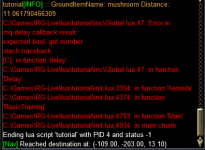
I wonder if something has changed or needs updating in this Lua. I have used it in the past and its been great. Today I started some new guys and it seems like it errors out whenever it comes to doing a turn in. Very first parts it fails when it needs to hand your weapon to Absor, and then when giving the mushroom to Xenadia. I tried on 3 different characters and accounts. Same behavior.

1774386495584.png
 
I am getting the same thing running the Lua script. When I researched it, it happens because the script has a delegate function that is being passed into the function below, from the Global.Lua. I am not well versed in Lua function delegates though, so cannot really provide a fix.


Code:
function Delay(timeout, condition)
    if ((not timeout and not condition) or type(timeout) ~= "number") then
        return
    end

    if (not condition) then
        mq.delay(timeout)

        return
    end

    local predicate = function ()
        mq.doevents()

        return condition()
    end

    mq.delay(timeout, predicate)
end

Code:
        Delay(1000, function()
            return Cursor.ID()
        end)
 
mq.delay 2nd argument (predicate in this case) expected to be Boolean true|false

The Delay input is being given the return of Cursor.ID, which appears to be a numerical value instead of the expected Boolean
 
This was a change in mq2lua that will likely hit a bunch of old scripts yes.
It's also a dirt easy fix.

If you are using mq delays, the callback functions must return a bool.

OP does not seem active, however.

Edit: the delay was silently failing before anyway. It's just not silent any more.
 
Release Tutorial

Users who are viewing this thread

Back
Top
Cart