
-
 Hail, we're RedGuides. We want you to play six (yes, 6!) EverQuest characters at once. We have scripts and a friendly community to help, please join our playstyle and say hello! 👋
You are using an out of date browser. It may not display this or other websites correctly.
You should upgrade or use an alternative browser.
You should upgrade or use an alternative browser.

Release TsC – Automated Inventory Management & Consolidation For Your Whole Crew (1 Viewer) 4.1.6
- Thread starter raw
- Start date


- Commits
- 2
Can try going to updates and downloading a previous version and see if that fixes your issues.

- Seller
- #443
I can't find anything wrong with it. Do you see this pop-up?Unless it's off screen somewhere, I'm not getting a pop window, I've minimized all windows and nothing. I tried resetting "Clear Saved ImGui Window Settings" button and still nothing.

- Seller
- #444
Can you delete your /Lua/tsc folder and redownload?also chain spamming this
View attachment 70694
I think its trying to get something out of the bank, but there's nothing that says who is trying to get what, so i dont know how to help it along

I am not getting any pop up window when using the "All give to..." button. I do get that window when I use the "select" buttons beneath the "Give all items" column.I can't find anything wrong with it. Do you see this pop-up?
View attachment 70695
- Seller
- #446
raw updated TSC – Automated Inventory Management & Consolidation For Your Whole Crew with a new update entry:
4.0.7
Read the rest of this update entry...
4.0.7
 Commits
Read the rest of this update entry...
- Seller
- #447
I'll DM you.I am not getting any pop up window when using the "All give to..." button. I do get that window when I use the "select" buttons beneath the "Give all items" column.
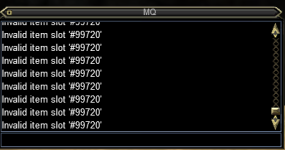
- Seller
- #449
Strange. I can't replicate this. If a toon's bank is full, it should stop immediately and give you a message that it's full. I just tested it. Could something else be happening?I am getting this error when ever the bank becomes full.
View attachment 70701
Just picked up this lua this morning, and worked wonders moving all the TS and Collectibles from mt 18 toons onto 2 toons 1 for each.
- Seller
- #450
I am adding messages on the main toon to help make it easier to see who is doing what.also chain spamming this
View attachment 70694
I think its trying to get something out of the bank, but there's nothing that says who is trying to get what, so i dont know how to help it along
e.g. `[TsC] Soandso is putting items in the depot...`
`[TsC] Soandso is done putting items in the depot...`
- Seller
- #451
raw updated TSC – Automated Inventory Management & Consolidation For Your Whole Crew with a new update entry:
4.0.8
Read the rest of this update entry...
4.0.8

Read the rest of this update entry...
- Seller
- #452
raw updated TSC – Automated Inventory Management & Consolidation For Your Whole Crew with a new update entry:
4.0.9
Read the rest of this update entry...
4.0.9

Read the rest of this update entry...
- Seller
- #455
What matters is the ownership of the item in the plot. An item is owned by the person who deposited it, regardless of whose plot it is. TSC will see all a toon's items, even if they are in a plot they don't own.I also have a question on how or does the lua work with plots that the toon is a co-owner of.?

I am having a tiny issue, which I had solved with some custom coding to increase the delay when depositing items into the TS Depot. I constantly get spammed with these replies from the banker, making people think we are about to resort to fisticuffs between me and the banker  So I put an event in to catch these happening, and it was increasing the delay by 100 from the base 1000 every time it caught the response. When I am doing a ton of deposits, it makes a big difference in spam. Let me know if you would like this as a github pull request (if that is available) or would prefer to program it yourself if you want to make that change. At times it was gettign up to a 2500 or 3000 delay on my toon that has almost 2000 TS depot slots.
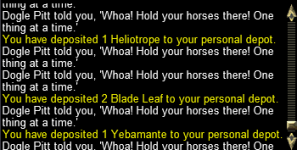
So I put an event in to catch these happening, and it was increasing the delay by 100 from the base 1000 every time it caught the response. When I am doing a ton of deposits, it makes a big difference in spam. Let me know if you would like this as a github pull request (if that is available) or would prefer to program it yourself if you want to make that change. At times it was gettign up to a 2500 or 3000 delay on my toon that has almost 2000 TS depot slots. Just purchased this - exciting to see if it works.
First attempt - tried it with 54 Toons spread across 3 computers. It failed - All toons need to be on same PC.
Second Attempt - Tried it with 20 toons on One PC.
Failed with some items:
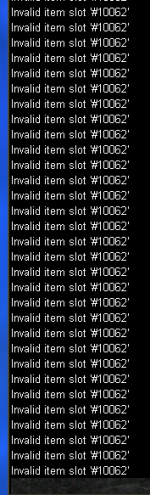
No idea what that is. Ill have to try some experimenting or self cleaning on that toon to see if i can find something.
Overall though - excited to try and get this working.
First attempt - tried it with 54 Toons spread across 3 computers. It failed - All toons need to be on same PC.
Second Attempt - Tried it with 20 toons on One PC.
Failed with some items:
No idea what that is. Ill have to try some experimenting or self cleaning on that toon to see if i can find something.
Overall though - excited to try and get this working.
- Seller
- #458
I think this is an issue with latency and how fast the server processes requests, because sometimes this happens, and othertimes it works smoothly.I am having a tiny issue, which I had solved with some custom coding to increase the delay when depositing items into the TS Depot. I constantly get spammed with these replies from the banker, making people think we are about to resort to fisticuffs between me and the banker
View attachment 71535
I'm thinking of adding a UI setting where you can manually adjust the delay yourself. Do you think that would be helpful?
- Seller
- #459
Correct, all toons must be on the same PC. I will specify that in the description. I've never had someone try this with multiple PCs. Thanks.Just purchased this - exciting to see if it works.
First attempt - tried it with 54 Toons spread across 3 computers. It failed - All toons need to be on same PC.
Second Attempt - Tried it with 20 toons on One PC.
Failed with some items:
View attachment 71703
No idea what that is. Ill have to try some experimenting or self cleaning on that toon to see if i can find something.
Overall though - excited to try and get this working.
I've seen a couple of others report the invalid slot error, but I cannot replicate it. Do you have any other info? Did it work on a second try? Does it always get stuck on the same item?
Correct, all toons must be on the same PC. I will specify that in the description. I've never had someone try this with multiple PCs. Thanks.
I've seen a couple of others report the invalid slot error, but I cannot replicate it. Do you have any other info? Did it work on a second try? Does it always get stuck on the same item?
Just want to say that It will work on Muliple PC's, as I have had it consolidate all my ts mats and collectibles accross my 3 pcs.
With the INVALID ITEM SLOT - I think i fixed the issue by playing about. I got it to Give all my TS stuff to another character and then did the consolidate again.
So it worked..in a roundabout way.
RE: Multiple PC's
All my toons are using Dannet and showed up in the peers list.
However, It tried to run scripts on the local PC - which don't exist.
I can see how it might work. you would need identical Directory Structures, and possibly needs config files to be copied as well.
I have many toons that have never been logged in on my Main PC - so trying to get things synchronized with all 3 is a bridge too far.
Happy to have it working on one PC at a time.
My Bags have never looked cleaner!
One thing I would Suggest is to add some more things by default to the Global Ignore List. Or at least have it as a suggested list. There are a lot more of these things that you just dont want to move around.
-Tiny Dagger
-Emerald
-Peridot
-Bone Chips
-Malachite
-Pearl
-Jasper
-Tiny Jade Inlaid Coffins
- Overlord/Dread Suzerain/ Symbol thingys for Trade skills
Two other things that might be really good for Consolidating - is
-Armor Ornaments
-RKII Spell Runes
I'd really like to be able to tell my toons to go and unload these to a plot or a person or something
So it worked..in a roundabout way.
RE: Multiple PC's
All my toons are using Dannet and showed up in the peers list.
However, It tried to run scripts on the local PC - which don't exist.
I can see how it might work. you would need identical Directory Structures, and possibly needs config files to be copied as well.
I have many toons that have never been logged in on my Main PC - so trying to get things synchronized with all 3 is a bridge too far.
Happy to have it working on one PC at a time.
My Bags have never looked cleaner!
One thing I would Suggest is to add some more things by default to the Global Ignore List. Or at least have it as a suggested list. There are a lot more of these things that you just dont want to move around.
-Tiny Dagger
-Emerald
-Peridot
-Bone Chips
-Malachite
-Pearl
-Jasper
-Tiny Jade Inlaid Coffins
- Overlord/Dread Suzerain/ Symbol thingys for Trade skills
Two other things that might be really good for Consolidating - is
-Armor Ornaments
-RKII Spell Runes
I'd really like to be able to tell my toons to go and unload these to a plot or a person or something
- Seller
- #463
@zhire @SzazorJust want to say that It will work on Muliple PC's, as I have had it consolidate all my ts mats and collectibles accross my 3 pcs.
This is interesting. I guess I meant to say that I don't officially support multiple PCs. But it could be possible if you copy the right files! I'd be curious how you set it up Rojadruid.
Thanks for the suggestions Szazor!
tbh I made no changes. I just happened to notice one day that if I had all my toons in 1 zone and was consolidating it stared moving and pulling from the toons on the other pc's as well.
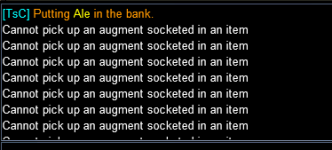
That would probably help. On the one character with 2000 TS depot slots is the one it hits the most. I would still like the delay to scale, because on the other characters, the 1000 delay works fine. It is just because ths one character has so many slots I think. Maybe have the starting delay be adjustable, then scale it up if you start getting spam from the banker?I think this is an issue with latency and how fast the server processes requests, because sometimes this happens, and othertimes it works smoothly.
I'm thinking of adding a UI setting where you can manually adjust the delay yourself. Do you think that would be helpful?
- Seller
- #467
Haha. I don't get how it works.tbh I made no changes. I just happened to notice one day that if I had all my toons in 1 zone and was consolidating it stared moving and pulling from the toons on the other pc's as well.
If you have TSC on all computers, it would find the appropriate scripts.
But, it wouldn't find the correct config files that are generated after the scan phase.
Weird. Glad it's working; but it confuses me

Haha. I don't get how it works.
If you have TSC on all computers, it would find the appropriate scripts.
But, it wouldn't find the correct config files that are generated after the scan phase.
Weird. Glad it's working; but it confuses me
It probably has to do with how I have my MQ setup on the other PC's, as they are all configured to use my main PC as the central config location for both MQ and Lua.
- Seller
- #469
That's really weird. Do you have an augment with the word "Ale" in it that is also a tradeskill item?
I think the latest EQ patch messed with your searches. It looks like when you do the FindItem (I am running the 'Clean Toon' process) it finds the Teleportation items in the Select By Type dropdown, and that makes the rest of the routine not really work. I believe that is what is happening here. Your program had closed the window quickly, but when I pulled it back up, that is what I noticed.
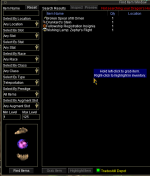
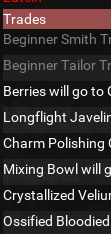
In looking at the code in TSC/scripts/scanner.Lua, it looks like changing line 10 from 42 to 44 fixes the FindItem window issue. I am not sure if it is coded like that anyplace else though. A similar change has to be made in the grabber.Lua. Even with those changes though, the list of items to trade is including some no-trade items, like the Trophies, and some TOB T3 Uprising pieces, so it looks like it is a lot more than just that 1 or 2 Tradeskilll selections. For collectible items, that is now off by 1, as they have added the 'Cash Loot' item flag right above the Collectible selection
Last edited:
Just guessin' - Looks like "collectible" moved from 20 -> 21 and "tradeskill" moved from 42 -> 44. That gets the "give all to..." back to listing tradeskill items, but now it also includes trophies / containers, so it appears some other indexed values have been changed on us as well making the "item.nodrop() and item.container() checks fail to properly exclude them. (Can still add trophy / container to ignores though and that works regardless).

when they added cash loot tag it broke things. I was able to fix it.anyone able to get this to work fully? i was able to get the look up to search correctly but its not auto banking at all
in my MQ folder you can find a file under this path
MQ\lua\TSC\scripts in that folder replace this scrip
credit to Nightmare327 for finding it before me.
raw is out of town doing what he does. I am sure he will fix it when he gets back so you all don't need to worry about it lol
Attachments

Thewre are still issues with the TSC wanting to trade and/or deposit non-stackable / no-trade items into the depot, or to other characters. I can see where the scanner is trying to set those automatically to skip, but it seems something is no longer working on the flags I believe..
Code:
if item.NoDrop() or item.Container() ~= 0 or not item.Stackable() or item.Lore() or item.NoRent() then
                skip = true
                --print('\at[TsC]\ao Skipping \ay'..name..'\ao because it\'s nodrop, lore, etc.')
endupdate, its because they added a "CASH LOOT" on inventory filter. Its probably indexing a value in filter and missing by 1 cause of the added option.Program is giving away cash loots when you do collectibles
scanner.Lua
Code:
local args = {...}
local itemType
if args[1] == 'Tradeskill' then
    itemType = 42
else
    itemType = 21
end
file is set to 20 should be 21
Users who are viewing this thread
Total: 2 (members: 0, guests: 2)
Share: