• You've discovered RedGuides, an EverQuest multi-boxing and scripting community 🧙‍♀️⚙️. We want you to play several EQ characters at once, come join us and say hello! 👋

  • A TLP without truebox has thawed (Very Vanilla ready)
    Frostreaver
TsC – Automated Inventory Management & Consolidation For Your Whole Crew

Release TsC – Automated Inventory Management & Consolidation For Your Whole Crew (2 Viewers) 4.1.6

I just ran it and it's trying to make my mules give items they have thousands of to people who only have a few or a few hundred of them. All toons are set to default.

View attachment 66381

View attachment 66382
This is actually default behavior.
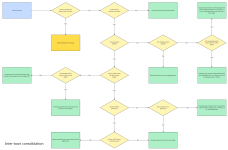
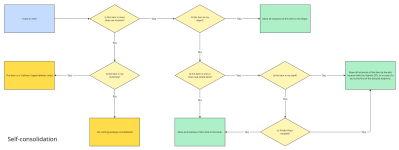
If Toon X has 1 in their depot and Toon Y has 800 in their inventory, they will be moved to Toon X's depot.
The reason is that the depot allows for unlimited stack size.
Where 800 might take up 8 slots in the mule's bags, in the depot it will only take up one slot.

 
That is a weird place to have an error.
Does it happen every time?
Can you verify that your Dannet full names are off? /dnet fullnames off
Can you try with the default skin? /loadskin default
The trade [and give] UI changed. You many need to update based on if you are using UI interaction to affect trading.
 
Something I'm working on releasing soon...

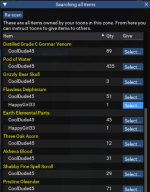
A search window that allows you to see, at a glance, ALL the TS/collectible items your toons and mules have. You'll be able to move items around directly from this screen.

Imagine: You're working on trade skills. You need some blue diamonds, but you're not sure which mule is carrying them. Just use the new search window and have them delivered!

1732741784094.png
 
Thanks for letting me know. They made a change to the find window (added a new item type "Activated").
Just pushed a fix.
 
A while back, the window started using /tscontinue instead of /tsresume when a deposit was stuck. A day or 2 ago, I started getting a message about /tscontinue was not recognized, but the prompt from the TSC still says /tscontinue is the proper command. I tried the original /tsresume, and that worked to finish the run. So I think something is a little out of whack.
 
A while back, the window started using /tscontinue instead of /tsresume when a deposit was stuck. A day or 2 ago, I started getting a message about /tscontinue was not recognized, but the prompt from the TSC still says /tscontinue is the proper command. I tried the original /tsresume, and that worked to finish the run. So I think something is a little out of whack.
Thanks, let me look into it.
 
with search and deliver, is there anyway to just make them give all of them to you without doing it all one toon/collect/tradeskillitem at a time?

Example... i have 12 toons on with various numbers of collectibles, and i want them to give them all to the same toon.
Use the Give button instead of the Search & Deliver. That tells a specified toon to Give all of their collectibles to another toon.
You still have to execute the command once per toon, though. (It's on the backlog to create an All-Give-All utility).
 
I used this today on a toon to transfer some Reflectivce Emberquartz Crystals, and have some comments. I had over 31000 crystals, and really only wanted 10 or so transferred to another toon for making some jewels. But when I tried to select the qty, the slider bar jumped to 135 without giving me a chance to set the number manually. If a manual selection would also be available, that would be great. The other issue is when I told the source toon to transfer those 135 crystals over, he pulled all 35000 of the crystals out of the depot, put them into inventory, did the trade, then put them back. I think it would be better to only withdraw enough to fulfill the request if possible. Especially if I have 99000 in the depot :)
 
When I hit search and scan. Script runs through the toons and reports done with restacking. then there is no pop up box like in the video for requesting items.

Edit: Deleting all of the config files fixed my issue.
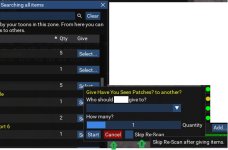
When searching all items for search and deliver, once you hit select there is no way to cancel or back out of selecting a name and qty.
Edit: Ok if I click the bar on the main box the select box goes away. :)

Couple small requests. Cancel button and skip re-scan after giving items. Also, support for consolidating housing storage and crate. Say you have 40 items in house and 60 in crate, combine them to 100.

Thanks for the script, overall very happy with what it does.
 

Attachments

  • Untitled.jpg
    Untitled.jpg
    53.1 KB · Views: 0
Last edited:
When I hit search and scan. Script runs through the toons and reports done with restacking. then there is no pop up box like in the video for requesting items.

Edit: Deleting all of the config files fixed my issue.
When searching all items for search and deliver, once you hit select there is no way to cancel or back out of selecting a name and qty.
Edit: Ok if I click the bar on the main box the select box goes away. :)

Couple small requests. Cancel button and skip re-scan after giving items. Also, support for consolidating housing storage and crate. Say you have 40 items in house and 60 in crate, combine them to 100.

Thanks for the script, overall very happy with what it does.
I'll add the suggestions to the backlog :)

It should consolidate between crate and house if you have plots enabled. It's been a while since I've used that part, but it used to work.
 
I used this today on a toon to transfer some Reflectivce Emberquartz Crystals, and have some comments. I had over 31000 crystals, and really only wanted 10 or so transferred to another toon for making some jewels. But when I tried to select the qty, the slider bar jumped to 135 without giving me a chance to set the number manually. If a manual selection would also be available, that would be great. The other issue is when I told the source toon to transfer those 135 crystals over, he pulled all 35000 of the crystals out of the depot, put them into inventory, did the trade, then put them back. I think it would be better to only withdraw enough to fulfill the request if possible. Especially if I have 99000 in the depot :)
It was drastically easier to code it in a way where toons would pull out everything, give what was requested, and then put things back.
I'll eventually do a better job so that they only pull out what's necessary.
 
i stacked/tabbed the Lua ignore list window with the TSC window on one toon and the conform and trade trade on another, i cant seem to separate the windows/tabs. no error code but the Lua wont run.
any advice would be appreciated.
 
i stacked/tabbed the lua ignore list window with the TSC window on one toon and the conform and trade trade on another, i cant seem to separate the windows/tabs. no error code but the lua wont run.
any advice would be appreciated.
Try going to "EQ Button" >> "Settings" >> "Overlay" and then press the "Clear Saved ImGui Window Settings" button
 
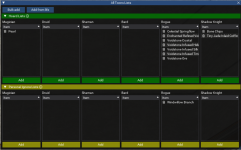
Little something I'm working on for TSC... The ability to specify hoard lists per toon and thus control who gets what much more granularly.
Also having a master window will allow for much easier management of ignore and hoard lists.

Also working on a "Reverse" button in the trade confirmation window, and an "All Toons Give To..." feature.

1745435776233.png
 
Hey guys,

TSC 4.0 is pretty much ready to go. I just need some volunteers to help me test it.

- Completely refactored from the ground up
- More reliable
- Can handle owning plots in multiple neighborhoods (not thoroughly tested, but should work)
- Includes a "Reverse" button to change trade directions on the fly
- Added an "All toons give to..." routine
- Improved sorting logic
- Includes HOARD lists in addition to ignore lists, allowing you to fine-tune who gets what (replaces the Artisan feature)

Please DM me if you're willing to help me with testing before the release!

Thanks!
raw

1749057527912.png
 
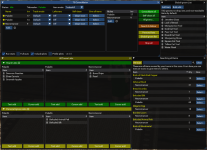
The last update is a major upgrade. TSC v.4.0.
  • Complete refactor
  • Improved performance
  • Increased reliability
  • Introduced hoard lists (replaces artisan feature)
  • Introduced reverse button
  • New list window for handling ignores and hoards
  • Included support for multiple neighborhoods
  • Added an ALL give ALL to... routine
  • Created an auto-update for all settings
I fully expect there to be some bugs, so please let me know.
 
Having an issue when it's trying to deposit to tradeskill depot. It'll deposit a few items fine, and then start spamming "Cannot top an item into the cursor slot" while holding an item, and do nothing forever. If I manually click to deposit that into the depot, it instead starts spamming "Invalid item slot '#10036'" (number changes, probably based on what it was working on at the time).

If I "Stop All" and start it again, it'll do another few items and get stuck again.
 
Also, the "All give to..." seems to be trying to trade No Trade items (at least - they appear in the "Confirm Trades" list, and if you don't ignore them it gets stuck part way through the trades.

Edit: Stacks of no trade items seem to be ignored properly. The items showing up in the "Confirm Trades" list were tradeskill trophies.
 
Having an issue when it's trying to deposit to tradeskill depot. It'll deposit a few items fine, and then start spamming "Cannot top an item into the cursor slot" while holding an item, and do nothing forever. If I manually click to deposit that into the depot, it instead starts spamming "Invalid item slot '#10036'" (number changes, probably based on what it was working on at the time).

If I "Stop All" and start it again, it'll do another few items and get stuck again.
I'll look into this.

Also, the "All give to..." seems to be trying to trade No Trade items (at least - they appear in the "Confirm Trades" list, and if you don't ignore them it gets stuck part way through the trades.

Edit: Stacks of no trade items seem to be ignored properly. The items showing up in the "Confirm Trades" list were tradeskill trophies.
This is strange. It ignores no-drop items during the scan phase, so they should never show up in the confirm trade window.
Is it possible that there is another item with an identical name?
 
Release TsC – Automated Inventory Management & Consolidation For Your Whole Crew

Users who are viewing this thread

Back
Top
Cart