• You've discovered RedGuides, an EverQuest multi-boxing and scripting community 🧙‍♀️⚙️. We want you to play several EQ characters at once, come join us and say hello! 👋

  • A TLP without truebox has thawed (Very Vanilla ready)
    Frostreaver
TsC – Automated Inventory Management & Consolidation For Your Whole Crew

Release TsC – Automated Inventory Management & Consolidation For Your Whole Crew 4.1.6

Thanks for the feedback.
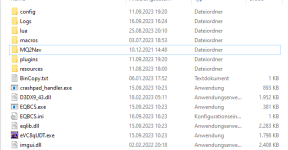
There are no files in my Next/Modules folder.
Only a luarocks.exe in Next main folder.

any pointer where i can get it?
Strange. This is not my specialty and more a question for the MQ devs. Is all your software up to date?

The Lua rocks are included in MQ so creators like me can add additional functionality. If the module folder is empty after accepting the install prompt from TSC then I'm not sure what's going on.

TSC follows the dev instructions for installing Lua rocks modules, and I haven't had anyone else with this problem so far.

Do you get an error message when it tries to install?
 
Strange. This is not my specialty and more a question for the MQ devs. Is all your software up to date?

The Lua rocks are included in MQ so creators like me can add additional functionality. If the module folder is empty after accepting the install prompt from TSC then I'm not sure what's going on.

TSC follows the dev instructions for installing Lua rocks modules, and I haven't had anyone else with this problem so far.

Do you get an error message when it tries to install?

yea, i am getting an error when i try to run the install. The problem appeared after getting out of beta. In beta it worked well.

here is the link to the post that shows the error.. i normally would not refer to old post, but i dont have the screenshots at hand right now.
 
Last edited:
yea, i am getting an error when i try to run the install. The problem appeared after getting out of beta. In beta it worked well.

here is the link to the post that shows the error.. i normally would not refer to old post, but i dont have the screenshots at hand right now.
Try quitting all your EQ instances. Then quit MQ.
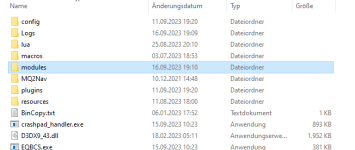
Then delete the modules folder in your Next directory.
Then reload MQ and EQ and try running TSC.
When it asks you to install, it will recreate your modules folder.
 
i ran VV as admin now - then it made the folder

1694884433001.png


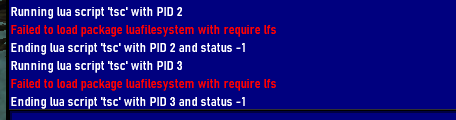
the folder is still empty tho (no luarock inside) and i still get this error on /Lua run tsc

1694884535143.png

can i DL it somwhere and put it in there manually?
 
I have a possible bug. I had a bunch of stacks of 20 rose absinthe in my bags, and a stack of 700 or so in the depot. I was running the clean up on the character, and he started pulling out the stacks of items from the depot (I am assuming to consolidate the stacks) and filled up my inventory wit the stacks of 20. It was then just sitting there with red text about not having any more room. I had to manually deposit all those stacks into the depot, then it would consolidate the stacks I had in the bank into the depot, where I now have 1600 in one stack
 
I have a possible bug. I had a bunch of stacks of 20 rose absinthe in my bags, and a stack of 700 or so in the depot. I was running the clean up on the character, and he started pulling out the stacks of items from the depot (I am assuming to consolidate the stacks) and filled up my inventory wit the stacks of 20. It was then just sitting there with red text about not having any more room. I had to manually deposit all those stacks into the depot, then it would consolidate the stacks I had in the bank into the depot, where I now have 1600 in one stack
Thanks for reporting this. I think I know what's happening and I will work on a fix.
 
was just working on consolidating and i realized that sometimes default or greedy or generous is the opposite of what you want it to do. Maybe a reverse button for the match window added next to skip, ignore, etc. Just trying to think of ways to get tinkering items to your tinker, regardless of who has the most or whatever.
 
I just ran the script for the first time. It's pretty neat but did not work flawless for me.

I've tried to double check for user error being brand new but I believe I had all the settings correct.

I had 7 characters in zone. Set it so the 7th char was greedy/artisan/tiebreaker on tradeskill mode. Set extras for 7th char depot/bank/mule (no mule set)

It searched and scanned fine. I had the Lua window overtop of where the depot window opened. This caused issue dropping items into depot. The script recognizes and gives a resume command. I moved the window and everything moved.

The problem is 2 of the 6 characters that were consolidating to the 7th character didn't move any of their items. Now i checked to make some there were qualifying consolidation items (and not all unique). I found 11 blue diamonds on one. The 7th character (greedy/artisan) has over 200 blue diamonds in depot.

Something happened and 2 of these characters didn't consolidate.
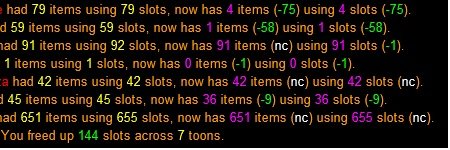
consolidate.jpg

If you look at the 3rd line and 5th line - You see 91 items and still has 91 slots used. The 5th line 42 and still has 42 used.

Not sure why some moved and some didn't.

I used the command for short names before running.

I followed up with the character that had 42 items/slot used and the 7th character as the only 2 consolidating. It worked fine. No idea why 2 of them didn't trade to the greedy/artisan on the first run. It was an open area in guild hall. Plenty of room.
 
Last edited:
I just ran the script for the first time. It's pretty neat but did not work flawless for me.

I've tried to double check for user error being brand new but I believe I had all the settings correct.

I had 7 characters in zone. Set it so the 7th char was greedy/artisan/tiebreaker on tradeskill mode. Set extras for 7th char depot/bank/mule (no mule set)

It searched and scanned fine. I had the lua window overtop of where the depot window opened. This caused issue dropping items into depot. The script recognizes and gives a resume command. I moved the window and everything moved.

The problem is 2 of the 6 characters that were consolidating to the 7th character didn't move any of their items. Now i checked to make some there were qualifying consolidation items (and not all unique). I found 11 blue diamonds on one. The 7th character (greedy/artisan) has over 200 blue diamonds in depot.

Something happened and 2 of these characters didn't consolidate.
View attachment 51304

If you look at the 3rd line and 5th line - You see 91 items and still has 91 slots used. The 5th line 42 and still has 42 used.

Not sure why some moved and some didn't.

I used the command for short names before running.

I followed up with the character that had 42 items/slot used and the 7th character as the only 2 consolidating. It worked fine. No idea why 2 of them didn't trade to the greedy/artisan on the first run. It was an open area in guild hall. Plenty of room.

Sorry that I didn't immediately see this. I PM'd you.
 
was just working on consolidating and i realized that sometimes default or greedy or generous is the opposite of what you want it to do. Maybe a reverse button for the match window added next to skip, ignore, etc. Just trying to think of ways to get tinkering items to your tinker, regardless of who has the most or whatever.
Hey.
When people talk about storing tinkering items with their tinkerer and alchemy items with their shamans, etc., I usually try to remind them that TSC is a consolidator, not an "organizer". It aims to free up slots by bringing like items together, not to sort things into categories.
Having said that, though, I like of like the idea of having a "reverse" option next to the skip option for one-time changes. I can see how that would come in handy.
I might add it to my roadmap (no promises, though).
 
I believe I figured out most of my issues. It seems to be bag space. I understand the idea of consolidation. The reason not all characters were transfering is because the account I set to greedy was full. Not in bank/depot, but just in personal bag storage. After a few runs it looks like this - I set character1 to greedy, he has at least 1 of every item I am consolidating. Since he is greedy he should get any amount from the other accounts. The search starts, they come up with 500 stacks of items to move. The account "character1" only has 200 spaces of inventory available, even though his depot can store much much more. So when the trading starts when character 1 gets full (or near full it seems) the trading stops. It goes to the bank/depot section. What it doesnt do is return to get the remaining 300 items that should be moved to character 1. This was less obvious when i was left with just a few items more then his available space. I thought the script was skipping items for some reason. He simply was full. It was much easier to see what was happening when I did a massive 10 account consolidation from characters with many years of trade skill items.

Now, if character 1 banks and deposits and the script is supposed to continue where trading left off, thats not happening. Maybe its not supposed to and I simply restart the script. After I consolidate most the items to the depot I shouldn't be burdened with such large quantities to consolidate. Thank you for the assistance.
 
I believe I figured out most of my issues. It seems to be bag space. I understand the idea of consolidation. The reason not all characters were transfering is because the account I set to greedy was full. Not in bank/depot, but just in personal bag storage. After a few runs it looks like this - I set character1 to greedy, he has at least 1 of every item I am consolidating. Since he is greedy he should get any amount from the other accounts. The search starts, they come up with 500 stacks of items to move. The account "character1" only has 200 spaces of inventory available, even though his depot can store much much more. So when the trading starts when character 1 gets full (or near full it seems) the trading stops. It goes to the bank/depot section. What it doesnt do is return to get the remaining 300 items that should be moved to character 1. This was less obvious when i was left with just a few items more then his available space. I thought the script was skipping items for some reason. He simply was full. It was much easier to see what was happening when I did a massive 10 account consolidation from characters with many years of trade skill items.

Now, if character 1 banks and deposits and the script is supposed to continue where trading left off, thats not happening. Maybe its not supposed to and I simply restart the script. After I consolidate most the items to the depot I shouldn't be burdened with such large quantities to consolidate. Thank you for the assistance.
Oh yeah, that makes sense. I can see how that would be hard to catch.
If a toon becomes full while receiving, TSC won't tell him to go store things and then continue receiving.
That would require additional configuration, settings, and preferences so it knew precisely how you wanted to do it.
Maybe something for the future, though.
Cheers!
 
This worked great the first couple times I ran it. Now unfortunately I'm having the following problem.
When my characters get to the trading portion of the Lua I continually get the message: "There are no spawns matching: (0-200) any whose name exactly matches charname00."
On whichever character is attempting to trade. Sometimes restarting the Lua will allow a few trades to go through, rarely will it let an entire consolidation process to complete.
 
This worked great the first couple times I ran it. Now unfortunately I'm having the following problem.
When my characters get to the trading portion of the lua I continually get the message: "There are no spawns matching: (0-200) any whose name exactly matches charname00."
On whichever character is attempting to trade. Sometimes restarting the lua will allow a few trades to go through, rarely will it let an entire consolidation process to complete.
That's a new one. Can you give me more details? Live server? Zone? # of toons.
 
That's a new one. Can you give me more details? Live server? Zone? # of toons.
Absolutely.
Live Server. Plane of Knowledge. Six toons.
I thought that it had something to do with my pet names being the same as their owners, but that's' not the case as I changed their names and it still happened.
If I remove everyone from the consolidator and then add them back it will run through mostly without issue.
If I swap to the toon trying to trade and initiate the trade manually it continues on as normal.
 
Absolutely.
Live Server. Plane of Knowledge. Six toons.
I thought that it had something to do with my pet names being the same as their owners, but that's' not the case as I changed their names and it still happened.
If I remove everyone from the consolidator and then add them back it will run through mostly without issue.
If I swap to the toon trying to trade and initiate the trade manually it continues on as normal.
I'll send you a PM see if we can figure it out.
 
Whatever 😆I only buit this after TCN inspired me to start doing trade skills 😸
Yea imagine my dismay when I realized you only need to max 6 out of 9 tradeskills for the Artisan prize.. at least that is what I am told.

I did em all, because, pain, love it, can't get enough of it..
 
Last edited:
Upcoming: Along with the upcoming release of Real Estate support, TSC will soon only need to scan once. All trades and moves will be determined in the first step.
It does this by anticipating items each toon will receive during the trading phase and already determining where they will be placed.
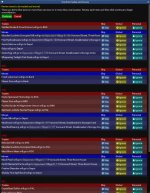
This means you'll only have one confirmation window instead of two. It will look something like this:
confirmation-window.jpg
 
raw updated TS Consolidator with a new update entry:

TSC v2.0 Introducing Real-Estate support

Major changes in v2.0:
- Added real-estate support
- Supports multiple plots and (maybe) neighborhoods
- TSC now only requires one scan instead of two
- Trade and move confirmations are now listed in a single window

This update has been a long time coming and took more work than I anticipated. I refactored most of the code. I expect there to be bugs, but I need your guys' help finding them as testing is a pain (it turns out that un-consolidating is just as difficult).

Read the rest of this update entry...
 
I did find out just now that is it locks up trying to deposit over maximum amount per item

TSC.png
it just tried over and over again to re-deposit the overage till it kicked in the /tsresume message, and then continues to try to deposit the overage, etc, etc...
 
rawmotion submitted a new resource:

TS Consolidator (Beta) - Consoidate all your TS items across all of your toons with one click.


Read more about this resource...
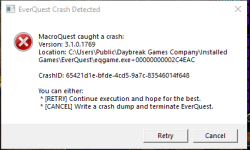
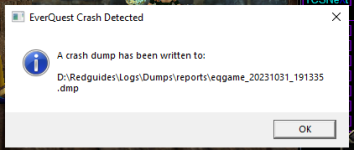
Not sure if right place to comment bout program crashing since last patch, used to run with no issues, but since last patch get crash message, click ok and toon goes to desktop. just a heads up)) I can paste an image of the crash notice if that would help, thanks again for a wonderful prog...
 
I did find out just now that is it locks up trying to deposit over maximum amount per item

View attachment 52334
it just tried over and over again to re-deposit the overage till it kicked in the /tsresume message, and then continues to try to deposit the overage, etc, etc...
Did not anticipate this. 😅 I'll create a fix
 
Not sure if right place to comment bout program crashing since last patch, used to run with no issues, but since last patch get crash message, click ok and toon goes to desktop. just a heads up)) I can paste an image of the crash notice if that would help, thanks again for a wonderful prog...
Send me a PM and I see if it's related to tsc.
 
1698756822057.png
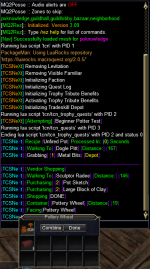
Got this bad boy in the housing area....Thoughts? I had include plots and prefer plots both checked if that helps. Ran consolidate all when this occurred. Tried twice and no luck. Unchecked prefer plots same issue.
 
ok so tried again today, 110 druid, doing trophy quest combines, and once again program crashes to desktop. I tried to capture a screenshot of the error message but need to use snipit or something like that, as it was not an ingame error message but rather a win 10 report. Will try and duplicate the problem and report. thanks

happens within 5 min of running prog, below are screen shots that may shed light.. thanks
 

Attachments

  • crash rpt 001.PNG
    crash rpt 001.PNG
    18.3 KB · Views: 2
  • crash rpt 002.PNG
    crash rpt 002.PNG
    96.7 KB · Views: 2
  • crash rpt 003.PNG
    crash rpt 003.PNG
    20.7 KB · Views: 2
Since the Real Estate patch I am having trouble with collectibles/tidy up.

I used to have a character set to collectible bank>mule and then "tidy up" He would place collectibles in bank. Now it appears he is trying to put them in depot? Not certain that is what is happening, but he will not bank. When he creates the list It says move xxxx items to storage - So i can't tell if he intends to move to depot or bank. But the error I get after he opens the banker is "Invalid item slot "item name" spam until I stop script. Before patch this method of moving collectibles worked perfect for me. FYI, the account in question doesnt own trade depot its 0/0. So perhaps its missing a depot full also (although its also missing the where to store settings of bank/mule).

More testing on this to help you. - Collectibles that already have one in the bank and are needing to consolidate are moving to the bank properly. It's the leftover collectibles that are having issue moving to bank.


Even more testing : and this time i'll wait for a feedback - I do not think its a depot issue. I think its item name issue. When one item was stuck with invalid item slot spam, I tried to find it and click on it. When I did I THINK it went to bank(happens fast) , but then it started moving all the items to bank as it should. Then it got hung up again. Check the item name of the collectible I'm moving. It has quotes and ":" so this may be the issue.


Thanks for your time.


----------------------------------------------

Different suggestion/issue: After a tradeskill consolidation - some accounts have "leftovers" - I have leftover savings disabled on them, so they keep these leftover items. Yet the script seems to still process "XXXX characters is going to leftover routine, client may focus on this person" For all accounts. It doesnt trade/deposit anything as it should. I just don't see any point in running thru the routine on every account if they are not flagged for leftover.
 

Attachments

  • tscissue.jpg
    tscissue.jpg
    455.6 KB · Views: 1
Last edited:
Since the Real Estate patch I am having trouble with collectibles/tidy up.

I used to have a character set to collectible bank>mule and then "tidy up" He would place collectibles in bank. Now it appears he is trying to put them in depot? Not certain that is what is happening, but he will not bank. When he creates the list It says move xxxx items to storage - So i can't tell if he intends to move to depot or bank. But the error I get after he opens the banker is "Invalid item slot "item name" spam until I stop script. Before patch this method of moving collectibles worked perfect for me. FYI, the account in question doesnt own trade depot its 0/0. So perhaps its missing a depot full also (although its also missing the where to store settings of bank/mule).


----------------------------------------------

Different suggestion/issue: After a tradeskill consolidation - some accounts have "leftovers" - I have leftover savings disabled on them, so they keep these leftover items. Yet the script seems to still process "XXXX characters is going to leftover routine, client may focus on this person" For all accounts. It doesnt trade/deposit anything as it should. I just don't see any point in running thru the routine on every account if they are not flagged for leftover.
Thanks for this. I'll look into it and see if I can figure out what's happening. I might send you a PM for more info.
 
Thanks for this. I'll look into it and see if I can figure out what's happening. I might send you a PM for more info.
I had a few edits to help you. Make sure you read my last part about the item names. And photo of one of the items is in the attached screenshot.
 
I had a few edits to help you. Make sure you read my last part about the item names. And photo of one of the items is in the attached screenshot.
Ah. Thank you. This is indeed because of the weird names. I will work on a fix.
 
Release TsC – Automated Inventory Management & Consolidation For Your Whole Crew

Users who are viewing this thread

Back
Top
Cart