• You've discovered RedGuides, an EverQuest multi-boxing and scripting community 🧙‍♀️⚙️. We want you to play several EQ characters at once, come join us and say hello! 👋

  • A TLP without truebox has thawed (Very Vanilla ready)
    Frostreaver
TsC – Automated Inventory Management & Consolidation For Your Whole Crew

Release TsC – Automated Inventory Management & Consolidation For Your Whole Crew (1 Viewer) 4.1.6

Joined
Mar 19, 2021
RedCents
10,291¢
rawmotion submitted a new resource:

TS Consolidator (Beta) - Consoidate all your TS items across all of your toons with one click.

This program will consolidate TS items across all of your toons.

It will attempt to eliminate all duplicates. After running this, no two toons should have the same TS items. E.g., if two toons both have raw diamonds, the toon with fewer will give all of theirs to the other toon. If you have a stack of Opals in your inventory and in your depot, it will move them all to your depot.

Requirements:

- All toons must be in the same zone when you run this.
- The zone must have a banker...

Read more about this resource...
 
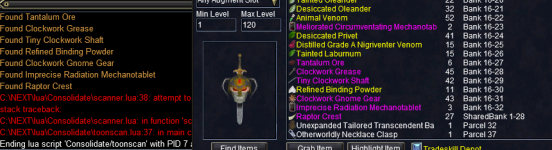
During the scanning, it worked as intended, but got an error here. I looked into it myself and saw I had two TS items in my parcels. After I removed those, it worked fine.

1681743757759.png
 
I am running this, and with each individual trade of the items, it's not automatically clicking the trade button. I am having to click it each time. I assume it should be completing the trade? Let me know what other info you might need to help troubleshoot.

Toon A intiates the trade by putting into the trade window and clicking trade. But on the receiving toon, I find I need to click trade to accept the item.
 
I am running this, and with each individual trade of the items, it's not automatically clicking the trade button. I am having to click it each time. I assume it should be completing the trade? Let me know what other info you might need to help troubleshoot.

Toon A intiates the trade by putting into the trade window and clicking trade. But on the receiving toon, I find I need to click trade to accept the item.

not sure if intended, but why dont you add each other's toon names to mq2autoaccept? Then they will auto accept trades from each other..
 
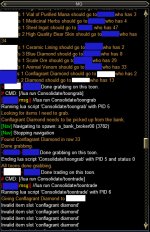
Here is an anonymized image of an issue I ran into. Toon White had 2 Conflagrant Diamonds. Toon Blue had 1 in their TS depot. It got stuck not being able to pull the Conflagrant Diamond from the TS Personal Depot and didn't prompt me to open the TS Depot or place my cursor anywhere.

I manually pulled it, and then it carried on successfully. It was able to move items from White to Blue, and successfully placed items into Blue's TS Depot.

I then tried to reproduce this, but it worked just fine.
 

Attachments

  • First Conflag Diamond sample.jpg
    First Conflag Diamond sample.jpg
    183.7 KB · Views: 8
Here is an anonymized image of an issue I ran into. Toon White had 2 Conflagrant Diamonds. Toon Blue had 1 in their TS depot. It got stuck not being able to pull the Conflagrant Diamond from the TS Personal Depot and didn't prompt me to open the TS Depot or place my cursor anywhere.

I manually pulled it, and then it carried on successfully. It was able to move items from White to Blue, and successfully placed items into Blue's TS Depot.

I then tried to reproduce this, but it worked just fine.
I just had a similar problem. Had berries in the bank . I grabbed them and it proceeded onward without problems. This has happened a few times so far. Not sure if there is a way to check MQ logs see if the berries somehow got skipped

Edit: I wonder if it did this since my inventory could've been full possibly so it would've skipped the remaining. I have so many mats between so many characters. I walked away and didn't pay attention
 

Attachments

  • 1681778891512.png
    1681778891512.png
    92.9 KB · Views: 9
Not a perfect solution for not having autoaccept enabled with all your toons names, but anyway. After the trade you already have that toon targeted.

Code:
mq.cmd('/notify TradeWnd TRDW_Trade_Button LeftMouseUp')
mq.cmd('/dex ${Target.CleanName} /notify TradeWnd TRDW_Trade_Button LeftMouseUp')
 
Last edited:
Thanks for all the bug reports and tests.
Indeed, this assumes you have auto-accept enabled, but I should write some backups for that.
Also need to create checks for things like full inventories.
There's a lot of work to do on this one =)
 
Here is an anonymized image of an issue I ran into. Toon White had 2 Conflagrant Diamonds. Toon Blue had 1 in their TS depot. It got stuck not being able to pull the Conflagrant Diamond from the TS Personal Depot and didn't prompt me to open the TS Depot or place my cursor anywhere.

I manually pulled it, and then it carried on successfully. It was able to move items from White to Blue, and successfully placed items into Blue's TS Depot.

I then tried to reproduce this, but it worked just fine.
Well, I can't seem to reproduce this.
But the only things I can think of are:
- There was already an item on your cursor that caused the grab to fail
- The bank window wasn't open anymore for some reason
I just added checks for both of those scenarios, so hopefully, that doesn't happen again.
Also added a print line that tells you when something was successfully grabbed.
 
Yessss! If anyone asked my opinion on plugins/Lua I'd love as a QOL requirement for boxing, this would be it! Excited to get out of tax season today and go try this.
 
Last edited:
Yessss! If anyone asked my opinion on plugins/LUA I'd love as a QOL requirement for boxing, this would be it! Excited to get out of tax season today and go try this.

Yeah this free'd up so much space. Thanks @rawmotion

Tax season? Is this a fellow CPA?! - this is my last season and im switching to industry lol
 
Bit of a roadmap. Working on additional functions and options. (Not set in stone, but this is what I'm thinking)

Upcoming commands:
- Do main routine on all toons /tsc go
- Self-consolidate routine - do nothing but consolidate bags, inventory, depot /tsc go player
- Give only routine: Give all TS itmes in bags to player /tsc player targetplayer
- Bank only routine: Put all TS items in bags in bank /tsc player bank


Settings options for the main routine:

- Set specific toons to only give, not receive
- Set specific toons to only receive, not give
- Tell specific toons to bank everything after running routine
 
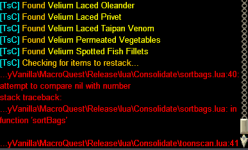
*UPDATE* I realized that I had an older UI in the files for the second character, hence the error. Copied my UI files to the second directory and fixed it. Sorry!

Immediately after running, I get:
 

Attachments

  • Error.PNG
    Error.PNG
    30.5 KB · Views: 2
Last edited:
@ikzi @eqboxer33
Looking into it. Just out of curiosity, do either of those toons have slots in their inventory that are NOT used by bags?
I.e., was there a TS item in one of their main inventory slots?
Very possible. I don't recall. I've had it happen with two different characters out of five. I'll check for that next time I run it.

Update: Yes! I alway keep one inventory slot open and there was a TS item in the open slot for the character that failed. Once I put that item in a bag, it seems to run correctly.
 
Last edited:
@ikzi @eqboxer33
Looking into it. Just out of curiosity, do either of those toons have slots in their inventory that are NOT used by bags?
I.e., was there a TS item in one of their main inventory slots?
Goodmorning..
Yes, working now, and also had TS item in a open bag slot..
 
Hi RM,

Fantastic utility. I was just planning out a stripped down version of this when you published, so doubly awesome.

I am seeing a couple of issues when trying to bank into the tradeskill depot. The first I think you mentioned, it'll pick stuff up, but you have to actually click it into the depot. That's fine, but obvs stops that part of the automation when simultaneously running across multiple toons.

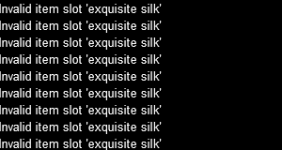
The other is this, during the same bank into depot phase:
1682283791477.png

At this point I have to kill the script.
This occurs immediately after placing exquisite silk into the depot.

Any ideas as to what's going on here?

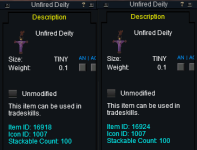
Oh, also, it does try to consolidate items that have the same name, but are different items and don't stack with each other, i.e:
1682284146494.png
 
Hi RM,

Fantastic utility. I was just planning out a stripped down version of this when you published, so doubly awesome.

I am seeing a couple of issues when trying to bank into the tradeskill depot. The first I think you mentioned, it'll pick stuff up, but you have to actually click it into the depot. That's fine, but obvs stops that part of the automation when simultaneously running across multiple toons.

The other is this, during the same bank into depot phase:
View attachment 48039

At this point I have to kill the script.
This occurs immediately after placing exquisite silk into the depot.

Any ideas as to what's going on here?

Oh, also, it does try to consolidate items that have the same name, but are different items and don't stack with each other, i.e:
View attachment 48040
Thanks for the observations. There's still a lot to improve, and this helps.

Holding your mouse over the Personal Depot window is unfortunately necessary. MQ isn't currently able to deposit items.

Not sure what's going on with the exquisite silk. I'll look into it... It could be that if you manually clicked it into the depot, it didn't register (you only need to position your mouse over the depot, it will do the clicking). But either way, I'll see if I can create some better checks.

Different items with identical names are not something I considered. I think it's going to try to stack them. But if it does, it shouldn't cause any errors. I'll take note of it as something to look into.

Thanks.
 
Release TsC – Automated Inventory Management & Consolidation For Your Whole Crew

Users who are viewing this thread

Back
Top
Cart