• You've discovered RedGuides, an EverQuest multi-boxing and scripting community 🧙‍♀️⚙️. We want you to play several EQ characters at once, come join us and say hello! 👋

  • A TLP without truebox has thawed (Very Vanilla ready)
    Frostreaver
Resource icon

Release Tradeskill Construction Set NeXt (1 Viewer) 4.1991b

Since the patch (and after the RG fix - i.e. on Thursday 22 Jan) I am getting a crash when trying to run TCN - it happens once I select the item to make. In this case it was Riven arcana Lumber.

I'll post this in a more general area too as I suspect it isn't TCN itself but something it uses at that point and it appears to be MQ2Main. ... EDIT: It looks as if someone deleted my other post so this thread contains the only reports

---------------------------
EverQuest Crash Detected
---------------------------
MacroQuest caught a crash:

Process ID: 65728
Version: 3.1.1.3579
Location: mq::datatypes::MQ2SpawnType::GetMember+0 (D:\EverMQ\MQ2Main.dll+0000000000085C20)

CrashID: d557cbd3-b345-4aa3-bd80-12be0daaa8e1

You can either:
* [RETRY] Continue execution and hope for the best.
* [CANCEL] Write a crash dump and terminate EverQuest.

Copy the contents of this dialog to your clipboard by pressing Ctrl+C

---------------------------
Retry Cancel
---------------------------
 
Last edited:
Since the patch (and after the RG fix - i.e. on Thursday 22 Jan) I am getting a crash when trying to run TCN - it happens once I select the item to make. In this case it was Riven arcana Lumber.

I'll post this in a more general area too as I suspect it isn't TCN itself but something it uses at that point and it appears to be MQ2Main.

---------------------------
EverQuest Crash Detected
---------------------------
MacroQuest caught a crash:

Process ID: 65728
Version: 3.1.1.3579
Location: mq::datatypes::MQ2SpawnType::GetMember+0 (D:\EverMQ\MQ2Main.dll+0000000000085C20)

CrashID: d557cbd3-b345-4aa3-bd80-12be0daaa8e1

You can either:
* [RETRY] Continue execution and hope for the best.
* [CANCEL] Write a crash dump and terminate EverQuest.

Copy the contents of this dialog to your clipboard by pressing Ctrl+C

---------------------------
Retry Cancel
---------------------------
I got the same error this morning when trying to create Minotaur Hero's Brew - it occurred twice immediately after I hit the Craft button.
 
Getting same error, when generating mass list, and when trying to craft any recipe.
---------------------------
EverQuest Crash Detected
---------------------------
MacroQuest caught a crash:

Process ID: 47276
Version: 3.1.1.3579
Location: mq::datatypes::MQ2SpawnType::GetMember+0 (E:\MQ\MQ2Main.dll+0000000000085D80)

CrashID: Not reported

You can either:
* [RETRY] Continue execution and hope for the best.
* [CANCEL] Write a crash dump and terminate EverQuest.

Copy the contents of this dialog to your clipboard by pressing Ctrl+C

---------------------------
Retry Cancel
---------------------------
 
doubt this is your program crashing, but something causing characters to crash when trying to do batch combines

---------------------------
EverQuest Crash Detected
---------------------------
MacroQuest caught a crash:

Process ID: 36292
Version: 3.1.1.3579
Location: mq::datatypes::MQ2SpawnType::GetMember+0 (Y:\RedGuides\MQ2Main.dll+0000000000085C20)

CrashID: 34fa60ce-d112-4d55-9195-685fee8f783a

You can either:
* [RETRY] Continue execution and hope for the best.
* [CANCEL] Write a crash dump and terminate EverQuest.

Copy the contents of this dialog to your clipboard by pressing Ctrl+C

---------------------------
Retry Cancel
---------------------------
 
I took a quick look at the changelog and didn't see anything standing out, will be monitoring the situation.
 
It pretty much happens whenever I try to craft something. I dont know if there is a debug mode we can run to help you trace the exact area causing the issue. I sometimes get the crash, and sometimes just get the client window disappearing. From the messages I have seen it may be a TLO spawn issue, but I am not sure exactly what it might be.

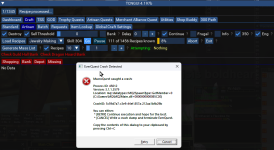
Case in point: Running a jewelry Crafting Artisan session to get from 304, and it loaded recipes without issues. When I hit the Go button, got the following crash. I also got the crash last night trying to make a Diminished Acrobat Ring container.

---------------------------
EverQuest Crash Detected
---------------------------
MacroQuest caught a crash:

Process ID: 45012
Version: 3.1.1.3579
Location: mq::datatypes::MQ2SpawnType::GetMember+0 (C:\Games\MQ\MQ2Main.dll+0000000000085C20)

CrashID: 5c59d7a7-c3e9-44ef-857a-212aa1bfb29b

You can either:
* [RETRY] Continue execution and hope for the best.
* [CANCEL] Write a crash dump and terminate EverQuest.

Copy the contents of this dialog to your clipboard by pressing Ctrl+C

---------------------------
Retry Cancel
---------------------------


1769099228081.png
 
I took a quick look at the changelog and didn't see anything standing out, will be monitoring the situation.

Might be worth reaching out to Brainiac? From the crash messages it looks as if it could be something in MQ2Main and most are pointing at the use of MQ2SpawnType::GetMember (and mostly around the same offset) ... rather than something specific in TCN
 
Well, in general, crash dumps do go to the devs, so they should be aware. However, if not, they do scour the posts and would be aware that way also. The other other option is a TLO or some other thing works in a different manner now (upgrade) and I need to redo the syntax (very rare but sometimes).
 
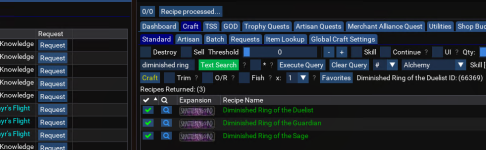
Just as another datapoint, when I did a search for Diminished, then hit the checkox to the left of the recipe, it crashed as it was loading the the Dimished Ring of the Duelist recipe. It did get to the point it displayed the recipe name to the right of the Favorites button,
 
Just wondering if there is any progress on this? Maybe I should try posting again in Questions, Problems and Bugs? (The last time I tried doing that my post was deleted - I assume because I had also reported it here).

I'm not sure we should just assume someone knows and is acting on it (but, if they are, it would be good to know that!)

If there is anything we can do to test or provide more info, just ask!

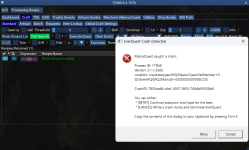
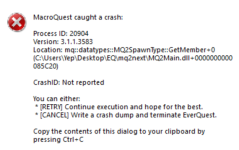
For the avoidance of doubt, the issue persists following todays emergency patch (as you would expect). I tested by entering Riven Arcana Lumber. It listed it but the same error came up on the crash as soon as I selected the item (see below for pic and pasted crash message).

1769209792274.png

---------------------------
EverQuest Crash Detected
---------------------------
MacroQuest caught a crash:

Process ID: 17948
Version: 3.1.1.3583
Location: mq::datatypes::MQ2SpawnType::GetMember+0 (D:\EverMQ\MQ2Main.dll+0000000000085C20)

CrashID: 7800ecd8-c4c6-4057-8f03-7684b93008b6

You can either:
* [RETRY] Continue execution and hope for the best.
* [CANCEL] Write a crash dump and terminate EverQuest.

Copy the contents of this dialog to your clipboard by pressing Ctrl+C

---------------------------
Retry Cancel
---------------------------
 
Well I am looking through the code, I will be fooling with the mq.TLO.Spawn() to see if I can get it to behave, but, it may only be able be solved outside of the Lua code, but I am checking updates/changelogs to see if I can try anything for a result.


Update:

Test: worked, somehow.. Spawn isn't or shouldn't be used in mass generation/recipe selection/info as it is not checking spawns.

Live: No Patch to test with
 
Last edited:
Just wondering if there is any progress on this? Maybe I should try posting again in Questions, Problems and Bugs? (The last time I tried doing that my post was deleted - I assume because I had also reported it here).

I'm not sure we should just assume someone knows and is acting on it (but, if they are, it would be good to know that!)

If there is anything we can do to test or provide more info, just ask!

For the avoidance of doubt, the issue persists following todays emergency patch (as you would expect). I tested by entering Riven Arcana Lumber. It listed it but the same error came up on the crash as soon as I selected the item (see below for pic and pasted crash message).

View attachment 74520

---------------------------
EverQuest Crash Detected
---------------------------
MacroQuest caught a crash:

Process ID: 17948
Version: 3.1.1.3583
Location: mq::datatypes::MQ2SpawnType::GetMember+0 (D:\EverMQ\MQ2Main.dll+0000000000085C20)

CrashID: 7800ecd8-c4c6-4057-8f03-7684b93008b6

You can either:
* [RETRY] Continue execution and hope for the best.
* [CANCEL] Write a crash dump and terminate EverQuest.

Copy the contents of this dialog to your clipboard by pressing Ctrl+C

---------------------------
Retry Cancel
---------------------------
Well there needs to be another patch for todays' fun, so we need to see after that.
 
What fun are you referring to?
MQ was updated almost immediately.
Ice cream code ready for licking.
My experience was update today, and then try to log in, and immediately told of a version mismatch. That is where I get my madness from.

This: ?

1769224961863.png


lol... nm, there is indeed a version mismatch but it isn't MQ :) .. This other box hasn't been touched since 2025.
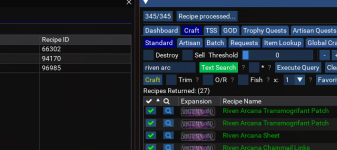
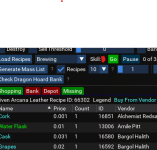
 
Ok on Live Server:

Generated Mass List - Good
Batch List generate - Good
Select Recipes - Good
Make Recipes - Good


1769228093955.png

1769228199497.png

I am trying to get it to crash...
 
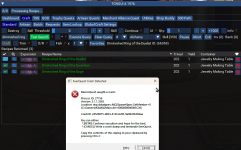
Hmm, I get a crash every time I select the 'Diminished Ring of the Duellist'
1769228976978.png
---------------------------
EverQuest Crash Detected
---------------------------
MacroQuest caught a crash:

Process ID: 27756
Version: 3.1.1.3583
Location: mq::datatypes::MQ2SpawnType::GetMember+0 (C:\Games\MQ\MQ2Main.dll+0000000000085C20)

CrashID: 24526075-d823-4144-b2bf-9a9bc0b394aa

You can either:
* [RETRY] Continue execution and hope for the best.
* [CANCEL] Write a crash dump and terminate EverQuest.

Copy the contents of this dialog to your clipboard by pressing Ctrl+C

---------------------------
Retry Cancel
---------------------------
 
Now, that's interesting! If you can't replicate the issue @jb321 then I wonder what's different between your setup and ours?

I assume we are all on the same version (4.197b)?
I check for updates every day on Redfetch.
Could something else we have running cause a clash?
It happens whether I am running a CWTN plugin or not. I have LEM running.
Not sure it will make a difference, but I'm on Win11.

On the off-chance that your toon is running an earlier version, is it possible to go back to that one if it works?
 
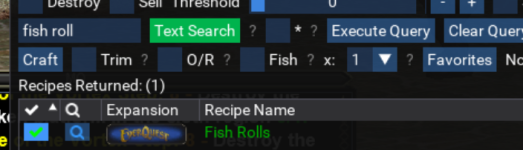
Just tested making broiled raxil fish on a character - did not detect a crash at all but my entire character/screen/instance of EQ disappeared.
 
Just adding my report...
Set up a small batch and upon clicking "execute batch"
Code:
---------------------------
EverQuest Crash Detected
---------------------------
MacroQuest caught a crash:

Process ID: 5592
Version: 3.1.1.3583
Location: mq::datatypes::MQ2SpawnType::GetMember+0 (C:\Users\dvrea\Desktop\MQNext\MQ2Main.dll+0000000000085C20)

CrashID: df56991d-d934-48d9-9174-0fa5bc3e9217

You can either:
 * [RETRY] Continue execution and hope for the best.
 * [CANCEL] Write a crash dump and terminate EverQuest.

Copy the contents of this dialog to your clipboard by pressing Ctrl+C

---------------------------
Retry   Cancel   
---------------------------
Screenshot 2026-01-24 070713.png
 
Now, that's interesting! If you can't replicate the issue @jb321 then I wonder what's different between your setup and ours?

I assume we are all on the same version (4.197b)?
I check for updates every day on Redfetch.
Could something else we have running cause a clash?
It happens whether I am running a CWTN plugin or not. I have LEM running.
Not sure it will make a difference, but I'm on Win11.

On the off-chance that your toon is running an earlier version, is it possible to go back to that one if it works?
I do not play EQ on Windows 11, I have Hyper-V on and use Docker and it does not play nice for me, pretty much any video game may or does have issues for me no matter what driver I use, RDR2, etc...
 
Hmm, I get a crash every time I select the 'Diminished Ring of the Duellist'
View attachment 74528
---------------------------
EverQuest Crash Detected
---------------------------
MacroQuest caught a crash:

Process ID: 27756
Version: 3.1.1.3583
Location: mq::datatypes::MQ2SpawnType::GetMember+0 (C:\Games\MQ\MQ2Main.dll+0000000000085C20)

CrashID: 24526075-d823-4144-b2bf-9a9bc0b394aa

You can either:
* [RETRY] Continue execution and hope for the best.
* [CANCEL] Write a crash dump and terminate EverQuest.

Copy the contents of this dialog to your clipboard by pressing Ctrl+C

---------------------------
Retry Cancel
---------------------------
1769270956861.png


Latest MQ on Live
 
from the Hallucinator in Chief: (Take it with a grain or no salt at all)

The crash you saw is not related to Lua.dll. It occurred in MQ2Main.dll, which is a core plugin DLL used by MacroQuest. Specifically, the error points to the MQ2SpawnType::GetMember function inside that DLL.

🔧 Breakdown:​

  • MQ2Main.dll: This is one of the main compiled plugin libraries in MacroQuest. It contains core functionality for interacting with EverQuest's game data.
  • MQ2SpawnType::GetMember: This function is part of the plugin's internal system for accessing spawn data (NPCs, players, etc.). Crashes here usually mean the plugin tried to access a spawn property that was invalid or corrupted.
  • Lua.dll: This is the Lua scripting engine used for running Lua scripts. It’s separate from the plugin system and wouldn’t be involved unless the crash happened during Lua script execution—which this one didn’t.

Me: The Lua code and Lua.dll are the trigger at least ostensibly so.
 
Someone who knows more than me on this has eyes on it, so, we are moving in a direction.
 
Someone who knows more than me on this has eyes on it, so, we are moving in a direction.

Thanks! Appreciate it - and that it's a shitty situation for you as the bug looks as if it's nothing to do with your fine Lua.

I'm hoping these guys can spot the issue because I have 4 toons that need Smithing for their next mask and I really don't want RSI from doing that crap manually! :)
 
Thanks! Appreciate it - and that it's a shitty situation for you as the bug looks as if it's nothing to do with your fine Lua.
Why do you think most people don't want to be in customer service, they catch everything.

Anyone who is in IT knows all of IT gets blamed for other IT.
 
So, I have depot turned off, so try that, and let me know, we think this is the current suspect for the trigger.

It would explain why it is not happening to me, I am using F2P accounts that wait for unlocks and have not bought expansions on these.
 
You could be right. I just tried it on a toon that has no trade depot and it appears to be working!

How do I turn depot off?

Edit: Yep - all looking good on toons with no trade depot! Woohoo! Now, if I can turn trade depot off on my main trade-skiller, I'm golden for now. Either way, my toons are all learning to smith.
 
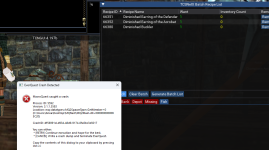
I was going to let you guys figure it out, but will just add that I'm having the same crash.

whenever I hit the green check next to the recipe.
1769282020492.png
I get
1769282053169.png
 
ok when i try to craft something usiing TCN its causing EQ to Crash, anyone else having issues like this?
If TCN is busted, I suggest you post on the TCN thread. Or any other program on that program's thread. It will help it get to the right people.

See link on WhoDis response for TCN link.
 
---------------------------
EverQuest Crash Detected
---------------------------
MacroQuest caught a crash:

Process ID: 7704
Version: 3.1.1.3587
Location: mq::datatypes::MQ2SpawnType::GetMember+0 (\AppData\Local\VeryVanilla\MacroQuest\Release\MQ2Main.dll+00000000000853B0)

CrashID: 29899c45-569a-4b1e-afec-720ae451b99f

You can either:
* [RETRY] Continue execution and hope for the best.
* [CANCEL] Write a crash dump and terminate EverQuest.

Copy the contents of this dialog to your clipboard by pressing Ctrl+C

---------------------------
Reintentar Cancelar
---------------------------

SAME ERROR HERE, WHEN I TRY TO MAKE RECIPE
uNFIRED sMALL bOWL
 
I can confirm that this has to do with Tradeskill Depot. Toons that don't have it work fine. Those that do, crash.

It's known and being investigated. As jb321 said:

1769339600536.png
 
Release Tradeskill Construction Set NeXt

Users who are viewing this thread

Back
Top
Cart