• You've discovered RedGuides, an EverQuest multi-boxing and scripting community 🧙‍♀️⚙️. We want you to play several EQ characters at once, come join us and say hello! 👋

  • A TLP without truebox has thawed (Very Vanilla ready)
    Frostreaver
Resource icon

Release Tradeskill Construction Set NeXt 4.1991b

Thank you. It would be helpful for sure. The Artisan missing audit returned many dyes needed for Blacksmithing, Tailoring, and Research. I caught the missing red variation when I searched for dye in the recipes (3 variations per color).

I hated doing these years ago when LoY came out.
I have made some progress here, at present, it will keep grabbing jars in my test environment, place them, and then combine the extract in them, and then grab another jar and do the same.
 
It is kind of kluge for dye making, but.. it will get the job done..

so when I put out the next release..

go to batch, put in these items or whatever for your dye

1709322917761.png

and check continue (currently it will only make 1 dye and return)

So you will make the jars, make the extract, and then make the dye...
 
I am running god baking and it is working just fine, so now I need to know the server, are you up to date on MQ and TCN, do you have any plugins that do any manipulation of items (loot, etc..) It sounds like a garbled install with all the issues.

It is using spit and bowl correctly..

also provide a screen shot of your inventory slots..
i had to manually complete the steps for those two chars so i can no longer reproduce since the quests are complete.

i did notice it was trying to open a non-existent container for one of the combines, it opened a tiny container window with 1 slot in it each time it was trying to place the components in something. sorry i can't be more helpful.


separately, thurgadin seems to be an issue for large races to navigate when doing the buy routine. not sure of a great solution to this other than allowing a shrink item/illusion to use on zoning
 
i had to manually complete the steps for those two chars so i can no longer reproduce since the quests are complete.

i did notice it was trying to open a non-existent container for one of the combines, it opened a tiny container window with 1 slot in it each time it was trying to place the components in something. sorry i can't be more helpful.


separately, thurgadin seems to be an issue for large races to navigate when doing the buy routine. not sure of a great solution to this other than allowing a shrink item/illusion to use on zoning
server? TLP?

People griped so hard when I used to remove illusion, so, now I leave being the right size up to the user.
 
its not finding the beginner toxicologist test for trophy
also, beginner researcher test doesn't have the vendor locations listed for the farm list (doesn't autoshop)

god baking
--ive had this get stalled on two of my chars but not others so im not sure whats causing the issue. they both got hung up on wayfarer muffin, wayfarer pie, and wayfarer pastry. the recipe wants them to use the oven but they keep trying to use a mixing bowl or spit but they dont put the items in the mixing bowl or spit they just put them in the top two inv slots in trade satchel over and over again
if you have more than 1 of these containers in inventory, it fouls things up, because it goes with the slot it is in, and doesn't use pack.. so the first one it finds it sets that as the number, but then wants to use the most bottom right slot for manipulation.
 
if you have more than 1 of these containers in inventory, it fouls things up, because it goes with the slot it is in, and doesn't use pack.. so the first one it finds it sets that as the number, but then wants to use the most bottom right slot for manipulation.
the two chars in question only had one of the trademasters satchels each. it was very adamant about putting the ingredients in the top slots of the trademasters satchel. i tried moving them to other locations but it would move them back, and then just try to pick up singles and they would go right back in the satchel. it wouldn't put them in the mixing bowl or spit. or oven. i ended up using the oven for those they were having problems with. my other 4 chars got through baking no problem so not sure why those two had problems
 
Observed off behavior today with 4.09b, upgraded to 4.12b and had the same issue.

One character is acting particularly dumb, and I'm unsure what could be causing the problem.
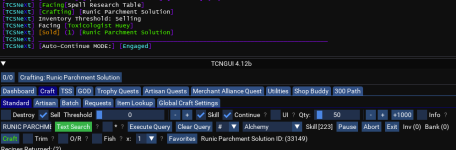
Six characters are all set to make 'Runic Parchment Solution ID:33149'. We're leveling research skill (144 to 243) using the Craft -> Standard tab. Settings as following:
Sell: Check
Skill: Check
Continue: Check
Qty: 50
Select: Runic Parchment Solution

Five characters race around, buy appropriate quantities of materials, craft subcombines, craft until they hit Inv (50), then go sell. Unless they hit 243 first, then they sell and hang out with their buddy Dogle Pitt.

Character 6 was dropped on its head as a child. It buys the required amount of materials for 50 combines. It creates the subcombines for ONE attempt. Crafts until we have Inv (1), Triggers Inventory Threshold:Selling. Then sells the 1 item, goes and buys 1 combines worth of materials and repeats this process indefinitely. The only way I have convinced it to correctly craft all is by removing Skill, Continue, and Sell checkmarks, telling it to make 50 at a time. IIf I check Sell of Continue by itself, it crafts 1, then engages auto continue or sell, thinking the threshhold is set to 1 (it's 50, i want 50). The actual "Threshold" slider is set to 0 for all 6 toons.

I Suppose Im asking here, why is this working for 5 toons, and number 6 is acting like it ate paint chips? Same PC, same settings in TCN. What could cause it to derp out like that?

[edit]
Update - Paint Chip Eater was set to a threshold of 500 (from 0) and seems to be acting right. Not sure why setting the maximum threshold to 500 causes the idiot child to act right when the others were acting correct otherwise.

[edit2]
Kidding. it did one cycle with a thresh of 500, qty of 50. then went back to making 1, selling one, buying parts for 1, but qty was 50. This one just ate paint chips. I don't understand why it wants to be different than the other 5.
 
Last edited:
Observed off behavior today with 4.09b, upgraded to 4.12b and had the same issue.

One character is acting particularly dumb, and I'm unsure what could be causing the problem.
Six characters are all set to make 'Runic Parchment Solution ID:33149'. We're leveling research skill (144 to 243) using the Craft -> Standard tab. Settings as following:
Sell: Check
Skill: Check
Continue: Check
Qty: 50
Select: Runic Parchment Solution

Five characters race around, buy appropriate quantities of materials, craft subcombines, craft until they hit Inv (50), then go sell. Unless they hit 243 first, then they sell and hang out with their buddy Dogle Pitt.

Character 6 was dropped on its head as a child. It buys the required amount of materials for 50 combines. It creates the subcombines for ONE attempt. Crafts until we have Inv (1), Triggers Inventory Threshold:Selling. Then sells the 1 item, goes and buys 1 combines worth of materials and repeats this process indefinitely. The only way I have convinced it to correctly craft all is by removing Skill, Continue, and Sell checkmarks, telling it to make 50 at a time. IIf I check Sell of Continue by itself, it crafts 1, then engages auto continue or sell, thinking the threshhold is set to 1 (it's 50, i want 50). The actual "Threshold" slider is set to 0 for all 6 toons.

I Suppose Im asking here, why is this working for 5 toons, and number 6 is acting like it ate paint chips? Same PC, same settings in TCN. What could cause it to derp out like that?

[edit]
Update - Paint Chip Eater was set to a threshold of 500 (from 0) and seems to be acting right. Not sure why setting the maximum threshold to 500 causes the idiot child to act right when the others were acting correct otherwise.

[edit2]
Kidding. it did one cycle with a thresh of 500, qty of 50. then went back to making 1, selling one, buying parts for 1, but qty was 50. This one just ate paint chips. I don't understand why it wants to be different than the other 5.

So if you have 49 out of 50 and you are not selling and continue and skill is on, it is expected to keep getting 1 and trying 1 to reach 50.

If you have sell on and skill on and continue on and the skill level is not reached but you have less than 50 but you have a lot in inventory, it is also expected to make 1 at a time to reach 50, the caveat being if you have less than say 4 slots bag space, then it would sell.

When you set a limit you are telling it you want that amount, so it will do it's best to adhere and not go over..
 
1709446323777.png
In this configuration, it bought 50 sets of combine materials. Crafted 1. Sold 1. 49 sets of materials on hand. Buys 1 set of materials, crafts 1 set. sells one set. repeat loop.

With the exact same settings, 5 other toons bought 50, crafted 50 (or til they ran out), sold, bought 50 more sets, etc until they hit 243. So either 5 toons are wrong, or the above toon is wrong. bag space is not an issue, the above toon has ~40 slots free.

So is this an incorrect setup and 5 toons are doing it wrong? Or is the one knucklehead doing it wrong?
 
View attachment 58232
In this configuration, it bought 50 sets of combine materials. Crafted 1. Sold 1. 49 sets of materials on hand. Buys 1 set of materials, crafts 1 set. sells one set. repeat loop.

With the exact same settings, 5 other toons bought 50, crafted 50 (or til they ran out), sold, bought 50 more sets, etc until they hit 243. So either 5 toons are wrong, or the above toon is wrong. bag space is not an issue, the above toon has ~40 slots free.

So is this an incorrect setup and 5 toons are doing it wrong? Or is the one knucklehead doing it wrong?


Alright the next release will take into account tradeskill items that are stackable > 1 and count the tradeskill bag for free space in that instance.
 
Last edited:
Was it a bug I somehow ran across then? I cannot figure out why 5 of 6 toons had no problems with it but the one did. I thought I was going insane.
 
Was it a bug I somehow ran across then? I cannot figure out why 5 of 6 toons had no problems with it but the one did. I thought I was going insane.
Not a bug, by design (at the time), there are lots of things I know about, and wonder how long before it hits the WCS (worst case scenario)
 
Last edited:
Wrong recipe in the database.

Elixir of Resolute Renewal​


  • I have seen 2 different recopies for this alchemy potion, neither will combine in a foldable reinforced medicine bag, or in the alchemy table in PoK.

Option 1: (allakhazam)
  • 1 Reflective Emberquartz Powder
  • 1 Echinacea
  • 2 Mandrake Root
  • 1 Emberquartz Potion Vial
  • 1 Fresh Fish
Option 2: (eqTraders)

It appears that the 'correct' recipe is:

Option 2: (eqTraders)
 
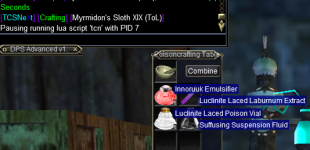
Found a combine that is incorrect. Combine is Myrmiddon's Sloth XIX (TOL).
View attachment 58714
Typically the recipe usually has a incorrect item count or a messed up ID, this one is just all messed up in the DB, My guess is that I entered it way back when and it changed and I never changed it and no one ever used it until now..
 
I hate tradeskills, but ive maxxed AA's and finished hunter. Shoot me straight, will this plugin make tradeskills tolerable enough to get through them all?
 
I hate tradeskills, but ive maxxed AA's and finished hunter. Shoot me straight, will this plugin make tradeskills tolerable enough to get through them all?
If I am a car salesman, I would ask other people how the car drives, not how I would tell ya.. You can check the reviews and ask others and also try the free version to see if it works on your system..

 
If I am a car salesman, I would ask other people how the car drives, not how I would tell ya.. You can check the reviews and ask others and also try the free version to see if it works on your system..

The short reply is if you can farm the missing items, yes, IMO, it is completely tolerable.
 
Even though it ain't broke, I was working on a new cruncher engine for recipe interrogation, for individual recipes the speed increase is relatively negligible (need more testing), but for doing mass lists, It went from 59 minutes to 26 minutes to do the Research list.. so far everything is checking out but I will need to do further testing, this ain't bethesda softworks..

The cool part is all I have to do is change a 0 to a 1 to test it out or leave it as is..
 
image.png
 
batch or standard?
I checked the itemid it is or it says it is 154789, I also checked the flow, this will happen after it went bank, depot, and vendor shopping.. if it is batch..

I seem to remember this from a few pages ago, but I figured I corrected it.. or not.
 
batch or standard?
i actually tried both - not sure if i had the 10 for the normal, but i tried to do normal first, got stuck in the loop, so then i restarted it and did batch, then i checked and saw i had the components
 
i actually tried both - not sure if i had the 10 for the normal, but i tried to do normal first, got stuck in the loop, so then i restarted it and did batch, then i checked and saw i had the components

Please update your LSO manually..

1711076793123.png
 
Last edited:
I hate tradeskills, but ive maxxed AA's and finished hunter. Shoot me straight, will this plugin make tradeskills tolerable enough to get through them all?
I abhor tradeskills. I hate everything about it...and yet here I am maxed TS on my main, all my alts have 300, AP maxed out...and I make a killing in the bazaar making stuff while I sleep. Is going to 350 a pain in the rear...YEP. Is farming all that crap a pain...yep...but this will definitely make your life easier if/when you choose to go down that path. Well worth the money.
 
I am running this currently and seeing the same issue. You say fix the LSO...please help me understand what this is.

Currently 2 recipes give me this: Fading Memory Amice of Adriotness, and Fading Memory Katar.
If you are not watching the LSO resource, I would do that and download it. What should happen, if you got a new version of TCN, it will check for expansion recipe packs and if they are missing try to install them. If you have a current version of TCN, it checks and if it sees any version of a recipe pack, it calls it good..

If you want to manually do it.. /Lua run lsdbupd (without TCN loaded/running)
 
I've started doing Spell research to 350, and am trying to figure out the process.

I loaded recipes, and it shows 15% completed (606 of 4068). I know I haven't done any low level combines yet on this character, yet the "Start On:" defaults to a Rough Spell Tablet. This is a trivial 243 combine. Is there any way to change this to start on the lowest trivial combines? I have all the low level hides etc, but don't know how to force it to make those recipes first.
 
If you are not watching the LSO resource, I would do that and download it. What should happen, if you got a new version of TCN, it will check for expansion recipe packs and if they are missing try to install them. If you have a current version of TCN, it checks and if it sees any version of a recipe pack, it calls it good..

If you want to manually do it.. /lua run lsdbupd (without TCN loaded/running)
I have been with you since I came back at the start of NOS sir. I did a manual update as you suggested and all of my recipes and fixes are there. Thanks JB...
 
I've started doing Spell research to 350, and am trying to figure out the process.

I loaded recipes, and it shows 15% completed (606 of 4068). I know I haven't done any low level combines yet on this character, yet the "Start On:" defaults to a Rough Spell Tablet. This is a trivial 243 combine. Is there any way to change this to start on the lowest trivial combines? I have all the low level hides etc, but don't know how to force it to make those recipes first.
the prize.db allows you to enable or disable the recipes that are to be crafted by setting the RecipeSkip field to 1..

I took the lists as they were provided, based on the recipe ID provided. I've no idea what the trivials are for them unless I did some table comparison.

All I do is make sure my trophies are maxed, Salvage maxed, Tradeskill AA maxed, GOD, TSS, Merchant Alliance, and then I run..
 
the prize.db allows you to enable or disable the recipes that are to be crafted by setting the RecipeSkip field to 1..

I took the lists as they were provided, based on the recipe ID provided. I've no idea what the trivials are for them unless I did some table comparison.

All I do is make sure my trophies are maxed, Salvage maxed, Tradeskill AA maxed, GOD, TSS, Merchant Alliance, and then I run..
Additionally, if you have not customized your prize.db already you can extract it from the prize.zip where I have removed a lot of the low level combines if they are used in another craft.
 
Release Tradeskill Construction Set NeXt

Users who are viewing this thread

Back
Top
Cart