Total rookie, no idea how to do this and don't want to mess anything up.The W/A in TCN_Craft.lua: (add the code in orange)
mq.cmd('/notify TradeskillWnd COMBW_ExperimentButton leftmouseup')
mq.delay(750)
mq.delay(3000)
return
end
I added an arbitrary delay to the delay for testing.. You can add it too to get going, at least for crafting. Tradeskill UI should be fine.
It seems to account for now for the delay in the boxes showing up.
As for the can't pick up, yeah it is trying to grab from a bag and yes just like DBG other shenanigans it is causing issues.
The W/A for that is in TCN_Library.lua: (add the code in orange)
mq.cmd('/ctrl /itemnotify in pack' .. pack .. ' ' .. slot2 ..
' leftmouseup')
mq.delay(200)
-- extra delay DBG screw up
mq.delay(3500)
end
if l_count == -1 then
mq.cmd('/shift /itemnotify in pack' .. pack .. ' ' .. slot2 ..
' leftmouseup')
mq.delay(100)
-- extra delay DBG screw up
mq.delay(3500)
end
I want to see how this stuff operates before committing to a release and arbitrary numbers.. if it has to stay that way I will try to tune to the lowest possible with "decent" latency..
Note: I am using standard UI and whatever DBG is doing..

-
 Hail, we're RedGuides. We want you to play six (yes, 6!) EverQuest characters at once. We have scripts and a friendly community to help, please join our playstyle and say hello! 👋
You are using an out of date browser. It may not display this or other websites correctly.
You should upgrade or use an alternative browser.
You should upgrade or use an alternative browser.
Resource icon
Release Tradeskill Construction Set NeXt (6 Viewers) 4.1991b
- Thread starter jb321
- Start date

- Seller
- #3,042
The good news is, you can re-install from the launcher if you mess anything up with a Lua file. I am not sure what they are doing in the closed door DBG sessions with regards to their UI silliness.. So I am waiting/watching to see where they are going to settle and end up.Total rookie, no idea how to do this and don't want to mess anything up.
If you are going to make changes, notepad, notepad++, visual studio code are some options to modify.
- Seller
- #3,043
I switched to a 3060ti and checked ram and ran sfc /scannow and it still blew up.. I updated the NVIDIA driver to official release and all seems to be good..To boot (pun intended) my main pc is crashing randomly, I think the CPU is going to heaven. The other box I have is for test so I am trying to spin up something.. all that said, still checking out what's up.
I have also been experiencing this problem with the Lua filling my inventory slots with single TS materials as well.Same problem myself
Had to stop using it because it was filling my inventory with single mats
How do you get the Lua script to crafter a set amount of items and sell them ? For example in jewelrycrafting I set the amount to be made, let's says 500 jaded platinum rings are what I want made , I click the skill and continue Checkbox and then i set the sell slider to let's say 30 rings , select the item to be made and hit craft. It will craft all of the items but it only crafts 1 item at a time and then goes to sell and repeats crafting 1 and selling again. I have more than enough slots in my inventory also for it to be able to hold 30 items. Also if it keeps crafting and my inventory gets full with no more room left that characters client will end up crashing and I have to log back in. Any help on this problem is appreciated. Thanks for the great Lua and your hard work
- Seller
- #3,046
When you do not select destroy or sell it takes into account what is in inventory and will only craft 1 at a time to reach the goal. So if on previous runs you had 499 in inventory it will shop for 1 and craft 1.How do you get the lua script to crafter a set amount of items and sell them ? For example in jewelrycrafting I set the amount to be made, let's says 500 jaded platinum rings are what I want made , I click the skill and continue Checkbox and then i set the sell slider to let's say 30 rings , select the item to be made and hit craft. It will craft all of the items but it only crafts 1 item at a time and then goes to sell and repeats crafting 1 and selling again. I have more than enough slots in my inventory also for it to be able to hold 30 items. Also if it keeps crafting and my inventory gets full with no more room left that characters client will end up crashing and I have to log back in. Any help on this problem is appreciated. Thanks for the great LUA and your hard work
- Seller
- #3,047
What results are people getting with this: By unchecking it?I have also been experiencing this problem with the lua filling my inventory slots with single TS materials as well.
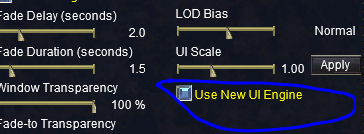
Keeping in mind after you have to exit and start a new window/session.
Well the answer is nope, cause it "fixes" the red tint when opening a bag, but does not help with the experiment container opening.
Last edited:
- Seller
- #3,048
jb321 updated Tradeskill Construction Set NeXt with a new update entry:
Spelling Fixes, and Arbitrary delays for DBG shenanigans and tomfoolery
Read the rest of this update entry...
Spelling Fixes, and Arbitrary delays for DBG shenanigans and tomfoolery
8/19/2023
3.94b(1) - ChangeLog
Fixed: Spelling of "Initializing"
Added: Arbitrary delays for opening containers and grabbing items to account for DBG tomfoolery.
Read the rest of this update entry...
I did not mention that I did have the sell button checked and it only makes 1 item and sells and cycles thatWhen you do not select destroy or sell it takes into account what is in inventory and will only craft 1 at a time to reach the goal. So if on previous runs you had 499 in inventory it will shop for 1 and craft 1.
- Seller
- #3,050
Please provide a SS of your standard tab like so: With the recipe selectedI did not mention that I did have the sell button checked and it only makes 1 item and sells and cycles that

- Seller
- #3,052
Custom UI I presume?View attachment 50436
This happens everytime I try to generate a mass list in artisan mode. I've looked through the thread but couldn't seem to find a fix I need to make for this to work.
The XML has a checkbox for that but in standard EQ UI.
Last edited:

Rare Spawn
Well-known member
Having trouble with getting items out of the bank.
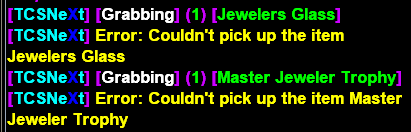
- Seller
- #3,054
Yeah.. DBG.. Thank Them
If you got the latest release I just put out, I added in some delays to account for that, if you did download and it ain't workin', it just means the delay need to be greater most likely from a couple of posts back describing the files and changes.
Rare Spawn
Well-known member
Yep, I have the latest. Prior to updating earlier, was having alot more issues.
Can we get the ability to toggle off putting all my tools and trophies back in the bank? Would save alot of time, and DBG meddling if I just kept most of my durable goods on my person.
Can we get the ability to toggle off putting all my tools and trophies back in the bank? Would save alot of time, and DBG meddling if I just kept most of my durable goods on my person.
- Seller
- #3,056
Right Thurr-- Auto DepositYep, I have the latest. Prior to updating earlier, was having alot more issues.
Can we get the ability to toggle off putting all my tools and trophies back in the bank? Would save alot of time, and DBG meddling if I just kept most of my durable goods on my person.

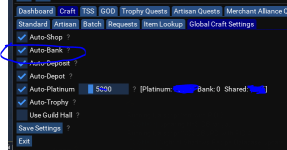
- Seller
- #3,057
I think DBG is trying to sabotage redguides.. I am going to make a tin foil hat.In default I can't get it past the faction portion using the old UI engine cause the faction window isn't populating.
- Seller
- #3,058
You might be able to type /fac and then /fac again or /fac once and it could/should/might continue.In default I can't get it past the faction portion using the old UI engine cause the faction window isn't populating.
Got past it relogging and it was the UI that was stopping it so thank you. Now to find out how to get it to make a list of all the recipes instead of just 100.You might be able to type /fac and then /fac again or /fac once and it could/should/might continue.
- Seller
- #3,060
Just uncheck the box next to the number of recipes..Got past it relogging and it was the UI that was stopping it so thank you. Now to find out how to get it to make a list of all the recipes instead of just 100.
Right Hurr:

- Seller
- #3,061
Got past it relogging and it was the UI that was stopping it so thank you. Now to find out how to get it to make a list of all the recipes instead of just 100.
- Seller
- #3,063
jb321 updated Tradeskill Construction Set NeXt with a new update entry:
Delay for bank grabbing, Sped up local grabbing.
Read the rest of this update entry...
Delay for bank grabbing, Sped up local grabbing.
8/20/2023
3.94(2)b - ChangeLog
Modified: Increased delay for grabbing items from bank to account for DBG.
Modified: Decreased delay for grabbing items locally.
Read the rest of this update entry...
Rare Spawn
Well-known member
Disabling auto-bank seemed to help mitigate those meddling kids for me. Rocking and rolling now. I noticed something strange I want to share. I dont have the perk that gives me 2 extra bag slots... while crafting with default UI, and the inventory open (I like to watch my trophy level), I noticed those 2 extra slots, appear and disappear while TCN is working away. Is this a clue?

- Seller
- #3,065
It's a clue they want you to buy the perks.Disabling auto-bank seemed to help mitigate those meddling kids for me. Rocking and rolling now. I noticed something strange I want to share. I dont have the perk that gives me 2 extra bag slots... while crafting with default UI, and the inventory open (I like to watch my trophy level), I noticed those 2 extra slots, appear and disappear while TCN is working away. Is this a clue?

- Seller
- #3,068
I can't even..Well, something new with the turn off New UI option. While the Lua is banking stuff, it locks the mouse back into the same spot across all the clients.
Well if you are referring to depot deposit. I can. This is known and there are no WAs ATM. The move cursor works independent of the game window.
Last edited:
- Seller
- #3,069
jb321 updated Tradeskill Construction Set NeXt with a new update entry:
Corrected depot cursor debacle after recent changes.
Read the rest of this update entry...
Corrected depot cursor debacle after recent changes.
8/23/2023
3.94(3)b - ChangeLog
Modified: Added Auto-Inventory to depot grabbing, recent changes no longer puts item in inventory after withdrawal, I added that in.
Modifed: Decreased grab time some more for picking up items from inventory.
Read the rest of this update entry...

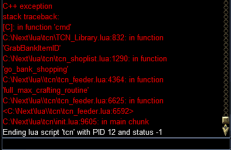
- Seller
- #3,073
According to your DM this has been resolved and had nothing to do with TCN, it concerned mesh settings, correct?ok so i experimented with changing back to new ui from old and now its hanging on command line initializing tradeskill depot,so baisically it got one line further,the strange thing is it was working about 4 hrs ago then just stopped.
Rare Spawn
Well-known member
Hello JB,
I've been putting the software to work recently. Thank you for all the hard work you put into this beast.
I noticed when Overseer kicks off while doing TCN stuff... some bad things can happen. I am an idiot and always forget to stop Overseer until bad things happen. I wouldn't be upset if TCN worker script paused (or stopped) Overseer at the start of its automation, and resumed it when crafting is done.
I've been putting the software to work recently. Thank you for all the hard work you put into this beast.
I noticed when Overseer kicks off while doing TCN stuff... some bad things can happen. I am an idiot and always forget to stop Overseer until bad things happen. I wouldn't be upset if TCN worker script paused (or stopped) Overseer at the start of its automation, and resumed it when crafting is done.

Hi hoping for a little advice, which may well be covered elsewhere, but cant find it. i have used this to do the trophies, and am now trying to get my skills upto 300, How exactly do I do that, say in Baking?
a quick step by step guide would be really nice, or point me to one if its already here. This is where I am at and cant seem to go any further, shave bought all the components, but it wont do any thing else.
a quick step by step guide would be really nice, or point me to one if its already here. This is where I am at and cant seem to go any further, shave bought all the components, but it wont do any thing else.
Attachments
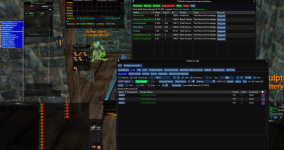
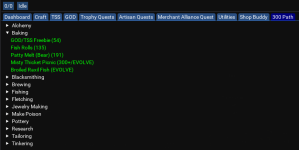
thats what i am trying , have selected patty melt , but it doesnt do anything. bought all the materials manually still nothing.

paasch
Active member
ok problem solved the mesh manager was requesting mesh agreement up in the mq2 chat box
yes because mesh was waiting for accept t&c in the chat box it was blocking tcn from activating last part of script although ive been using it weeks i had no idea that mesh was waiting for conformationAccording to your DM this has been resolved and had nothing to do with TCN, it concerned mesh settings, correct?
- Seller
- #3,079
The craft button is yellow , It means what you selected is missing something, I am gonna guess a frying pan mold.. but to find out you need to check the info box:thats what i am trying , have selected patty melt , but it doesnt do anything. bought all the materials manually still nothing.
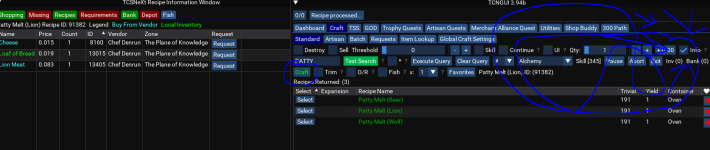
I tried to keep the color scheme to green (check the tab), red nothing to check..
your missing tab should reveal all of life's mysteries and what is happening with TCN
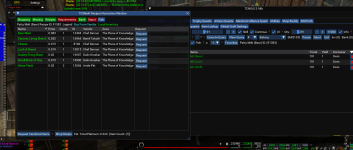
When i click on info i get this window, and i bought everything listed, but it still wont do anything? do i then need to go to pottery first to craft the frying pan then?The craft button is yellow , It means what you selected is missing something, I am gonna guess a frying pan mold.. but to find out you need to check the info box:
View attachment 50549
Attachments
Users who are viewing this thread
Total: 7 (members: 0, guests: 7)
Share: