• You've discovered RedGuides, an EverQuest multi-boxing and scripting community 🧙‍♀️⚙️. We want you to play several EQ characters at once, come join us and say hello! 👋

  • A TLP without truebox has thawed (Very Vanilla ready)
    Frostreaver
Resource icon

Release Tradeskill Construction Set NeXt 4.1991b

So batch?

I just looked at the artisan crafting routine, it doesn't do depot dropping in that routine so it must be the return from the call

And I was right, it is doing it after
yes batch for sure
 
Ok so the quick fix for this seems to be turning auto depot off. Seems to run fine with that clicked off. Auto depot also just kept trying to deposit every single inventory item into depot even after full. Easier to just have that off for now.
I think the latest fix will address that..
 
I am pretty sure it was having problems with GLOBAL_PLATINUM being nil or something, this fix should do it..
 
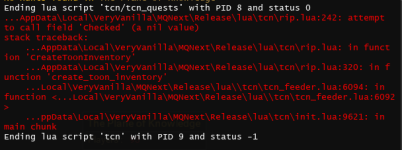
While doing the Beginner Brewer Test, I clicked on "Generate Farm List" and the GUI crashed with this error message:

1690041356814.png
 
Do you have NOS? or using a custom UI?
It could be one of those situations where there have been improvements to the Lua.dll and it is catching some of my nonsense. I just put in a check for NOS before trying that operation (next release). I had it in the previous block to check the box for TSD, but not the following one.
 
where can i get the tsqlite3 file the Lua is asking for?
it wont load when i click install.
 

Attachments

  • faile tsqlite3.png
    faile tsqlite3.png
    13.6 KB · Views: 2
This is a nice fix for me, my Mage is a jewel crafter so I will sometimes be making stuff then go out to fight and not realize the program put my pet summoning reagent in the bank when I wasn't looking. It normally isn't a big deal, I just summon a banker and get it back.
Thanks for the update though.
Ufc 205 Thank You GIF by UFC
 
It's not honoring the Auto-Depot check box....
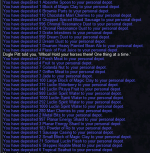
View attachment 49994
what a mess.....
View attachment 49995
now I have to go pull all this back out
derp , binary and boolean don't mix

maybe not, still looking

I assume this is Artisan, Batch, or Standard?

I am going to presume this is on a toon you've not saved the new settings on.

I added a switch to check the box, and I have unchecked it for testing.
 
Last edited:
What I am doing is a batch of Artisan, so I load up a bunch of materials, run the crafting portion, do the turn in, rinse and repeat till I have the desired number of Seals, then return the unused portion to the toon(s) with the appropriate depot. So it's auto-depoting stuff in the wrong depot!
 
What I am doing is a batch of Artisan, so I load up a bunch of materials, run the crafting portion, do the turn in, rinse and repeat till I have the desired number of Seals, then return the unused portion to the toon(s) with the appropriate depot. So it's auto-depoting stuff in the wrong depot!
If you save the settings and restart TCN does it work? or same issue?

I have been checking and unchecking and using deposit items button in utilities for testing. I will try standard, batch, and artisan.

No luck for me on live. All is working..
 
Last edited:
On live as well, I had to go make Chum and now I'll take a peak at how it did the last run...

I had uncecked, saved and rechecked, saved.... so far it's fine. It was on a fresh log in earlier, and I had verified that is was unchecked before I made that run above
 
And now I have to forage up some stuff before I can go further.... the last run did appear to only have banked the tools as it should have and didn't Depot anything.... I keep an eye on it and report back a bit later.
 
Is there a check box to stop gating home after each completion?

I am doing the GoD 54 quests in abysmal sea and I select a skill and it runs and when it's done it says, "Going home wherever that is" and it gates out. Then I have to run back to start the next skill-up quest.

Or at least be able to select multiple or all of the GoD quests and have it do them all before gating home.
 
anyone had an issue recently with the Lua getting stuck in a loop of picking things up and putting them back in the bank after crafting is complete?
 
If Auto-Trophy is disabled in Global Craft Settings, the Lua should not unload mq2tstrophy.
Mq2tstrophy works more reliably for me.
I had 3 wrong trophy switches when batching 4 items in the same forge.
The plugin is also not putting my trophies where i dont want them to be (bank).
Hence i prefer using the plugin in background rather than the Lua for it.
Especially since it doesnt turn it back on either after Lua ends. Which can lead to mistakes if one doesnt do ALL the crafting using the Lua.
 
Last edited:
If Auto-Trophy is disabled in Global Craft Settings, the lua should not unload mq2tstrophy.
Mq2tstrophy works more reliably for me.
I had 3 wrong trophy switches when batching 4 items in the same forge.
The plugin is also putting my trophies where i dont want them to be (bank).
Hence i prefer using the plugin in background rather than the lua for it.
Especially since it doesnt turn it back on either after lua ends. Which can lead to mistakes if one doesnt do ALL the crafting using the lua.
I took a quick look at the logic and it is designed to unload the plugin if loaded and load upon exit if it was loaded.

I can think of a few ways, if auto-trophy is unchecked then enable the plugin, if it is checked disable it, or make it a separate option. Alternatively upon 1st running TCN check to see if the auto-trophy is checked or not and not unload the plugin if it is currently loaded.

I've not heard too much from the auto-trophy causing an issue, I have if other plugins are running concurrently or ones that manipulate inventory items. Additionally, I have it set so if you put your trophies in the house it uses them from there.
 
Is there a check box to stop gating home after each completion?

I am doing the GoD 54 quests in abysmal sea and I select a skill and it runs and when it's done it says, "Going home wherever that is" and it gates out. Then I have to run back to start the next skill-up quest.

Or at least be able to select multiple or all of the GoD quests and have it do them all before gating home.
You can actually select all the quests at once in the drop down. Should be all..
 
anyone had an issue recently with the lua getting stuck in a loop of picking things up and putting them back in the bank after crafting is complete?
Is this test or live, custom UI, other plugins pluggening, etc?
 
Is this test or live, custom UI, other plugins pluggening, etc?
It's live and yes I run cwtn plug-ins but pause them while I'm crafting. I was using the sic ui but changed to new eq ui to see if that would resolve the issue
 
After changing and resetting the ui and reinstalling the Lua looks to be working fine
 
Request time. When generating a mass list of items, under missing, when I have them in inventory, the item appears green. When I have them in my bank or depot, it does not. Is there a way for this to register as green no matter what slot it is in? Just an OCD thing of mine, can work around if not easy.
 
Sorry for the delay in response, it was ignoring the Auto-Depot setting every time I started it up, I had mentioned that I copied/pasted your settings from the post, apparently that was screwing it up somehow. Deleting the settings INI and allowing the Lua to re-write the file, then unchecking the box seems to have fixed it for me.
 
Apparently I spoke to soon, after having closed the Lua to run to my Guild Neighborhood. Restarted TCN and ran the Artisan Brewing Quest, and there it went, deposited all 40ish TS items into the Depot. So I am back to the only way I can prevent this is to start TCN, open my settings Check the Depot Box, Save, then un-check the box and Save again. Then it will run fine till I close and restartt TCN again.
 
Apparently I spoke to soon, after having closed the Lua to run to my Guild Neighborhood. Restarted TCN and ran the Artisan Brewing Quest, and there it went, deposited all 40ish TS items into the Depot. So I am back to the only way I can prevent this is to start TCN, open my settings Check the Depot Box, Save, then un-check the box and Save again. Then it will run fine till I close and restartt TCN again.
I will review it again, but it has (or is believed to) the same code as the the check boxes with functionality as the other options.
 
Last edited:
I will review it again, but it has (or is believed to) the same code as the the check boxes with functionality as the other options.
This is proving to be a bit of a head scratcher, is anyone else having this happen?
 
Had the depot thing do some weird shit.
I tabbed to another toon (ISBoxer), and the cursor stated moving about on its own, I thought I'd accidentally enabled broadcast (mirror actions) on my first toon and it was catching up, but no, it was TCS taking control from the other instance moving the cursor to the depot and left clicking. Killing the tcs Lua on the first toon fixed it. Switched off depot function.
Depot function currently dangerously unusable =/
 
Had the depot thing do some weird shit.
I tabbed to another toon (ISBoxer), and the cursor stated moving about on its own, I thought I'd accidentally enabled broadcast (mirror actions) on my first toon and it was catching up, but no, it was TCS taking control from the other instance moving the cursor to the depot and left clicking. Killing the tcs lua on the first toon fixed it. Switched off depot function.
Depot function currently dangerously unusable =/
Until my prayers are answered it seems to be the only way. The item needs to be in the vicinity of the box, but it has control outside of the gaming window. The 3 options are, OFF, DPG makes a deposit button, MQ goes to behavioral training.
 
The way the depot works currently causes the cursor to jump to the center of the window even when not in the game, this is ok if you are on a single instance, until this or other methods change, it may be best to do a single off load of items to depot on a character and then turn it off until you load up again.
 
How does one turn off the Depot functionality permanently? I unchecked the Auto-Depot box under Global Craft Settings, however the Trophy Quests functionality seems to still try accessing the Depot causing the window issues mentioned above.
 
How does one turn off the Depot functionality permanently? I unchecked the Auto-Depot box under Global Craft Settings, however the Trophy Quests functionality seems to still try accessing the Depot causing the window issues mentioned above.
I modified quests to not do it, but of course, did not add that to the release..
 
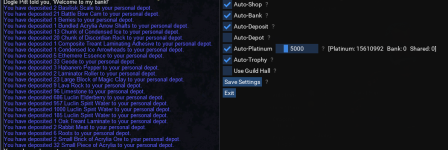
On my last re-boot, verified that my MQ and Lua were all up to date, just for shits and giggles I hit the "Reinstall" button on TCN. Fired up TCN, did NOT check/save uncheck/save the Depot box under settings, ran the Artisan Fletching quest.... and there it went.
Screenshot 1.png
just to be clear, this is only happening to me while running the Artisan Quest, I have not tested any other crafting to see if it's happening under other circumstances. Any information you need from me, just let me know.
 
Release Tradeskill Construction Set NeXt

Users who are viewing this thread

Back
Top
Cart