
-
 Hail, we're RedGuides. We want you to play six (yes, 6!) EverQuest characters at once. We have scripts and a friendly community to help, please join our playstyle and say hello! 👋
You are using an out of date browser. It may not display this or other websites correctly.
You should upgrade or use an alternative browser.
You should upgrade or use an alternative browser.
Resource icon
Release Tradeskill Construction Set NeXt (2 Viewers) 4.1991b
- Thread starter jb321
- Start date


Give him what class/race/illusion or size you were and what you were making so he can try to recreate it.got stuck multiple times going from the kiln to Sculptor Radee in POK. just letting you know. no big deal
edit:
did it again, this time going to Amile Pitt

- Commits
- 2
When the batch window opens and the window is out of the view area to move the window and it won't resize. How do I move the window?
Getting stuck is commonly due to meshes in PoK. It's sometimes possible to fix it on the macro/Lua side, but really I'd recommend you modify your nav mesh for the zone instead.got stuck multiple times going from the kiln to Sculptor Radee in POK. just letting you know. no big deal
edit:
did it again, this time going to Amile Pitt
I get hung up on that kiln(?) right on the corner there by caden when the nav command wants to run me through to the little bank. I modded my mesh, so my toons swing out and around it now, and generally it's not a problem any longer.
- Commits
- 2
I have had pretty good luck with not getting stuck.got stuck multiple times going from the kiln to Sculptor Radee in POK. just letting you know. no big deal
edit:
did it again, this time going to Amile Pitt
Attachments
blahblahblah84
Well-known member
Is there anything included in the plugin to simplify making the Earring of the Solstice items?
blahblahblah84
Well-known member
Just trying to figure out the UI since there's no documentation.
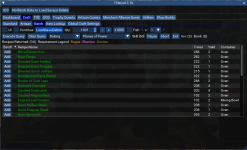
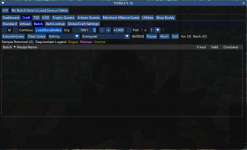
When I go the batch tab, I can choose any expansion and 'Execute Query' and I will see a bunch of recipes, except for the Everquest expansion. I assume the Everquest expansion includes all the older recipes. How am I supposed to fine a recipe like Fish Rolls in this batch UI, since it's an older recipe?
PoP Execute Query result:
Everquest Execute Query result:
When I go the batch tab, I can choose any expansion and 'Execute Query' and I will see a bunch of recipes, except for the Everquest expansion. I assume the Everquest expansion includes all the older recipes. How am I supposed to fine a recipe like Fish Rolls in this batch UI, since it's an older recipe?
PoP Execute Query result:
Everquest Execute Query result:

- Seller
- #1,528
Every flag for an expansion is a manual process, I have added fish rolls because I just looked it up, but for every one that doesn't have a flag it will never show up in batch.Just trying to figure out the UI since there's no documentation.
When I go the batch tab, I can choose any expansion and 'Execute Query' and I will see a bunch of recipes, except for the Everquest expansion. I assume the Everquest expansion includes all the older recipes. How am I supposed to fine a recipe like Fish Rolls in this batch UI, since it's an older recipe?
PoP Execute Query result:
View attachment 42967
Everquest Execute Query result:
View attachment 42968
27,203 recipes are expansion flagged, 16,604 are not flagged.
- Seller
- #1,529
Every flag for an expansion is a manual process, I have added fish rolls because I just looked it up, but for every one that doesn't have a flag it will never show up in batch.
27,203 recipes are expansion flagged, 16,604 are not flagged.
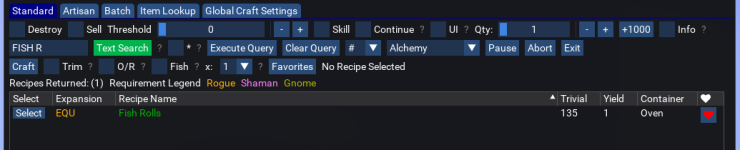
If you are just making fish rolls, or a single item, I would use the standard crafting, it will make a specified amount or reach a desired skill level and can continue to try to reach the goal as long as you have supplies and plat.
I added in a text search if you dunno what skill is used, you can do partial search or full search:
Everyone can use batch any damn way they want..
but what it is for is pumping out a bunch of different items primarily to sell for cash, or creating a complete set of armor all at once, or option c
- Seller
- #1,530
That version is eleventy billion years old!I dont see any TOV Jewelery when i do a batch. Is it just me or am i just missing something?
View attachment 42929
- Seller
- #1,531
mesh?got stuck multiple times going from the kiln to Sculptor Radee in POK. just letting you know. no big deal
edit:
did it again, this time going to Amile Pitt
blahblahblah84
Well-known member
Is it possible to add flags on my own? I was trying to create a batch with a bunch of different progressive recipes to skill up through baking (e.g. Fish Rolls to 135, Filleted Bear to 143, Patty Melt to 191 ...). I'm not sure if this is the right way to go about it. Like you said, I did find the recipe under standard, but that would not let me automate a whole series of recipes.Every flag for an expansion is a manual process, I have added fish rolls because I just looked it up, but for every one that doesn't have a flag it will never show up in batch.
27,203 recipes are expansion flagged, 16,604 are not flagged.
In the original TSC.mac I was able to create an ini with a bunch of recipes and just let it run. I've attached a file that I used with TSC.mac to skill up smithing to 300. I'm was hoping that I would be able to do something similar through the UI with this version.
Attachments
- Seller
- #1,533
Is there anything included in the plugin to simplify making the Earring of the Solstice items?
This is what you need and it can make them all.
* Demi-Sec Champagne
* Mistletoe Cutting Sickle
* Golden Idol of Tunare
* Blessed Fishing Rod
* Star Ruby Encrusted Stein
* Ceremonial Solstice Robe
* Lotus Pie
* Misty Thicket Picnic
* Lucky Cabbage
- Seller
- #1,534
Is it possible to add flags on my own? I was trying to create a batch with a bunch of different progressive recipes to skill up through baking (e.g. Fish Rolls to 135, Filleted Bear to 143, Patty Melt to 191 ...). I'm not sure if this is the right way to go about it. Like you said, I did find the recipe under standard, but that would not let me automate a whole series of recipes.
In the original TSC.mac I was able to create an ini with a bunch of recipes and just let it run. I've attached a file that I used with TSC.mac to skill up smithing to 300. I'm was hoping that I would be able to do something similar through the UI with this version.
for that functionality and if the recipe isn't flagged, you just create any old batch file and then edit it
9662,Misty Thicket Picnic,1,18031
13475,Fish Rolls,1,90823
19189,Armadillo Simmer Ale,1,89605
I added Armadillo Simmer Ale
You will need the recipe ID, which is displayed when selected in standard, you would the item ID..
If you flag your recipes manually, they will get overwritten upon updating..
Here is an example if you wanted the first three items for the Earring of Solstice:
9662,Misty Thicket Picnic,1,18031
9720,Golden Idol of Tunare,1,18299
9666,Blessed Fishing Rod,1,18089
- Seller
- #1,535
the Internet is unhelpful. I looked for ImGui default window position, or reset window position and came up with nada. You can set the position, but then you can't move it, there is an ini file or something and I am skeptical if this version of ImGui supports it.. did your monitor go dark or something?When the batch window opens and the window is out of the view area to move the window and it won't resize. How do I move the window?
- Commits
- 2
Not dark. I tried to size the bottom of the window up and it repositioned the window above the top of the screen with no return. hahathe Internet is unhelpful. I looked for ImGui default window position, or reset window position and came up with nada. You can set the position, but then you can't move it, there is an ini file or something and I am skeptical if this version of ImGui supports it.. did your monitor go dark or something?
- Seller
- #1,538
Format C: or alt-f4 or rm -rNot dark. I tried to size the bottom of the window up and it repositioned the window above the top of the screen with no return. haha
- Seller
- #1,539
I can add this to the suite but will require some user intervention to copy it..I have had pretty good luck with not getting stuck.
blahblahblah84
Well-known member
The video was very helpful. Now if only the server hadn't gone down so I could try it out :POk, dunno what or if it will break anything..
but build-a-batch, your way!
And yes I had the idea, but didn't want to do it for .. reasons..
- Seller
- #1,541
Actually I just added it, and before I could complete testing, EQ blew up..The video was very helpful. Now if only the server hadn't gone down so I could try it out :P
Ok I tested it to make sure I can switch between executing the query and hitting the text box. so I am 23.5% confident it will work..
Last edited:
blahblahblah84
Well-known member
So one major difference. Your batch screen has a search textbox, and mine doesn't. Here's a screenshot of what I see ....Actually I just added it, and before I could complete testing, EQ blew up..
Ok I tested it to make sure I can switch between executing the query and hitting the text box. so I am 23.5% confident it will work..
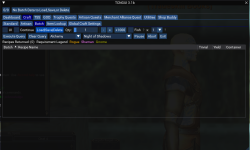
The lack of a text search box is what was causing me problems since I could only use the dropdown by expansion. I'm not sure why it's missing on mine, since I'm on version 3.1b as well.
- Seller
- #1,543
The version is 3.11b that I am using, at the time of the video I didn't update it in the GUI, this will be the next release 3.11bSo one major difference. Your batch screen has a search textbox, and mine doesn't. Here's a screenshot of what I see ....
View attachment 42976
The lack of a text search box is what was causing me problems since I could only use the dropdown by expansion. I'm not sure why it's missing on mine, since I'm on version 3.1b as well.
- Seller
- #1,544
I really should let versions breath just a little before pushing them out..The version is 3.11b that I am using, at the time of the video I didn't update it in the GUI, this will be the next release 3.11b
You're like a mama bunny.I really should let versions breath just a little before pushing them out..
Hey @jb321 , while you're taking every request on the internet... 
I noticed when I'm trying to output a "missing" components list in Artisan, it tells me how many total I would need without taking into account what's in the inventory.
Was wondering if it was done this way on purpose, and if so, to avoid needing to switch how it's handled maybe the "inv" column could also be output to the CSV?
I may or may not have farmed a bunch of shit I already had in my inventory before I realized this, lol.
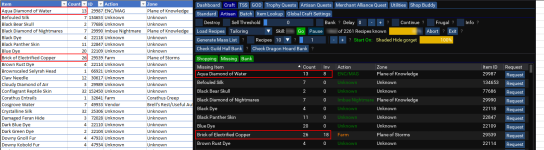
I noticed when I'm trying to output a "missing" components list in Artisan, it tells me how many total I would need without taking into account what's in the inventory.
Was wondering if it was done this way on purpose, and if so, to avoid needing to switch how it's handled maybe the "inv" column could also be output to the CSV?
I may or may not have farmed a bunch of shit I already had in my inventory before I realized this, lol.
- Seller
- #1,547
The simplest answer is I don't know at what time you used what and what you put where, so I give you a complete list so there is no way you cannot have enough...Hey @jb321 , while you're taking every request on the internet...
I noticed when I'm trying to output a "missing" components list in Artisan, it tells me how many total I would need without taking into account what's in the inventory.
Was wondering if it was done this way on purpose, and if so, to avoid needing to switch how it's handled maybe the "inv" column could also be output to the CSV?
I may or may not have farmed a bunch of shit I already had in my inventory before I realized this, lol.
View attachment 43003
The .csv list has and always been geared towards being complete regardless of what inventories you may have...
Even if I did add an inventory column, we still wouldn't know what went were, unless that character never eats/drinks or never does anything with the materials after you output the list..
Since I am the government, I am here to protect you..
- Seller
- #1,548
jb321 updated Tradeskill Construction Set NeXt with a new update entry:
Build-a-Batch, search for batch items without the expansion
Read the rest of this update entry...
Build-a-Batch, search for batch items without the expansion
10/19/2022
3.1b - ChangeLog
Added: Functionality to search for individual items to add to batch
Added: POK mesh to be used if your character sometimes gets stuck
Read the rest of this update entry...
The simplest answer is I don't know at what time you used what and what you put where, so I give you a complete list so there is no way you cannot have enough...
The .csv list has and always been geared towards being complete regardless of what inventories you may have...
Even if I did add an inventory column, we still wouldn't know what went were, unless that character never eats/drinks or never does anything with the materials after you output the list..
Since I am the government, I am here to protect you..
I had always assumed it was just to quickly output a list of things to farm to achieve whatever mass list you had generated at the time. Is it tied to something else as well? I feel like if I was to output a list, completely change what's in my inventory, then still expect the list to be up to date I'd be pretty... special.
So if I've got an inventory full of garbage (I do!) along with a bank full of more garbage (it is so!), I would want to know what's specifically missing from my character as a whole so that I could send my crew out to various zones and start collecting.
I normally follow something like this:
- Run a full "Generate Mass List" for the TS I'm focusing on at the moment
- Review the CSV to see what's reasonable to farm (always aim to farm whatever will most quickly reduce my missing recipe list size)
- Send my crew off to various places to start farming
- Start crafting, using what I *do* have on myself, while the other chars are farming
- Once I run out of recipes I can complete, return with my farmers to dump their new mats on my TS character
- Re-run the "Generate Mass List" so that I don't need to manually check off the 300 stacks of items I've brought back from 5 different zones
- Repeat
Maybe I'm approaching it wrong? It's very possible. I've had to adapt in messy ways to account for inventory space, lack of mats on the bazaar, the PITA of farming some of the stuff, and desperately wanting to get the missing recipe lists as small as possible ASAP to reduce the load/processing times.
- Seller
- #1,550
If I provide an option to write a list that subtracts inventory and bank counts, would that be confusing?I had always assumed it was just to quickly output a list of things to farm to achieve whatever mass list you had generated at the time. Is it tied to something else as well? I feel like if I was to output a list, completely change what's in my inventory, then still expect the list to be up to date I'd be pretty... special.
So if I've got an inventory full of garbage (I do!) along with a bank full of more garbage (it is so!), I would want to know what's specifically missing from my character as a whole so that I could send my crew out to various zones and start collecting.
I normally follow something like this:
There's always a lot of stuff going on for me at once, and it's easy for me to lose track of things I've already done. The other day I accidentally re-farmed an item for like 6 hours based on the farm list, when in reality I had gotten the ones I needed within the first 15 mins.
- Run a full "Generate Mass List" for the TS I'm focusing on at the moment
- Review the CSV to see what's reasonable to farm (always aim to farm whatever will most quickly reduce my missing recipe list size)
- Send my crew off to various places to start farming
- Start crafting, using what I *do* have on myself, while the other chars are farming
- Once I run out of recipes I can complete, return with my farmers to dump their new mats on my TS character
- Re-run the "Generate Mass List" so that I don't need to manually check off the 300 stacks of items I've brought back from 5 different zones
- Repeat
Maybe I'm approaching it wrong? It's very possible. I've had to adapt in messy ways to account for inventory space, lack of mats on the bazaar, the PITA of farming some of the stuff, and desperately wanting to get the missing recipe lists as small as possible ASAP to reduce the load/processing times.
If I provide an option to write a list that subtracts inventory and bank counts, would that be confusing?
I do see the dilemma.
Doing something like this would at least be consistent with the in-game window:

You'd not technically need to address the bank thing at all, because the bank is a separate CSV/Window anyway at the moment.
But then the "issue" isn't really fully addressed, right, because technically one would still have the same problem if they had stuff in their bank instead of their inventory...
Buuuut if you were to add bank info to the missing csv, then it does definitely get confusing since they're separate in-game.
That part of it never really occurred to me because I normally pull all the relevant mats out of my bank before starting, so that my char doesn't need to run back and forth 1000x while crafting.
Damn.

- Seller
- #1,552
So what ultimately is it you want to know, how much you need at a specific point of time based on ONLY what is needed minus ONLY what is in your inventory?I do see the dilemma.
Doing something like this would at least be consistent with the in-game window:
View attachment 43008
You'd not technically need to address the bank thing at all, because the bank is a separate CSV/Window anyway at the moment.
But then the "issue" isn't really fully addressed, right, because technically one would still have the same problem if they had stuff in their bank instead of their inventory...
Buuuut if you were to add bank info to the missing csv, then it does definitely get confusing since they're separate in-game.
That part of it never really occurred to me because I normally pull all the relevant mats out of my bank before starting, so that my char doesn't need to run back and forth 1000x while crafting.
Damn.
For me personally that's what I wanted to know, yeah. Exactly what you've already got in the in-game tabs.
It's one of those things that really covers my personal situation though, because I don't leave stuff in my bank when I'm trying to do my 300-350 combines.. I could see how others may have wanted that same functionally but also including other sources (bank, dragon's hoard, etc.). It may turn things into a mess trying to cover everything, and it may not be worth it.
*slowly backs towards the door*
It's one of those things that really covers my personal situation though, because I don't leave stuff in my bank when I'm trying to do my 300-350 combines.. I could see how others may have wanted that same functionally but also including other sources (bank, dragon's hoard, etc.). It may turn things into a mess trying to cover everything, and it may not be worth it.
*slowly backs towards the door*
blahblahblah84
Well-known member
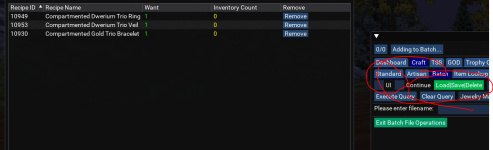
Ok, so I'm being dumb here. I created a batch, but how do I save the batch. If I 'Generate Batch List' it fills in the bottom of the batch screen, but I don't see any file saved anywhere. Your reply above mentioned editing a batch file, but I can't even see any file in the file system.
- Seller
- #1,556
Ok, so I'm being dumb here. I created a batch, but how do I save the batch. If I 'Generate Batch List' it fills in the bottom of the batch screen, but I don't see any file saved anywhere. Your reply above mentioned editing a batch file, but I can't even see any file in the file system.
blahblahblah84
Well-known member
Ahh, I didn't realize the save button was in the other UI. Thanks.

Dragonator
Active member
Fish rolls are the bomb !I have added fish rolls because I just looked it up,
- Seller
- #1,559
If EQ only had pork gyoza..Fish rolls are the bomb !
Hey JB - I know you get bored and are always looking to add more things to your already super Resource, so I thought I'd throw this out there.
Like most people - I have a guild full of bots with multiple housing estates full of Items - both trash and treasure!
If the Database knew about these trash and treasure repositories then it could do a search and go get the treasure to use? Not really much different to Navigating to the Bank In principle.
So the problems would really only be getting a complete /Find list of every item from every person, concatenating them together and adding them to the SQL Database, and maybe a way to update this on a periodic basis.
That sounds easy doesnt it?
Oh then we would need nav spots for each of the Housing plots - 101 Terminus Way and all that mumbo jumbo - just so you could nav to them to fetch that treasure!
Of course they might surprise us and the new feature they are giving us in NOS might actually give us the central repository we all need, and hopefully we wont need 400 Houses to hold our shite.
Anyway...food for thought
PS Troll Shaped Cookies > Fish Rolls
Like most people - I have a guild full of bots with multiple housing estates full of Items - both trash and treasure!
If the Database knew about these trash and treasure repositories then it could do a search and go get the treasure to use? Not really much different to Navigating to the Bank In principle.
So the problems would really only be getting a complete /Find list of every item from every person, concatenating them together and adding them to the SQL Database, and maybe a way to update this on a periodic basis.
That sounds easy doesnt it?
Oh then we would need nav spots for each of the Housing plots - 101 Terminus Way and all that mumbo jumbo - just so you could nav to them to fetch that treasure!
Of course they might surprise us and the new feature they are giving us in NOS might actually give us the central repository we all need, and hopefully we wont need 400 Houses to hold our shite.
Anyway...food for thought
PS Troll Shaped Cookies > Fish Rolls
Users who are viewing this thread
Total: 3 (members: 0, guests: 3)
Share: