• You've discovered RedGuides, an EverQuest multi-boxing and scripting community 🧙‍♀️⚙️. We want you to play several EQ characters at once, come join us and say hello! 👋

  • A TLP without truebox has thawed (Very Vanilla ready)
    Frostreaver
Resource icon

Release Tradeskill Construction Set NeXt (2 Viewers) 4.1991b

This is where it gets the recipes to compare to..

1672359025437.png

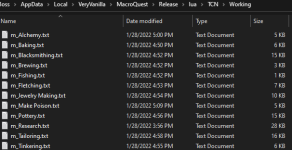
Does your directory look like this with the file sizes?
 
This is where it gets the recipes to compare to..

View attachment 44710

Does your directory look like this with the file sizes?
My directory has no files in it. I watched the folder as I click the Load Recipes button and it creates a file very briefly, then removes it almost immediately. Also, the number, EX: 4 of 4 changes depending on the character I am on but its always the same number IE: 171 out of 171
 
My directory has no files in it. I watched the folder as I click the Load Recipes button and it creates a file very briefly, then removes it almost immediately. Also, the number, EX: 4 of 4 changes depending on the character I am on but its always the same number IE: 171 out of 171
So, you have a directory called working and there is nothing in it?

I was able to recreate the same error by having a 0 byte tailor txt file.. in the working directory..
 
Last edited:
So, you have a directory called working and there is nothing in it?

I was able to recreate the same error by having a 0 byte tailor txt file.. in the working directory..
Correct, I have a Working folder and it is empty. If I run the script and click the load recipes button a file shows up in it for less than half a second and then disappears.
 
It is red, i typed this by hand so there might be typos but the double \ in the path is whats reported, thats not a typo:
Release\lua\\tcn\tcn_library.lua:2598: attempt to concatenate local 'p_id' (a nil value)
stack traceback:
Release\lua\\tcn\tcn_library.lua: in function 'return_max_skip_flag'
Release\lua\\tcn\tcn_feeder.lua:3940: in function 'full_max_crafting_routine'
Release\lua\\tcn\tcn_feeder.lua:6358: in function 'run_max_list'
Release\lua\tcg.lua:9382: in main chunk
As an FYI, you can open the MQ Console (Ctrl+~) and copy/paste from there.
 
Correct, I have a Working folder and it is empty. If I run the script and click the load recipes button a file shows up in it for less than half a second and then disappears.
Drops these files into the TCN\Working directory
 

Attachments

Drops these files into the TCN\Working directory
That fixed it, now its the number we saw before, 4 and 171 of 754. Does this fix the problem? Did I not do the setup right so these didnt get created?

For reasons unknown zip file didn't extract afaik.. The resource should be watched here and that should allow it to update via the launcher.. If there are additional issues then we should just drag and drop the files from the zip into the directories.
 
Last edited:
Did some spiritually faded visibles today and it kept using my bolt.... Might want to make it check for the shaded shears. Also, could you make it turn MQ2TStrophy back on if it was on when it started. one of these days Im gonna eat some expensive mats :P

Overall really like the product.
 
Apologies if this has already been asked/answered, is there a way to have a toon bring the crafter what they have of an item even if it doesn't fulfill the need? Say I need 100 fine silk, but random toon I'm asking for fine silk only has 87 of them, is there something I can do to make them give the silk to me anyway?
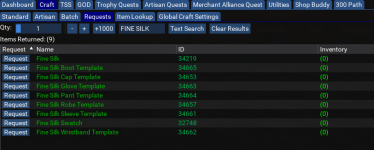
 
Apologies if this has already been asked/answered, is there a way to have a toon bring the crafter what they have of an item even if it doesn't fulfill the need? Say I need 100 fine silk, but random toon I'm asking for fine silk only has 87 of them, is there something I can do to make them give the silk to me anyway?

1672609931227.png

The overall intent is too not flood your inventory with stuff that you can't possibly use to make the item(s)..

There is also a macro that transfers items

 
Last edited:
also noticed, I told it to make one wrist twice instead of 2 wrists, and it only made one before it quit.
That is by design, The intent is to have the total amount per line per item, I would just remove the entries and set it to 2 and re-add it.
 
Did some spiritually faded visibles today and it kept using my bolt.... Might want to make it check for the shaded shears. Also, could you make it turn MQ2TStrophy back on if it was on when it started. one of these days Im gonna eat some expensive mats :P

Overall really like the product.

The plugin will now be loaded if you use the exit button and it was unloaded when starting TCG. - Next Release

Dunno why I would check for shaded shears that is a range/primary slot item. the trophies are hard slotted for ammo. They both appear to be the same effect..

The trophies can also be activated from the house, shears cannot.

1672610148902.png
 
The plugin will now be loaded if you use the exit button and it was unloaded when starting TCG. - Next Release

Dunno why I would check for shaded shears that is a range/primary slot item. the trophies are hard slotted for ammo. They both appear to be the same effect..

The trophies can also be activated from the house, shears cannot.
Shears are an extra 5 skill in tailoring. you get an extra 1-2% chance of success at 300+ combines.
 
NoS Make Poison recipes are not coming up for me. Others do (baking, tailoring, etc...). Am I doing something wrong, or are they not available?
 
So I am having an issue with the artisan tab, every time I go to load a recipe list it does an outputfile and then closes whole script. It does it for each recipe. what am I doing wrong? I am trying to max to 350, all TS are 315-330ish thanks!

*edit Didn't realize I am getting a error

no such table: Max_Trophy_Table
stack traceback:
[C]: in function 'nrows'
...Downloads\RedGuides_VeryVanilla\Lua\\tcn\tcn_library.Lua:2598: in function 'return_max_skip_flag'
...Downloads\RedGuides_VeryVanilla\Lua\\tcn\tcn_library.Lua:2704: in function 'readfile_artisan'
...Downloads\RedGuides_VeryVanilla\Lua\\tcn\tcn_library.Lua:2498: in function 'generate_recipes'
...\Downloads\RedGuides_VeryVanilla\Lua\\tcn\tcn_feeder.Lua:4904: in function 'load_max_recipes'
RedGuides_VeryVanilla\Lua\tcg.Lua:9368: in main chunk
Ending Lua script 'tcg' with PID 3 and status -1
 
Last edited:
So I am having an issue with the artisan tab, every time I go to load a recipe list it does an outputfile and then closes whole script. It does it for each recipe. what am I doing wrong? I am trying to max to 350, all TS are 315-330ish thanks!

*edit Didn't realize I am getting a error

no such table: Max_Trophy_Table
stack traceback:
[C]: in function 'nrows'
...Downloads\RedGuides_VeryVanilla\lua\\tcn\tcn_library.lua:2598: in function 'return_max_skip_flag'
...Downloads\RedGuides_VeryVanilla\lua\\tcn\tcn_library.lua:2704: in function 'readfile_artisan'
...Downloads\RedGuides_VeryVanilla\lua\\tcn\tcn_library.lua:2498: in function 'generate_recipes'
...\Downloads\RedGuides_VeryVanilla\lua\\tcn\tcn_feeder.lua:4904: in function 'load_max_recipes'
RedGuides_VeryVanilla\lua\tcg.lua:9368: in main chunk
Ending lua script 'tcg' with PID 3 and status -1

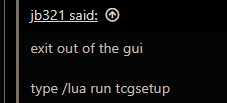
exit out of the gui

type /Lua run tcgsetup
 
Tested the eval version, really cool!

Will this full version do the level 1 trophy quest for your character?

Let's say you start with 50 skill character.

I remember there was a script (now discontinued)
that ran to West Freeport then back to POK to buy and do the easy combines for the level 1 trophy quest then back to West Freeport to do the turnins.
 
Tested the eval version, really cool!

Will this full version do the level 1 trophy quest for your character?

Let's say you start with 50 skill character.

I remember there was a script (now discontinued)
that ran to West Freeport then back to POK to buy and do the easy combines for the level 1 trophy quest then back to West Freeport to do the turnins.

What is the purpose of this (TLDR)?

To provide an mostly automated method and sometimes completely automated method to craft ANY recipe by means of grabbing items and plat from bank (including trophies), shopping from vendors, going to the craft stations, and crafting, create mass lists for shopping, farming, etc... for use with regular crafting, batch, quests, and artisan (350 earring) mode crafting. Will also under most circumstances allow the user to ask their fellow logged in characters if they have an item they are missing, and it will request it and deliver. Will also check the users local inventory and bank, and when applicable a way to check their guild hall and dragon hoard banks. Equipped with the bells and whistles to continue crafting to reach goals, stop when a skill level is reached, destroy, or sell items. grab tools from bank for use and when done crafting, return them to the bank so the bags don't stay filled up, grab components from bank as needed to complete a recipe, ,use tradeskill depot as needed, run through a selected amount or all recipes to max your augment for 350, fish scale swapping for high level recipes, shopping multiplier to account for mistakes, save lists for later, lookup recipes based on a component, create custom batch file lists for large and varied orders, cultural smithing for everyone except Erudites and Woodelves (sorry, for now), Cultural tailoring for ALL, Aid Grimel recipes for assistance in getting one of the pieces to turn in for the Artisan's Prize. Furthermore, this will do the merchant alliance quest crafting, all the artisan prize seal crafting, and all trophy quests. Does all the GOD and TSS freebie quests also to get to 54 and also refine materials for GOD recipes.
 
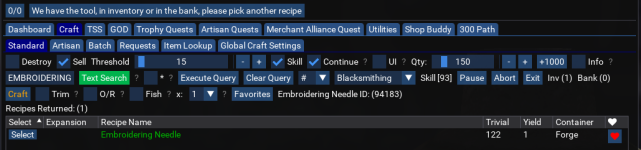
I discovered another way to inadvertently crash it unfortunately. When I tried to skill up smithing on a new character I decided to try the embroidery needle as my 92-122 route. However; the Lua crashes if you try to craft one and already have one in inventory. Probably because it's a component for other combines, and it takes an erroneous detour when you try. So having one in inventory and trying to craft more with these settings will CTD, or did 3 times in a row for me anyway:
1673304917627.png
 
I just tried to load this up on a different computer and getting the following. Lua runs, but when I use the drop down to select the TS discipline under the Artisan tab, this happens and it ends What am I missing to run?:

1673316768434.png
 
Thank you so much for the quick reply. I did run the setup, as you suggested, but this is the result. I am certain it's something I did wrong, possibly out of order? I plan to delete the files and start from scratch when I have time this evening.
 
Thank you so much for the quick reply. I did run the setup, as you suggested, but this is the result. I am certain it's something I did wrong, possibly out of order? I plan to delete the files and start from scratch when I have time this evening.
The other option is to make sure you have these files in the Lua\tcn\working directory
 

Attachments

Last edited:
The other option is to make sure you have these files in the lua\tcn\working directory
If you are copying to a new machine you need to make sure you copy the sub dir folders as well..


if you are not using the launcher to install it..
 
Last edited:
Has been pretty amazing, but also a few hiccups.

On two characters, it failed to make Aqua Fortis and other researching recipes. i believe it got stuck naving to the merchant for gnomish heat source, but not positive.

Spent 10 minutes trying to make "makeshift enchanted Spell parchment" with a character with 0 research spell. In general that's my biggest pet peave, is when I hit a button I think should do something, and nothing happens and no error message/prompt to tell you why it doesn't want to do something. Is there a way to turn on debug output?

A FAQ/getting starting on 300+/artisan would be nice, still haven't gotten gotten this working (0/0) recipes. Is running on multiple character simultaneously an issue?

When I hit pause (probably while doing a trophy quest), it stopped/paused nav, then thought it was stuck and started /rewinding and jumping.

Even with the hiccups, I'm getting 3x as much done as doing stuff manually.
 
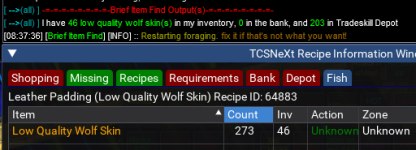
The depot information is a little difficult to extract when trying to make combines. I'm trying to make leather padding from low quality wolf skins at the moment, and I have 46 on me and 203 in the depot as reported by my item find Lua. The missing tab on the recipe list however only shows the 46 on me, and says I don't have enough to do 250 or more combines(273 is my attempt right now because I have 273 silk thread on me). The depot tab is red, and shows nothing for what I have in there for hides.

1673373101044.png

If I change the number to craft to be 249, which is the sum of all the low quality wolf hides I have between inventory and depot, then the depot tab turns green and shows my inventory count plus depot count, and the missing tab turns red, as I have the ingredients to do the craft now.

TLDR; if you're missing the adequate ingredients, the missing tab, which currently shows inventory, should really show bank/depot sum also, and/or the sum you are missing. At a minimum, if you have depot items, it shouldn't be red and show nothing. Right now the algebra equation is showing two variables for a four variable problem.
 
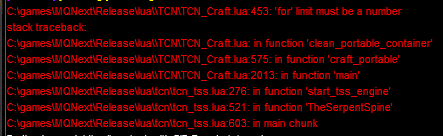
salvaging is causing crashes too for me, while trying the TSS freebie quests at least. Currently running the fletching cycle and if I salvage any parts, it puts/leaves them in the fletching kit, and tcg crashes with a for limit error on 453 where it's trying to clear out the container for another combine:

1673378454105.png


As another note, it reaaaally doesn't like you to have a full set of containers when you try these freebie quests (ie 8/8 slots filled with a bag, even if one of the bags is empty), because things like mixing bowls/fletching kits etc have nowhere to go. it just keeps cycling errors about combining stacks of items, or crashes. It also removes the gui window, and mqoverlay/resume or reload don't bring it back, so I have to reload the Lua again. Should have a check loop that cycles out of the combines on an early fail if there are no available main inventory slots to continue the combines, and maybe give an error message as to why, I would find it helpful at least?
 
Last edited:
Release Tradeskill Construction Set NeXt

Users who are viewing this thread

Back
Top
Cart