• You've discovered RedGuides, an EverQuest multi-boxing and scripting community 🧙‍♀️⚙️. We want you to play several EQ characters at once, come join us and say hello! 👋

  • A TLP without truebox has thawed (Very Vanilla ready)
    Frostreaver
Resource icon

Release Tradeskill Construction Set NeXt (Free) Eval Version 1.2b

No permission to download

jb321

Captain Obvious
Creator
Joined
Mar 29, 2020
RedCents
7,705¢
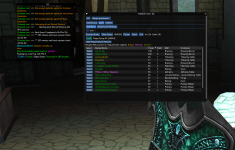
I downloaded this eval version because I'm on a tradeskill buzz at the moment and planning on getting the main version but uh... so I ran the setup and have the Lua running and GUI appears...

What happens now? I can't work out how to specify a query, if I hit execute query some receipes come up, so I guess this is just what is in the eval version and maybe you can't specify the query in the eval version? OK... so then I pick a recipe like lemonade and hit the craft button and nothing happens...I'm in PoK so is it supposed to run and autobuy and do the combine?


EDIT: Scratch all that it started working all of a sudden, I was probably doing something wrong. And to others, note that in the full version there are boxes for enterring your query but in the eval version they are removed and you just have the 'Execute Query' button.
 
Last edited:
This is just for information.
Some research into emu usage:
---
On EMU was getting error with lsqlite3.dll. Stating that it could not find even though it was installed in the right location. My belief was that this was due to 32bit vs 64bit compatibility. Here is some trial and error steps I took.
1. I checked to see if there was a 32bit version of lsqlite3.dll . Unfortunately there wasn't one I could find.
2. I thought I would try there is a 32bit version though of sqlite3complete found here.
3. I extracted lsqlite3complete.dll and renamed to lsqlite3.dll. This did not work, but receive a different error. Pointing me towards certain files in the TCN folder.
4. Investigating tcn_feeder, tcn_library, cruncher they had the following.
local sqlite3 = require('lsqlite3')
5. So I thought I would change the lsqlite3.dll I renamed(step3), back to lsqlite3complete.dll and change ]local sqlite3 = require('lsqlite3') to ]local sqlite3 = require('lsqlite3complete') in those 3 Files
6. This worked and TCN loaded and running on the EMU Server. Yatta...
Though now that it was running, there was some issue with cursor control. I was able to start the Lemonade recipe, it would add the lemon, but as soon as I got water and sugar it would not add to the experimental window.
Also trying the vegetable soup. it would take me to an empty building and not use the mixing bowl in my inventory.
---
I just wanted to provide what file it took to run on EMU in case one day someone wanted to make one for EMU.
 
/Lua run tcgsetup BUT it keeps saying could not find script at path C:\users\jrgad\appdata\local\veryvanilla\macroquest\release\ I am in fact a noob virgin.... I see the Lua setup in downloads no idea how to get it to the correct destination. sad face.. =/ anyone willing to help please and thank you.!! just trying to max out my artisans prize /cry lol
 
/lua run tcgsetup BUT it keeps saying could not find script at path C:\users\jrgad\appdata\local\veryvanilla\macroquest\release\ I am in fact a noob virgin.... I see the lua setup in downloads no idea how to get it to the correct destination. sad face.. =/ anyone willing to help please and thank you.!! just trying to max out my artisans prize /cry lol
whatever Lua you are trying to run you should "watch" the overview page for that resource and let the RG launcher download and install it in the correct location.

if that is TCGNext > click this < then run the RG Launcher and click Lua tab, and the install it


it appears you're trying to use the TCG Evaluation version - > click here <
which is the same as
1668218290974.png
you can select to receive notifications about it or not
1668218298722.png

when you go to your redguides launcher, and click on the "Lua" tab

1668218337577.png
you will see this
hit that install button

1668218345107.png

and now it shows it is installed
1668218378036.png

now you can go in game and do the /lua run tcgsetup and then /lua run tcg > instructions <


I moved your post into the discussion thread for the TCG eval version
 
Last edited:
woot i got it working I i just got the paid version and shit started working. but now i've no idea how to use and or set up the dashboard.. i'm a youtube degenerate. i'm worthless with out a up to date video to watch.. /sadness lol
 
How do you get this to work? have it so it brings up a window and can get it to list some recipes but cant get it to do anything after that
TSconsset.png
 
scotsbiker did you press the Craft button?

I Got the demo recipe to work, but I am unclear if this or full version will do the initial TS trophy quests for you?

Tested on 120 character on FV with 300 Jewelry skill and 7/7 trophy

Unzipped the eval version into Lua folder (TCN subfolder in Lua folder)
C++ runtimes installed just fine

/Lua run tcgsetup
/Lua run tcg

Selected Silver Amber Ring and pressed Craft button

Char Zoned manually zoned out of GH and run to POK (instead of using Drunkard's Stein)
Bought the ingredients and again run back to GH (instead of using GH anchors or Throne of Heroes)

Did not have jewelry table in GH (i used jewelry bag)so script stopped.

Bought and placed table and rerun /Lua run tcg

Made the ring but script did not use the trophy.

So the sqlite3 database to purchase stuff looks fantastic.

Still, will this script help a 0 TS char build to 50 and get level 1 trophy(ies)?
 
How to reopen tcg window wen it closes ? The program is already running
 
How to reopen tcg window wen it closes ? The program is already running
/Lua pause typically..

additionally, this is a bare bones script to get the idea if this will work in your environment with minimal changes. It uses static containers only.. and only does a few recipes..
 
I seem to be stuck at same screen as scotsbiker.
everything seems to be installed correctly - I see all the folders where they are supposed to be in the Lua subfolder.
Press craft - then what - nothing to pick from. Will initialize eq and such to try again later.

Assuming I get this working to my satisfaction and want to buy the full version, do I need to uninstall this free version?
How does one go about uninstalling a Lua?
 
I seem to be stuck at same screen as scotsbiker.
everything seems to be installed correctly - I see all the folders where they are supposed to be in the lua subfolder.
Press craft - then what - nothing to pick from. Will initialize eq and such to try again later.

Assuming I get this working to my satisfaction and want to buy the full version, do I need to uninstall this free version?
How does one go about uninstalling a lua?
If you decide to get the full version, you will not have to delete anything as it should put all the files where they belong. I typically advise people to do /Lua run tcgsetup prior.
scotsbiker did you press the Craft button?

I Got the demo recipe to work, but I am unclear if this or full version will do the initial TS trophy quests for you?

Tested on 120 character on FV with 300 Jewelry skill and 7/7 trophy

Unzipped the eval version into lua folder (TCN subfolder in lua folder)
C++ runtimes installed just fine

/lua run tcgsetup
/lua run tcg

Selected Silver Amber Ring and pressed Craft button

Char Zoned manually zoned out of GH and run to POK (instead of using Drunkard's Stein)
Bought the ingredients and again run back to GH (instead of using GH anchors or Throne of Heroes)

Did not have jewelry table in GH (i used jewelry bag)so script stopped.

Bought and placed table and rerun /lua run tcg

Made the ring but script did not use the trophy.

So the sqlite3 database to purchase stuff looks fantastic.

Still, will this script help a 0 TS char build to 50 and get level 1 trophy(ies)?
The free version is just a watered down test version to make sure things are working before taking the plunge to purchase the full version. This just does a few recipes and is not intended to level skills.
 
I seem to be stuck at same screen as scotsbiker.
everything seems to be installed correctly - I see all the folders where they are supposed to be in the lua subfolder.
Press craft - then what - nothing to pick from. Will initialize eq and such to try again later.

Assuming I get this working to my satisfaction and want to buy the full version, do I need to uninstall this free version?
How does one go about uninstalling a lua?

If you do decide to get the full version it will overwrite all the files and you will need to do /Lua run tcgsetup

Quite a few changes have been taking place and I need to revisit this code to see if all is still good. Typically if you select sugar syrup and click craft, it should run to the vendor and then to the containers and make it.
 
Also as a note it is designed to make 1 item and if it is already in inventory it won't make another of the same item.
 
I have separated TCSNeXt from TCNFree.. they both now live in their own folders.. will be putting out a release..

I have modernized some of the back end code and also tested it to make sure it made items and it also uses the trophy.
 
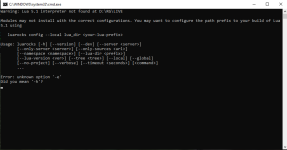
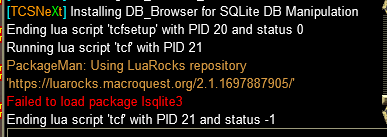
I can't get this to install. I get to this point, a black screen flashes (after install) and says something about lsqlite -e, but maybe h? its too fast to see.
1678222024128.png
 
I am glad this got worked out, I know enough to be dangerous, the Devs know enough to be effective.
 
I can't get this to install. I get to this point, a black screen flashes (after install) and says something about lsqlite -e, but maybe h? its too fast to see.
View attachment 46962
I also got this message when trying out the program. not sure if I made a mistake while installing it and the text box that showed up blinked in and out too quick to read but seems like we both have the same issue.

any tips on this?
 
I also got this message when trying out the program. not sure if I made a mistake while installing it and the text box that showed up blinked in and out too quick to read but seems like we both have the same issue.

any tips on this?
if there is a sqlite3.dll or something like that already in a Lua directory it needs to be deleted, unless you know it is part of something.. that is the 1st try
 
Did it work?
tcf error.png

Got the screen catch of the error when I attempted to run it again. I tried a reinstall after the patch this week, deleted the sqlite3.dll file within the TCF Lua folder. This is the result when I /Lua run tcf after the setup and instal from /Lua run tcfsetup
 
Don't know if you can trust this guy but he has provided this:

By default, LuaRocks looks for the Lua interpreter executable in the PATH environment variable on Windows 10.

If you have installed Lua in the default location, LuaRocks should be able to find it automatically. Otherwise, you can specify the path to the Lua interpreter executable using the --Lua-dir command-line option when installing or configuring LuaRocks.

To check if Lua is already in your PATH, you can open a command prompt and type Lua -v. If Lua is installed and in your PATH, this should display the version of Lua you have installed. If not, you may need to add the path to the Lua executable to your PATH environment variable.
 
I appreciate that, thank you :)
I'll give it a try, worst case I may save my INIs and Macro settings and try to reinstall to the default location of the VV folder. I did choose a different spot for it originally which may be the root of this.
 
I was trying this free eval version before buying the full version but this one doesnt seem to work on classic/kunark era. Does the full version offering TLP(Rizlona) functionality works for those era?
 
That was weird. I selected a recipe, but it assumed I wanted to start crafting (the craft button is separate). Does the full version do that too? Surprised me because the character immediately used Throne of Heroes.
 
That was weird. I selected a recipe, but it assumed I wanted to start crafting (the craft button is separate). Does the full version do that too? Surprised me because the character immediately used Throne of Heroes.
Until you select craft in the full version it will not move, caveat being you are doing the quests/artisan/etc anything other than standard crafting.
 
Last edited:
I have separated TCSNeXt from TCNFree.. they both now live in their own folders.. will be putting out a release..

I have modernized some of the back end code and also tested it to make sure it made items and it also uses the trophy.
I got the free version and then upgraded to the pay version.
do I still need to "watch" and keep the free version updating in the redguides launcher? I am unsure if they share any resources that uninstalling the free version will break the version I paid for.
 
I got the free version and then upgraded to the pay version.
do I still need to "watch" and keep the free version updating in the redguides launcher? I am unsure if they share any resources that uninstalling the free version will break the version I paid for.
They are completely separate, or at least I have been told.. Basically do not watch the free one :)
 
Trying to get this working in a unique situation, so hopefully there is an alternative way to setup the sql part? I run the tcfsetup and things work fine, but when I run /Lua run tcf it wants to install something with SQLite (eventhough it appeared to be installed by the setup?). unfortunately clicking the install button causes an issue when it tries to execute. I am running in wine/crossover for mac, so this is wine crashing with an illegal command. Is there a specific script I can run outside the game to do the install for sql?
 
Trying to get this working in a unique situation, so hopefully there is an alternative way to setup the sql part? I run the tcfsetup and things work fine, but when I run /lua run tcf it wants to install something with SQLite (eventhough it appeared to be installed by the setup?). unfortunately clicking the install button causes an issue when it tries to execute. I am running in wine/crossover for mac, so this is wine crashing with an illegal command. Is there a specific script I can run outside the game to do the install for sql?
I'm :mystery:
 
I think you can generate the dll using luarocks on a different machine or maybe even on that machine and then use it. If you have the dll itself it can be copied to the Lua directory
 
having problems with Lua tcn i can run the command Lua run tcn but im not getting the control panel appearing its just started doing it today
 
having problems with lua tcn i can run the command lua run tcn but im not getting the control panel appearing its just started doing it today
Figuring this belongs in the TCN thread, but I think it already exists there and has been resolved?
 
I'm also getting this error. I followed the install instructions. If I try to install the included vc-redist package that it states to install if you get red text, it says it can't install as I already have a newer version. I tried deleting the luarocks folder in the localdata directory as someone else mentioned (due to having installed it as admin possibly?). no dice there either. The only thing I can think of is uninstalling the version of the visual c++ redist that I already have (which is supposedly newer) and installing the included one, I'm just leary to do that as I'm afraid it will break something else at this point lol. Any ideas?
1700465041110.png


Edit : Well I found a work around that worked for me. I tried it on another laptop. it installed fine there. so I copied everything out of the modules folder, and out of the Lua and Lua/tfc folder to my main machine. It ran fine once I'd done that.
 
Last edited:
The evaluation version seems to have installed correctly. I can select a recipe, but nothing happens when I hit the craft button. Any suggestions? I'd like to purchase the full version as I absolutely loathe tradeskills.
 
I'm also getting this error. I followed the install instructions. If I try to install the included vc-redist package that it states to install if you get red text, it says it can't install as I already have a newer version. I tried deleting the luarocks folder in the localdata directory as someone else mentioned (due to having installed it as admin possibly?). no dice there either. The only thing I can think of is uninstalling the version of the visual c++ redist that I already have (which is supposedly newer) and installing the included one, I'm just leary to do that as I'm afraid it will break something else at this point lol. Any ideas?
View attachment 53343


Edit : Well I found a work around that worked for me. I tried it on another laptop. it installed fine there. so I copied everything out of the modules folder, and out of the lua and lua/tfc folder to my main machine. It ran fine once I'd done that.
1st step is to delete the lsqlite3.dll that may be in the Lua directory..
2nd step is please delete %appdata%/local/luarocks folder, and make sure not to run the Lua in UAC or as admin
 
Last edited:
The evaluation version seems to have installed correctly. I can select a recipe, but nothing happens when I hit the craft button. Any suggestions? I'd like to purchase the full version as I absolutely loathe tradeskills.
if the button is yellow, it means you are missing something or there is a requirement, try clicking on lemonade.. and trying that.

If everything appears right and it just stands there, is your MQ2Nav plugin loaded? meshes?
 
Last edited:
Release Tradeskill Construction Set NeXt (Free) Eval Version

Users who are viewing this thread

Back
Top
Cart