• You've discovered RedGuides, an EverQuest multi-boxing and scripting community 🧙‍♀️⚙️. We want you to play several EQ characters at once, come join us and say hello! 👋
The NEW Linux and MQ Guide!!

Guide - The NEW Linux and MQ Guide!! (1 Viewer) 2.0

No permission to download
Anybody find a way to get IMGUI to work in Ubuntu 22.04? Everything else is working perfectly, but IMGUI for some reason is the only feature that I can't seem to get. Pretty annoying with how many scripts have GUIs attached to them lol.
Figured it out.

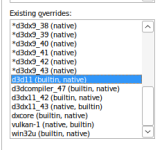
The IMGUI backend calls from DirectX11, so when you're setting up via winecfg, you need to add the following dll overrides:
- d3d9 (native, builtin)
- d3d11 (builtin, native)
- d3dcompiler_47 (builtin, native)
- dxcore (builtin, native)
- win32u (builtin, native)
- &vulkan (native, builtin)


*I'm not sure I saw vulkan mentioned in the macroquest build, but wine does spit out a lot of vulkan info stuff, so it's probably needed as well.

I haven't messed around with slimming up my overrides, but the above is what worked for me on Ubuntu 22.04. Thanks to everyone who made the code open source on GitHub, otherwise I would never have guessed which libraries need to be overridden to make imgui work on Linux.

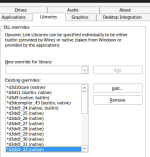
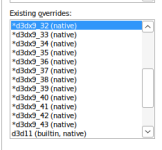
Edit: I've attached a screenshot of the full list of library overrides that I used, in order to get this to work, you should also make sure to not override dxgi (remove it from your existing overrides)... Just in case anyone else is struggling trying to get imgui into their linux build
1750623014438.png1750623042725.png1750623057287.png
 
Last edited:
Noob here trying to get this to work...do I use Redfetch or the Launcher to try to get this working? Having a bit of trouble with that aspect of things.
 
Noob here trying to get this to work...do I use Redfetch or the Launcher to try to get this working? Having a bit of trouble with that aspect of things.
Redfetch is a lot easier to use. The launcher doesn't really work too well on Linux.
 
Figured it out.

The IMGUI backend calls from DirectX11, so when you're setting up via winecfg, you need to add the following dll overrides:
- d3d9 (native, builtin)
- d3d11 (builtin, native)
- d3dcompiler_47 (builtin, native)
- dxcore (builtin, native)
- win32u (builtin, native)
- &vulkan (native, builtin)


*I'm not sure I saw vulkan mentioned in the macroquest build, but wine does spit out a lot of vulkan info stuff, so it's probably needed as well.

I haven't messed around with slimming up my overrides, but the above is what worked for me on Ubuntu 22.04. Thanks to everyone who made the code open source on GitHub, otherwise I would never have guessed which libraries need to be overridden to make imgui work on Linux.

Edit: I've attached a screenshot of the full list of library overrides that I used, in order to get this to work, you should also make sure to not override dxgi (remove it from your existing overrides)... Just in case anyone else is struggling trying to get imgui into their linux build
View attachment 70380View attachment 70381View attachment 70382
If you don't want to do all of this, just using Zorin18 or a distro based on Ubuntu 24.04+ will also take care of the IMGUI issues.
 
I could still really use some help trying to troubleshoot the lack of UI interaction from the system tray icon though. Not being able to use/configure auto login is kind of a non-starter for me. All of my EQ accounts have random passwords generated by a password manager and I don’t have any of them memorized so logging into the game by just running “eqgame.exe patchme” won’t work and I really don’t want to have to run 6+ instances of the launcher to get all my guys logged in with cached credentials like I used to before I learned about the beauty that is auto login.
Have you ever been able to fix this? I have this exact issue. Both on cachyos and Ubunty 24.04. I can't get the right click menu to show up.
 
Have you ever been able to fix this? I have this exact issue. Both on cachyos and Ubunty 24.04. I can't get the right click menu to show up.
Are you able to left click the icon and get that menu to show up?
I've not been able to get the right click menu to show up, but the left click window works on both CachyOS, Ubuntu 24.04, and 26.04.
Which flavor of Cachy are you using, too? Gnome has been what I've been using and it works pretty well outside of a few issues with the game acting funny with 20 year old graphics cards lol.
 
Are you able to left click the icon and get that menu to show up?
I've not been able to get the right click menu to show up, but the left click window works on both CachyOS, Ubuntu 24.04, and 26.04.
Which flavor of Cachy are you using, too? Gnome has been what I've been using and it works pretty well outside of a few issues with the game acting funny with 20 year old graphics cards lol.
Left click works, just not right click. I was using it on cachy KDE.
ChatGPT recommend to change the way macroquest spawns the right click menu spawn mechanic. I think it said it might work if it spawned on where the mouse is located when you right click, instead of on a fixed location. But i don't wanna be the person that bothers open source devs with AI slop suggestions.
 
Last edited:
Left click works, just not right click. I was using it on cachy KDE.
ChatGPT recommend to change the way macroquest spawns the right click menu spawn mechanic. I think it said it might work if it spawned on where the mouse is located when you left click, instead of on a fixed location. But i don't wanna be the person that bothers open source devs with AI slop suggestions.
You could try moving an EQGame window underneath (or above) the icon and see if that works (it used to last year on Ubuntu 22.04, but it didn't last time I tried on 26.04). Or try running with a WINE virtual desktop and move the desktop underneath it and see what happens.
 
But i don't wanna be the person that bothers open source devs with AI slop suggestions.
First, let me say: ♥️

Second, I think this is actually the only menu that does use the mouse position. It's probably the magic dance that we're using to figure out where the mouse position is that isn't working in that scenario.
 
You could try moving an EQGame window underneath (or above) the icon and see if that works (it used to last year on Ubuntu 22.04, but it didn't last time I tried on 26.04).

Wow this actually works! I got the right click menu working now.
I do have to click it twice and it doesn't popup right at my mouse, but it does work.
Not sure what this means from a technical point of view, but it' s an okay-isch workaround.
 
Just now seeing this thread after posting a Linux thread myself. A couple of the issues I was having are referenced here with fixes I can't wait to try.

Do any of you play in 4k? What methods do you use to scale the Game/UI to make it more readable that are compatible with MQ? I had the initial idea of launching MQ using gamescope to force the game to run internally at 1080p and upscale to 4k to retain the capability of autologin using MQ, but that was a no-go. MQ just crashes. I have successfully used gamescope through Lutris (I didn't want to screw up my default wine prefix) to do this for just EQ by itself, and it worked really well... once. After you camp and close out the game, it won't launch again with the same settings through Lutris until a reboot. For the curious, the image and scaling quality is similar to using Lossless Scaling in Windows to do the same thing.

Have any of you been able to get DanNet working? If so, what did you do to make it work?
 
Do any of you play in 4k? What methods do you use to scale the Game/UI to make it more readable that are compatible with MQ? I had the initial idea of launching MQ using gamescope to force the game to run internally at 1080p and upscale to 4k to retain the capability of autologin using MQ, but that was a no-go. MQ just crashes.
I've not been able to get to 4k (I also haven't really tried super hard). MQ makes the EQ Window autoscale, I think it's in the MQ settings, and that could be the cause of your crashing. What are you trying to accomplish with 4k? Better graphics? Better scaled UI elements?
I highly recommend trying out some of the IMGUI UI things that others have created. They are a huge improvement to the game's native UI.

Have any of you been able to get DanNet working? If so, what did you do to make it work?
For Dannet, I just used straight up WINE and configured some of the in-game dannet settings in order to get it to work... Temporarily. It was incredibly unstable compared to EQBC, so I create compatibility shims for anything that "requires" dannet.
I think the new "modern" way of inter-box-communication is communicating via Actors. Your boxes can communicate fine over actors, but if you want to use it with 3rd party applications, you need to write a bridge and compile that with MSVC Wine (maybe regular winebuild/winegcc works, I've not done extensive testing) just to be able to use the named pipe (and only one 3rd party app can communicate with the bridge at a time, which is super annoying). The path of least resistance for me has been to just comment out the dannet stuff of whatever i'm trying to use and replace it with EQBC.
 
I've not been able to get to 4k (I also haven't really tried super hard). MQ makes the EQ Window autoscale, I think it's in the MQ settings, and that could be the cause of your crashing. What are you trying to accomplish with 4k? Better graphics? Better scaled UI elements?
I highly recommend trying out some of the IMGUI UI things that others have created. They are a huge improvement to the game's native UI.


For Dannet, I just used straight up WINE and configured some of the in-game dannet settings in order to get it to work... Temporarily. It was incredibly unstable compared to EQBC, so I create compatibility shims for anything that "requires" dannet.
I think the new "modern" way of inter-box-communication is communicating via Actors. Your boxes can communicate fine over actors, but if you want to use it with 3rd party applications, you need to write a bridge and compile that with MSVC Wine (maybe regular winebuild/winegcc works, I've not done extensive testing) just to be able to use the named pipe (and only one 3rd party app can communicate with the bridge at a time, which is super annoying). The path of least resistance for me has been to just comment out the dannet stuff of whatever i'm trying to use and replace it with EQBC.
I didn't know MQ did any scaling itself. What I am talking about is MQ itself crashing if you try to run it through gamescope. I didn't expect it to work, I just wanted to try it. Maybe the better thing would be to ask what options there are with MQ when it comes to launching the EQ client? Is there a place where command line arguments could be added? If so, then in theory arguments for scaling via gamescope might be possible.

My primary reason for scaling is for the UI to be readable. This is possible just using DPI scaling with the default wine renderer, but the image isn't nearly as sharp as running native or with a modern scaler like LLS or Gamescope. So while using higher DPI settings does get the icons and text larger, it's also a little blurrier. Also, things like enabling shadows crash the game and performance isn't near as good as it is with DXVK enabled in the prefix. It's nothing i can't live with, but if there is a way to improve things, I'd certainly like to do so. I do have a dual-boot to another drive with Windows, so I do have options, I just hate having to use it. Feels like I'm taking the easy way out instead of learning how to fix something properly.


My primary reason for wanting DanNet to work was just to be able to use those hotkeys for following, etc. I love RGmercs, it works well, I'm just wanting more fine control without having to alt-tab between toons so much, and to make mission achievements more doable. This said, I am VERY much a novice to all of this still, and there are probably fine-control options already in RGMercs that I simply don't know how to leverage properly yet. Personally speaking, I'd prefer 3-boxing with another boxer to do these achieves, but I don't know any in-game and it's certainly not something you wanna advertise, for obvious reasons ><
 
Guide - The NEW Linux and MQ Guide!!

Users who are viewing this thread

  • Back
    Top
    Cart