• You've discovered RedGuides, an EverQuest multi-boxing and scripting community 🧙‍♀️⚙️. We want you to play several EQ characters at once, come join us and say hello! 👋

  • A TLP without truebox has thawed (Very Vanilla ready)
    Frostreaver
The NEW Linux and MQ Guide!!

Guide - The NEW Linux and MQ Guide!! 2.0

No permission to download
Anybody find a way to get IMGUI to work in Ubuntu 22.04? Everything else is working perfectly, but IMGUI for some reason is the only feature that I can't seem to get. Pretty annoying with how many scripts have GUIs attached to them lol.
Figured it out.

The IMGUI backend calls from DirectX11, so when you're setting up via winecfg, you need to add the following dll overrides:
- d3d9 (native, builtin)
- d3d11 (builtin, native)
- d3dcompiler_47 (builtin, native)
- dxcore (builtin, native)
- win32u (builtin, native)
- &vulkan (native, builtin)


*I'm not sure I saw vulkan mentioned in the macroquest build, but wine does spit out a lot of vulkan info stuff, so it's probably needed as well.

I haven't messed around with slimming up my overrides, but the above is what worked for me on Ubuntu 22.04. Thanks to everyone who made the code open source on GitHub, otherwise I would never have guessed which libraries need to be overridden to make imgui work on Linux.

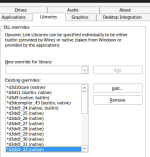
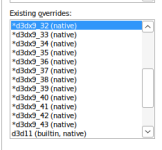
Edit: I've attached a screenshot of the full list of library overrides that I used, in order to get this to work, you should also make sure to not override dxgi (remove it from your existing overrides)... Just in case anyone else is struggling trying to get imgui into their linux build
1750623014438.png1750623042725.png1750623057287.png
 
Last edited:
Noob here trying to get this to work...do I use Redfetch or the Launcher to try to get this working? Having a bit of trouble with that aspect of things.
 
Noob here trying to get this to work...do I use Redfetch or the Launcher to try to get this working? Having a bit of trouble with that aspect of things.
Redfetch is a lot easier to use. The launcher doesn't really work too well on Linux.
 
Figured it out.

The IMGUI backend calls from DirectX11, so when you're setting up via winecfg, you need to add the following dll overrides:
- d3d9 (native, builtin)
- d3d11 (builtin, native)
- d3dcompiler_47 (builtin, native)
- dxcore (builtin, native)
- win32u (builtin, native)
- &vulkan (native, builtin)


*I'm not sure I saw vulkan mentioned in the macroquest build, but wine does spit out a lot of vulkan info stuff, so it's probably needed as well.

I haven't messed around with slimming up my overrides, but the above is what worked for me on Ubuntu 22.04. Thanks to everyone who made the code open source on GitHub, otherwise I would never have guessed which libraries need to be overridden to make imgui work on Linux.

Edit: I've attached a screenshot of the full list of library overrides that I used, in order to get this to work, you should also make sure to not override dxgi (remove it from your existing overrides)... Just in case anyone else is struggling trying to get imgui into their linux build
View attachment 70380View attachment 70381View attachment 70382
If you don't want to do all of this, just using Zorin18 or a distro based on Ubuntu 24.04+ will also take care of the IMGUI issues.
 
Guide - The NEW Linux and MQ Guide!!

Users who are viewing this thread

Back
Top
Cart