



Some details on the new interface.
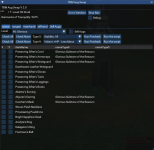
- Tabs are used to sort item types. Each tab has the available equipment of that type that contains a TBM slot (type 9 or type 5).
- If the aug slot is empty, it will be blank in the table. Otherwise, whatever is currently installed will be displayed
- Select check boxes in the type column to identify any items you wish to add an aug (or upgrade an existing one)
- Can select multiple items
- "Run Precheck" will cycle through and provide feedback on the number and full name of the augment to be installed
- "Run the script" will do the actual work of buying and installing new augs (and removing existing ones if they are not correct)
- Tool will only remove/replace augments that do not match the selected Level/TypeX full name
- Each typeX augment is handled seperately via the associated buttons