
Install the app
How to install the app on iOS
Follow along with the video below to see how to install our site as a web app on your home screen.
Note: This feature may not be available in some browsers.
-
 You've discovered RedGuides, an EverQuest multi-boxing and scripting community 🧙♀️⚙️. We want you to play several EQ characters at once, come join us and say hello! 👋
You are using an out of date browser. It may not display this or other websites correctly.
You should upgrade or use an alternative browser.
You should upgrade or use an alternative browser.
Question - saving forage settings
- Thread starter spudz90
- Start date


those items should be written to your MQ2Autoforage.ini file in your Release folder (Btw, you opened two threads back to back for the same thing, best to give folks a second to respond to you)I use mq2autoforage.
after I add an item to /destroyitem… how do I save it so I don't have to do it again when I log back in?
doesn't look like it is writing to the ini - I'll look into itI use mq2autoforage.
after I add an item to /destroyitem… how do I save it so I don't have to do it again when I log back in?


- Joined
- Dec 29, 2017
- RedCents
- 24,680¢
Doesn't look like there was a change submitted at this time. I'm looking at it right now. No idea how this got lost in the wood works. Thanks for the reminder.
- Joined
- Dec 29, 2017
- RedCents
- 24,680¢
Okay, so looking at the details
The INI file is MQ2Forage_YourName_Server.ini being set in SetGameState where GameState is GAMESTATE_INGAME.
Even though the plugin is called MQ2Autoforage
So it's saving this to the INI listed above and not MQ2Autoforage.ini (which is a file I currently have in my Release as well) which makes things a bit misleading.
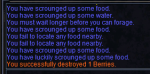
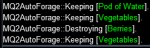
I set berries to destroy using /destroyitem Berries
and when I found them again it successfully destroyed them as expected.
I then installed a debug statement, rebuild the plugin, logged out and loaded the plugin at character select. As expected no INI file was loaded at character select, but once I logged in the characters INI file was loaded correctly for the entries AutoKeepAll, AutoAddAll, and ForageOn. Those entries are all in the general section.
Determining if an item is Kept or destroyed is part of a function called Check_INI() which uses the same INI file as those entries. It's used when an item is on the cursor and a bool is set to the value based on that Function.
It first attempts to get a value from the INI for the zone and item mentioned with a default value of NULL, if it's NULL it will check your AutoAddEnabled and AutoKeepEnabled settings to determine how to handle new items not currently in the INI.
To be clear, determining if an item is kept or destroyed is done on a zone by zone basis and there is no global keep/delete file. It's also done per character so that different characters can have different values for each entry per zone.
Based on all tests this does in fact save to the INI, just perhaps not the one you were thinking it was. MQ2Forage (Not MQ2Autoforage).
Additionally, a review of the previous merge requests doesn't appear to change the name of the INI, which tells me it's been this way for a significant amount of time.
The resource overview with this information is found at the following link. https://www.redguides.com/community/resources/mq2autoforage.99/
It seems the issue is a misunderstanding more than a logic issue. Possibly due to the INI File and plugin name not matching since based on all tests everything seems in order.
If you're positive the issue persists and you can walk me through what happens and what should happen and we can recreate the issue it would be helpful to try and recreate the issue. When providing these details. please type out exactly what you type in game, IE: /destroyitem ..... vs /destroy item berries
If my explanation of the details on how the plugin works has cleared up a misunderstand, then please also let me know so that we know the issue is resolved.
C++:
sprintf_s(INIFileName,"%s\\MQ2Forage_%s_%s.ini",gszINIPath,GetCharInfo()->Name,EQADDR_SERVERNAME);The INI file is MQ2Forage_YourName_Server.ini being set in SetGameState where GameState is GAMESTATE_INGAME.
Even though the plugin is called MQ2Autoforage
So it's saving this to the INI listed above and not MQ2Autoforage.ini (which is a file I currently have in my Release as well) which makes things a bit misleading.
I set berries to destroy using /destroyitem Berries
and when I found them again it successfully destroyed them as expected.
I then installed a debug statement, rebuild the plugin, logged out and loaded the plugin at character select. As expected no INI file was loaded at character select, but once I logged in the characters INI file was loaded correctly for the entries AutoKeepAll, AutoAddAll, and ForageOn. Those entries are all in the general section.
Determining if an item is Kept or destroyed is part of a function called Check_INI() which uses the same INI file as those entries. It's used when an item is on the cursor and a bool is set to the value based on that Function.
It first attempts to get a value from the INI for the zone and item mentioned with a default value of NULL, if it's NULL it will check your AutoAddEnabled and AutoKeepEnabled settings to determine how to handle new items not currently in the INI.
To be clear, determining if an item is kept or destroyed is done on a zone by zone basis and there is no global keep/delete file. It's also done per character so that different characters can have different values for each entry per zone.
Based on all tests this does in fact save to the INI, just perhaps not the one you were thinking it was. MQ2Forage (Not MQ2Autoforage).
Additionally, a review of the previous merge requests doesn't appear to change the name of the INI, which tells me it's been this way for a significant amount of time.
The resource overview with this information is found at the following link. https://www.redguides.com/community/resources/mq2autoforage.99/
It seems the issue is a misunderstanding more than a logic issue. Possibly due to the INI File and plugin name not matching since based on all tests everything seems in order.
If you're positive the issue persists and you can walk me through what happens and what should happen and we can recreate the issue it would be helpful to try and recreate the issue. When providing these details. please type out exactly what you type in game, IE: /destroyitem ..... vs /destroy item berries
If my explanation of the details on how the plugin works has cleared up a misunderstand, then please also let me know so that we know the issue is resolved.
Last edited:
Katiekaboom
Well-known member
- Joined
- Mar 2, 2019
- RedCents
- 951¢
The mq2autoforage will pretty much forage anything, /destroyitem <name of item to destroy> will work, but the destroy list needs to be added for each zone
the only conflict I have seen has been with the include for the advanced ninja loot, for some reason it will decide to KEEP everything regardless of destroy settings until you shut that nonsense off Discussion Here : Ninjadvloot How do you turn this damn thing off
the only conflict I have seen has been with the include for the advanced ninja loot, for some reason it will decide to KEEP everything regardless of destroy settings until you shut that nonsense off Discussion Here : Ninjadvloot How do you turn this damn thing off
I am glad someone resurrected this. Getting annoyed with small chunk of velium everywhere.
yup exactly what drawthow saidThe forage ini file is per character and the items are per zone in that file. MQ2Forage_Character_Server.ini in the plugin directory. It was working in February.
it might be useful for it to be a universal file instead of a per character per zone
When TOV first launched I tried this and the fishing mac at the same time. I ended up modifying the ini manually. I also noticed that things on the destroy list worked maybe 80 percent of the time. It may have had something to do with the timing of fishing and foraging. Those velium globe thingies, sandals, and daggers would sometimes get past the macs and end up in my bags. I didn't run them long enough to figure out why.
yeah if something gets auto inventoried before the plugin gets to deleting something, then it would get auto inventoriedWhen TOV first launched I tried this and the fishing mac at the same time. I ended up modifying the ini manually. I also noticed that things on the destroy list worked maybe 80 percent of the time. It may have had something to do with the timing of fishing and foraging. Those velium globe thingies, sandals, and daggers would sometimes get past the macs and end up in my bags. I didn't run them long enough to figure out why.

- Joined
- Jul 22, 2018
- RedCents
- 1,312¢
Just open the ini and use the find/replace function to change
Velium Chunk=keep to Velium Chunk=destroy
- Joined
- Oct 18, 2013
- RedCents
- 2,806¢
Are there global settings, such in the [General] section, where a ItemName=destroy would be for all zones?
- Joined
- Jul 22, 2018
- RedCents
- 1,312¢
noAre there global settings, such in the [General] section, where a ItemName=destroy would be for all zones?
Users who are viewing this thread
Total: 1 (members: 0, guests: 1)
Share: