• You've discovered RedGuides, an EverQuest multi-boxing and scripting community 🧙‍♀️⚙️. We want you to play several EQ characters at once, come join us and say hello! 👋

  • A TLP without truebox has thawed (Very Vanilla ready)
    Frostreaver
Quick HUD

Release Quick HUD 2022-12-10

No permission to download
Just noticed this wasn't working. When I tried to start it manually I get this error:

Cannot find script at C:\Games\MQ2\lua\init.lua

I have ran an update on Redguides launcher for both MQ and the Lua's that I have installed. Any idea where I can find that file, or just reinstall this Lua?

Thanks

Vrak
 
Just noticed this wasn't working. When I tried to start it manually I get this error:

Cannot find script at C:\Games\MQ2\lua\init.lua

I have ran an update on Redguides launcher for both MQ and the LUA's that I have installed. Any idea where I can find that file, or just reinstall this LUA?

Thanks

Vrak
Try the download link above, drag all of the contents to your Lua folder, then edit the file in the quickhud folder called uihelpers.Lua by removing both instances of ' .new ' and save. then try running /Lua run quickhud
 
AMAZING SCRIPT. THANK YOU.

Also, if you get a chance to look at it. Character Tab in the Quick Hud Settings crashes the script and game.
sorry cbd - that was just me updating with the adjustments you made.

the author hasn't been on in a couple of months

we could try and get ahold of them and see if they didn't mind if someone else took over this - would you want that if the case?

in the meantime if you have updates you want uploaded/updated let me know and i can post a new version
 
sorry cbd - that was just me updating with the adjustments you made.

the author hasn't been on in a couple of months

we could try and get ahold of them and see if they didn't mind if someone else took over this - would you want that if the case?

in the meantime if you have updates you want uploaded/updated let me know and i can post a new version
The crash in character settings looks related to ImGui.BeginPopupModal .. brainiac that is the one you asked about the other week whether anyone was using it?
Code:
if ImGui.BeginPopupModal("Icon Chooser", true, ImGuiWindowFlags.NoMove + ImGuiWindowFlags.NoResize) then
Changing the true to nil as mentioned on discord fixes that one.
The general settings also seems to crash using ImGui.SliderInt
Code:
state.settings.windowOpacity = (ImGui.SliderInt("Window Opacity", state.settings.windowOpacity * 100, 0, 100, "%d %%") / 100)
That one seems to just be the value not being an int
 
Last edited:
sorry cbd - that was just me updating with the adjustments you made.

the author hasn't been on in a couple of months

we could try and get ahold of them and see if they didn't mind if someone else took over this - would you want that if the case?

in the meantime if you have updates you want uploaded/updated let me know and i can post a new version
Sure you can put it in my name. I got an update to fix the crashing settings. I reached out to loki through git and haven't heard from him. Until he decides to come back. I love his work on this and hate to see it broken.
 
Sure you can put it in my name. I got an update to fix the crashing settings. I reached out to loki through git and haven't heard from him. Until he decides to come back. I love his work on this and hate to see it broken.
Awesome dude. Thanks for stepping up
 
I'm very sorry for so abrupt absence but the circumstances were unfortunately beyond my control. I am happy to see someone else has taken up the mantle, thank you @Cannonballdex and everyone else involved. If you want me to grant you access to the original repo let me know but if you have forked it and are accepting PRs somewhere I'd be happy to contribute when I have the chance again!

Happy Holidays
 
I'm very sorry for so abrupt absence but the circumstances were unfortunately beyond my control. I am happy to see someone else has taken up the mantle, thank you @Cannonballdex and everyone else involved. If you want me to grant you access to the original repo let me know but if you have forked it and are accepting PRs somewhere I'd be happy to contribute when I have the chance again!

Happy Holidays
Welcome Back. I really didn't fix (fix) it. The script is pretty complex compared to my ability. I just patched it up to be able to use it. This is a fabulous script and would love to see you back at it. Merry Christmas. Hope you have a great holiday.
 
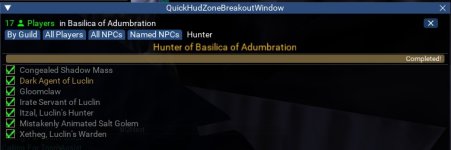
I really love this Lua. It's become the cornerstone of my UI. Thank you loki for creating it and Cannon for the work you put in while loki was away. I use the breakout window consistently. One suggestion I have, if it's possible, is to have the breakout window remember it's open. Not a big deal, but I pop it back out on all my characters when I log in each time haha. It remembers where it was, just not it was popped out.
 
I really love this lua. It's become the cornerstone of my UI. Thank you loki for creating it and Cannon for the work you put in while loki was away. I use the breakout window consistently. One suggestion I have, if it's possible, is to have the breakout window remember it's open. Not a big deal, but I pop it back out on all my characters when I log in each time haha. It remembers where it was, just not it was popped out.
In your QuickHud folder open the file state.Lua and edit the false to true on state.breakdownOpen = false

Code:
local state = {}

state.settings = {}
state.settingsBuffer = nil
state.settingsComponents = {}

state.openGUI = true
state.shouldDrawGUI = true
state.openSettingsUI = false
state.shouldDrawSettingsUI = false

state.windowX = 400
state.windowY = 400
state.windowWidth = 400
state.windowHeight = 200

state.breakdownOpen = true
state.shouldDrawBreakdown = false

state.locked = false

return state
 
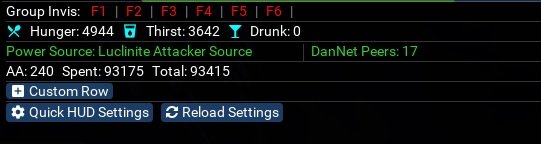
Has anyone else been making custom widgets for this thing?
Been playing around with a bit. Very customizable with a little bit of code.
Here is an example Lua to put in your quickhud folder and then restart quickhud to add the custom examples.
 

Attachments

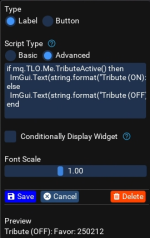
Is it possible to add Tribute status to a custom row?
You could do something like this:
Code:
if mq.TLO.Me.TributeActive() then
  ImGui.Text(string.format("Tribute (ON): %s / %s Favor", mq.TLO.Me.ActiveFavorCost() or 0, mq.TLO.Me.CurrentFavor()))
else
  ImGui.Text(string.format("Tribute (OFF): Favor: %s", mq.TLO.Me.CurrentFavor()))
end

widget.png
 
You could do something like this:
Code:
if mq.TLO.Me.TributeActive() then
  ImGui.Text(string.format("Tribute (ON): %s / %s Favor", mq.TLO.Me.ActiveFavorCost() or 0, mq.TLO.Me.CurrentFavor()))
else
  ImGui.Text(string.format("Tribute (OFF): Favor: %s", mq.TLO.Me.CurrentFavor()))
end

View attachment 45355
Amazing! Thanks.

I would really love it if, when it's ON, the background would be red. But I haven't been able to figure it out.
 
Amazing! Thanks.

I would really love it if, when it's ON, the background would be red. But I haven't been able to figure it out.
Code:
if mq.TLO.Me.TributeActive() then
 ImGui.TextColored(0,1,0,1,string.format("Tribute (ON): %s / %s Favor", mq.TLO.Me.ActiveFavorCost() or 0, mq.TLO.Me.CurrentFavor()))
else
 ImGui.TextColored(0.95, 0.05, 0.05, 1,string.format("Tribute (OFF): Favor: %s", mq.TLO.Me.CurrentFavor()))
end
 
Hrmmmm...

[CODE title="AA Totals"]"ImGui.Text('AA: ['..mq.TLO.Me.AAPoints()..']')\
ImGui.SameLine()\
ImGui.Text('Spent: ['..mq.TLO.Me.AAPointsSpent()..']')\
ImGui.SameLine()\
ImGui.Text('Total: ['..mq.TLO.Me.AAPointsTotal()..']')\
";[/CODE]

This isn't parsing in the HUD for me. What am I doing wrong?

(For reference, I was trying to match the AA string in this post: https://www.redguides.com/community/threads/quick-hud.81540/post-542296)
 
Hrmmmm...

[CODE title="AA Totals"]"ImGui.Text('AA: ['..mq.TLO.Me.AAPoints()..']')\
ImGui.SameLine()\
ImGui.Text('Spent: ['..mq.TLO.Me.AAPointsSpent()..']')\
ImGui.SameLine()\
ImGui.Text('Total: ['..mq.TLO.Me.AAPointsTotal()..']')\
";[/CODE]

This isn't parsing in the HUD for me. What am I doing wrong?

(For reference, I was trying to match the AA string in this post: https://www.redguides.com/community/threads/quick-hud.81540/post-542296)
Are you using this in a custom element? With that file you referenced, if you click add row and then click Example Widgets, you can add that code automatically.
Code:
[19] = {
            ["category"] = "1. Label";
            ["title"] = "AA Totals";
            ["mode"] = 1;
            ["buttonScriptType"] = 2;
            ["evalButtonLabel"] = true;
            ["buttonSize"] = 1;
            ["buttonColor"] = {
                [1] = 0.24;
                [2] = 0.41;
                [3] = 0.63;
                [4] = 1;
            };
            ["scriptType"] = 2;
            ["buttonLabel"] = "'Button'";
            ["fontScale"] = 1;
            ["buttonScript"] = "mq.cmd('/echo hello world')";
            ["value"] = "ImGui.Text('AA: ['..mq.TLO.Me.AAPoints()..']')\
                        ImGui.SameLine()\
                        ImGui.Text('Spent: ['..mq.TLO.Me.AAPointsSpent()..']')\
                        ImGui.SameLine()\
                        ImGui.Text('Total: ['..mq.TLO.Me.AAPointsTotal()..']')\
                        ";
            ["type"] = 1;
            ["useDisplayCondition"] = false;
            ["displayCondition"] = "mq.TLO.Target.ID()";
            ["id"] = "1494c152-8e4c-4109-a657-41efa311263e";
        };
 
Are you using this in a custom element? With that file you referenced, if you click add row and then click Example Widgets, you can add that code automatically.
Code:
[19] = {
            ["category"] = "1. Label";
            ["title"] = "AA Totals";
            ["mode"] = 1;
            ["buttonScriptType"] = 2;
            ["evalButtonLabel"] = true;
            ["buttonSize"] = 1;
            ["buttonColor"] = {
                [1] = 0.24;
                [2] = 0.41;
                [3] = 0.63;
                [4] = 1;
            };
            ["scriptType"] = 2;
            ["buttonLabel"] = "'Button'";
            ["fontScale"] = 1;
            ["buttonScript"] = "mq.cmd('/echo hello world')";
            ["value"] = "ImGui.Text('AA: ['..mq.TLO.Me.AAPoints()..']')\
                        ImGui.SameLine()\
                        ImGui.Text('Spent: ['..mq.TLO.Me.AAPointsSpent()..']')\
                        ImGui.SameLine()\
                        ImGui.Text('Total: ['..mq.TLO.Me.AAPointsTotal()..']')\
                        ";
            ["type"] = 1;
            ["useDisplayCondition"] = false;
            ["displayCondition"] = "mq.TLO.Target.ID()";
            ["id"] = "1494c152-8e4c-4109-a657-41efa311263e";
        };
Ah - So I need to add the whole thing into the custom widget? I was just adding the "value" out of the Lua file.
 
Ah - So I need to add the whole thing into the custom widget? I was just adding the "value" out of the lua file.
Click Custom Row, Example Widgets and Add or Custom Row, Add widget - Advanced - you had some extra quotes and ; in there.
Code:
ImGui.Text('AA: ['..mq.TLO.Me.AAPoints()..']')
                        ImGui.SameLine()
                        ImGui.Text('Spent: ['..mq.TLO.Me.AAPointsSpent()..']')
                        ImGui.SameLine()
                        ImGui.Text('Total: ['..mq.TLO.Me.AAPointsTotal()..']')
 
Click Example Widgets and Add or Add widget - Advanced - you had some extra quotes and ; in there.
Code:
ImGui.Text('AA: ['..mq.TLO.Me.AAPoints()..']')
                        ImGui.SameLine()
                        ImGui.Text('Spent: ['..mq.TLO.Me.AAPointsSpent()..']')
                        ImGui.SameLine()
                        ImGui.Text('Total: ['..mq.TLO.Me.AAPointsTotal()..']')
Got it working now! Superfluous \'s in the copied notepad text I used. Thanks for your quick replies. :)
 
Good morning,

I decided to tempt the fates again and spun up RG. Unfortunately when I launch characters if the account launching isn't my main window (as in it's in the background behind another character or even a web browser) when the character loads in the client crashes. I have all of my drivers updated as well as all of my plugins, macros, and Lua scripts. Any advice on what to try next would be greatly appreciated. I can log characters in, but I have to do it 1 at a time while ensuring that the account stays as the active window.
 
no crashes when i load game using isboxer vs MQ, I suspect it's related to a imgui possibly based on the crash message.
 
---------------------------
EverQuest Crash Detected
---------------------------
MacroQuest caught a crash:

Process ID: 2060
Version: 3.1.1.3179
Location: ImFont::CalcTextSizeA+0 (E:\MQNext\imgui-64.dll+0000000000090E30)

CrashID: 44200d43-0d27-42a4-a703-815a850f8d45

You can either:
* [RETRY] Continue execution and hope for the best.
* [CANCEL] Write a crash dump and terminate EverQuest.

Copy the contents of this dialog to your clipboard by pressing Ctrl+C

---------------------------
Retry Cancel
---------------------------
 
Any idea which Lua's you're starting. Likely in an ingame.cfg file

My Guess is a CalcTextSize is happening on an empty string or something.
 
If you are using the new equi engine you need to disable that
In your eqclient.ini
UseNewUIEngine=0
 
new UI is disabled yes.

I'm loading Quickhud, Magellan, LEM, and guildclicky. I'll try disabling them 1 at a time to narrow down the culprit.
 
It's Quickhud. But once the char is ingame, I can run Quickhud with no issues. It only crashes when loading and not the primary active window......
 
Glad you were able to pinpoint the issue. I recommend posting about it in the QuickHud discussion thread.

Hopefully you can find some assistance there.
 
It's Quickhud. But once the char is ingame, I can run Quickhud with no issues. It only crashes when loading and not the primary active window......
Any idea which lua's you're starting. Likely in an ingame.cfg file

My Guess is a CalcTextSize is happening on an empty string or something.
@loki I went ahead and just merged the whole thing to this disco - you can see the above, quickgud crashing mq
 
Release Quick HUD

Users who are viewing this thread

Back
Top
Cart