• You've discovered RedGuides, an EverQuest multi-boxing and scripting community 🧙‍♀️⚙️. We want you to play several EQ characters at once, come join us and say hello! 👋

  • A TLP without truebox has thawed (Very Vanilla ready)
    Frostreaver

Problem - Quest Overlay

Joined
Jun 6, 2022
RedCents
2,210¢
Good Afternoon ya'll;

About a month ago I ran into a small issue on 2 out of 6 of my boxes.

Whenever I log in, my quest overlay window is missing on my main tank and a monk. All other char have it up.

I have set it on in options, I have logged out (/camp, wait for timer, exit exit) just to make sure the UI files save.... I've looked through INI after INI file to see if I can find a toggle that may have gotten saved.

I know I can log in and turn it on under the eq button...... But I just want it to BE there like it always was before.

Has this happened to anyone else? Any help would be appreciated.


Thanks!!!! Jarlentor
 
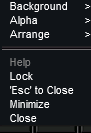
make sure you don't have it to "'Esc' to Close". you might just be closing it on accident

1690569680061.png
 
make sure you don't have it to "'Esc' to Close". you might just be closing it on accident

View attachment 50072

No Sir.... That is not set to close.... It just simply closes when I log and I have to manually open it every time..... it's odd because it's only on 2 out of the 6 char...... and they ALL have the exact same settings.

I use the same UI copy to start every char I make, and then just move the hotbuttons around to accomodate the different classes

Thanks for that thought.... I did check to make sure :)
 
Good Afternoon ya'll;

About a month ago I ran into a small issue on 2 out of 6 of my boxes.

Whenever I log in, my quest overlay window is missing on my main tank and a monk. All other char have it up.

I have set it on in options, I have logged out (/camp, wait for timer, exit exit) just to make sure the UI files save.... I've looked through INI after INI file to see if I can find a toggle that may have gotten saved.

I know I can log in and turn it on under the eq button...... But I just want it to BE there like it always was before.

Has this happened to anyone else? Any help would be appreciated.


Thanks!!!! Jarlentor
I have the same issue on one of my boxes. Not sure why it's setting (resetting) itself to hide each time I log off.
Yes, somewhat frustrating.
No, I've not been able to figure out what command / action I'm missing to ensure it stays visible through sessions.
 
Try actually deleting the INI file, and have the game recreate it when you start EQ back up again. Log back out. Then restart EQ once more. Then, do a UI copy from one you know is working.
 
Try actually deleting the INI file, and have the game recreate it when you start EQ back up again. Log back out. Then restart EQ once more. Then, do a UI copy from one you know is working.
Ok, your idea of resetting state is a good one. And it prompted me to think about the ui files.
So, I checked the file UI_<char_name>_<server>.ini and the entry is here:
[CODE lang="ini" title="Character UI File"][TaskOverlayWnd]
Show=0[/CODE]
Compared to a UI that is visable:
[CODE lang="ini" title="Character UI File"][TaskOverlayWnd]
Show=1[/CODE]
There's a bunch more stuff under the [TaskOverlayWnd] section, but Show= is the entry you're after.

I did a quick check, and the issue is now resolved for my character.
No idea why this is not saving on camp for characters.
I do use ISBoxer for window management with character virtual files enabled, but I don't know enough about how ISBoxer works to point to that as an issue.
 
Last edited:
Ok, your idea of resetting state is a good one. And it prompted me to think about the ui files.
So, I checked the file UI_<char_name>_<server>.ini and the entry is here:
[CODE lang="ini" title="Character UI File"][TaskOverlayWnd]
Show=0[/CODE]
Compared to a UI that is visable:
[CODE lang="ini" title="Character UI File"][TaskOverlayWnd]
Show=1[/CODE]
There's a bunch more stuff under the [TaskOverlayWnd] section, but Show= is the entry you're after.

I did a quick check, and the issue is now resolved for my character.
No idea why this is not saving on camp for characters.
I do use ISBoxer for window management with character virtual files enabled, but I don't know enough about how ISBoxer works to point to that as an issue.


DUDE!!!!

Thanks a ton! I had looked through the UI file, but kept doing searches for the wrong thing and never actually got down far enough to find that.
fixed my issue right up.... still have no idea why it won't save it from in game..... all the other window changes and movements and hotkeys save. just that one item never did.


Still.... thank you all for the time and effort helping with this! appreciate it immensely.
 
Ok, your idea of resetting state is a good one. And it prompted me to think about the ui files.
So, I checked the file UI_<char_name>_<server>.ini and the entry is here:
[CODE lang="ini" title="Character UI File"][TaskOverlayWnd]
Show=0[/CODE]
Compared to a UI that is visable:
[CODE lang="ini" title="Character UI File"][TaskOverlayWnd]
Show=1[/CODE]
There's a bunch more stuff under the [TaskOverlayWnd] section, but Show= is the entry you're after.

I did a quick check, and the issue is now resolved for my character.
No idea why this is not saving on camp for characters.
I do use ISBoxer for window management with character virtual files enabled, but I don't know enough about how ISBoxer works to point to that as an issue.
I know this is old, but posting to say this resolved the issue for me. Driving me nuts the last few days.
 
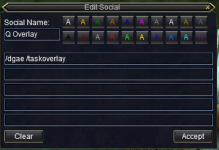
I don't always want my overlay window up, so I have my guys logging in with it closed, and I have a hotkey on my main that I drive with set to open it on everyone if I am doing quest.

1756249388907.png
 
I don't always want my overlay window up, so I have my guys logging in with it closed, and I have a hotkey on my main that I drive with set to open it on everyone if I am doing quest.

View attachment 71329

nice.... I think I'll add that key.
I was able to edit the ini file and make it come back.

I notice though, that randomly it still just changes it on random characters.
I have not been able to pinpoint a reason for this. It just happens every few weeks on a different char each time.
Same thing happens with my keybinds. At least once every couple days, one or more char that I log in revert to default keys and I have to log out to desktop and back in to fix it.
 
My overlay will stay up if I click on a box on any of my quests in the quest window. It only closes if I uncheck the tasks
 
Problem - Quest Overlay

Users who are viewing this thread

Back
Top
Cart