• You've discovered RedGuides, an EverQuest multi-boxing and scripting community 🧙‍♀️⚙️. We want you to play several EQ characters at once, come join us and say hello! 👋

  • A TLP without truebox has thawed (Very Vanilla ready)
    Frostreaver

Problem - Procedure entry point could not be found mq2main / mq2plugin.dll etc

paman

Member
Joined
Dec 10, 2021
RedCents
10¢
Hey all,

I returned from about a year break from the game. When I reloaded the launcher, I updated everything, and when I tried to launch the game through MQ2 I get this error. "The procedure entry point pTradeSkillDeptWnd could not be located in the dynamic link library". I have looked at previous threads with similar issues and tried the suggestions to fix the issue (redownloading MQ2, checking the ini file for plugins, and I verified my licenses are still valid for about another month). I am not sure where I should take my troubleshooting from here. I will attach a screenshot of the error message. Any help would be greatly appreciated!
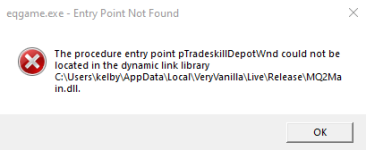
image_2023-02-15_211456238.png
 
Solution
Welcome back!

did you install mq over your old mq2 install?

I would suggest having the launcher point to a fresh location and then re-install - you can migrate settings if you do that --- or just wipe out that entire install directory and then reinstall. you don't want any old lingering and potentially conflicting files

The options to fix this are as follows:

- The RG Launcher is unable to *delete* old files.
-- This means you will get an error box if you don't have a current plugin that matches the mq build
-- your options are:
--- a: purchase a license
--- b: delete the old .dll in your plugin folder, and/or
--- c: change your macroquest.ini to MQ2PluginName=0 under [Plugins]

if your error has to do with mq2main.dll:

the other big...
If you have already checked the RG Launcher Plugin Tab then read the following:
- The RG Launcher is unable to *delete* old files.
-- This means you will get an error box if you don't have a current plugin that matches the mq build
-- your options are:
--- a: purchase a license
--- b: delete the old .dll in your plugin folder, and/or
--- c: change your macroquest.ini to MQ2PluginName=0 under [Plugins]
 
All my subs are up to date, they expire in april. I deleted the mq2enchanter.dll and re installed it and i am still getting the problem. My VV is up to date also. I never intalled anything in my EQ folder either. Do i need to delete all my plugins ?
 
Check your everquest directory for imgui-64.dll, mq2main.dll and eqlib.dll

if you found any of those, delete them, then delete the rest of your everquest directory, then reinstall everquest beacuse you installed MQ into your EQ dir.
 
All my subs are up to date, they expire in april. I deleted the mq2enchanter.dll and re installed it and i am still getting the problem. My VV is up to date also. I never intalled anything in my EQ folder either. Do i need to delete all my plugins ?
you are getting a mq2enchanter.dll error warning without the mq2enchanter file?
 
Check your everquest directory for imgui-64.dll, mq2main.dll and eqlib.dll

if you found any of those, delete them, then delete the rest of your everquest directory, then reinstall everquest beacuse you installed MQ into your EQ dir.
Brainiac I just check my EQ folder and none of these 3 files are in it. I mean ive been using Mq2 since april last year and didnt change anything to the way i do things and its the first time i encounter this error :/
 
Ok so I deleted every CWTN plugins I had. It stopped giving me the message. Then i downloaded MQ2necro from the redguide launcher and /plugin mq2necro from within the game. Got the same message as before but with necro instead :/
 
I re installed MQ2 and started from fresh, installed the plugins from the launcher and it worked fine. Still not sure what caused it but its fixed. Thanks you two.
 
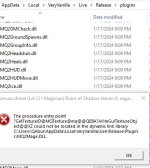
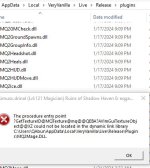
I just purchased and installed CWTN mq2mage, mq2enchanter, and mq2cleric. When I try /plugin load mq2xxxx any of them I get the error in the attached picture. I extracted them into my plugin folder (file path and mq2mage.dll can be seen in the picture), watched and installed them from the RedGuides launcher, and have all of the other required software installed. Any idea what I'm doing wrong or haven't done? I found a previous thread about procedure entry point failures being due to outdated plugins but I just installed it and even verified it as up to date in the launcher so I'm not sure how mine could be outdated.

mq2mage error.JPG
 

Attachments

  • mq2mage error.JPG
    mq2mage error.JPG
    37.3 KB · Views: 0
> Check this link <
If you have already checked the RG Launcher Plugin Tab then read the following:
- The RG Launcher is unable to *delete* old files.
-- This means you will get an error box if you don't have a current plugin that matches the mq build
-- your options are:
--- a: purchase a license
--- b: delete the old .dll in your plugin folder, and/or
--- c: change your macroquest.ini to MQ2PluginName=0 under [Plugins]


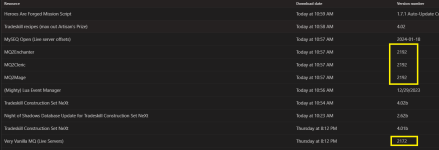
your MQ isn't updated.


1705857141301.png
 
you need to update the mq in your rg launcher then, go back to the plugins tab in the launcher, and hit refresh and reinstall, that should hopefully fix it.
 
> Check this link <
If you have already checked the RG Launcher Plugin Tab then read the following:
- The RG Launcher is unable to *delete* old files.
-- This means you will get an error box if you don't have a current plugin that matches the mq build
-- your options are:
--- a: purchase a license
--- b: delete the old .dll in your plugin folder, and/or
--- c: change your macroquest.ini to MQ2PluginName=0 under [Plugins]


your MQ isn't updated.


View attachment 56403
 
Hello Everyone,

I'm getting this error message when I load my 6 CWTN toons through the launcher. Would welcome suggestions on how to fix it:

View attachment 56462

Thanks,

Dysanor


> Check this link <
If you have already checked the RG Launcher Plugin Tab then read the following:
- The RG Launcher is unable to *delete* old files.
-- This means you will get an error box if you don't have a current plugin that matches the mq build
-- your options are:
--- a: purchase a license
--- b: delete the old .dll in your plugin folder, and/or
--- c: change your macroquest.ini to MQ2PluginName=0 under [Plugins]
 
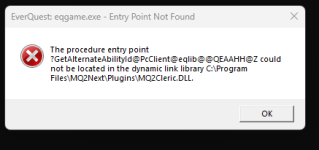
Entry Point Not Found - The procedure entry point?GetAlternateAbilityld@PerClient@eqlib@@QEAAHH@Z could not be located in the dynamic link library (location of library).

I initially assumed my license had expired, but when I go to my licenses, and click on renew for the cleric, I get the message saying my license is valid but I can buy one for a friend.

Ty.
 
I had this after the wizard plugin free period expired. Just needed to go into the config folder and edit macroquest.ini to set the mq2wizard=0. If you had another class plugin that you let expire, might start by checking there to see if it still is trying to load it.
 
I want to load CWTN cleric though. I have the same error with the monk and enchanter too (and they all also say I have an active license so I am stumped).
 
Entry Point Not Found - The procedure entry point?GetAlternateAbilityld@PerClient@eqlib@@QEAAHH@Z could not be located in the dynamic link library (location of library).

I initially assumed my license had expired, but when I go to my licenses, and click on renew for the cleric, I get the message saying my license is valid but I can buy one for a friend.

Ty.
> Check this link <
If you have already checked the RG Launcher Plugin Tab then read the following:
- The RG Launcher is unable to *delete* old files.
-- This means you will get an error box if you don't have a current plugin that matches the mq build
-- your options are:
--- a: purchase a license
--- b: delete the old .dll in your plugin folder, and/or
--- c: change your macroquest.ini to MQ2PluginName=0 under [Plugins]

.
 
Welcome back!

did you install mq over your old mq2 install?

I would suggest having the launcher point to a fresh location and then re-install - you can migrate settings if you do that --- or just wipe out that entire install directory and then reinstall. you don't want any old lingering and potentially conflicting files

The options to fix this are as follows:

- The RG Launcher is unable to *delete* old files.
-- This means you will get an error box if you don't have a current plugin that matches the mq build
-- your options are:
--- a: purchase a license
--- b: delete the old .dll in your plugin folder, and/or
--- c: change your macroquest.ini to MQ2PluginName=0 under [Plugins]

if your error has to do with mq2main.dll:

the other big thing to think about is checking if you installed any macroquest files into your everquest folder - this should not be like that

check that you don't have dlls like eqlib.dll, mq2main.dll etc in your everquest folder and delete them

if your error has to do with a specific plugin like mq2grind.dll or mq2berzerker.dll:
- make sure you update VV and check to ensure your plugins are also updated
Ty for replying. I have not altered anything. The only thing I did was update using the launcher (MQ2) as I usually do. I have not messed with any files, etc. Can I just delete the old .dll's in my plugin folder and again using the MQ2 launcher (which all shows green) just 'force' it to update? According to my license list they are all current. (I never keep track of when they are expiring, I just resubmit when they go) The only ones that may legit be expired are necro and druid as I have not played those in months.
 
Ty for replying. I have not altered anything. The only thing I did was update using the launcher (MQ2) as I usually do. I have not messed with any files, etc. Can I just delete the old .dll's in my plugin folder and again using the MQ2 launcher (which all shows green) just 'force' it to update? According to my license list they are all current. (I never keep track of when they are expiring, I just resubmit when they go) The only ones that may legit be expired are necro and druid as I have not played those in months.
you don't currently have an mq2cleric license.

so you can pick one of the "a", "b", or "c" options i posted for you.
 
you don't currently have an mq2cleric license.

so you can pick one of the "a", "b", or "c" options i posted for you.

I will gladly resub, but you must admit this looks like I have one, which is why I asked instead of assuming the license was the issue. Sorry for your troubles.


1721176008413.png
 
you ar trying to load the mq2cleric plugin, but its not current, so its not letting you, you can remove it by either deleting the mq2cleric.dll from the plugin folder, editing the macroquest.ini and setting mq2cleric=0 or renewing your sub for mq2cleric, and updating it.
 
When I log on to any account I get this. Not sure what it is the game still plays. But it pops up on any account I log into. How do I get rid of it?View attachment 63653
> Check this link <
If you have already checked the RG Launcher Plugin Tab then read the following:
- The RG Launcher is unable to *delete* old files.
-- This means you will get an error box if you don't have a current plugin that matches the mq build
-- your options are:
--- a: purchase a license
--- b: delete the old .dll in your plugin folder, and/or
--- c: change your macroquest.ini to MQ2PluginName=0 under [Plugins]

.
 
> Check this link <
If you have already checked the RG Launcher Plugin Tab then read the following:
- The RG Launcher is unable to *delete* old files.
-- This means you will get an error box if you don't have a current plugin that matches the mq build
-- your options are:
--- a: purchase a license
--- b: delete the old .dll in your plugin folder, and/or
--- c: change your macroquest.ini to MQ2PluginName=0 under [Plugins]

.
Ok so I went in the plugin folder deleted all the .dll files went through all the files deleted all the files of toons I no longer play went to the launcher refreshed everything then clicked on update all. I didnt realize my MQ2 Cleric was expired. So I bought the copy. Usually I get a message that tells you when one expires. Then I logged on and the error went away. Thank you Sic
 
I haven't played in a few years I've updated the MQ2 and Everquest files when I go to auto login I get this error message. (see below) but once I click out the error message the toon runs in MQ2...Please help...I'm not a computer guy....thanks
 

Attachments

  • Screenshot (1).png
    Screenshot (1).png
    151.6 KB · Views: 0
Wrong forum
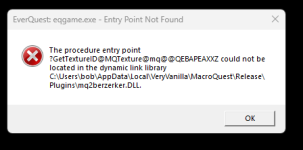
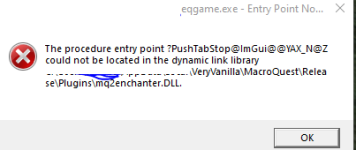
I am getting these DLL error each tme I launch VV, two errors per toon when MQ loads. These were from CWTN plugins that I did not renew.
1739988478926.png

is there anything I can do to stop this? I have other CWTN plugins I also did not renew which are not throwing dll errors.

Thanks!

Mod edit: I went ahead and edited your images for you.
 
> Check this link <
If you have already checked the RG Launcher Plugin Tab then read the following:
- The RG Launcher is unable to *delete* old files.
-- This means you will get an error box if you don't have a current plugin that matches the mq build
-- your options are:
--- a: purchase a license
--- b: delete the old .dll in your plugin folder, and/or
--- c: change your macroquest.ini to MQ2PluginName=0 under [Plugins]
 
Problem - Procedure entry point could not be found mq2main / mq2plugin.dll etc

Users who are viewing this thread

Back
Top
Cart