• You've discovered RedGuides, an EverQuest multi-boxing and scripting community 🧙‍♀️⚙️. We want you to play several EQ characters at once, come join us and say hello! 👋

  • A TLP without truebox has thawed (Very Vanilla ready)
    Frostreaver
Pricecheck (TLP)

Release Pricecheck (TLP) (1 Viewer) v1.7.0

No permission to download
Joined
May 28, 2018
RedCents
376¢
morgium submitted a new resource:

Pricecheck (TLP) - EC-Era handled with ease

This is my first Resource, and i would like to thank Sic and brainiac for their relentless Code Reviews and Knightly for adding Lua-curl to luarocks, which made it possible to do the HTTP requests asynchronously without blocking your game client.

What is it?​

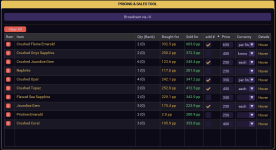
A little Lua, that makes handling the EC-Tunnel Trading Era a bit less cumbersome. It requests Pricing Data from tlp-auctions.com to give you an idea for how much you might want to sell stuff.
It...

Read more about this resource...
 
Oh, Dude, you have it in the Macro section but looks like you built a wonderful Lua, you might need Sic to move the resource for you.
 
morgium updated Pricecheck (TLP) with a new update entry:

v1.1.1

Fixed​

  • Cursor query window crash**: Fixed a crash when closing the standalone cursor query window caused by calling a non-existent method setShowCursorQueryWindow on the state wrapper.
  • Vulnerability/format string crash**: Fixed a potential crash in mq.cmdf when broadcasting item/player names containing % by passing them via %s format specifiers.

Refactored​

  • State...

Read the rest of this update entry...
 
morgium updated Pricecheck (TLP) with a new update entry:

v1.2.0

Added​

  • Changelog Tab**: Added a new tab to display the CHANGELOG.md file contents inside the main window, with dynamic colorized parsing for headers.

Changed​

  • No Trade Filtering**: Filter out No Trade and No Drop items during bulk inventory scans to avoid listing untradeable items.

Removed​

  • Drop Slot**: Removed the Item Drop Slot interface block and separator from the main UI...

Read the rest of this update entry...
 
morgium updated Pricecheck (TLP) with a new update entry:

v1.3.0

Added​

  • Pause & Resume Broadcasts**: Added Pause/Resume button to freeze the broadcast timeline, timers, and progress bars.
  • Auto-Recheck Quantity**: Added automated inventory quantity checks when starting, stopping, pausing, or resuming broadcasts, and on list loads.
  • API Provider Pattern**: Decoupled third-party URL structures in the HTTP module to support customized database or server pricing endpoints.

Changed​

  • Cleaner...

Read the rest of this update entry...
 
Not sure what really changed but I just tried 1.4 and could not get it to start the auction process (pushing broadcast did nothing).

I grabbed 1.3.0 from history and it worked like a charm.
 
morgium updated Pricecheck (TLP) with a new update entry:

v1.5.0

Added​

  • Broadcast Manager Window**: New split-view window displaying WTS loop status and Checklist side-by-side with Tells Log (Communications).
  • Scrolling Stock Ticker**: Real-time ticker tape displaying character wallet, active sales totals, and pending inquiry counts.
  • Historical Krono Price Trends**: Automatic retrieval and display of 1D, 3D, and 7D Krono averages.
  • Broadcast Separator Config**: Customize delimiters between items on auction lines...

Read the rest of this update entry...
 
So I just ran it, and about half the items had links, and the other half did not. Not sure what happened. Also, it's not moving items, but I think it might have to do with people not being clear. Would it not make sense to ask clarifying questions? For example, if you list a "shield of whatever" and someone says I'll take the shield it responds with What shield are you looking for? so you can get the right item?
 
Hello, thanks for the Feedback. I didnt encounter that Problem until now, can you please provide specifics, for example which items didnt have links?
 
Oh. I learned something about MQ2LinkDb :) i will add the required commands to the Lua. basically, it only knows items it has scanned, but it has a function to import links from an item.txt that is provided by RG.
until then, run


/link /import /update

and you should be fine.
 
morgium updated Pricecheck (TLP) with a new update entry:

v1.6.0

Added​

  • Dynamic Tools Tab**: Created a new UI tab that scans the pricecheck/tools/ directory and renders discovered scripts as modern square buttons with rounded corners.
  • Standardized Tool Interface**: Defined a contract for tools supporting local host execution (buttonFunctionOnHost) and remote client execution (buttonFunctionExport) with support for custom button colors.
  • Tools Refresh Support**: Included a...

Read the rest of this update entry...
 
It is still not linking everything. An example is the Ry'gorr chain collar and the Valorium Chestplate, to name 2. It will also place a long string of letters and numbers before it. Now I have seen this happen with other things as well, so I'm not sure what's up with that.
 
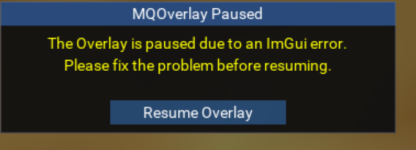
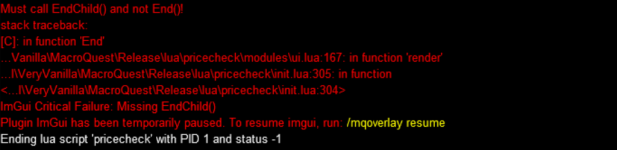
I moved the window to the bottom of the screen, in order to re-arrange the screen. I guess i accidentally dropped it at the edge of the EQ window, and it could not render it anymore. Now i get an error message (below). I can load this on another character i get no errors. Is the location of the window stored somewhere i can reset?

1783501370496.png1783501547749.png
 
Also. Is there a way to have it auction off a stack of items. IE a stack of Potions. So it will say WTS Blood of Wolf 40p/stack (or something along those lines)
 
i will fix that bug, the stack thing: you can set the currency in configuration to nothing, and then just write 40p/stack into the price on the price tab...
 
morgium updated Pricecheck (TLP) with a new update entry:

v1.7.0

Added​

  • Global Currency & Suffix Configuration**: Added global configuration fields for Default Currency (default pp), Alternate Currency (default krono), Multiple Items suffix (default each), and Sell as Stack suffix (default per Stack).
  • Granular Per-Item Sales Settings**:
  • Added an add # checkbox column in the pricing list to toggle whether to include the quantity prefix for that...

Read the rest of this update entry...
 
I moved the window to the bottom of the screen, in order to re-arrange the screen. I guess i accidentally dropped it at the edge of the EQ window, and it could not render it anymore. Now i get an error message (below). I can load this on another character i get no errors. Is the location of the window stored somewhere i can reset?

View attachment 77971View attachment 77972
i have been trying to fix this error for the past 2 hours on the one i downloaded... its a fun process - also crashes if you minimize EQ
 
Release Pricecheck (TLP)

Users who are viewing this thread

  • B
Back
Top
Cart