- Source Repository
- https://github.com/m0rg/pricecheck
This is my first Resource, and i would like to thank Sic and brainiac for their relentless Code Reviews and Knightly for adding Lua-curl to luarocks, which made it possible to do the HTTP requests asynchronously without blocking your game client.
It makes a suggestion, but you can edit for what you want to advertise your items.
It handles broadcasting selected items to a configurable channel (/auction by default).
It provides a "Communications" Tab, where it tries to detect if specific items were requested in a tell, and tells you what amount you should expect.
It warns you if it can't make a good prediction.
2. /Lua run pricecheck
It will prompt you if you don't have the required libraries installed, loads MQ2LinkDB if its not already loaded.
Upon startup, you are presented with the following Screen:

Click the BULK Price Button to have the median Prices fetched:

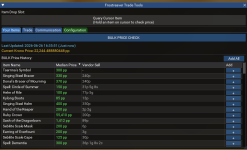
Then you see this:

Click the + to add Items to your Trade Tab, or click Add all. A tooltip will tell you how long the checks will take.
Move to the Trade Tab:

Enter the prices you want to advertise your Items for and apply pressure to the Broadcast button to start advertising!

Pro-Tip: RIGHT click to instantly pick up an Item, but be careful with STACKS. Dont say i didnt warn you, im not responsible for you being too lazy to check quantities. If you cant read quantities, go get glasses or dont use ZLIZ Ui.
Move on to the Communications tab:
If someone mentions an Item by name, the green message appears. If not, then not.
Click "Reply" to send your Quick Reply, click the green button to remove the message.

There are more features, but this is the neccessary Steps to get it running.
More features will be added.
Please don't send DMs here. Use the discussion Page if you have questions, so we can all learn.
What is it?
A little Lua, that makes handling the EC-Tunnel Trading Era a bit less cumbersome. It requests Pricing Data from tlp-auctions.com to give you an idea for how much you might want to sell stuff.It makes a suggestion, but you can edit for what you want to advertise your items.
It handles broadcasting selected items to a configurable channel (/auction by default).
It provides a "Communications" Tab, where it tries to detect if specific items were requested in a tell, and tells you what amount you should expect.
It warns you if it can't make a good prediction.
How do i use it?
1. Subscribe to the resource (use redfetch pallllease)2. /Lua run pricecheck
It will prompt you if you don't have the required libraries installed, loads MQ2LinkDB if its not already loaded.
Upon startup, you are presented with the following Screen:
Click the BULK Price Button to have the median Prices fetched:
Then you see this:
Click the + to add Items to your Trade Tab, or click Add all. A tooltip will tell you how long the checks will take.
Move to the Trade Tab:
Enter the prices you want to advertise your Items for and apply pressure to the Broadcast button to start advertising!
Pro-Tip: RIGHT click to instantly pick up an Item, but be careful with STACKS. Dont say i didnt warn you, im not responsible for you being too lazy to check quantities. If you cant read quantities, go get glasses or dont use ZLIZ Ui.
Move on to the Communications tab:
If someone mentions an Item by name, the green message appears. If not, then not.
Click "Reply" to send your Quick Reply, click the green button to remove the message.
There are more features, but this is the neccessary Steps to get it running.
More features will be added.
Please don't send DMs here. Use the discussion Page if you have questions, so we can all learn.