• Hail, we're RedGuides. We want you to play six (yes, 6!) EverQuest characters at once. We have scripts and a friendly community to help, please join our playstyle and say hello! 👋
  • We've added LLM sections to our Terms & Rules and Resource Rules, for everyone's sanity & in-game safety.
    Read more
    a. Do not replace your voice with an LLM. This goes for your posts and your scripts. Drafting and editing with a tool is fine, but don't take you out of what you share.
    b. Do not replace your EQ character's voice with an LLM. We don't want scripts that speak over /ooc, /shout or other public channels. This has been an unwritten rule that's kept casino scripts off the site for decades, but we're now compelled to make it clear: keep automated communication private.

    Why Does RG Review Scripts?
    Nearly every LLM-written Lua script we see is making your character do impossible things, and rarely in a way that's beneficial to you. We've seen heavy server hammering, /target over impossible distances when /nav spawn would passively accomplish the same thing, a spawn search that fires 20+ times per second, and other pointless actions that are likely annoying GMs.

    You are welcome to use LLMs as a tool to structure, draft, and edit your work, but please read critically before hitting /lua run

Problem - Plugin UI Window - Help!

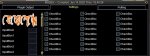
I've reloaded the UI, updated Redguides, but...this is my new Plugin UI Window (for lack of a better descriptor!)

EQ000033.jpg

As an aside, it's doing it on the MQ2Cleric window as well...
 
this update should have also included the updated window file to your mq2 -> release -> uifiles -> default folder --- if you have moved it anywhere, you should delete it so it can load from that file.
Since there are a couple people with this issue - i'm trying to make sure that the file got into the update
 
yup just checked. the files are correct.

Sounds like you and others must be copying the file to your everquest ui or default folder (you don't need to do that and you will break yourself if/when changes happen)
 
yup just checked. the files are correct.

Sounds like you and others must be copying the file to your everquest ui or default folder (you don't need to do that and you will break yourself if/when changes happen)

Yes, I did copy and paste that into my custom EQ UI folder. User error, as always. Thanks for helping out Sic!
 
Just updating to let you know that deleting the UI File in my custom folder fixed this 100%.

Hopefully I don't have reload the UI everytime I log in to get this to show...that's part of why I moved it over to my custom folder. A small price to pay, I guess!
 
Just updating to let you know that deleting the UI File in my custom folder fixed this 100%.

Hopefully I don't have reload the UI everytime I log in to get this to show...that's part of why I moved it over to my custom folder. A small price to pay, I guess!
you dont

once the game knows it should be loaded (when it launches and the plugin is set to load) you'll be good to go.
several months ago, custom windows had to be moved to custom folders, but brianiac fixed it so it works again and pulls from the mq2 directory as it sould
 
I had this same problem as well - posted about it in Discord. It had nothing to do with my /uifiles/ content.

I:
  1. unloaded / exited MQ2 completely
  2. did a /loadsk on my char
  3. force patched MQ2 VV and all MQ2___ plugins
  4. started MQ2 back up
  5. MQ2Rogue window did not show, so I did a /rog show command, which resulted in "RogWnd not found" or something weird like that
  6. Did another /loadsk
  7. Ta-da, all fixed!

I'm sure I did too many things, but I was really trying to refresh all possible content.
well

if you load the plugin in game for the first time since you logged in mq2, eq won't have the xml loaded; if the plugin is loaded before you log in, it will load the xml
so when that happens you have to reload your UI, like it says when it says it doesn't find it
 
Problem - Plugin UI Window - Help!

Users who are viewing this thread

Back
Top
Cart