• You've discovered RedGuides, an EverQuest multi-boxing and scripting community 🧙‍♀️⚙️. We want you to play several EQ characters at once, come join us and say hello! 👋

  • A TLP without truebox has thawed (Very Vanilla ready)
    Frostreaver

Question - Overwhelmed...Lol

Flowmsp

New member
Joined
Apr 2, 2016
RedCents
So i just subscribed to level 2, wanted to take advantage of some botting help using KISS. I have been reading through the beginner's guide etc.....it is quite overwhelming. I am going to continue to research more but wasnt sure if there was an idiots guide to setting up a small box group? I box a SK, bard and Mage atm, may add one more also if i can get something going to help me.

What is the best route to say, automate my mage and bard and i play the SK? I keep seeing references to, add this ini to your MQ folder..is that the one inside of the default UI folder where i installed?
Sorry for the newb questions, i would just like to utilize this system to make my lack of large amounts of playtime useful.

Thanks in advance!
 
Great spot to start. I would read it in its entirety. --> http://www.redguides.com/community/showthread.php/26002-KissAssist-6-Instructions-amp-Settings-Info

As far as the question about the ini file which is directly from the link above.
KissAssist settings are editable in your KissAssist_ToonName.ini
--------------------------------------------------------------------------------------------------------
NOTE: If you have characters on different servers with the SAME NAME, you can maintain separate ini files for each toon by
renaming the KissAssist_ToonName.ini file to reflect the server.

Example: Joe Blow has a mage called Megamage on Xegony and Cazic Thule servers.
He would need to have two separate ini files of KissAssist_Xegony_Megamage.ini and KissAssist_Cazic_Megamage.ini.

This post helped me as far as a starting spot for my ini files
http://www.redguides.com/community/showthread.php/29000-Compiled-INI-List

I would find an ini that was close to the level of my toon, use that and modify spell/ability names to fit my toon's level.
 
Well just take it step by step. If you try and do to much to fast you can get overwhelmed easily. I would let Kissassist control your SK as tank and let kissassist control your mage. Play your bard and pull with him/her. this way you can better control what's going on in camp, while you tweak your setting on the 2 characters controlled by kissassist.

The MQ folder is where you installed the Very_Vanilla_Compile of MQ2 from RedGuides. you will find the Macros folder in your MQ2 root folder.

and what deltree is referring too is a great place to start.
 
Building on the "take it step by step" advice:
Set up in an easy camp you can fully box manually in case things go wrong. Ex: House of Thule Courtyard if you're running Heroic characters.
Pick 1 character and automate them until you're comfortable with what they are doing.
Next, pick another character and repeat.

Don't worry about getting everything running yet.
Don't worry too much about optimization yet.

For me I setup my cleric first using autocleric. So easy.
Next I setup a shaman using kissassist. Took a bit longer. Kept running into things to add. Canni. Slows. Heals. etc.
Then a DPS class on kissassist.
Then my puller/tank.

Then I started cycling through tweaking and optimizing what I thought were weak points. Adjust the melee DPS guy & up his parses. That kind of thing.

I'm a couple weeks in now I guess and I've setup myself pretty well and I know enough to Q&A with a RL friend who is starting up as well. As other people said I got a lot of mileage out of digging up example .ini files and tweaking them for my usage.
 
Tell us the levels of your toons and we can probably give you some help. I think I would play whichever toon you enjoy playing. I usually play my puller, but it's also set up so that you can fully afk. I find that if you do a lot of fully afk, you might burn out of the game. If you like to pull with the SK, then play him.

This is the list of INI files for toons by level: http://www.redguides.com/community/showthread.php/29000-Compiled-INI-List

So if you have a 105 SK, just look at those files. You'll see that they have BUFFS, DPS, etc.

What you want to do is copy one of those files, and save it in your folder with your toons name. Mine looks like: /Desktop/Release/Macros/kissassist_toon.ini

If you're not sure what to use as the server name, then go to the game with macroquest running, target yourself, type /mac kissassist. Wait a bit, then type /end. Go back to your folder, and you should see a file with kissassist_toon.ini

Ask us some specific questions and most people will help you! The thing to remember is that KISS stands for "Keep It Simple Stupid". Some people will expect users to be "stupid", others may call you stupid, but it's mostly in jest.
 
Last edited:
Flowmsp,

eqgeek, ausername, eqmule, ctaylor22 and deltree beat me to the punch (not hard to do since my KA/MQ2 days have been very minimal for the last year). They have sound advice and basically is what I did years ago. Ask question if your search does not find a good answer for your issue.
 
Right now I usually 3 box, 105SK, 102 bard and 101 Mage. Ive been an alt/tabber for awhile now. But looking to accomplish more with less time so figured i would give this a shot lol.

- - - Updated - - -

Ok with all the help i am slowly learning lol. Getting my mage setup first since he is primarily my dps bot thats FTP. Only thing i havent figured out yet is how to get him to send pet in when he assists my SK as MA/Tank???
 
Ok with all the help i am slowly learning lol. Getting my mage setup first since he is primarily my dps bot thats FTP. Only thing i havent figured out yet is how to get him to send pet in when he assists my SK as MA/Tank???

Rich (BB code):
[Pet]
PetOn=1     <---Turns on Pet Section
PetSpell=Convocation of Water
PetFocus=Chitin Stud
PetShrinkOn=1
PetShrinkSpell=Chitin Stud
PetBuffsOn=1
PetBuffs1=Burnout XII
PetBuffs2=Iceflame Armaments
PetBuffs3=Focus of Primal Elements
PetBuffs4=Host in the Shell
PetBuffs5=Velocity
PetBuffs6=Companion's Aegis
PetBuffs7=Second Wind Ward
PetBuffs8=Virulent Talon
PetCombatOn=1     <---This Should send in your pet when you assist your MA
PetToysOn=0
PetToys1=NULL
PetToys2=NULL
PetToys3=NULL
PetToys4=NULL
PetToys5=NULL
PetToys6=NULL
PetToysGave=NULL
PetBreakMezSpell=NULL
PetRampPullWait=0
PetSuspend=0
MoveWhenHit=1
PetHoldOn=1
 
Got the pets working now. Next question, looting. Still playing around with the macros, but cant seem to get my wiz to just loot all from every mob? Any easy fix?
 
I have adv looting turned on. My wiz will bring the window up, but it won't auto loot it. I've been sitting there hitting loot all everytime mobs die lol.


Sent from my iPhone using Tapatalk
 
In adv loot window need to go to settings and check the auto loot all box.
 
Are the items that are getting stuck "no trade" by chance?

If so then you need to go into your character options window and uncheck the box for loot no trade notifications.
 
As far as the looting goes, you can run ninjaloot and set your wizard as main looter. That should make it to where he loots everything not designated No or Never in your advloot options. Works for me :)
 
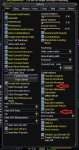
Confirmation.jpg

Options window ==> make sure you do not have confirmation turned on for lootall, and set your NO DROP setting to either off or "can not use", like Meistro is saying.

Holler of that doesn't do the trick

- - - Updated - - -

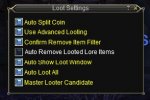
ADVLoot.jpg

Want to be sure your ADVLoot window has "Auto Loot All" checked.

I realize you said it was, just making sure, and giving visual aid for anyone else who happens along with similar problems trying to find a solution and may not know =)
 
Too tired to read entire thread, assuming you are using kissassist.
1. make sure you LootOn=1 in your characters kissassist ini file.
2. use group leader to pick that same character (right click) in the group window and select group role as master looter.
ninjadvloot is automatic with kissassist and should loot everything not specifically marked otherwise.
 
Question - Overwhelmed...Lol

Users who are viewing this thread

Back
Top
Cart