
I can try it on test. It looks like you don’t have luarocks installed or a few things going on with your install.I probably missed a step, but I'm seeing this after installing the latest. I'm on test if you think that could matter.
View attachment 71734

-
 Hail, we're RedGuides. We want you to play six (yes, 6!) EverQuest characters at once. We have scripts and a friendly community to help, please join our playstyle and say hello! 👋
You are using an out of date browser. It may not display this or other websites correctly.
You should upgrade or use an alternative browser.
You should upgrade or use an alternative browser.
Resource icon
Release Overseer (1 Viewer) 04/27/2026
- Thread starter GoldenFrog
- Start date

knave23
Cookie Champion 2022
I feel like I've had problems with luarocks before on live, but can't remember what I did to fix. I'll poke around the boards some more and try a few things out once the test build is ready and I can get back in game.I can try it on test. It looks like you don’t have luarocks installed or a few things going on with your install.
I see it looking for a utils folder in the Lua/overseer folder but that doesn't exist. Is it possible the test install for this Lua is different? I just hit download in the RG launcher because I have this thread watched.
I also found it odd that it would be looking for Lua stuff in my EQ folder? Is that expected? You can see it there in the middle it's looking for `Lua\utils`.
EDIT:
as another data point I tried switching back to Live and I got the same errors. Is there a setup for luarocks I could have missed or messed up? on first run of overseer.Lua I got the (packageman?) popup about installing.. something I can't remember atm and I hit yes, but could that have failed without me knowing? Is there a way to redo that step? I saw in another thread brainiac recommended deleting %appdata%/local/luarocks but I don't seem to have that.
Last edited:
Are you running in admin mode or elevated?I feel like I've had problems with luarocks before on live, but can't remember what I did to fix. I'll poke around the boards some more and try a few things out once the test build is ready and I can get back in game.
I see it looking for a utils folder in the lua/overseer folder but that doesn't exist. Is it possible the test install for this lua is different? I just hit download in the RG launcher because I have this thread watched.
I also found it odd that it would be looking for lua stuff in my EQ folder? Is that expected? You can see it there in the middle it's looking for `lua\utils`.
EDIT:
as another data point I tried switching back to Live and I got the same errors. Is there a setup for luarocks I could have missed or messed up? on first run of overseer.lua I got the (packageman?) popup about installing.. something I can't remember atm and I hit yes, but could that have failed without me knowing? Is there a way to redo that step? I saw in another thread brainiac recommended deleting %appdata%/local/luarocks but I don't seem to have that.
knave23
Cookie Champion 2022
No sirAre you running in admin mode or elevated?
EDIT TO ADD: forgot to mention but when I switched between live and test last night I deleted the `Lua/Overseer` folder in both to compare what the launcher brings down and, while I didn't compare file contents, the number of files and filenames all looked identical so it probably is something with my local machine.
Last edited:
burdsjm updated Overseer with a new update entry:
09/16/2025
Read the rest of this update entry...
09/16/2025
 Commits
Read the rest of this update entry...
knave23
Cookie Champion 2022
got back to testing this a little.. here are the steps I took and it seemed like I was making progress, but not sure.
Have I missed some setup or something? Or accidentally gotten into a developer mode/version? Not sure where to turn other than overseer.mac but I thought I read a while back we shouldn't use that anymore.
- it complained about no utils.logger in Release\Lua\overseer\utils\logger
- since I could see those files, I tried renaming the (I'm pretty sure RG Launcher created) folder from Overseer to overseer and it stopped complaining about this
- it complained about no overseer\lib\LIP\init.Lua
- I stole this folder after searching the boards and while I'm not sure it "works" for overseer.Lua, it got past the error at least
- it complained about no overseer\tests\string_utils_tests\init.Lua
- This is where I stopped since I figured these were custom files
Have I missed some setup or something? Or accidentally gotten into a developer mode/version? Not sure where to turn other than overseer.mac but I thought I read a while back we shouldn't use that anymore.

Crypl
Well-known member
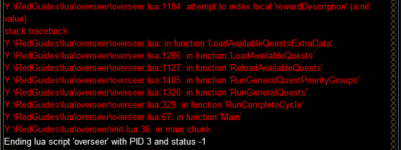
I am experiencing something a little bit weird on only 1 of my characters. I am able to setup and change my Active Rewards for 5 of my 6 characters. On my 6th character using the + button won't add any Active Rewards to my window. I have tried stopping the script, ending the Lua, relaunching MQ and EQ, and rebooting. Any thoughts?
Thanks for an update to this burds. I adjusted the line you had mentioned not too far up the thread a while ago. It fixed the general issue of being able to utilize this. It continued to crash from time to time, but was in a much more usable spot (re-runs would fix). I will see if I can't capture my errors, if any continue to happen post this update. Thanks for your contributions!

kronoislife
Active member
Been getting this one on just one character.
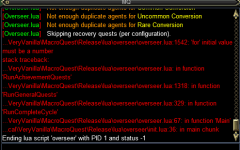
PM me your character ini file please
kronoislife
Active member
will do when I get home tonight. I can anecdotally say that this problem resolved after this character completed the one remaining active mission he had.PM me your character ini file please

getting a EQ crash error when i try to load the Lua for the first time.. am i missing something? Installed via redguides launcher.
---------------------------
EverQuest Crash Detected
---------------------------
MacroQuest caught a crash:
Process ID: 10488
Version: 3.1.1.3357
Location: C:\Users\Public\Daybreak Game Company\Installed Games\EverQuest\eqgame.exe+00007FFF006B6E75
CrashID: 32cf92a6-4872-4d77-8183-4679b1f213f8
You can either:
* [RETRY] Continue execution and hope for the best.
* [CANCEL] Write a crash dump and terminate EverQuest.
Copy the contents of this dialog to your clipboard by pressing Ctrl+C
---------------------------
Retry Cancel
---------------------------
---------------------------
EverQuest Crash Detected
---------------------------
MacroQuest caught a crash:
Process ID: 10488
Version: 3.1.1.3357
Location: C:\Users\Public\Daybreak Game Company\Installed Games\EverQuest\eqgame.exe+00007FFF006B6E75
CrashID: 32cf92a6-4872-4d77-8183-4679b1f213f8
You can either:
* [RETRY] Continue execution and hope for the best.
* [CANCEL] Write a crash dump and terminate EverQuest.
Copy the contents of this dialog to your clipboard by pressing Ctrl+C
---------------------------
Retry Cancel
---------------------------
Last edited:
New install of MQ/VV and having an issue. I did try searching through the forums but whatever the solution is seems to have been handled through DM/voice.
Trying to run Overseer I have the following error messages:
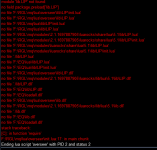
Any assistance or guidance would be highly appreciated!
Trying to run Overseer I have the following error messages:
Any assistance or guidance would be highly appreciated!
I’ll change the reference points for the require.New install of MQ/VV and having an issue. I did try searching through the forums but whatever the solution is seems to have been handled through DM/voice.
Trying to run Overseer I have the following error messages:
View attachment 72413
Any assistance or guidance would be highly appreciated!
Can you delete your overseer folder and retry the download. I included the lip.Lua

I've fixed the overseer problem for me on my end as far as the program just stopping at the end of the cycle and failing. I went to the Lua folder (in my hard drive) in MQ and deleted the all the files in the OVERSEER FOLDER (i left the overseer master folder, DO NOT DELETE THE FILES FROM THE RECYLE BIN YOU WILL NEED TO RESTORE THEM LATER). I extracted the overseer file from the download link (top right corner of page) and extracted them to the Lua Overseer Master folder. I then ran very vanilla and reinstalled the Overseer Lua through the Lua tab (it will not work with this step alone at least not for me). I then went back to my recycle bin and restored the original files back to the overseer folder. I skipped any files that came up as copies. I ran the program, and all was fine. I hope this works for you.
Last edited:
I did delete the Overseer folder and reinstall, same error message(s) as posted somehow.I’ll change the reference points for the require.
Can you delete your overseer folder and retry the download. I included the lip.lua
Fresh install - same issue mentioned already about init.Lua and lib.zip, etc. When I ran it the first time I got a pop-up asking to download some files. Click yes, then saw a command prompt pop up for a few seconds then it disappeared.
Tried extracting the files from the downloaded .zip file but that didn't work either.
Tried extracting the files from the downloaded .zip file but that didn't work either.


Going out on a limb here but if you have it open already, you can uncheck Claim rewards on startup in the general settings or use the command /mqoverseer claimRewards falseIs there a way to start up this LUA and skip the claim rewards election? Like /lua overseer safe or something?
If it's not open you can edit line 70 in your config/overseer/Overseer_TOONNAME_classshortname.Lua file before running it to read false
Lua:
};
    ["General"] = {
        ["version"] = 12;
        ["showUi"] = true;
        ["claimEliteAgentEchos"] = true;
        ["agentCountForConversionElite"] = 1;
        ["runFullCycleOnStartup"] = false;
        ["rewards"] = {
            ["storedExpRewardsCount"] = 8;
            ["claimRewards"] = true;
        };
        ["claimRewards"] = true;
        ["useQuestDatabase"] = true;
        ["minimumSuccessPercent"] = 0;
        ["logLevel"] = 3;
        ["ignoreConversionQuests"] = false;
["ignoreRecruitmentQuests"] = true;Going out on a limb here but if you have it open already, you can uncheck Claim rewards on startup in the general settings or use the command /mqoverseer claimRewards false
If it's not open you can edit line 70 in your config/overseer/Overseer_TOONNAME_classshortname.lua file before running it to read false
Lua:}; ["General"] = { ["version"] = 12; ["showUi"] = true; ["claimEliteAgentEchos"] = true; ["agentCountForConversionElite"] = 1; ["runFullCycleOnStartup"] = false; ["rewards"] = { ["storedExpRewardsCount"] = 8; ["claimRewards"] = true; }; ["claimRewards"] = true; ["useQuestDatabase"] = true; ["minimumSuccessPercent"] = 0; ["logLevel"] = 3; ["ignoreConversionQuests"] = false; ["ignoreRecruitmentQuests"] = true;
Nice workaround. Yeah totally forgot I had auto claim on and wanted to spend some
time converting some agents (didn’t want to do it by hand) and accidentally claimed a bunch of research rewards I was building up for release of the next expac. Bah!

I recently began trying this and got errors on all characters, since this is my first time trying it, I suspect my system is more "virgin" than most others. Through some looking around and having Claude explain some stuff to me and help me through some of the changes and errors, we came up with the attached. This has been tested across 13 characters and is working for all of them.
The one thing I am not really sure of is an issue with the "Claim Rewards" option. If this option is NOT checked, it fails to read the rewards as it scans each quest. I tested to see if it was a delay issue and no matter how high the delay, it still failes. If this option IS checked, it reads them just fine with the preview window. I can't make any sense of that specific behavior, but the attached file has all the changes that it took for me to get it working on my system across all characters. Figured it might help someone else as well.
The one thing I am not really sure of is an issue with the "Claim Rewards" option. If this option is NOT checked, it fails to read the rewards as it scans each quest. I tested to see if it was a delay issue and no matter how high the delay, it still failes. If this option IS checked, it reads them just fine with the preview window. I can't make any sense of that specific behavior, but the attached file has all the changes that it took for me to get it working on my system across all characters. Figured it might help someone else as well.
Attachments

just returned to EQ after a break and tried to run Overseer via Lua, but getting the Error " Cannot find Lua Script matching "overseer" ".
havent changed anything since i last played about 3-4 month ago and it worked fine then.
any ideas on what to do ( am sure there are song lyrics int here somewhere).
thanks in advance
havent changed anything since i last played about 3-4 month ago and it worked fine then.
any ideas on what to do ( am sure there are song lyrics int here somewhere).
thanks in advance
Doublecheck your Lua directory (Vanilla_Live/Lua) for a folder named Overseer, and an init.Lua inside that folder. If not there use the launcher to reinstall it - on the Overview tab near top of page, make sure it is 'watched', then it should show up when you run launcher, and get installed properly.
thanks turns out that is what was wrong, for some reason, my drives had changed order so it was looking at the wrong drive.Doublecheck your lua directory (Vanilla_Live/lua) for a folder named Overseer, and an init.lua inside that folder. If not there use the launcher to reinstall it - on the Overview tab near top of page, make sure it is 'watched', then it should show up when you run launcher, and get installed properly.
I was having the same issue everybody else was, but I searched on the site for the lip.Lua file and found it some other posts. I downloaded it and put it in the folder, but now whenever I try and run it I get the following error. This was after a fresh install after I grabbed the lip.Lua file:
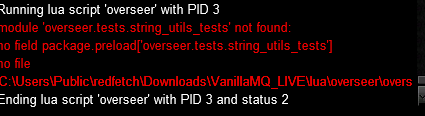
inside the overseer folder, do you have 4 folders, data, lib, tests, utils?I was having the same issue everybody else was, but I searched on the site for the lip.lua file and found it some other posts. I downloaded it and put it in the folder, but now whenever I try and run it I get the following error. This was after a fresh install after I grabbed the lip.lua file:
View attachment 72871
Also, the last red line is cut off, but it looks like you might have an extra level of directory named 'overseer'. Might look inside the second one, and see if those folders are present. If so, should move everything in the second folder, into the first, and get rid or the second.
I was able to get it this morning! I did have multiple overseer files in there that I did not realize!inside the overseer folder, do you have 4 folders, data, lib, tests, utils?
Also, the last red line is cut off, but it looks like you might have an extra level of directory named 'overseer'. Might look inside the second one, and see if those folders are present. If so, should move everything in the second folder, into the first, and get rid or the second.
Is it as simple as editing lines 393 - 396 from 125 to 130 or is there more logic in the overseer.ini?, and adding "The Outer Brood", to line 481?Probably on your list of things to do, but just incase its not, Gonna need a 130 level max for xp claims
Probably but I dont want to do it :P Figured it would be a bit more useful if everyone got the update.Is it as simple as editing lines 393 - 396 from 125 to 130 or is there more logic in the overseer.ini?, and adding "The Outer Brood", to line 481?
Just as a stopgap until Burd has time to update.Probably but I dont want to do it :P Figured it would be a bit more useful if everyone got the update.
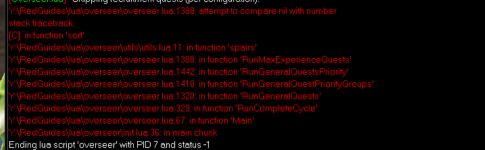
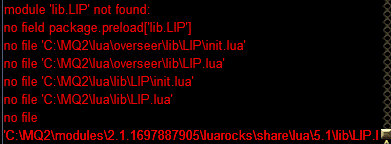
Encountering the missing files errors reported above with a fresh install but not seeing a resolution beyond grabbing an older version that I don't see available. Any help to proceed would be greatly appreciated.
> /lua run overseer
Running lua script 'overseer' with PID 11
module 'lib.LIP' not found:
no field package.preload['lib.LIP']
no file 'C:\redfetch\Downloads\VanillaMQ_LIVE\lua\overseer\lib\LIP\init.lua'
no file 'C:\redfetch\Downloads\VanillaMQ_LIVE\lua\overseer\lib\LIP.lua'
no file 'C:\redfetch\Downloads\VanillaMQ_LIVE\lua\lib\LIP\init.lua'
no file 'C:\redfetch\Downloads\VanillaMQ_LIVE\lua\lib\LIP.lua'
no file 'C:\redfetch\Downloads\VanillaMQ_LIVE\modules\2.1.1697887905\luarocks\share\lua\5.1\lib\LIP.lua'
no file 'C:\redfetch\Downloads\VanillaMQ_LIVE\modules\2.1.1697887905\luarocks\share\lua\5.1\lib\LIP\init.lua'
no file 'C:\redfetch\Downloads\VanillaMQ_LIVE\modules\luarocks\share\lua\5.1\lib\LIP.lua'
no file 'C:\redfetch\Downloads\VanillaMQ_LIVE\modules\luarocks\share\lua\5.1\lib\LIP\init.lua'
no file '.\lib\LIP.lua'
no file 'C:\EverQuest\lua\lib\LIP.lua'
no file 'C:\EverQuest\lua\lib\LIP\init.lua'
no file 'C:\Lua\5.1\lua\lib\LIP.luac'
no file 'C:\redfetch\Downloads\VanillaMQ_LIVE\lua\overseer\lib\LIP.dll'
no file 'C:\redfetch\Downloads\VanillaMQ_LIVE\modules\2.1.1697887905\luarocks\lib\lua\5.1\lib\LIP.dll'
no file '.\lib\LIP.dll'
no file 'C:\EverQuest\lib\LIP.dll'
no file 'C:\EverQuest\loadall.dll'
no file 'C:\redfetch\Downloads\VanillaMQ_LIVE\lua\overseer\lib.dll'
no file 'C:\redfetch\Downloads\VanillaMQ_LIVE\modules\2.1.1697887905\luarocks\lib\lua\5.1\lib.dll'
no file '.\lib.dll'
no file 'C:\EverQuest\lib.dll'
no file 'C:\EverQuest\loadall.dll'
stack traceback:
[C]: in function 'require'
C:\redfetch\Downloads\VanillaMQ_LIVE\lua\overseer\init.lua:17: in main chunk
Ending lua script 'overseer' with PID 11 and status 2
Users who are viewing this thread
Total: 2 (members: 0, guests: 2)
Share: