
-
 Hail, we're RedGuides. We want you to play six (yes, 6!) EverQuest characters at once. We have scripts and a friendly community to help, please join our playstyle and say hello! 👋
You are using an out of date browser. It may not display this or other websites correctly.
You should upgrade or use an alternative browser.
You should upgrade or use an alternative browser.
Resource icon
Release Overseer 04/27/2026
- Thread starter GoldenFrog
- Start date

- Commits
- 6
Does this happen every time or just once?Got this, not sure why.
The error seems to indicate Me.OverseerTetradrachms() returned nil rather than 0+. Haven't seen that before ---
- Commits
- 6
GoldenFrog updated Overseer with a new update entry:
3.60: UI Action Optimizations, Misc Fixes
Read the rest of this update entry...
3.60: UI Action Optimizations, Misc Fixes
Primary purpose of this update is to optimize interactions with the EQ UI for performance and reduce automated hits
Most changes are foundational to allow for other up-coming features.
- Quest Database
- Most known Overseer quests read from a database.
- Removes need to physically walk the UI and read quest details. Noticeable performance gain and click-reduction
- May be disabled by unchecking Settings > General > ...
- View attachment 61937...
Read the rest of this update entry...


BlueBug
Seasoned veteran member
/Lua stop overseeris there a command to hide the overseer window?
Run it every few hours. Not good to keep it running 24/7
BB~

knave23
Cookie Champion 2022
Lesson doesn't work on overseer xp unfortunately.Just came back to game and loving this
Is there any way to trigger Lesson of the Devoted, or any other xp buffs people might want to do, if using it to afk xp? /featurerequest, please?
- Commits
- 6
/mqoverseer hide/showis there a command to hide the overseer window?
Also, clicking the 'x' on the Overseer window, is equivalent to hiding it. The script will continue in the background.
- Commits
- 6
This is correct. However it does work during bonus XP times (like double XP weekends), not that the script is able to automatically act differently during these times.Lesson doesn't work on overseer xp unfortunately.

- Commits
- 6
Do you have any logs on the crash? This is a simple package install that several other scripts have used.
If anyone else is seeing this, I will push a version without reliance on the package.
@Robahn, sending you a direct message with additional question/information to work around for now.

Working great here! Awesome upgrade with the random delay btw.Do you have any logs on the crash? This is a simple package install that several other scripts have used.
If anyone else is seeing this, I will push a version without reliance on the package.
@Robahn, sending you a direct message with additional question/information to work around for now.
I noticed the claim rewards option was unchecked on all toons after the install/upgrade for some reason but if anyone see's their toons not collecting rewards, just check the box =)

- Commits
- 6
Thank you, Psy.Working great here! Awesome upgrade with the random delay btw.
I noticed the claim rewards option was unchecked on all toons after the install/upgrade for some reason but if anyone see's their toons not collecting rewards, just check the box =)
And "hmmm". Will look at that too - shouldn't happen.
Clicking fixes, or you can use the command to mass update on all characters if desired. Examples:
- For char: /mqoverseer claimRewards true
- All via DanNet: /dga /mqoverseer claimRewards true
- All via BC: /bca /mqoverseer claimRewards true

YALM was doing this when i tried to install that pkg, somebody from RG helped me fix it, was only her PC, and turned out to be a silly issue.Do you have any logs on the crash? This is a simple package install that several other scripts have used.
If anyone else is seeing this, I will push a version without reliance on the package.
@Robahn, sending you a direct message with additional question/information to work around for now.
We had this issue before and brainiac said to the following here https://www.redguides.com/community...nstruction-set-next.79853/page-87#post-584878
%appdata%/local/luarocks delete it and stop running as admin
another thing to test is to install the filesystem manually via console as descripted here https://www.redguides.com/community/threads/luarock-missing-in-modules-folder.87647/#post-576870
I did not have enough time to check the solutions for this issue - will do so tomorrow and report back.
%appdata%/local/luarocks delete it and stop running as admin
another thing to test is to install the filesystem manually via console as descripted here https://www.redguides.com/community/threads/luarock-missing-in-modules-folder.87647/#post-576870
I did not have enough time to check the solutions for this issue - will do so tomorrow and report back.


When actively doing a run this latest evolution of Overseer.Lua seems to take complete control of my EQ sessions. As it runs I can't click on anything or do anything and even kissassist.mac seems to halt. I haven't done any troubleshooting yet. It functions more slowly than before too, even though I disabled the new feature for extra time delays. Just throwing this out here to see if anyone else is experiencing similar?
- Commits
- 6
When actively doing a run this latest evolution of Overseer.lua seems to take complete control of my EQ sessions. As it runs I can't click on anything or do anything and even kissassist.mac seems to halt. I haven't done any troubleshooting yet. It functions more slowly than before too, even though I disabled the new feature for extra time delays. Just throwing this out here to see if anyone else is experiencing similar?
When you say "as it runs", do you mean actively loading and running quests? Or just sitting there between sessions? Typically things aren't happy if you try to use the mouse during a session.
Also "more slowly" as a noticable difference in how long things take overall or in each action. The latest release primarily cut out the need for that initial walk-through of all available quests, generally resulting in a much faster cycle. But curious more specifically where you're seeing slow-downs.

I continue to LOVE Lua Overseer, thanks for this great program.
I believe I uncovered a problem with the option Automatically Restart. I prefer to start Lua Overseer with Automatically Restart unchecked, but I do have Run Full Cycle on Startup checked.
When I start Lua Overseer, it brings up the in-game Overseer window, then parses (i.e., clicks through) each completed Quest on the Quest tab. After this, Lua Overseer closes the in-game Overseer window and “pauses”. Lua Overseer did not select (clear) the completed Quests and start new Quests.
Also, I specifically do not want Automatically Restart enabled because I want to manually control when Lua Overseer processes Overseer items after initial startup, and I do not want to load/unload Lua Overseer.
I believe I uncovered a problem with the option Automatically Restart. I prefer to start Lua Overseer with Automatically Restart unchecked, but I do have Run Full Cycle on Startup checked.
When I start Lua Overseer, it brings up the in-game Overseer window, then parses (i.e., clicks through) each completed Quest on the Quest tab. After this, Lua Overseer closes the in-game Overseer window and “pauses”. Lua Overseer did not select (clear) the completed Quests and start new Quests.
Also, I specifically do not want Automatically Restart enabled because I want to manually control when Lua Overseer processes Overseer items after initial startup, and I do not want to load/unload Lua Overseer.
- Commits
- 6
Disappointing. Things definitely used to work as you outlined in the past, as that is how I ran on several characters as well.I continue to LOVE Lua Overseer, thanks for this great program.
I believe I uncovered a problem with the option Automatically Restart. I prefer to start Lua Overseer with Automatically Restart unchecked, but I do have Run Full Cycle on Startup checked.
When I start Lua Overseer, it brings up the in-game Overseer window, then parses (i.e., clicks through) each completed Quest on the Quest tab. After this, Lua Overseer closes the in-game Overseer window and “pauses”. Lua Overseer did not select (clear) the completed Quests and start new Quests.
Also, I specifically do not want Automatically Restart enabled because I want to manually control when Lua Overseer processes Overseer items after initial startup, and I do not want to load/unload Lua Overseer.
I'll crack it open this afternoon.
- Commits
- 6
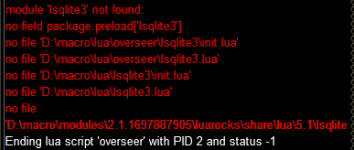
Glad you got it resolved. I'm not 100% clear on how the packages work, but "have you tried turning it off and on again" is a good fix.I'm getting this error when trying to run Overseer now. I have tried to reinstall and deleted the files and still get this, any insight.
I resolved this by reloading the computer.
- Commits
- 6
GoldenFrog updated Overseer with a new update entry:
3.61: Honors "Run on Startup" if Auto-Restart Not Selected
Read the rest of this update entry...
3.61: Honors "Run on Startup" if Auto-Restart Not Selected
- Ensures "Run on Startup" initiates when Auto Restart is unselected
Read the rest of this update entry...
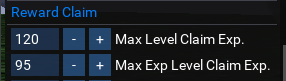
Hi Zero,Is there a way to tell this script to claim "exp" when a character is below a certain level and tetradrachms otherwise?
Not in game at the moment but yes. Choose character exp as the first reward and then tatradrachms as the second on the rewards tab (you can change the priority up and down) and then choose the max level on the settings tab with the % of exp to stop at.

- Commits
- 6
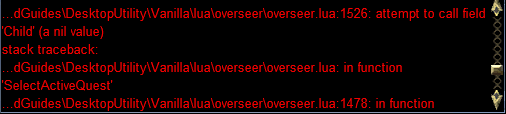
That looks like a UI timing or other type of issue. Happens while attempting to select/claim a conversion quest.does anyone have this problem? sometimes this will happen.
Can put in some crash-preventions there. Do you know if you or anything was clicking around while that was going on? Don't believe I've seen that happen in the wild myself.

When I click retire Elite Agents nothing happens.
I set the number to keep to 10 and after collecting stats I have some with 20 and 30 that are green but I have to click them one at a time.
Is there a way to just go and retire over that amount?
I set the number to keep to 10 and after collecting stats I have some with 20 and 30 that are green but I have to click them one at a time.
Is there a way to just go and retire over that amount?
- Commits
- 6
Well my goodness. There's all this code in there to do exactly that --- but there's no actual trigger to initiate it.When I click retire Elite Agents nothing happens.
I set the number to keep to 10 and after collecting stats I have some with 20 and 30 that are green but I have to click them one at a time.
Is there a way to just go and retire over that amount?
I know I was really gun shy about accidentally purging someone's elite collection, so played it safe but apparently the final wiring never got published (nor checked in).
Even a separate "Retire Elites" button is there under [Actions] tab, which also isn't wired up:

>sigh< Thanks, @burdsjm
If you want to send me a beta I’ll test the purge for you.Well my goodness. There's all this code in there to do exactly that --- but there's no actual trigger to initiate it.
I know I was really gun shy about accidentally purging someone's elite collection, so played it safe but apparently the final wiring never got published (nor checked in).
Even a separate "Retire Elites" button is there under [Actions] tab, which also isn't wired up:
View attachment 62650
>sigh< Thanks, @burdsjm
I'd get in on that action as well if you like =)If you want to send me a beta I’ll test the purge for you.
Apologies if this has been asked before but I can't find an answer. Has anyone else run into the issue where they can't add anything to the "Active Rewards" section on the "Rewards" tab for only some toons? Hitting the "+" after selecting a reward from "Available Rewards" list doesn't do anything on a couple of my toons whereas other toons I am able to make those changes just fine.
I must have looked right at this 20 times. Thank you!Hi Zero,
Not in game at the moment but yes. Choose character exp as the first reward and then tatradrachms as the second on the rewards tab (you can change the priority up and down) and then choose the max level on the settings tab with the % of exp to stop at.
View attachment 62554
View attachment 62555
one of my toons goes into absolute slow motion when running Lua overseer. This happens when quests are cycling and giving out rewards. Rest of group is moving or fighting in background and he just saunters along and clicking on any buttons does nothing. It appears that it is the conversion quests that are causing the issue but not really sure. Once the new missions are taken he is back to normal.
one of my toons goes into absolute slow motion when running lua overseer. This happens when quests are cycling and giving out rewards. Rest of group is moving or fighting in background and he just saunters along and clicking on any buttons does nothing. It appears that it is the conversion quests that are causing the issue but not really sure. Once the new missions are taken he is back to normal.
Yes! I thought it was just me!
- Commits
- 6
Are you saying the "slow" behavior appears just when waiting on the conversion quests to complete?
I just ran things across multiple accounts again and haven't seen. Will continue to look at this.
I just ran things across multiple accounts again and haven't seen. Will continue to look at this.
Not sure if it's the same issue or even my system but I do see a pause/freeze now after the last update when it's collecting the rewards. It's only a few seconds per toon and a bit hard to narrow down exactly what/when it's doing it with other Lua's loading at login but I could do a bit more research by disabling all other things on load and see if I can narrow down what part of the program it's in when doing it exactly. But again, it could be my system as well, so /shrug
I logged in only one toon this morning with no other Lua's and there was a bit of pausing during both the collecting rewards/claiming missions and then again during the starting quest phase (conversions included). But it was minimal with only one toon logged in. When you run the Lua with multiple toons at the same time. you can see it more. It seems to have something to do with the clicking as it takes a moment for the computer to "catch up".
I do have "load known quests checked"
I do not use UI delay
CPU usage seems normal
All items checked under claim settings
Not sure if any of this helps but if you need more, please feel free to ask. Happy to run some tests for ya.
I also noticed there will likely need to be some logic to handle the elite agent conversations as when you have too many and your reward window fills up, the script freezes. I figured you likely knew that though and were working on it due to burds post above.
I do have "load known quests checked"
I do not use UI delay
CPU usage seems normal
All items checked under claim settings
Not sure if any of this helps but if you need more, please feel free to ask. Happy to run some tests for ya.
I also noticed there will likely need to be some logic to handle the elite agent conversations as when you have too many and your reward window fills up, the script freezes. I figured you likely knew that though and were working on it due to burds post above.
- Commits
- 6
...
Not sure if any of this helps but if you need more, please feel free to ask. Happy to run some tests for ya.
...
That all may help. I'm trying to see if there's a stray Sleep/Pause that happens under the UI's thread. That can definitely cause what's being reported but not seeing any such thing.
Is this something more recently discovered or has it existed for some time? I'm not aware of changes in months that should have impacted this type of situation.
Users who are viewing this thread
Total: 1 (members: 0, guests: 1)
Share: