• You've discovered RedGuides, an EverQuest multi-boxing and scripting community 🧙‍♀️⚙️. We want you to play several EQ characters at once, come join us and say hello! 👋

  • A TLP without truebox has thawed (Very Vanilla ready)
    Frostreaver
Resource icon

Release Overseer 04/27/2026

No permission to download
An option that I can select to only claim rewards on recovery missions if there is actually an agent that is incapacitated and can be recovered.
...
Thanks, Wampuel.

I've always been game to add intelligent Recovery logic but needed someone to explain a what/when/where it's make sense. I've never used it myself.

Sounds like you are saying:
  • Checkbox option for [ ] "Queue up Recovery quests"
    • Select Durations: [ ] 3 [ ] 6 [ ] 12 ... whatever
    • How many to queue at a time [1 |v] dropdown or whatever.
  • Then claim anytime both:
    • Recovery quest is ready to be claimed from the reward window...
    • and an agent is incapacitated

Is there any logic to which recovery quest to use on which agents?
Is there any logic to the priority of which incapacitated agent to recover? Any better than others?
 
Last edited:
no, somehow that mechanic is broken.. like when you have 1 wounded, 1 discouraged and 1 missing and your using a missing recovery it can also recover the others.. so basiacally just use as many random rewards as many agents are incapacitated..
could also add an option to claim rewards of quests that critically succeeded right away, because you get extra random agents with those.. not sure if ppl would want that, only if its not a lot of work I guess..

while im at it: could it be that the priority checks are bugged or not working? first of, the settings dont get saved globally.. I changed em on one toon and all other toons didnt see the change.. second, I selected only rarity or tried with rarity and type but the macro would not accept elite quests with 12h when there were grey ones with 6h.. or am I misunderstanding something?
 
Last edited:
Still learning my way around Luas, but with character-specific settings is this a Lua that can be run on all toons at once (like, /bcaa //Lua run overseer) or is it designed to be run from one specific toon? If it's the latter I haven't figured out how yet, but just want to make sure luas are like macros that can be run independently across multiple toons at the same time. Please and thank you!
 
Still learning my way around Luas, but with character-specific settings is this a lua that can be run on all toons at once (like, /bcaa //lua run overseer) or is it designed to be run from one specific toon? If it's the latter I haven't figured out how yet, but just want to make sure luas are like macros that can be run independently across multiple toons at the same time. Please and thank you!
It can be run on each toon with their own individual configuration or with "1" general configuration for all. The overview tab goes into more detail about this.

As for Lua's and macros, they can be run simultaneously. You can run as many Lua's as you would like concurrently but only one macro at a time.

Hope this helps!!
 
It can be run on each toon with their own individual configuration or with "1" general configuration for all. The overview tab goes into more detail about this.

As for Lua's and macros, they can be run simultaneously. You can run as many Lua's as you would like concurrently but only one macro at a time.

Hope this helps!!
That helps immensely. Thank you!
 
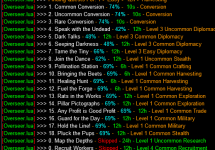
I am still having issues with the conversion quests, i have accounts with 2,3,4 of multiple common agents that I end up having to convert manually.

I enabled the debug mode, and it does not think there are enough duplicate agents - this is on an account that only has 2 of each

On another account that has many with 3 or 4, the conversion works OK.
I watched this account run the conversions, and as soon as it got to 2 of each overseer, it stopped processing

Is the logic set for >2 or =>2?
 
Is the logic set for >2 or =>2?
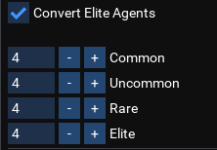
The actual amount is specified by the user. "How many do you want to keep before converting"

Check the UI Settings > General and see what this is set at.
For my numbers below, if won't convert until I have 4 of each.

I'm guessing that's where your issue is at
1705707299467.png
 
The actual amount is specified by the user. "How many do you want to keep before converting"

Check the UI Settings > General and see what this is set at.
For my numbers below, if won't convert until I have 4 of each.

I'm guessing that's where your issue is at
View attachment 56261

So i should actually be setting this count to 1, not 2?
 
Is it normal to lag heavily when it starts running and completing quests? Have it running on 6 toons at once on a pretty beefy PC with 64gigs of ram.

I keep having to turn it off while in combat in case it runs the quest cycle and gets me killed.
 
Is it normal to lag heavily when it starts running and completing quests? Have it running on 6 toons at once on a pretty beefy PC with 64gigs of ram.

I keep having to turn it off while in combat in case it runs the quest cycle and gets me killed.
The EQ Overseer window itself starts to lag heavily if you have "too many" agents.

I initially was saving like 25+ of each type and the window would take forever and almost freeze up my system.
Took the script like 30 minutes of converting down to 5 of each and things have been good ever since.

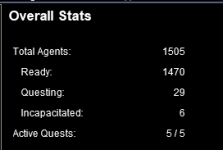
Check the stats tab and see how many agents you have.
 
The EQ Overseer window itself starts to lag heavily if you have "too many" agents.

I initially was saving like 25+ of each type and the window would take forever and almost freeze up my system.
Took the script like 30 minutes of converting down to 5 of each and things have been good ever since.

Check the stats tab and see how many agents you have.
Ummm this is bad I suppose

1705849792410.png


Awkward Schitts Creek GIF by CBC


Converting
 
The EQ Overseer window itself starts to lag heavily if you have "too many" agents.

I initially was saving like 25+ of each type and the window would take forever and almost freeze up my system.
Took the script like 30 minutes of converting down to 5 of each and things have been good ever since.

Check the stats tab and see how many agents you have.
I'll try this thanks.
 
I definitely haven't seen this. Are you saying they're LISTED with a 60 min duration - or actually taking that long? (Or both)?

Listed as 10s, but actual was 60m. The script gave me a polite message that they were still running and to manually check them.
 
Running into a wierd issue. Lua runs, open overseer windows, but does not collect the rewards / finish the quest. Instead it opens up my trade skill container. and hangs.

1706209891492.png 1706209912860.png
 
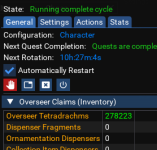
Figured it out. I had some boxes of Tetradrachms in my inventory. Once I open those, and they went away. Lua overseer started working normally.
So you're saying the Auto-Claim of Tetradrachms seems to have an issue.

Used to keep 4-5 of each type of clicky for testing but haven't in a while. Time to bank up a few and test again.
 
It appears that if it does not open the Tetradrachms, whether due to zoning or some other things, overseers will run, but get stuck. The behavior it was causing on the toon is that if the toon picks something up from their inventory it is automatically dropped back into the inventory, so you cannot hand something to someone.
 
GoldenFrog, your Overseer continues to work well for me, thank you.

In the current version (3.58) I noticed the startup message in the MQ window no longer shows the version number. Would you add that back or as alternative, is there a way from inside the Overseer program (while running) to see the current version number (maybe add it under the General tab)?
 
GoldenFrog, your Overseer continues to work well for me, thank you.

In the current version (3.58) I noticed the startup message in the MQ window no longer shows the version number. Would you add that back or as alternative, is there a way from inside the Overseer program (while running) to see the current version number (maybe add it under the General tab)?
Thank you, MacQ. Will see what's up and include that in the next push.
 
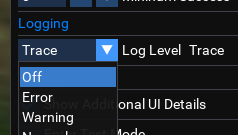
@MacQ The issue is in your logging configuration. At some point it got modified (there was an update recently that touched it, so possibly that)

Under Settings > Logging - ensure this is set to at least Warning level.
(Not Off or Error).
1706714469341.png

1706714510945.png
 

Attachments

  • 1706714431130.png
    1706714431130.png
    4.4 KB · Views: 0
GoldenFrog updated Overseer with a new update entry:

3.59: Corrected Left-Over Reward, Handle Bad Item Claiming

  • Should no longer occasionally leave a reward unclaimed
  • If item claiming (i.e. tetradrachm coffers) is interrupted, will stop that process until next run
  • Added [Actions] button for initiating Item Claiming (i.e. tetradrachm coffers) at any time
  • Log output has had a slight coloring make-over

Read the rest of this update entry...
 
Looks like that loopy loop may have been a issue with the first run of new version only. Killing the Lua and re-running properly detected the next quest completion and sets timer.
 
Looks like that loopy loop may have been a issue with the first run of new version only. Killing the lua and re-running properly detected the next quest completion and sets timer.
The problem is just a timing issue in claiming rewards. I didn't fix it - but "caught" it and retried when happened.

Glad that your situation self-resolved.

- Specifically when the rewards claim a non-option reward (i.e. Recruit with no options but to claim the recruit), the NEXT reward doesn't act correct. I'm pretty sure a simple extra delay there would correct but takes time - like 6+ hours - to recreate so just cheated for now.
 
Hello fellow overseers :)

Im trying to get my toons to chose the right quests, using the priority setting.. can I just set the priority with those 4 options in a certain order, or does it also take into account the order of rarities for example?

Im trying to give the colored missions (uncommon, rare and elite) the highest priority even if the duration is 12h.. so far the Lua is preferring a grey 6h quest over a colored 12h.. how can I change that?
 
Longer post than I originally intended but there's actually a lot here available. The tldr is the last paragraph. If it makes sense, great. If not - read the rest.
--------------------

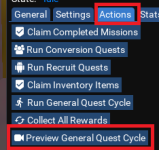
First note, at any time, you can "experiment" to see how your current settings would prioritize the current configuration.
Click that button - it'll run through and say: "This is the order I would have used if it was a real run."
Can tweak your settings and try again.
NOTE: In testing this, seems a bug with this preview has crept in. You need to restart the script after each run or it doesn't reset properly. I will correct.
1707232552860.png1707232798614.png


There is quite a bit of control that you have over how things are prioritized.

The first level is what order to prioritize the priorities. Default is Levels > Duration > Rarities > Types.
This means it should first look at level (5 > 4 > 3 > 2 > 1). If you have only a single level 5 in the available quest list, it will be selected first (assuming it meets other criteria)

Sounds like you want Rarities to come before Duration. That means changing the priority of priorities :P

On the basic config screen, you can select WHICH of each type is run. "Should I run 24h quests or not". But the PRIORITY order of those can be seen in orange at the top of each section.
Here is it set to only run 12 and 6 hours. And it'll prefer 6h to 12, all else being equal.

1707233151400.png


You can change this order by going into Advanced settings. This lets you manually type (no pretty interface here, sorry) the order you want. For me to flip those above, click [Advanced], type what you want in full, and click the [Durations] button.
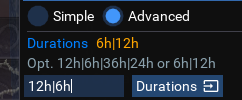
1707233272437.png


So! After this long explanation, it sounds like what you want is to change that priority of priorities - so do that.

1707233376345.png
This should mean that a level 5 Elite will run before a level 5 Common - regardless of Duration or Type.
 
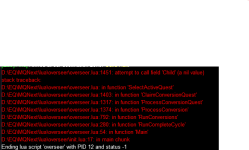
Error I don't remember to have seen yet:
1709471608844.png

Running Overseer contemporary on 6 chars, one of them produced this error.
For me not a big deal, restarting overseer a second time, made it work "normal".
So low priority, but if you have an idea what might had caused it .....
 
Release Overseer

Users who are viewing this thread

Back
Top
Cart