When that happens to me I just end and restart the macroGetting stuck at waiting for a quest to complete that is 12 hours away.

-
 Hail, we're RedGuides. We want you to play six (yes, 6!) EverQuest characters at once. We have scripts and a friendly community to help, please join our playstyle and say hello! 👋
You are using an out of date browser. It may not display this or other websites correctly.
You should upgrade or use an alternative browser.
You should upgrade or use an alternative browser.

Release Overseer Automation (2 Viewers) 1.9
- Thread starter GoldenFrog
- Start date

- Commits
- 2
Same here, just started happening recently, wasn't sure if it was a patch or level.When that happens to me I just end and restart the macro

Seems to happen as you get more hero's, like it it "lags" trying to select them... found with newer char, it wasnt a issue.. once they have been doing Overseer's for a bit, they can occasionally hang up. Seems to happen less if you have the Overseer window set to open fully? or maybe thats just wishful thinking....Same here, just started happening recently, wasn't sure if it was a patch or level.
- Commits
- 2
All of my toons got hung up on the Secure the Shipment. Just that specific one. ah well.Seems to happen as you get more hero's, like it it "lags" trying to select them... found with newer char, it wasnt a issue.. once they have been doing Overseer's for a bit, they can occasionally hang up. Seems to happen less if you have the Overseer window set to open fully? or maybe thats just wishful thinking....
- Commits
- 6
I haven't yet seen this. Will try to experiment and see what we can find.
Goldenfrog (or anybody), i set 6 of my guys to prioritize collection item reward.. I cant remember how i did that, and even after reading the directions it doesnt come back.. any help would be greatly appreciated. or.. could i just copy one of the "good" ini's to the 18 im trying to get to behave that way?
Goldenfrog (or anybody), i set 6 of my guys to prioritize collection item reward.. I cant remember how i did that, and even after reading the directions it doesnt come back.. any help would be greatly appreciated. or.. could i just copy one of the "good" ini's to the 18 im trying to get to behave that way?
Couple options you have available to resolve this issue.
- The Overseer macro INI configurations for each character is located within the Macro folder (at least for the standard MQ2 version of VV, I can't say where it is for Next). Copy and replace the internals, specifically the Rewards section, to each of the other character's INI configurations.
- Based on your scenario, I'm inferring you want to treat all your characters the same way. If so, modify the base Overseer.INI configuration (same configuration location) to that of one of the existing characters that behaves as you want (copy everything over) and make sure
useCharacterConfigurations=0is set in theGeneralsection.
- Commits
- 6
Rouneq was right - if you want just one config to look the same for everyone - use
To prioritize collections, there are two parts to it.
1. Set to run the "Collection" quests. Collection quests are the following.
2. If you also want the macro to claim your rewards, set them properly. I'm not running EQ right now to remember what the reward(s) for collection are called, but enter those names here with as many or few as you're looking for.
useCharacterConfigurations=0 .To prioritize collections, there are two parts to it.
1. Set to run the "Collection" quests. Collection quests are the following.
- Exploration
- Diplomacy
- Trade
INI:
[QuestPriority]
Priorities=Levels|Durations|Rarities|Types
Durations=6h|12h|24h
Rarities=Elite|Rare|Uncommon|Common
Types=Exploration|Diplomacy|Trade
Levels=5|4|3|2|1
2. If you also want the macro to claim your rewards, set them properly. I'm not running EQ right now to remember what the reward(s) for collection are called, but enter those names here with as many or few as you're looking for.
INI:
[Rewards]
index=3
1=Character Experience
2=Mercenary Experience
3=Overseer Tetradrachm@GoldenFrog It appears Next does not create the INI file. The macro seems to run properly but there is no INI file in the macro directory and nothing when I do a complete search of my PC for Overseer_charname.ini, I can't say where it is for Next


Do some missions need to be added to their categories? I found some missions that my toons don't attempt to do.


Last edited:
- Commits
- 6
Do some missions need to be added to their categories? I found some missions that my toons don't attempt to do.
Looks like that's a 'yup'. "Easy" is a new rarity, it seems. Will try to get that added later today.
- Commits
- 6
The only change necessary to run these types is add the 'Easy' difficulty into your INI file.
I will look at pushing an update to the macro to set this as a default, but probably not something we want to automatically modify.
Appropriate 'Rarities' node, add 'Easy' to the priority level you want. Most INI files will look similar to below.
Rarities=Elite|Rare|Uncommon|Common|Easy
I will look at pushing an update to the macro to set this as a default, but probably not something we want to automatically modify.
Appropriate 'Rarities' node, add 'Easy' to the priority level you want. Most INI files will look similar to below.
Rarities=Elite|Rare|Uncommon|Common|Easy
INI:
[QuestPriority]
Priorities=Levels|Durations|Rarities|Types
Durations=6h|12h|24h
Rarities=Elite|Rare|Uncommon|Common|Easy
Types=Any
Levels=5|4|3|2|1

[QuestPriority_Unsubscribed]
Priorities=Durations|Levels|Rarities|Types
Durations=6h|12h|24h
Rarities=Elite|Rare|Uncommon|Common|Easy
Types=Any
Levels=5|4|3|2|1- Commits
- 6
GoldenFrog updated Overseer Automation with a new update entry:
1.37: New Overseer Quest Type: Easy
Read the rest of this update entry...
1.37: New Overseer Quest Type: Easy
Also discussed at: https://www.redguides.com/community/threads/overseer-automation.72290/post-485269
- Added Addition of new 'Easy' Type
- One-time update of certain INI files to add type
- See below for limitations
Overseer now has an additional difficulty 'Easy', added to Common, Uncommon, Rare, and Elite.
To correct, Easy type must be added to your INI file.
This update will do this automatically, one-time, if the priorities...
Read the rest of this update entry...

novadude17
Member
try /reload and restarting the macro. Usually works for me.I have developed a slight problem. Before, the macro would always click yes in the confirmation box to accept a mission but now it has stopped and I have to manually accept the mission. What should I check?
- Commits
- 6
try /reload and restarting the macro. Usually works for me.
That's unfortunately the right (and only) answer here. It's an issue in the MQ2 core choosing the correct (first) message box.
- Commits
- 6
No longer necessary to pop mercs to get the exp from rewards, may want to depreciate that?
I saw that and wanted to test before removing (I stopped playing quite some time ago).
Can you verify this is actually working that way? There's zero reason to have a merc unpacked for both Exp and Merc Exp?
Zero reason, it works.I saw that and wanted to test before removing (I stopped playing quite some time ago).
Can you verify this is actually working that way? There's zero reason to have a merc unpacked for both Exp and Merc Exp?
- Commits
- 6
GoldenFrog updated Overseer Automation with a new update entry:
1.4: Remove Mercenary Management
Read the rest of this update entry...
1.4: Remove Mercenary Management
- Remove mercenary management
- Mercenary will never automatically un/suspend.
Recent EQ patch modified Mercenaries to always receive exp, even when suspended.
Game Update Notes: October 20, 2021 | EverQuest Forums
October 20, 2021 _____________________ *** Items *** - Look to the Marketplace this month for the Feir'Dal Heritage Crate. Each crate contains a...forums.daybreakgames.com
Read the rest of this update entry...

I tried to update this through the Launcher, but it stays red and won't update. Do I need to uninstall and reinstall?
**Edit - I "Unwatched" then "Watched" again - didn't help. Is there a file I need to remove to get this fixed?
**Edit - I "Unwatched" then "Watched" again - didn't help. Is there a file I need to remove to get this fixed?
Last edited:
This is why jarheads can never have anything nice. JK, I was in from 86-92. Semper Fi, Sir.I tried to update this through the Launcher, but it stays red and won't update. Do I need to uninstall and reinstall?
**Edit - I "Unwatched" then "Watched" again - didn't help. Is there a file I need to remove to get this fixed?
I think if you check the file date on the macro itself you'll find that it's really updated. It does this on one of my computers. It tells me that it's not updated even though I just ran the update. I could be wrong though, it's happened once or twice in my lifetime I think.
-G
Last edited:

my boy 6 come home from school talking about the Marines. I said you cant be a Marine you dont eat crayons. He goes to school telling everyone Marines eat crayons. We bought him some "crayons" gum and he was super happy and thought it was funny. Army 2002-2006 here.

Fyrepheonix17
Well-known member
Ty for this program it is awesome I Just figured out how to get it set up and I absolutely love that it completed old quests and gets new ones without me having to spend the time on 18 accounts choosing each one lol Judy wished it could have been able to claim the overseer tetch on all my guys

I tried to update this through the Launcher, but it stays red and won't update. Do I need to uninstall and reinstall?
**Edit - I "Unwatched" then "Watched" again - didn't help. Is there a file I need to remove to get this fixed?
That's a bug with the launcher with next. You upgrade the macro, but it still display as an not updated one. Don't worry, your macro is up to date. It's just not displaying it.
If that red thing annoy you, it's easy to get it back to the green color. Update it on mq2 before, and then on next. It will be green again.
Semper Fi!This is why jarheads can never have anything nice. JK, I was in from 86-92. Semper Fi, Sir.
1988 - 2021 (Just retired on Oct 1st). I started playing EQ back in 2000 as a GySgt in Iwakuni on the crappiest dial-up you ever saw, ha ha!

That's a bug with the launcher with next. You upgrade the macro, but it still display as an not updated one. Don't worry, your macro is up to date. It's just not displaying it.
If that red thing annoy you, it's easy to get it back to the green color. Update it on mq2 before, and then on next. It will be green again.
Yep, that fixed it. Thanks a ton!
novadude17
Member
I'm thinking maybe its EQ itself that is bugged and not the macro after the last update.
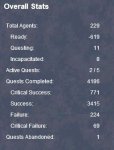
Looking in Overseer it says, for example on one toon - Total Agents 229, Ready -619, Questing 11, Incapacitated 8.
Has anyone else had this happen? Its preventing me from getting more quests started.
I guess i'm not alone --
Looking in Overseer it says, for example on one toon - Total Agents 229, Ready -619, Questing 11, Incapacitated 8.
Has anyone else had this happen? Its preventing me from getting more quests started.
I guess i'm not alone --
Duplicate - overseer quests with no agents | EverQuest Forums
I have two active overseer quests with no agents listed as participating. One quest started about 10 hours ago, the other about a half hour ago. I've...
forums.daybreakgames.com
Attachments

A lot. 1996-2002.omg how many jarheads are in here? 1990 - 2000
Semper Fi!
1988 - 2021 (Just retired on Oct 1st). I started playing EQ back in 2000 as a GySgt in Iwakuni on the crappiest dial-up you ever saw, ha ha!
I tried it from Okinawa but gave up and kept playing Diablo 2. Sergeant in Elmaco

Did the Iwakuni thing myself. Way back in the mists of time. H&MS-12. IMA Comm/Nav Tech. Mostly TACAN and IFF for Skyhawks.
Nice! I was in Iwakuni from 99-02 as the Test Cell SNCOIC testing the engines for the F/A-18, AV-8B and the EA-6B. I came in the Corps when the H&MS thing was on it's way out. H&MS-32 in Cherry Pt. was where I started in '88.Did the Iwakuni thing myself. Way back in the mists of time. H&MS-12. IMA Comm/Nav Tech. Mostly TACAN and IFF for Skyhawks.
- Commits
- 6
GoldenFrog updated Overseer Automation with a new update entry:
1.5
Read the rest of this update entry...
1.5
All 3 changes below are opt-in and by default should have no change to the behavior.
All appropriate configuration entries and defaults will be set on the first run.
Select Quests with highest Exp or MercExp rewards
General > questSelectionType
Possible values are:
- Priority - existing mechanism. Uses [QuestPriority] section
- Exp - Selects quests with the highest character experience rewards first
- Requires MQ2Next
- MercExp - Selects...
Read the rest of this update entry...
GoldenFrog updated
If I set
questSelectionType=Exp won't that just practically guarantee I'll get all 24 hour missions? Or does it factor Exp/Hour? And if so, how can I then exclude 6 hour missions because I'm never going to check often enough for them to be worthwhile? (I run /mac overseer manually and never leave it running unattended. I normally only run it once per day but have defaulted to preferring 12 hour missions since I'm not very punctual about running it.)- Commits
- 6
If I setquestSelectionType=Expwon't that just practically guarantee I'll get all 24 hour missions? Or does it factor Exp/Hour? And if so, how can I then exclude 6 hour missions because I'm never going to check often enough for them to be worthwhile? (I run /mac overseer manually and never leave it running unattended. I normally only run it once per day but have defaulted to preferring 12 hour missions since I'm not very punctual about running it.)
"Exp Per Hour". That's a neat thought. I'm now disappointed about not considering as it's obviously an obvious and obvious step.
The current implementation is just the highest % reward flat-rate. I initially tried tying it into the same Priority section as the rest but it got a bit muddled.
Okay. This'll take a bit more work. Big thumbs down to you, Big Daddy. Big thumbs down.
(I manually run it as well - usually maybe twice a day. )
- Commits
- 6
If I setquestSelectionType=Expwon't that just practically guarantee I'll get all 24 hour missions? Or does it factor Exp/Hour? And if so, how can I then exclude 6 hour missions because I'm never going to check often enough for them to be worthwhile? (I run /mac overseer manually and never leave it running unattended. I normally only run it once per day but have defaulted to preferring 12 hour missions since I'm not very punctual about running it.)
I should have mentioned the primary reason I implemented things this way --
I'm banking exp Overseer rewards for that sexy push to 120. I'm not actively playing so don't have actual quest rewards... and I expect to get only 20% out of this, but it's something.
For that reason, the largest exp boost was the most desired. But obviously that is a very small use case. And becomes invalid in a month.
I'll try to look at better options going forward.
I should have mentioned the primary reason I implemented things this way --
I'll try to look at better options going forward.
You're fine! I just wanted to understand the mechanics! It's not like we are paying you (enough!)!
Users who are viewing this thread
Total: 3 (members: 0, guests: 3)
Share: