• You've discovered RedGuides, an EverQuest multi-boxing and scripting community 🧙‍♀️⚙️. We want you to play several EQ characters at once, come join us and say hello! 👋

  • A TLP without truebox has thawed (Very Vanilla ready)
    Frostreaver
Overseer Automation

Release Overseer Automation 1.9

No permission to download
Any suggestion on an optimal for most people default config?

I can't really answer that. For all my work on the macro, I haven't studied the optimal. There are several threads on everquest.com Forums but I haven't really read them.

I have been trying to track the rewards as I see them (and I'm bored). Personally my main is after coin. All others after exp/merc AA. Here's what I have for you to think what's best for you.


LevelRarityTypeEasy?DurationExperienceCoinMerc ExpCoin/Hr
1CommonCrafting60.2827545.8
1CommonDiplomacy120.550041.7
1CommonExploration120.550041.7
1CommonHarvesting60.2827545.8
1CommonMilitary120.550012.541.7
1CommonPlunder60.282756.8845.8
1CommonResearch240.990037.5
1CommonStealth120.550012.541.7
1CommonTrade120.550041.7
1RareTrade120.8383369.4
1UncommonDiplomacy120.8383369.4
1UncommonMilitary120.6766755.6
1UncommonPlunder60.3736761.2
1UncommonTrade120.6766755.6
2CommonCrafting60.3434457.3
2CommonDiplomacy120.6362552.1
2CommonExploration120.6362552.1
2CommonHarvesting60.3434457.3
2CommonMilitaryEasy120.6362515.6352.1
2CommonMilitary120.6362515.6352.1
2CommonPlunderEasy60.343448.5957.3
2CommonPlunder60.343448.5957.3
2CommonResearch241.13112546.9
2CommonStealth120.6362515.6324.8
2CommonTradeEasy120.6362552.1
2CommonTrade120.6362552.1
2EliteExploration121.251250104.2
2EliteTrade241.25125052.1
2UncommonMilitary120.8383320.8369.4
2UncommonResearch241.5150062.5
2UncommonStealth120.8383320.8369.4
3CommonCrafting60.4141368.8
3CommonHarvesting60.4141368.8
3CommonMilitary120.7575062.5
3CommonPlunder60.4141310.3168.8
3CommonStealth120.7575018.7562.5
3UncommonPlunder60.5555013.7591.7
4CommonDiplomacy120.8887572.9
4UncommonDiplomacy121.17116797.3
5CommonResearch241.8180075.0
5UncommonResearch242.42400100.0
 
Noticed I get a macro ending with several accts when my rewards are full.. I'll try to see if I can explain what seems to be happening.

say I have 7 of 10 AA rewards and have 5 Overseer tasks completed, I start the script. it collects the first 3 tasks (I'm set to not automatically take reward due to the issue before of it using up my saved AA tasks) so that takes me to 10/10 it then doesn't take the last 2.
so then it runs through and picks up 3 new tasks and ends. I think it's probably because there's still the 2 completed so its trying to calculate the time till next task but can't because its already 0?
 
Noticed I get a macro ending with several accts when my rewards are full.. I'll try to see if I can explain what seems to be happening.

say I have 7 of 10 AA rewards and have 5 Overseer tasks completed, I start the script. it collects the first 3 tasks (I'm set to not automatically take reward due to the issue before of it using up my saved AA tasks) so that takes me to 10/10 it then doesn't take the last 2.
so then it runs through and picks up 3 new tasks and ends. I think it's probably because there's still the 2 completed so its trying to calculate the time till next task but can't because its already 0?

When the quests were full, it ended the macro. I have a minor fix to this but it's still a weird situation. This means there is 1+ quests waiting to [Collect Reward!] which means the restart for the macro should be ZERO.

Things are in a situation requiring human interaction to manually claim and free up rewards. How long would you want for the thing to go again?
 
Its actually fine for me, I was just stating what I thought was happening.. wasn't sure if it was or not.

the best scenario for me I guess would be for it to be able to accept the reward, but just for Overseer ones..
not sure if it's detectable but like if it checked the reward and it had overseer coin then it would collect whatever reward you have set. but not touch the other rewards that are things like pure AA.

I actually love this Mac btw, and works great for me in its current state. Was just some thoughts.
 
the best scenario for me I guess would be for it to be able to accept the reward, but just for Overseer ones..

I actually love this Mac btw, and works great for me in its current state. Was just some thoughts.

Keep the thoughts coming. Still much that can be fixed.

As it stands, macros can NOT pick-and-choose rewards. They can only talk about tab #1 - which means if there's banked rewards, it doesn't work.

There is a separate effort that's moving forward to correct this issue. Initial tests are positive but needs clean-up before it gets published officially.
 
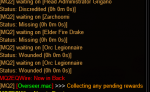
Well found another bug in DB's overseer implementation, look at all of these 0h 0m 0s incapacitated agents. /eyeroll
Have to open the agent tab and select the filter then sit waiting for it to clear.
1590994280750.png
 
Well found another bug in DB's overseer implementation, look at all of these 0h 0m 0s incapacitated agents. /eyeroll
Have to open the agent tab and select the filter then sit waiting for it to clear.

That's less than ideal. I haven't seen this.

Thinking in terms of the macro... how long did it take to clear? What was the behaviour we can translate? Was it a wait for agents to be free (i.e. wait 10 min if no agents are available)?
 
Just switch to the agent tab then sit and wait, took about 5 seconds for each agent that was at 0 to clear. Did not need to switch the filter to incapacitaded.

Translating to macro,

Claim quest rewards, then before starting new quests.

Switch to agents tab
Optional switch filter to incapacitated
Run through list of agents
None found that is 0 0 0 return
One found, wait 5 seconds
Repeat

In the Main loop just after after CollectAllRewards
Code:
     /call CollectAllRewards

    /call MinionStatus

    /call RunConversions
Code:
Sub MinionStatus
    /call ChangeTab 2
    /declare statusTxt string local
    /declare agentNode string local

    /if (!${Window[OverseerWnd].Child[OW_OM_MinionList].Children}) {
        /call LogError "No agents"
        /endmac
    }

:firstAgent
    /varset agentNode Window[OverseerWnd].Child[OW_OM_MinionList].FirstChild
:nextAgent
    /varset statusTxt ${${agentNode}.Child[OW_OM_MinionEntry].Text}
  
    /if (${statusTxt.Find[0h 0m 0s]}) {
        /echo waiting on [${statusTxt}]
        /delay 5s
        /goto :firstAgent
    }

    /if (${${agentNode}.Siblings}) {
        /varset agentNode ${agentNode}.Next
        /goto :nextAgent
    }
  
/return

Still needs testing but that should work. Waiting for bug to reappear.

Ok it works
1591012672674.png
 
Last edited:
Overseer.PNG

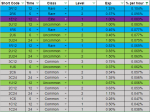
Working on a list of overseer tasks

would love any other input. (the short code is level, class, time I.E. level 1 class common, 6 hours is: 1C6)

GoldenFrog, is there a way for Overseer to see the level?

The level is a big factor in how much XP you get. 1R12 is about half the XP of 3R12

If so I would want to change my INI to run 3R12 first then 2R6 and so on until 1C24.
 
GoldenFrog, is there a way for Overseer to see the level?

The level is a big factor in how much XP you get. 1R12 is about half the XP of 3R12

If so I would want to change my INI to run 3R12 first then 2R6 and so on until 1C24.

Thank you for this. I have been doing almost zero research into actual strategy or optimizations as a player. Posts like yours are very helpful.

Currently level is not part of the discussion but I had started to do it within the new Priority framework. You can let me know if this enhancement would address your request:

INI:
[QuestPriority]
Priorities=Levels|Durations|Rarities|Types
Durations=6h|12h
Rarities=Elite|Rare|Uncommon|Common
Types=Any
Levels=5|4|3|2|1

So by having 'Levels' first, the resulting quests would be look at:

  1. Level 5 - 6h - Elite - Any
  2. Level 4 - 6h - Elite - Any
  3. .....through rare, etc...
  4. Level 5 - 12h - Elite - Any
  5. Level 4 - 12h - Elite - Any
  6. ...
Let me know if this would work for you as it is a simple extension which I have some work done already.
 
Last edited:
GoldenFrog me and you must run about the same schedule. Let me I was just jumping on to message you about hijacking RunGeneralQuestsLegacy for what i was looking for. let me scan the new code and see how this would change with the updates.
 
Still needs testing but that should work. Waiting for bug to reappear.

Jande, this has caught a few occurrences of the bug so far. Just sitting overnight running on the auto-cycle had 1 instance on one character, and 2 instances on another. Nice catch on this. We'll see if it holds up.
 
Gold, checked out the new update. As always thanks for the hard work.

Level is probably the closest to what I'm looking to do. now that RunGeneralQuestsLegacy has been removed. it appears to just be RunGeneralQuests now.

I run the Overseer Macro to maximize the Reg XP I get trying to play catch up on lower toons. the current best order to do that would be as follows.

INI:
[QuestOrder]
index=20
1=Rare | 12h | 3
2=Rare | 6h | 2
3=Uncommon | 12h | 3
4=Elite | 12h | 1
5=Uncommon | 6h | 2
6=Rare | 6h | 1
7=Uncommon | 24h | 3
8=Uncommon | 12h | 2
9=Rare | 12h | 1
10=Uncommon | 24h | 2
11=Common | 12h | 3
12=Uncommon | 6h | 1
13=Common | 6h | 2
14=Common | 24h | 3
15=Uncommon | 12h | 1
16=Common | 12h | 2
17=Common | 24h | 2
18=Common | 6h | 1
19=Common | 12h | 1
20=Common | 24h | 1

If the code from RunGeneralQuestsLegacy was modified slightly it could run this.

Duration isn't the best time jump around and duration won't run a 24 right now.

Rarities isn't going to work because as you see the 3rd quest i would run is uncommon

Level isn't going to work because a level 2 rare 6h is better then a level 3 uncommon 12 h

Type isn't taken into concentration as not relevant to someone trying to maximize XP.


one closing thought, overseer should always be used on the highest toon you are leveling as its not a flat point amount but a percent of your level. an level 1 Elite 12h will always give you 1%, so you can get 1% of 85 or 1% of 110. the 110 is the better option.
 
Jande, this has caught a few occurrences of the bug so far. Just sitting overnight running on the auto-cycle had 1 instance on one character, and 2 instances on another. Nice catch on this. We'll see if it holds up.
Honestly don't know why we are even seeing this. Timers should be processed server side not client side !

What really puzzles me is how did the programmer think it should work. Majority of people will not go and check in the agent list. I did not either till I saw that my success percent was pretty low for quests and found it after digging though the screens.
 
I run the Overseer Macro to maximize the Reg XP I get trying to play catch up on lower toons. the current best order to do that would be as follows.

You are proposing something I was wondering if it would come up: "Complete control of the list". I was wondering if anyone would just because of the management involved in maintaining.

This could easily be added as an option, as you say, just tweak whats there. Basically: [QuestOrderExactlyAsIveSpecified!] (made up name). Optional for those who want to use instead of [QuestPriorities].

Let me see what I can do.
 
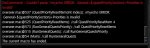
After updating to version 1.12 today I suddenly began to get this error:

overseer_112_error.JPG

which meant that the word "Levels" had to be added to my Priorities Statement in the overseer.ini file as in:

Code:
[QuestPriority]
Priorities=Levels|Rarities|Durations|Types
Rarities=Elite|Rare|Uncommon|Common
Durations=6h|12h|24h
Types=Plunder|Military|Stealth|Exploration|Diplomacy|Trade|Any
Levels=5|4|3|2|1
 
GoldenFrog Thanks for the quick fix today.

I have done, 10 quests today and maxed out all my turn in, so i have two competed quest that it is stuck trying to turn in, instead of by passing the quests that can't be turned in and picking up 3 more quest to await completion as well.

"you have reached your max Completed Quests for this rotation. You will be able to complete more Overseer Quests in 1h:11m:8s"
 
GoldenFrog Thanks for the quick fix today.

I have done, 10 quests today and maxed out all my turn in, so i have two competed quest that it is stuck trying to turn in, instead of by passing the quests that can't be turned in and picking up 3 more quest to await completion as well.

"you have reached your max Completed Quests for this rotation. You will be able to complete more Overseer Quests in 1h:11m:8s"

You are finding too many issues. Stop that.

I'd thought that issue was resolved, a couple versions ago - but obviously not. Will see if I can give that some attention later tonight.
 
@GoldenFrog As I recall when you submitted this macro you said something along the lines of
"I got started on this and then ran out if time to finish"

How does it feel to get sucked back in?
 
First off - LOVE this macro!!!!!!

Question: For rewards - is it best to get the Exp for the Overseer Recruits (does this help on later quests the higher the levels) or to take the Trachederms?
 
@GoldenFrog As I recall when you submitted this macro you said something along the lines of
"I got started on this and then ran out if time to finish"

How does it feel to get sucked back in?

Hah. I think of that a lot lately. I basically am not playing anymore outside of this and Overseer (not that overseer is 'playing'). But this has been worth it.


First off - LOVE this macro!!!!!!
Question: For rewards - is it best to get the Exp for the Overseer Recruits (does this help on later quests the higher the levels) or to take the Trachederms?

Jgil, I haven't been researching any of this type of stuff. A few here have but there's been some seriously detailed threads on the Everquest.com forums about it. A few people, specifically, have tables, charts, and the like. Give some of those a read.
 
You are finding too many issues. Stop that.

I'd thought that issue was resolved, a couple versions ago - but obviously not. Will see if I can give that some attention later tonight.
Think I found a problem. Doesn't look the same as the report, so a bit puzzled

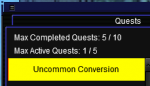
So you have 10/10 quests but you can still do conversion quests and claim them. But with the current fix it just stop claiming when reaching 10/10.
(not sure but I think I previously had conversions also not able to be claimed, maybe DB is making changes on the fly at the backend)

Moved from EnumerateActiveQuests to ProcessActiveQuest
Code:
/if (${Window[OverseerWnd].Child[OW_OverseerActiveQuestsPage].Child[OW_AQP_CompletedLabel].Text.Find[10 / 10]}) {

Hopefully this fixes it.
Code:
Sub ProcessActiveQuest(string NODE) 
    /if (${Window[OverseerWnd].Child[OW_OverseerActiveQuestsPage].Child[OW_AQP_CompletedLabel].Text.Find[10 / 10]}) {
        /if (!${Window[OverseerWnd].Child[OW_OverseerActiveQuestsPage].Child[OW_ALL_DifficultyLabel].Text.Fiund[Conversion]}) {
            /return FALSE
        }
    }

    /if (${Window[OverseerWnd].Child[OW_OverseerActiveQuestsPage].Child[OW_ALL_CollectRewardButton].Enabled}) {

* beginning to wonder if DB is not intentionally breaking things, nobody can be this incompetent
 
Last edited:
* beginning to wonder if DB is not intentionally breaking things, nobody can be this incompetent

I picture a single dev working 12 hour days to try and keep up. Maybe I'm just too sympathetic.

Thank you for this. I'm just not doing enough to hit the 10/10 and see this.
 
If you click the [Start] button manually and restart the macro does it continue past?

Hint: You can start the macro at any point, so can re-pick it up at the Do-All-Available-Quests part with the [general] parameter and it'll jump to starting there.
/mac overseer general

I'll experiment some to see if there's a potential timing issue in the mix.

Sum1 if you care to add some logging to help see, you can replace ClickConfirmationYes with the code below. The only change is adding some logging outputs. Could let us see where it's hanging up.

INI:
Sub ClickConfirmationYes
:ConfirmWait
/echo Opening confirmation dialog box
      /delay 10s ${Window[ConfirmationDialogBox].Open}
      /if (!${Window[ConfirmationDialogBox].Open}) /goto :ConfirmWait
      /delay 2s
/echo Clicking [Yes]
      /nomodkey /notify ConfirmationDialogBox Yes_Button leftmouseup
      /doevents
      /delay 5
/echo  ...clicked Yes
/return
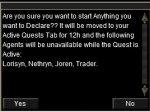
I am also having the same problem on 1 of my 8 accounts. It appears that the problem is that ${Window[ConfirmationDialogBox].Open} never returns as TRUE, even though visually I can see the dialog box (screenshot attached).
 

Attachments

  • EQ000017b.jpg
    EQ000017b.jpg
    46.9 KB · Views: 4
Just ran 1.14 on a character. It never unpacked my merc before claiming 4 Exp rewards. I know it worked yesterday! Earlier today I reinstalled MQ2 from the launcher and reinstalled all my 'watched' macros. The character was in a group with 2 other PC but there was 3 open slots left in the group. The character was not the group leader. Here is my current INI file.

[CODE lang="ini" title="Overseer.ini file that didn't unpack the merc"][General]
claimRewards=1
repeatTimeMinutes=-1
useCharacterConfigurations=0
minimumSuccessPercent=81
requireMercToClaimExpRewards=1
logLevel=2
useQuestPriorities=1

[Rewards]
index=2
1=Character Experience
2=Mercenary Experience

[QuestPriority]
Priorities=Levels|Rarities|Durations|Types
Levels=5|4|3|2|1
Rarities=Elite|Rare|Uncommon|Common
Durations=6h|12h|24h
Types=Plunder|Military|Stealth|Exploration|Diplomacy|Trade|Any

[QuestPriority_Unsubscribed]
Priorities=Levels|Rarities|Durations|Types
Rarities=Elite|Rare|Uncommon|Common
Durations=6h|12h|24h
Types=Plunder|Military|Stealth|Exploration|Diplomacy|Trade|Any
Levels=5|4|3|2|1
[/CODE]

Edit to ADD: I logged in another character and using the same overseer.mac and overseer.ini it worked perfectly except that the character was solo and not in a group.
 
Last edited:
Thanks for this brilliant resource.

I noticed a bit of a quirk, when the macro gets to the first conversion quest it doesn't pause long enough for the quest to complete. The macro then starts the first quest in the list regardless of what you have selected in the ini file. instead of selecting the conversion quest again. This only seems to happen on the first conversion quest, the macro does wait long enough to complete subsequent conversions.
Same here, if the conversion quest is top it never completes. Have to manually finnish it. On every one of the accounts, 3 different computers.
Doesnt happen to anyone else?
 
I have noticed that if I am at my 10/10 limit and have some quests to finish (say, 3 quests in the queue) it won't start new quests to fill my 5 active ones. It stalls out on the 10/10 part and won't proceed to add new quests in. I can manually do them, however.
 
I downloaded the newest version yesterday. Everything was running great on the old version I was using. On the new version (1.14) it runs everything fine until it gets past recruitment mission. It will run the recruit mission then gets an error about wrong priority and ends the macro. This happens on all 4 of my toons grouped or single.

EQ000011.jpg

[General]
claimRewards=1
repeatTimeMinutes=-1
minimumSuccessPercent=0
requireMercToClaimExpRewards=0
logLevel=2
useQuestPriorities=1

[QuestPriority]
Priorities={Ini[Overseer_Camariel.ini,QuestPriority,Priorities]}|Levels
Durations=6h|12h
Rarities=Elite|Rare|Uncommon|Common
Types=Exploration|Diplomacy|Trade|Any
Levels=5|4|3|2|1

[QuestPriority_Unsubscribed]
Priorities=Types|Durations|Rarities|Levels
Durations=12h|6h
Rarities=Common|Elite|Rare|Uncommon
Types=Exploration|Diplomacy|Trade|Any
Levels=5|4|3|2|1

[Rewards]
index=4
1=Collection Item Dispenser
2=Overseer Tetradrachm
3=Character Experience
4=Mercenary Experience
 
I downloaded the newest version yesterday. Everything was running great on the old version I was using. On the new version (1.14) it runs everything fine until it gets past recruitment mission. It will run the recruit mission then gets an error about wrong priority and ends the macro. This happens on all 4 of my toons grouped or single.

Dangabbit. I test, I really do. Not sure how that slipped past.

Updating the macro officially now but until then - change one line:
INI:
[QuestPriority]
Priorities=Levels|Types|Durations|Rarities
 
I am guessing you are using a custom UI for Overseer? @jande had put one together a while ago:
https://www.redguides.com/community/resources/overseer-window-also-known-as-dumpster-fire-3.1524/

I'm guessing it didn't get a field added which DBG pushed at a later date.

The errors can be ignored - they just mean the script isn't enforcing the 10/10 cap.
I can look to add logic to ignore if it doesn't exist.


View attachment 22189

Oh yeah I did, going to delete it as they made most of the changed I had in. Just delete the EQUI_OverseerWnd.xml from your custom ui folder.
 
Release Overseer Automation

Users who are viewing this thread

Back
Top
Cart