



Noobhaxor submitted a new resource:
noobs-blue-infinity MQ Blue Infinity UI - Blue Infinity with MQ stats
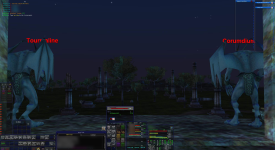
Read more about this resource...
Install
1. Click Code > Download ZIP and extract it.
2. Copy `
3. In game, run
Automatic layout (MacroQuest)
1. Copy
2. Apply the plugin layout settings if you use MQ2TargetInfo or MQ2GroupInfo.
3. In game, run:
Automatically detects 1440p, 1080p, or 720p and adjusts for your class.
noobs-blue-infinity MQ Blue Infinity UI - Blue Infinity with MQ stats
Noobs Blue Infinity - Live compatibility update
This repository contains the original Noobs Blue Infinity skin (May 2020) and its compatibility update for the November 2026 EverQuest Live client.
Install
- Copy the entire
Freq_di28889directory into EverQuest'suifilesdirectory. Keep the existinguifiles/defaultdirectory intact; the custom skin relies...
Read more about this resource...
Install
1. Click Code > Download ZIP and extract it.
2. Copy `
Freq_di28889` into EverQuest's `uifiles` folder. Keep the `default` folder.3. In game, run
Code:
/loadskin Freq_di28889Automatic layout (MacroQuest)
1. Copy
macroquest/lua/noobs_layout.lua into MacroQuest's `Lua` folder.2. Apply the plugin layout settings if you use MQ2TargetInfo or MQ2GroupInfo.
3. In game, run:
Code:
/lua run noobs_layoutAutomatically detects 1440p, 1080p, or 720p and adjusts for your class.
Last edited:

