• You've discovered RedGuides, an EverQuest multi-boxing and scripting community 🧙‍♀️⚙️. We want you to play several EQ characters at once, come join us and say hello! 👋

  • A TLP without truebox has thawed (Very Vanilla ready)
    Frostreaver

Question - New Computer Build - Priority on Specs?

Chibz

Well-known member
Joined
Nov 22, 2018
RedCents
953¢
I am looking at building a tower desktop to run at least 24 instances of EQ. I would like opinions on which specs are priority and what is recommended. Here is my starting list:

1. RAM - more is better; is 64 enough?
2. Processor - Cores/Threads; is more cores or threads a priority for more EQ instances? Minimum 1 thread per instance?
3. Processor - Speed; not really important on modern CPU's?
4. Graphics - are the AMD built-in graphics sufficient?

Would you change the priority order?
 
How I under stand it.
1. 64 should be more than fine for 24
2.+3. Any newer gen cpu should be just fine. I had np with an r5 2600
4. Get a gpu there are good cards for under $600 that will kill it.
 
How I under stand it.
1. 64 should be more than fine for 24
2.+3. Any newer gen cpu should be just fine. I had np with an r5 2600
4. Get a gpu there are good cards for under $600 that will kill it.
How many accounts were you running simultaneously for "np with an r5 2600"? Asking for science.
 
I'd say Ram, Processor Cores/Threads, SSD, and not worry so much about having a high end gpu unless you need it for other games or something like that. I am running 12 accounts once and a while, with no problems. My old laptop would do it fine It was a 2016 era Alienware R7 32gb ram with an I7.

Recently upgraded to an Acer Nitrov15 laptop. The new laptop has 13th gen I9 with 16gb and RTX 4060 but also has the intel display that runs on shared ram as well. EQ by default just runs on the intel display adapter and does fine for me. I always like to do 1tb or larger ssd, seems like most run around 500gb but that seems to fill up so fast these days.

I use the Frame Limiter to only render the active screen and cycle through them on one monitor normally. Some times I'll run 3 or 4 active on each monitor, like 2 from each group mostly to watch my healers and drivers especially if I have each group doing different content at the same time. Lots of info on here about making things run good but over all most anything you build with modern components will be fine and reading up on and using Frame Limiter is going to be valuable. Helps a ton to not render a bunch of scenes that you don't have active on an actual monitor at that specific moment.
 
How many accounts were you running simultaneously for "np with an r5 2600"? Asking for science.
I was able to have 26 or 27 logged in before things went weird. Tho I only ran 24 to raid a little.
 
I recently upgraded to 64 gb of ram and it is more than enough to run 24. I'm only running 18 but my ram usages is never over 50%, usually around 35%.

I'm running on an older generation i7 processor, but Frame Limiter works miracles there.

I'd recommend that you go with the best graphics card and processor you feel comfortable buying (as this is different for all of us). Don't feel you have to break the bank if you don't want to.
 
Definately don't need a top of the line graphics card, but I wouldn't use any onboard card.

Ram is pretty cheap so i would say get 64gb.

Any i7 or similar CPU will perform just fine.

Like others said you should look into Fram Limiter if you are going to box more than a group imo.
 
64gb is plenty to box 24. Would recommend a GPU. Doesn't have to be super powerful unless for other more recent games. Multiple core/thread CPU over clock speed IMO. As others mentioned, definitely get an SSD.

When boxing this many, I wouldn't recommend trying to stream YouTube or Plex or have a bunch of other stuff open at the same time. It will affect stability. Usually, if I'm planning on boxing 24, I'll do this on a fresh reboot.

Framelimiter will be your best friend for boxing multiple toons/groups. I don't have mine tweaked to its best performance, but currently sit around 0.5% CPU, 2gb ram, and 2.5%-3.0% GPU per background instance of EQ. Then whichever instance I have on the main screen is 1.5% CPU, 3.2gb ram, and 18% GPU.

My PC specs is an AMD 7950x, 64gb ram, and an RTX 3080 GPU.
 
It is important to know whether you mean 24 instances with all graphical settings enabled? Or stripped with stick figures? Also are you expecting to get 60FPS on all accounts at once? (don't do that, just use frame limiter). This makes a large difference as to what "specs" you should run.
 
OP: Wish to run at LEAST 24 characters ( which means likely to expand to 36+ )

RAM: At least 1 GB per instance + 2 GB for OS and other stuff
CPU: Shoot for 1 core per instance but can generally get by with 1 core for every 2 clients or
GPU: Best you can afford with in the sweet bang for the buck. EQ may not make use of it but you'll enjoy it for other games.

My last computer build was an AMD 3950X (16 core/32 thread) with 64 GB of ram and a NVidia 2070.

It would run ~ 30x with no issue. When I pushed past 40x the machine started to show signs of stress and I could peg the GPU.

Others have reported boxing two groups on a $300 "business" computer with no dedicated graphics.
 
It is important to know whether you mean 24 instances with all graphical settings enabled? Or stripped with stick figures? Also are you expecting to get 60FPS on all accounts at once? (don't do that, just use frame limiter). This makes a large difference as to what "specs" you should run.
First, thanks everyone for the replies! This has been very helpful!

Doc, I use frame limiter so I want to preserve computer resources to maximize the number of toons I run on one computer.
 
OP: Wish to run at LEAST 24 characters ( which means likely to expand to 36+ )

RAM: At least 1 GB per instance + 2 GB for OS and other stuff
CPU: Shoot for 1 core per instance but can generally get by with 1 core for every 2 clients or
GPU: Best you can afford with in the sweet bang for the buck. EQ may not make use of it but you'll enjoy it for other games.

My last computer build was an AMD 3950X (16 core/32 thread) with 64 GB of ram and a NVidia 2070.

It would run ~ 30x with no issue. When I pushed past 40x the machine started to show signs of stress and I could peg the GPU.

Others have reported boxing two groups on a $300 "business" computer with no dedicated graphics.
Thanks dewey, the advice on cores/client is very insightful.

I didn't think my current laptop was utilizing the Nvidia 3070 graphics, but when I look at system resources and performance, it definitely is carrying the heavy load. So GPU looks like a given also!
 
I would also highly recommend Microcenter for your parts/computer.

The "power spec" line is their in house brand. They use common parts and don't load the systems down with a bunch of preinstalled crap.

I personally enjoy tailoring my computer builds so I end up just buying the parts and putting them together. That way I can min/max my system and get exactly what I want.
 
I would also highly recommend Microcenter for your parts/computer.

The "power spec" line is their in house brand. They use common parts and don't load the systems down with a bunch of preinstalled crap.

I personally enjoy tailoring my computer builds so I end up just buying the parts and putting them together. That way I can min/max my system and get exactly what I want.
I will second this.

I buy 2-3 desktops per month for customer sites and have been buying powerspec for all of them for over a year now. The failure rate has been less than half of HP/Dell and the pricing has been great.
Added benefit is that we've been able to add ram, storage, GPU, etc. to tailor the system to the needs of the site.
 
Based on your comments, here is where I think I will go:

CPU: Core Ultra 9 Series 2 (24 cores total)
Motherboard: MSI MPG Z890 Edge TI
RAM: Corsair Vengenance 96GB (2x48GB) DDR5 6000MHz
SSD: Samsung EVO 5.0 NVMe M.2 PCI-E 2TB
Graphics: Onboard for now until the RTX 50 series become more readily available (don't want to buy a RTX 40 series and replace it in a month)

Seems like over kill, but it gives me the most cores plus the newest gen of processor, socket, chipset, graphics slot, SSD slot, etc.
 
Last edited:
Based on your comments, here is where I think I will go:

CPU: Core Ultra 9 Series 2 (24 cores total)
Motherboard: MSI MPG Z890 Edge TI
RAM: Corsair Vengenance 96GB (2x48GB) DDR5 6000MHz
SSD: Samsung EVO 5.0 NVMe M.2 PCI-E 2TB
Graphics: Onboard for now until the RTX 50 series become more readily available (don't want to buy a RTX 40 series and replace it in a month)

Seems like over kill, but it gives me the most cores plus the newest gen of processor, socket, chipset, graphics slot, SSD slot, etc.

The only thing that stands out as questionable is the choice of ram.

RAM: Going from 64 GB to 96 GB is a pretty significant bump in price. $220 vs $330 and unless you have a use case its
not likely to help you. Better to put that $110 towards something like the GPU.


CPU: The intel 285K is the newest line of intel CPU's and I seem to remember some issues at launch ( which have probably been fixed ) Anyone here using one? The integrated graphics on it is supposed to be pretty good so if you have to live of that for a while it definitely shifts the equation.


The AMD option: ( because I love my 3950x )

CPU: AMD 9950x - 16 core/32 thread - $520
Motherboard: MSI X870 MAG Tomahawk - WiFi - $300 ( I would probably not go wifi but matches what you had )
RAM: Corsair Vengenance 64 GB ( 2x32 GB) DDR5-6000 Mhz CL30 - $220 ( see above )

These are just "at a glace" options. Normally I spend several days researching comments and reviews. Just looking over pc parts picker I'd be tempted to go with a previous generation AMD 7950x $463, MSI B650 Gaming $150, GSkill 2x32GB DDR5-5600 CL 28 $177 and use the savings to bump up the GPU since all the prices on them are crazy over price.
 
I had/have issues with i9-14900KF. I had zero problems with 30 EQ accounts but other games I had constant crashes. It took some time to find an answer which was CPU affinity. It drove me nuts. I am not sure if this has been resolved.
 
I ended up with a PCIe 5.0 x4 SSD with 2TB. No RAID.
Your MB (and whatever your doing) doesnt need a RAID setup. For faster data access speeds you would need a dedicated raid controller (your johnny homeowner board cant transfer data that fast), and with the easy of doing backups, data redundancy isnt needed except on servers for high reliability.
 
Invest in a stable NVMe with at least PCIE 4.0 if not in RAID setup too.

I agree that you want to get a solid NVMe drive. You'd need to be doing something pretty spectacular for RAID to make sense.

Are there any good review/benchmark sites for storage these days?
 
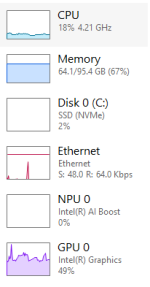
Thought I should share after everyone's input! Up and running with 24 instances open. This is with the onboard graphics chipset only. Memory usage is a bit high (around 2.2Gb per instance), but in the past it has seemed to decrease over time, maybe it's a cache thing...

1741924359009.png
 
From what I've seen, I agree that memory usage seems to go down the longer you are running EQ in the session. I'm not 100% sure why, but it almost drops in half for me.

Are you using Frame Limiter and what settings did you go with there?
 
Thought I should share after everyone's input! Up and running with 24 instances open. This is with the onboard graphics chipset only. Memory usage is a bit high (around 2.2Gb per instance), but in the past it has seemed to decrease over time, maybe it's a cache thing...

You have something odd going on with the memory usage. I'm at ~ 1.0 - 1.4 GB per instance.
 
Thought I should share after everyone's input! Up and running with 24 instances open. This is with the onboard graphics chipset only. Memory usage is a bit high (around 2.2Gb per instance), but in the past it has seemed to decrease over time, maybe it's a cache thing...

View attachment 68905
framelimiter + not using eq's new ui engine - are you doing both those things?
 
From what I've seen, I agree that memory usage seems to go down the longer you are running EQ in the session. I'm not 100% sure why, but it almost drops in half for me.

Are you using Frame Limiter and what settings did you go with there?
Yes, I am using Frame Limiter. I have background frame rate at 1 with render game scene on, and foreground is 48 for tanks, and 36 for support.
 
Last edited:
framelimiter + not using eq's new ui engine - are you doing both those things?
I was using eq's new ui engine in that post. I have turned it off since. Also finding a few other oddities that I need to revert also.
 
Providing an update. Running 30 toon raids with no issues with this desktop build, very smooth. Worth noting that I do not have a dedicated graphics card, just the onboard graphics in the processor (perhaps this is why my ram usage is high?)
 
I remember the day I has two HP desktop computers. Paid 500 each. I could run 6 groups (36 toons) on each computer like a charm. Those days have sailed. haha
 
I remember the day I has two HP desktop computers. Paid 500 each. I could run 6 groups (36 toons) on each computer like a charm. Those days have sailed. haha
I still use the same computer I used when RoK got released free and I started RG, its dying and I will need a new one, so this thread is good for me, but I noticed back then I ran 3 groups and a buyer and a seller without issue. I can't get that now. what happened Willis? That was on LIVE.
 
I still use the same computer I used when RoK got released free and I started RG, its dying and I will need a new one, so this thread is good for me, but I noticed back then I ran 3 groups and a buyer and a seller without issue. I can't get that now. what happened Willis? That was on LIVE.
The 64 bit switch, the dx9 to 11 shinnagins, the new ui.
 
The 64 bit switch, the dx9 to 11 shinnagins, the new ui.
Starting Too Late GIF by CBS
Classic Tv Nostalgia GIF by Sony Pictures Television
 
The 64 bit switch, the dx9 to 11 shinnagins, the new ui.
I would have thought those moves would have made things faster ...

I'm back new myself after a pretty long break and I was expecting to easily box my 6 accounts on my Surface (i71255U) with a 4060 in an eGpu enclosure.

I can barely run the 6 accounts with everything I can turn off/down (even using stick figures).
 
I would have thought those moves would have made things faster ...

I'm back new myself after a pretty long break and I was expecting to easily box my 6 accounts on my Surface (i71255U) with a 4060 in an eGpu enclosure.

I can barely run the 6 accounts with everything I can turn off/down (even using stick figures).
Stick figures aren't even needed these days.

But you do 100% need to turn off the new eq UI engine and turn on the MQ framelimiter
 
I was using frame limiter and had the new UI off but was still having issues.

I think the problem had to do with the fact that I was playing on a surface pro.
As long as I was only playing 2 boxes it was fine but once loaded more and it struggled.

It was also probably thermal throttling because that poor thing was running HOT.
IsBoxer started giving me crap about the not being at full clock speed and nothing I could would change that.

My best guess is that between that and trying to use the E cores and and nothing was at all happy.

I ended up using this as a excuse to get a new rig :) and everything is right as rain now ... and my barbar can look right again.
 
Question - New Computer Build - Priority on Specs?

Users who are viewing this thread

Back
Top
Cart