grimmier updated MyUI with a new update entry:
v4.1
Read the rest of this update entry...
v4.1
git wasn't pulling update so manually bumping
Read the rest of this update entry...


git wasn't pulling update so manually bumping
[4.1] - 2025-03-08
Commits
- Styles and fixes
AA Party
* window can be locked
BigBag
* Items should no longer flash when refreshing contents
ChatRelay
* Added tab arrows to navigate tabs easier when you have a lot of them
MyGroup
* Tooltips work
MyPaths
* fix bad var name
MySpells
* Removed bard restriction on seeing cast bar
SAST
* some more details on ADV status window
SillySounds
* Fix low HP var names
* Party member missing...
[4.3] - 2025-03-16
Styling
- Fix: feat:
MyDps
Fix for actors reporting that wouldn't send the final battle information without reporting enabled.
This was causing battles to never officially clear out
MyGroup
a lot of style fixes and tooltip tweaks
added separate scale for raid window.
MySpells
Settings fix when checking against defaults for missing settings
PlayerTarg
Settings fix when checking for missing settings
aggro bar color can...
[4.6] - 2025-03-24
Features
- Client mode tweaks
(5a19ba9) ~grimmier378If loading in client mode we will auto enable mybuffs\mygroup\and aaparty to relay the data to the driver.
[4.7] - 2025-03-29
Features
- Features fixes and updates
Added itrack to the module list
module list will now alpha sort.
AAparty
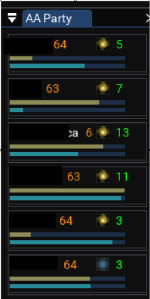
Added space for more digits on pts display
AlertMaster
split char configs out of the alertmaster.ini file.
This will happen per character as they load the script. (recmmend doing one at a time)
added ZoneNames.lua to compare long and short names when importing SM lists.
EMU users can shift click a name to...
The updates and add on of iTrack are awesome. I was using iTrack on its own, so really nice addition to the super package.
[4.8] - 2025-03-29
Features
- Bigbag spells and songs
(2893e80) ~grimmier378Bigbag
Highlighting Can Use items will also check spells and songs to see if you have it in spell book already.
added highlighting on the button when hovered
iTrack
added highlighting on the button when hovered
[4.9] - 2025-03-29
- Cleanup spell check
(96577a5) ~grimmier378Also added lvl to tooltip for scrolls.
[5.0] - 2025-03-31
Features
- New stuff and some fixes.
...MyDots
made settings persistant
moved controls to a menu bar
added lock windows
added toggle for menu and titlebars.
horizontal layout is just icons with tooltips clicking still recasts.
MyGroup
Added Lvl display Toggle
iTrack
clicking on a characters name will switch to them `/foreground`

if you right click the tab you can edit the config for that channel. you set your default output (echo channel) per channel that way. =)Just starting to use this, really love everything so far! I'm sorry if this is common knowledge or addressed somewhere, but is there a way to set the default chat channel from within My Chat? Right now everything is defaulting to Say, even though I've specified Fellowship chat as the default within the EQ game client chat window (I do realize it's a separate and unrelated window, which is why I am asking about how to do this for the LUA-based My Chat window).
[5.1] - 2025-04-27
Features
- Fixes, new features and some styling
(c6f20eb) ~grimmier378New toggles for all
various fixes for random bugs here and there
MyBuffs now has a favorites option so you can flag buffs as a favorite.
You can also buff beg (auto or manually) over dannet if you have mq2buffme enabled and one of your favorites fades
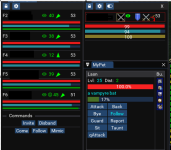
PERFECT!!! I jsut have not set it up on my other toons yetif your other characters run this and are on the same PC the data will show real numbers for group members. that data isn't sent to other players though normally so we use actors to relay our stats to the other characters on the same machine.
Will get right on that!!!Hmmm, any particular setting in the group? I have them all turned on. I have it active on all the toons now, and I can see the numbers for health and mana on hover over, but they are still not showing up on the group mana/heal and endurance bar. Those remain just colored bars that go up and down based on the numbers. I can see the buffs from everyone, Also, seems when I set the group to display myself, it does not even put the actual number on my bars in the group window.PERFECT!!! I jsut have not set it up on my other toons yet
[5.2] - 2025-04-29
Features
- Toggle show values mygroup, style: toggle tweaks
(f69be0b) ~grimmier378MyGroups added toggle to display values on the bars.
Cosmetic tweaks on toggles on the other windows.
This is PERFECT! PERFECT! Love it!!something like this?
View attachment 69507
had to up the bar thickness though for the text on top or the bar was to small for the text and looked all sorts of weird
hmmm, lickit it off and reopened it and it is back to percentsSo this is odd, it is up and running and it was showing a percent, somehow thought it changed to showing the actual mana count, like the 5240/6100
[5.3] - 2025-05-28
Features
- BigBags trade and sort options fix: some fixes
...AlertMaster
* Fix: commands not firing on pc detect. these should now work again
BigBag
* Sort by item Type option
* trade items from details tab (Select all the items to trade to target and click trade, this will do multiple trades if more than 8 items)
MyGroup
* fix: trading broke this last round sorry.
[5.5] - 2025-06-08
Features
- Some features and fixes see below
MySpells
* Added some more data to the tooltips
MyGroup
* Cleaned up some tooltip info
* Passed over the data checks and stale chceks
* should now better display group info when a member is not running on this machine or not running the script.
MyPaths
* fixed raid and group watching should now better track and pause accordingly
* debug window can be popped out
* You can now...
update is on git should be here in next 20 min to an hour depending on the bot today.For some reason, when I enter my Guild Hall, MyUI lua completely crashes, and I have to rerun it every time.
It also resets all the windows, and I have to reposition them.
So far it's only the Guild Hall that does this.
Here's the error message:
ImGui Failure:
C:\VeryVanilla\lua/MyUI/modules/mygroup.lua:1084: attempt to concatenate a nil value
stack traceback:
C:\VeryVanilla\lua/MyUI/modules/mygroup.lua: in function 'RenderGUI'
C:\VeryVanilla\lua\myui\init.lua:219: in function 'RenderModules'
C:\VeryVanilla\lua\myui\init.lua:524: in function <C:\VeryVanilla\lua\myui\init.lua:381>
[5.6] - 2025-06-15
Bug Fixes
- Style: feat: some fixes, style updates, and features
Alertmaster
* Fixed settings not saving\loading for pc alerts
BigBag
* Added readability for coins with comma's
DialogBD
* Added Raid Commands.
iTrack
* Accepts Item ID's as well as names.
* Added Total count to the items count table display
MyGroup
* fixed some missing nil checks
MyPaths
* Added options to popout the 3 tabs
* Cleaned up some interrupt...
[5.7] - 2025-06-16
Features
- MySpells toggle spell names
(010cf80) ~grimmier378* Added a toggle and setting to display Spell names next to the gem's
* Also shows the cost below the name.
[5.8] - 2025-06-22
Features
- New modules, some fixes and more...
NEW Modules
MyAA : Simple aa window for buying and hotkeying AA done up in ImGui
RaidWatch : Basic window to montior raid members presence, corpse and distance.
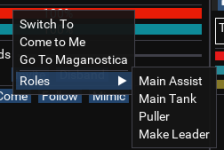
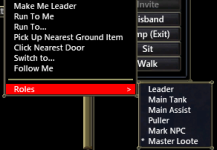
* ctrl-clicking will bring that char to the forground
* right click for some nav options.
* displays orange if the person is not in the zone
* shows distance from you
* if they are LD of feared they will display * LD...
[5.9] - 2025-06-24
Bug Fixes
- Myspells newchar load...
(63f3854) ~grimmier378MySpells
* fixed a crash on new characters when loading
MyAA
* should only show the hotkey button if you have a rank and its activated
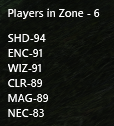
AlertMaster
* Added counts to the NPC's and Players tabs
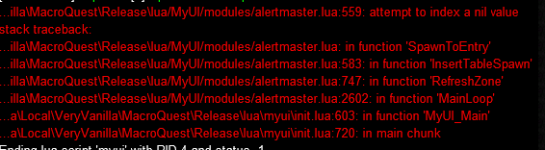
oops fix in next updateBeen getting error and crash on MYUI on zone alot. Im not sure what it is but I figured I would report it.
View attachment 70654