• You've discovered RedGuides, an EverQuest multi-boxing and scripting community 🧙‍♀️⚙️. We want you to play several EQ characters at once, come join us and say hello! 👋

  • A TLP without truebox has thawed (Very Vanilla ready)
    Frostreaver
Resource icon

Release MySpells (1 Viewer) v2.32

Download
it looks like it isn't reading in the transparency setting or it is still nil.

not at my pc atm but try adding

or 1 to the end of line 833.
 
Is there any way to have the Ability Picker open up in a location other than near the bottom and to the right of the spell bar? As I have things set, I have to drag the picker window up and onto the screen where it can be used, every time. I REALLY like the picker vs the eq standard cascading menus which I regularly fight with as I twitch a bit and the menu I was shooting for goes away.
 
Is there any way to have the Ability Picker open up in a location other than near the bottom and to the right of the spell bar? As I have things set, I have to drag the picker window up and onto the screen where it can be used, every time. I REALLY like the picker vs the eq standard cascading menus which I regularly fight with as I twitch a bit and the menu I was shooting for goes away.
ahh currently I have it set to cursor location for the popup i can add a toggle to turn that off so it maintains a static location
 
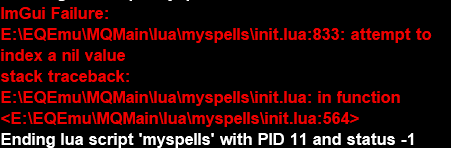
Im getting this ImGui failure everytime on a druid when i load it up.

1772885594003.png

seems only to happen on the druid as it loads on my sk and bst.
 
Hey Grimmier its looking good so far. Are you going to tie this in with you UI or keep this seperate? Also are you looking at making it horizontal as well as vertical?


Zeb
 
Hey Grimmier its looking good so far. Are you going to tie this in with you UI or keep this seperate? Also are you looking at making it horizontal as well as vertical?


Zeb
this is already included in MyUI.

If you right click on the spell book you can bring up a menu. there you can access the settings, autoresize, locking...
if you disable autosize and have show gem names turned off you can resize the bar and the gems will auto line up , so you could do a horizontal, vertical, or even a rectangular as rows.
I didn't enable this with the names on though for layout purposes.
 
Great I will look at it with MyUI. Still messing around with it but so far your doing a good job. Keep It up!


Zeb
 
Release MySpells

Users who are viewing this thread

Back
Top
Cart