• You've discovered RedGuides, an EverQuest multi-boxing and scripting community 🧙‍♀️⚙️. We want you to play several EQ characters at once, come join us and say hello! 👋

  • A TLP without truebox has thawed (Very Vanilla ready)
    Frostreaver
MySEQ Open (Test server offsets)

💾Software MySEQ Open (Test server offsets) April 7, 2026

No permission to download
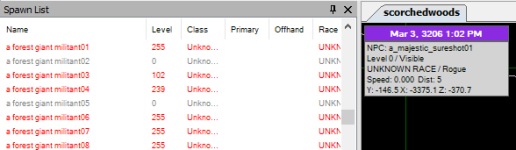
Hiya. I'm not sure if maybe I missed an update or not. the map is working and i'm getting skittles but the levels/races are all over the board.

1693127064511.png
 
Hi all!

Firstly, the in game map additions are great, but we all know that nothing beats SEQ for situational awareness and filtering. It seems that finding offsets has become more challenging over the years, or my search-foo is just weak as I cannot seem to locate anyone posting Test offsets, or any "modern" instructions for finding them myself that actually work. I realize there is a watchable resource here for Test offsets, however, it has not yet been updated for the 11/6 patch.

I'd much rather self-service offset finding instead of beg for offsets regularly, especially given the rate of change on Test. Is there anyone with an updated guide on doing this, either with SEQ debug mode or something like Cheat Engine?

Thanks much!

Oh, and if I've missed some obvious solution in my hunting for Offset updates please leave me a breadcrumb trail to find it, and my apologies in advance. :)
 
Offsets are trivial to find, they are not the problem.

Offsets are only half of the equation. What you call offsets are either function addresses or data addresses. These offsets do not describe the data, just where it is

EQ has been through a lot of refactoring, which changes the memory layout of the data. Additionally, MQ has become quite advanced over the years and requires knowing more and more about the data layout in memory.

Most of the time is spent figuring out the data layouts. Offsets are completely automated at this point and the process hasn’t changed in 20 years (just my working knowledge of eqgame.exe has)
 
Offsets are trivial to find, they are not the problem.

Offsets are only half of the equation. What you call offsets are either function addresses or data addresses. These offsets do not describe the data, just where it is

EQ has been through a lot of refactoring, which changes the memory layout of the data. Additionally, MQ has become quite advanced over the years and requires knowing more and more about the data layout in memory.

Most of the time is spent figuring out the data layouts. Offsets are completely automated at this point and the process hasn’t changed in 20 years (just my working knowledge of eqgame.exe has)
Thanks for the explanation!
 
The community has been posting them in this thread (with directions) for the past few months (JMO is away atm).
Thanks for the reply; I appreciate it. While that certainly seems to be true for the Live server offsets, the last Test offsets posted in this thread were from November 2023, seven posts above this one. Those don't appear to be working. If those are most current Test offsets, something else is wrong with my install.

If the Test offsets exist in a different thread, I'd be very grateful to hear about it!
 
I was trying to follow this guide for finding the offsets for test, but cannot get the server.exe in debug mode. I have tried downloading the latest version from the show eq website and the Reds version.

Guild I was trying to follow https://www.showeq.net/forums/showthread.php?7272-How-to-find-offsets

Has the ability to put server.exe into debug mode been removed? The guild showed the command was server.exe debug
 
Update for the 12 June 2024 test release :
[SpawnInfo Offsets]
LevelOffset=0x5b5
RaceOffset=0xfd4
ClassOffset=0xfdc
 
Grounditem X & Y are the wrong way around, and Z is .. was just out a bit - here's the corrected ini section, the 3 changes are x,y,z offset, for feedback into the mq work :)
[GroundItem Offsets]
PrevOffset=0x0
NextOffset=0x8
IdOffset=0x10
DropIdOffset=0x18
XOffset=0x8c
YOffset=0x90
ZOffset=0x94
NameOffset=0x38
 
Grounditem X & Y are the wrong way around, and Z is .. was just out a bit - here's the corrected ini section, the 3 changes are x,y,z offset, for feedback into the mq work :)
[GroundItem Offsets]
PrevOffset=0x0
NextOffset=0x8
IdOffset=0x10
DropIdOffset=0x18
XOffset=0x8c
YOffset=0x90
ZOffset=0x94
NameOffset=0x38
hrm, i went and checked what MQ had for the x/y/z cause grounditems changed again

INI:
/*0x8c*/ float            Y;
/*0x90*/ float            X;
/*0x94*/ float            Z;

@Knightly mind educating me here on what im confused about
 
hrm, i went and checked what MQ had for the x/y/z cause grounditems changed again

INI:
/*0x8c*/ float            Y;
/*0x90*/ float            X;
/*0x94*/ float            Z;

@Knightly mind educating me here on what im confused about
oh, it might be, that MQ and EQ and SEQ and MySeq use different X & Ys, iirc - I think SEQ stuff has then reversed so they match "loc" or whatever it was that tells you your location, which is the wrong way around. This is a decade old memory, mind you!
 
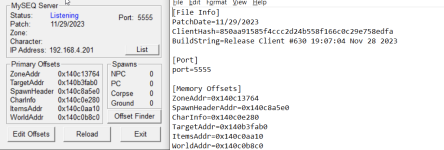
Test server offsets / ini file contents for MySeq, patch from 10th July 2024
... I haven't looked at hide/invis status, and I didn't check primary / secondary cos it doesn't impact me much. Dunno, they might be right. All the location, class, race, type, level, groundspawn, heading, seem to be right.

[CODE lang="ini" title="myseqserver.ini"][File Info]
PatchDate=07/10/2024

[Port]
port=5555

[Memory Offsets]
ZoneAddr=0x140e46c74
SpawnHeaderAddr=0x140e3f408
CharInfo=0x140e3f408
TargetAddr=0x140d73070
ItemsAddr=0x140e3e050
WorldAddr=0x140e3f4f8

[WorldInfo Offsets]
WorldHourOffset=8
WorldMinuteOffset=9
WorldDayOffset=10
WorldMonthOffset=11
WorldYearOffset=12

[SpawnInfo Offsets]
NextOffset=0x8
PrevOffset=0x10
LastnameOffset=0x48
XOffset=0x74
YOffset=0x78
ZOffset=0x7c
SpeedOffset=0x8c
HeadingOffset=0x90
NameOffset=0xb4
TypeOffset=0x135
SpawnIDOffset=0x168
OwnerIDOffset=0x404
HideOffset=0x484
LevelOffset=0x5a8
ClassOffset=0xfe4
RaceOffset=0xfdc
PrimaryOffset=0x10e4
OffhandOffset=0x10f8

[GroundItem Offsets]
PrevOffset=0x0
NextOffset=0x8
IdOffset=0x10
DropIdOffset=0x18
XOffset=0x8c
YOffset=0x90
ZOffset=0x94
NameOffset=0x38[/CODE]
 

Attachments

💾Software MySEQ Open (Test server offsets)

Users who are viewing this thread

Back
Top
Cart